ERPNext for education: schools, academies and training centres
ERPNext for education gives registrars, teachers and the finance team one shared system. Admissions, classes, attendance, grades and fees all run on the same student file, so every fee becomes an invoice in your accounts without retyping.
We have implemented ERPNext for a school group in Saudi Arabia and an education quality platform in Egypt.
An admissions board from application to enrolment
Timetables that refuse room and teacher clashes
Marks for a whole class in one grid
Family fees, discounts and instalments in your accounts
The process
How ERPNext for education runs, from application to accounts
1
Admission
Each applicant moves across a board from applied to admitted.
2
Enrolment
One step then turns the approved applicant into a student in a programme.
3
Fees
When you bill the term’s fees from the fee structure, each student gets a sales invoice in ERPNext.
4
Timetable
You schedule classes by group, room and teacher.
5
Attendance
Teachers then mark each class present or absent.
6
Assessment
Teachers enter marks per group, then your grading scale turns them into grades.
7
Reports and accounts
Reports on collections, attendance and grades all draw on the same data.
Problems we solve
The problems schools and training centres face, and how ERPNext for education answers them
Applications live in folders and spreadsheets
Each admission season brings a pile of forms. Because they sit in folders, nobody knows who was approved, who is waiting and who has enrolled.
Every applicant becomes a card on a board with four stages: applied, approved, rejected and admitted. One step then turns an approved applicant into a student with a programme enrolment.
One family, several children, several fee rules
A parent with three children wants one figure. But each child has a grade, a discount and perhaps a bus seat, so the quote takes far too long.
For a school group we built a family quotation that lists every child with tuition, books and bus fees. The parent's category and each child's order in the family then set the discount automatically.
Timetable clashes surface in the first week
A timetable built by hand hides its clashes until a teacher has two classes at once, or two classes arrive at the same room.
Instead, the scheduling tool creates the sessions for a group over a date range. It rejects any session that overlaps for the room, the teacher or the group.
Student data sits in several files
Admissions keeps one list, teachers another and finance a third, so the copies drift apart during the year.
One student file in ERPNext for education links the application, guardians, enrolments, attendance, results and fees, so everyone reads the same record.
Fee tracking lives outside the accounts
When fee lists live in spreadsheets, you find late payers late. Finance also has to match the list with the ledger by hand.
In ERPNext each fee is a sales invoice on the student's customer account, and it posts to your accounts once submitted. You then record payments against it, so the balance per student stays current.
A training centre cannot see which batch makes money
Training centres run many batches across branches, but the income, instalments and trainer cost of a batch rarely meet in one report.
Our batch profit report shows each batch's learners, fees collected and instalments still due. It then sets trainer and certificate costs against them and shows the net.
What we set up
What we set up with ERPNext for education
Eight areas we configure or build for schools and training providers.
Admissions and enrolment
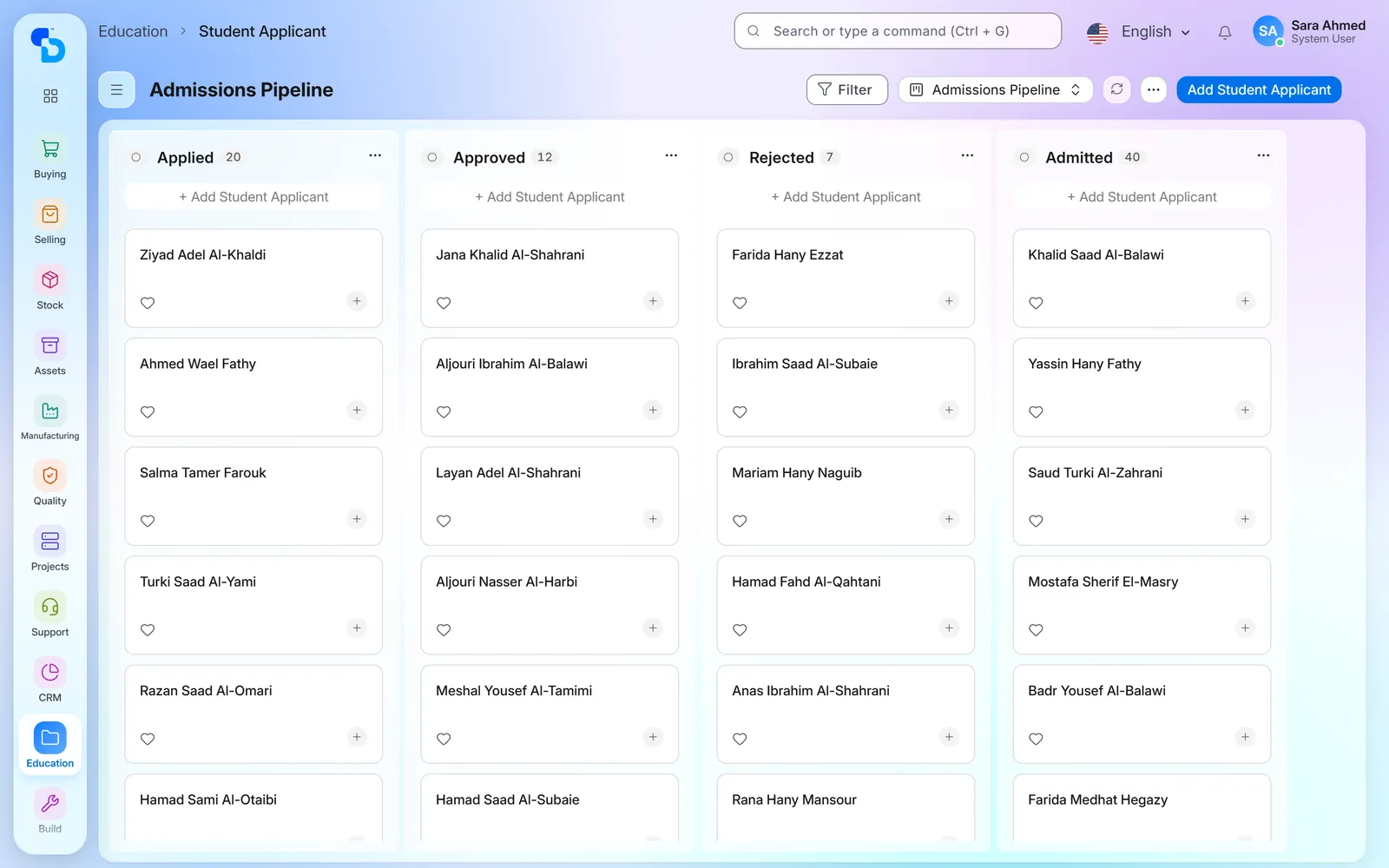
You publish an admission round for each academic year, with its programmes, age limits and application fee. Applicants then move on a board from applied to approved and admitted, or rejected. Once you approve an applicant, the Enroll button creates the student and opens the programme enrolment, so nobody retypes the form. The enrolment tool also moves a whole class to the next year or programme in one run. For one school we also added an interest register that records which grades a family asks about.
Admissions pipeline: applicants in four columns from applied to admitted
One student file and academic record
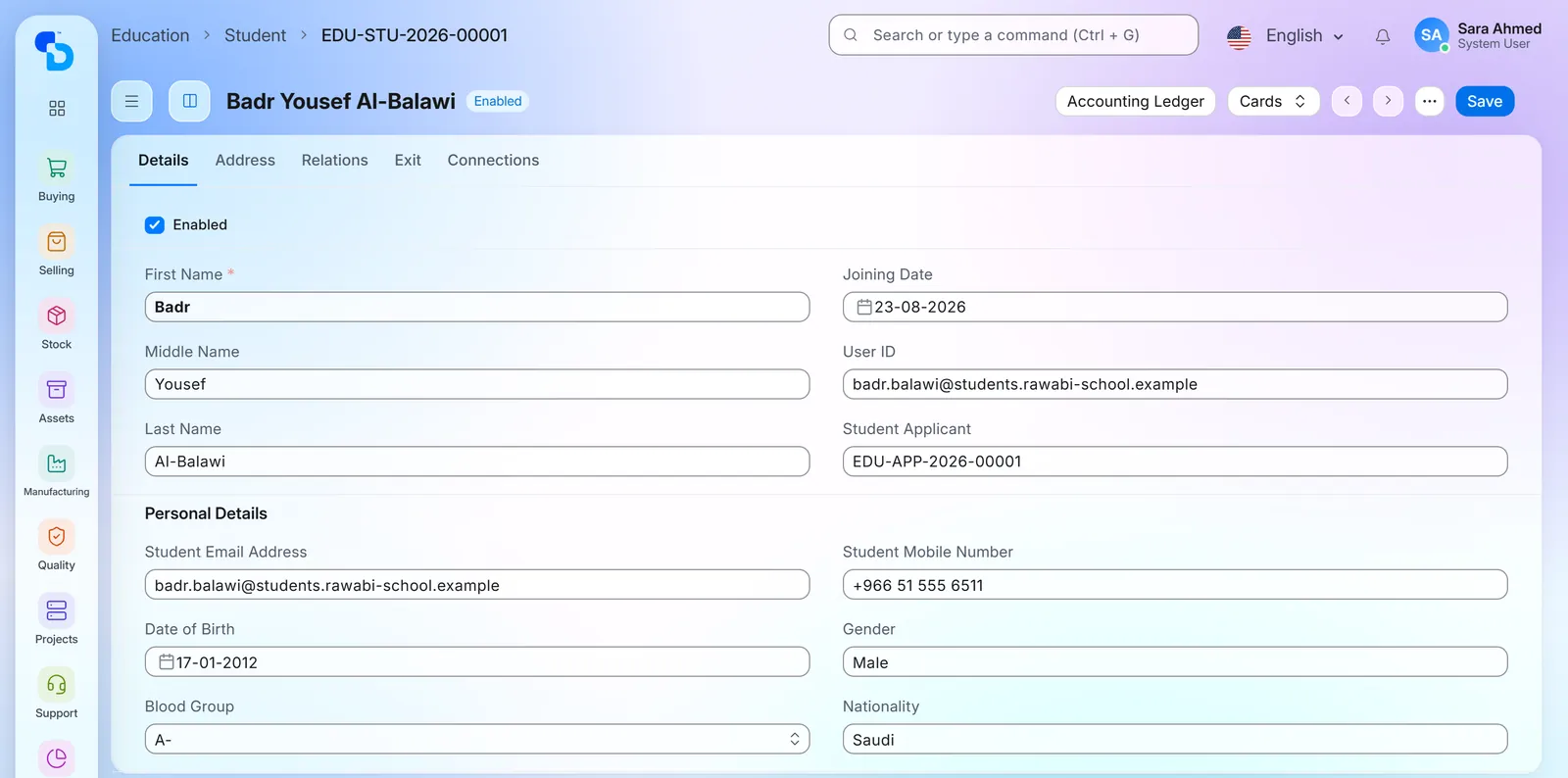
Each student has one file from the first application until the leaving date. It holds personal details, guardians and siblings. It also links to every enrolment, attendance entry, leave request, assessment result and fee. Staff add log entries marked general, academic, medical or achievement, so counselling notes stay with the student. A contact report lists each student with both guardians and their phone numbers. Because everyone shares the file, admissions, teachers and finance stop keeping separate lists.
A student file: personal details, the linked applicant, and tabs for address, relations and exit
Timetables, teachers and attendance
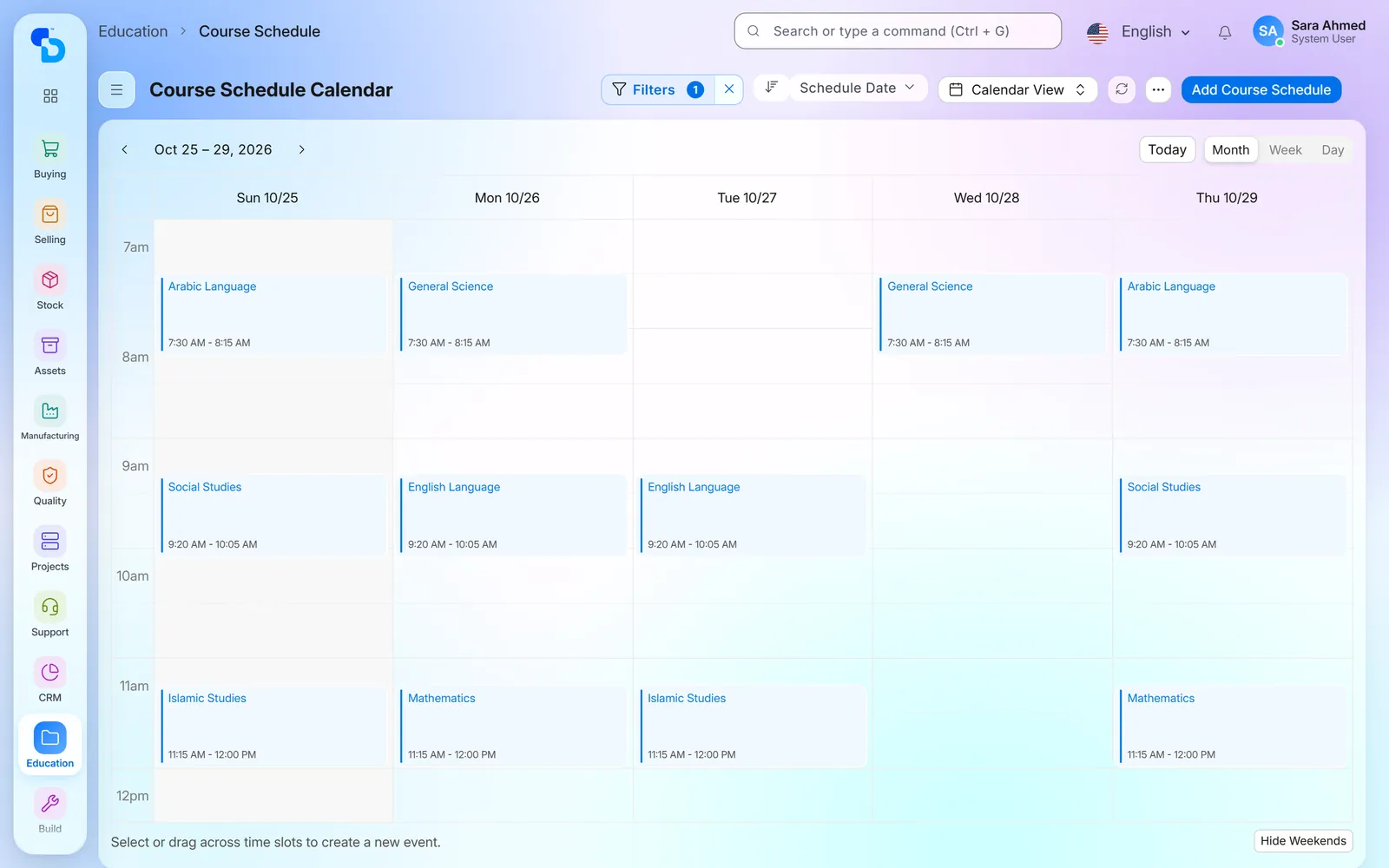
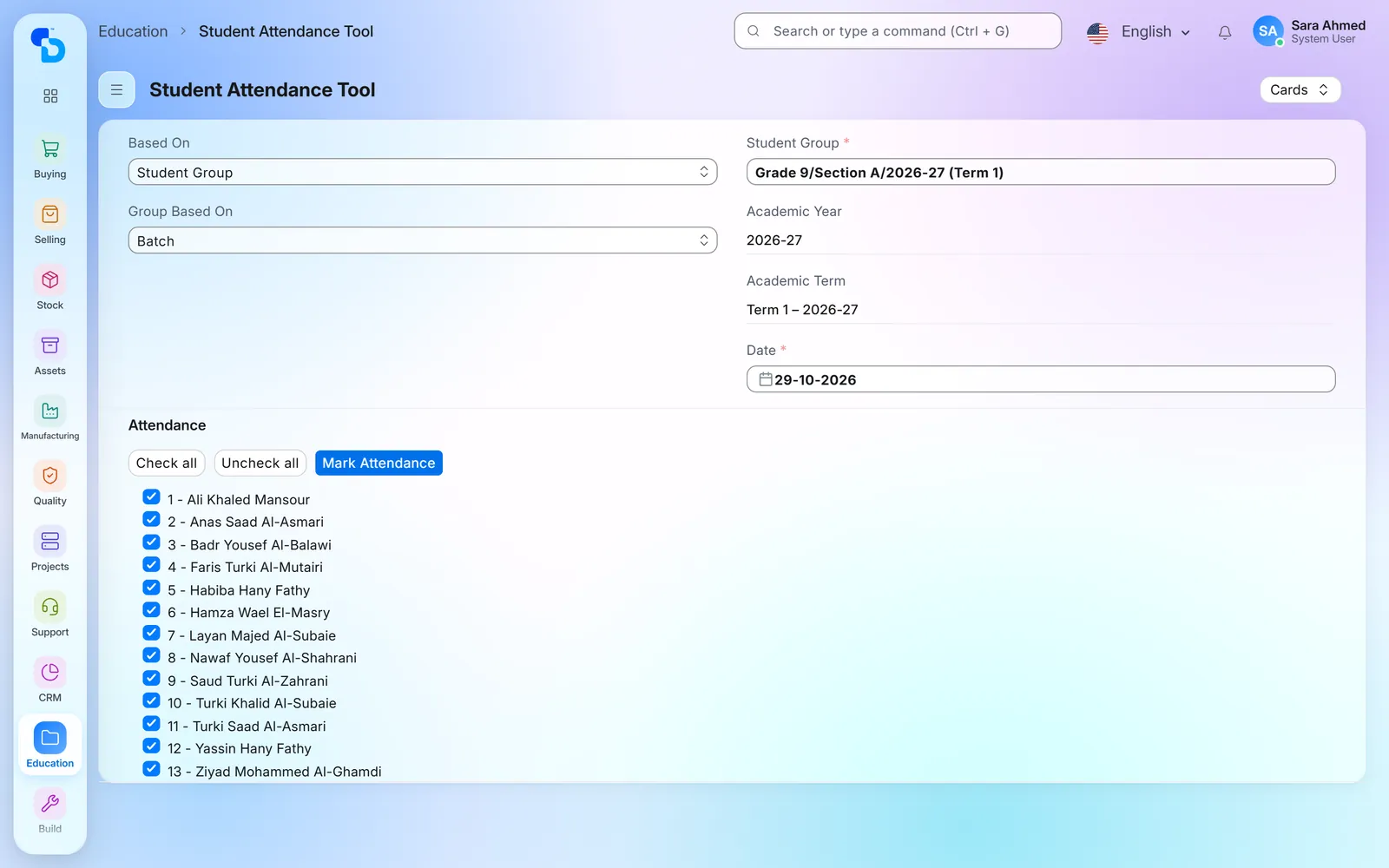
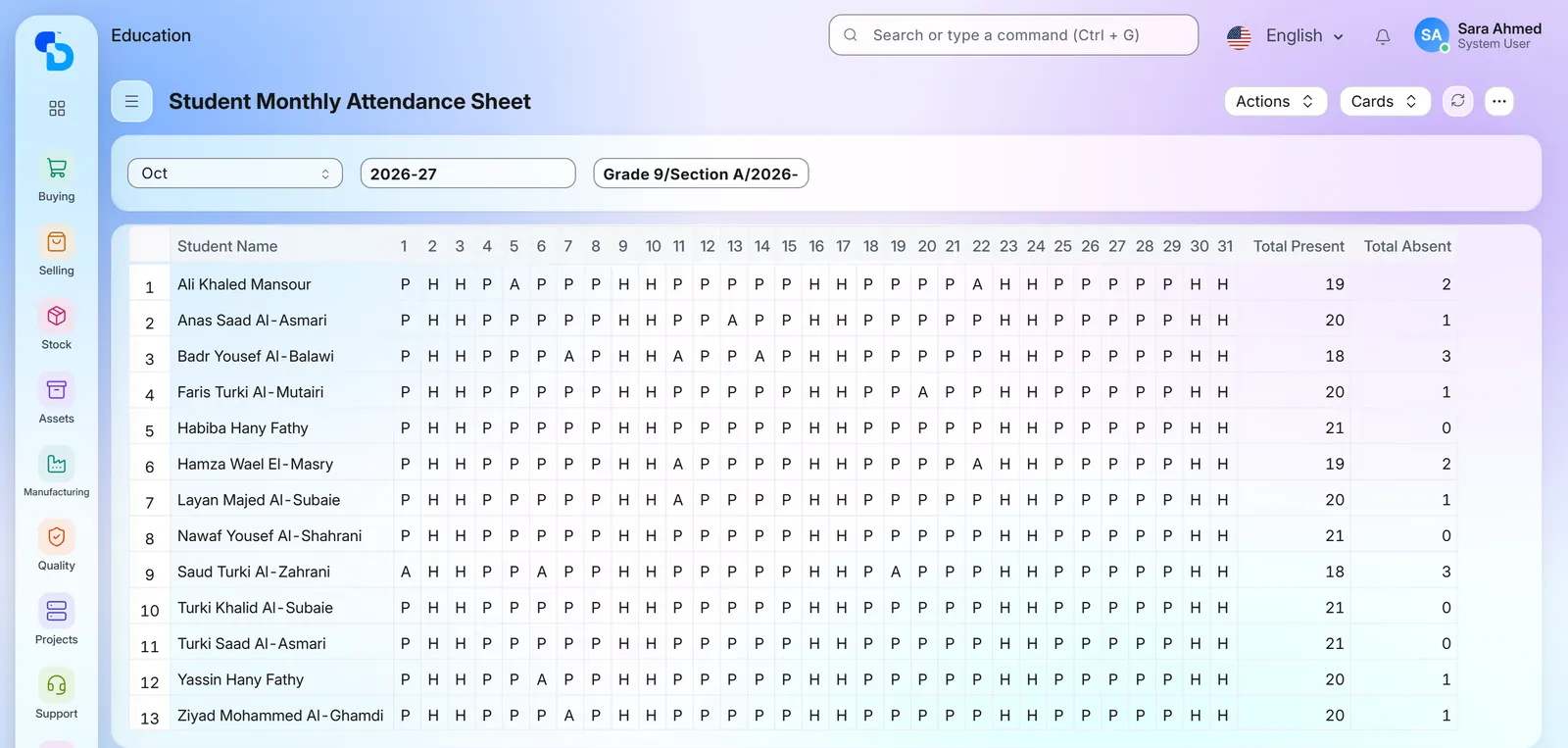
The scheduling tool builds a term’s sessions for a group on the weekdays you choose, with course, teacher, room and time. It refuses a session that overlaps for the group, the teacher or the room, then shows the timetable on a calendar. Teachers then mark a whole class present or absent from one screen, by group or by session, and leave applications sit alongside. A monthly sheet shows each student’s days present and absent, while a daily report lists who is absent.
Class timetable for one week on the course schedule calendar
Assessment plans and grade reports
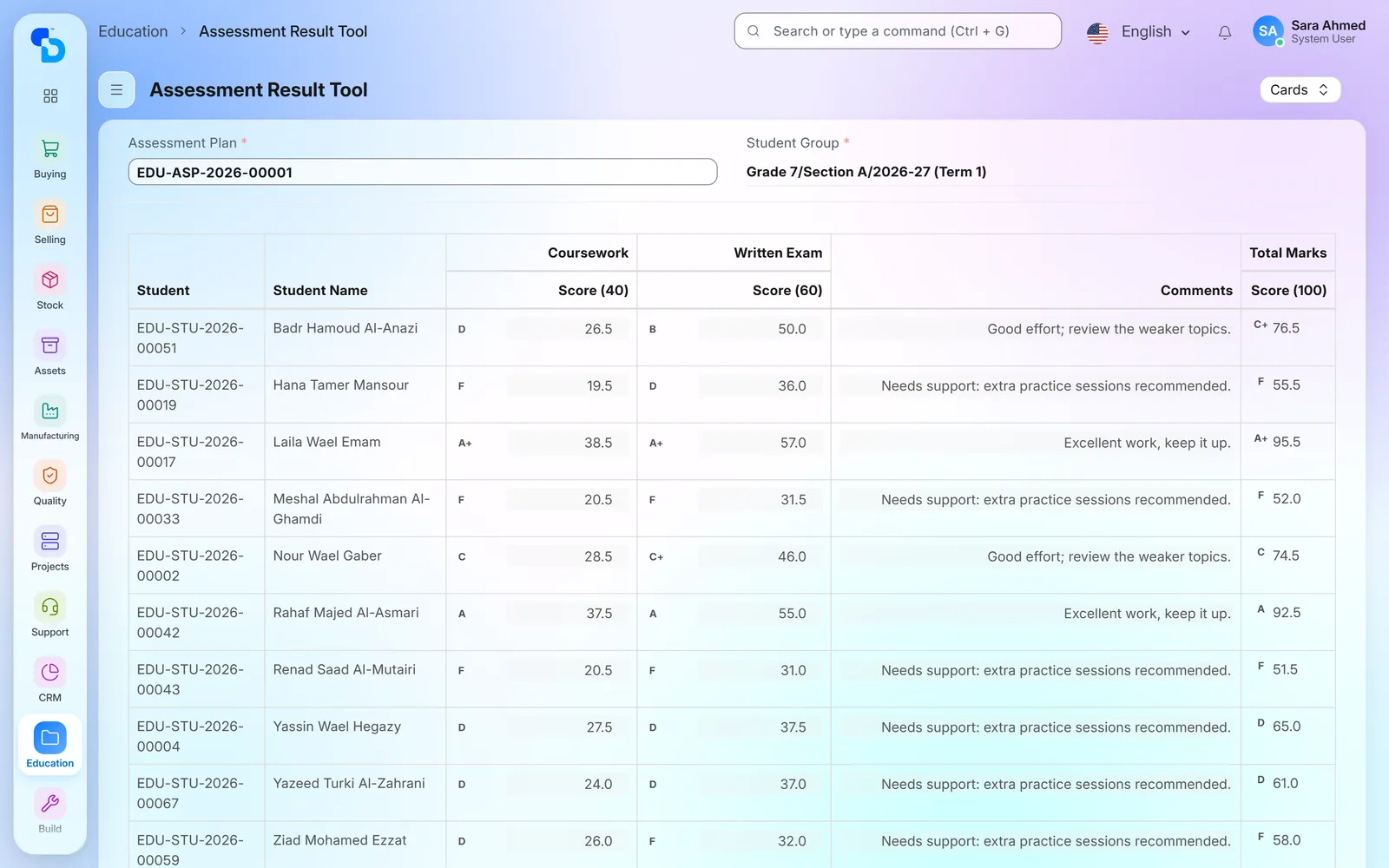
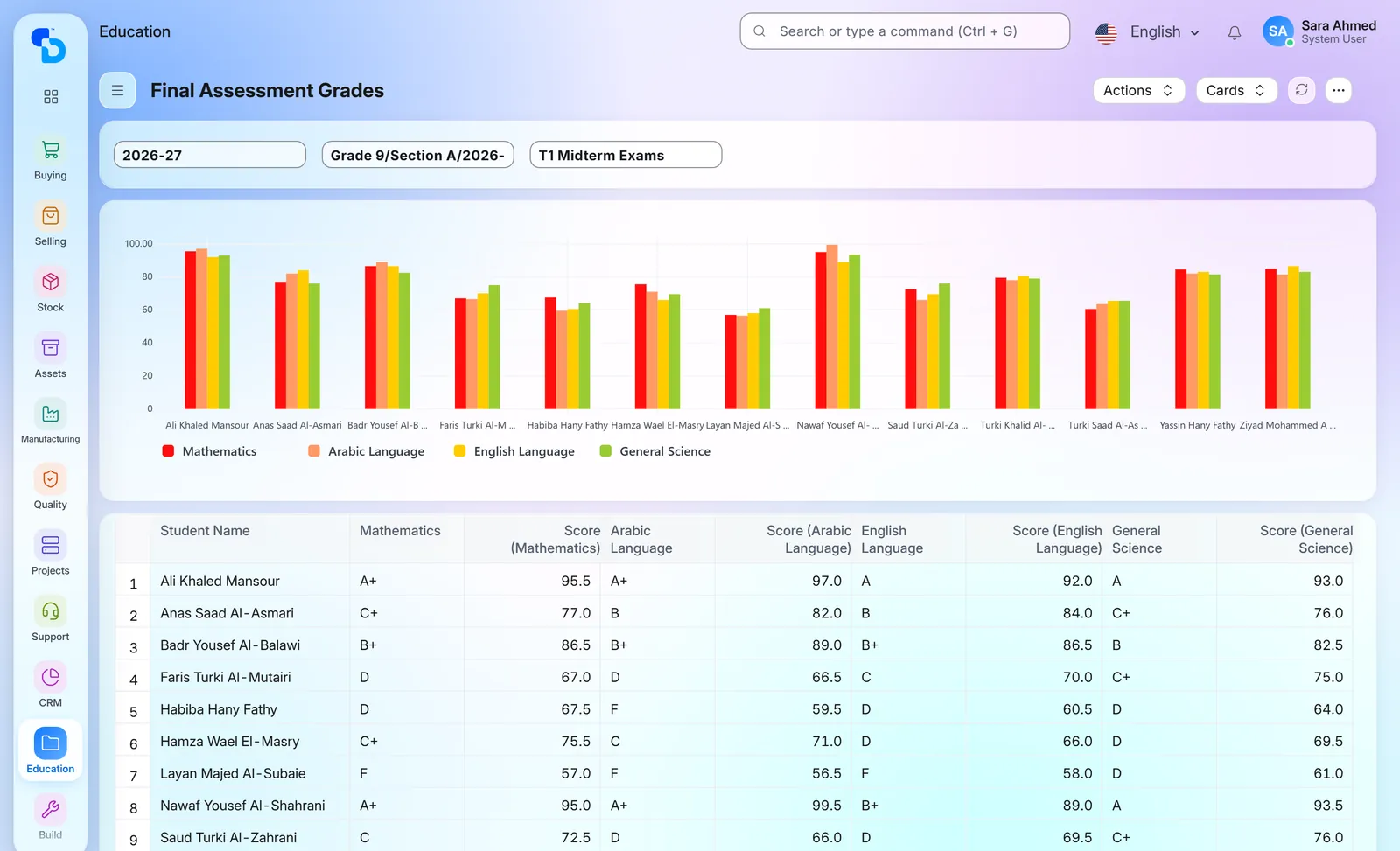
An assessment plan sets the course, the group, the date, the room, the examiner and the maximum score. You split that score over weighted criteria, such as coursework and a written exam. Teachers then enter marks for the whole group in one grid, and the grading scale turns each score into a grade automatically. The final grades report shows every student’s grade per course with a chart, while another report shows which plans still wait for results.
Marks for a whole group in one grid: coursework, written exam, comments and the total with its grade
Fee structures, discounts, instalments and collection
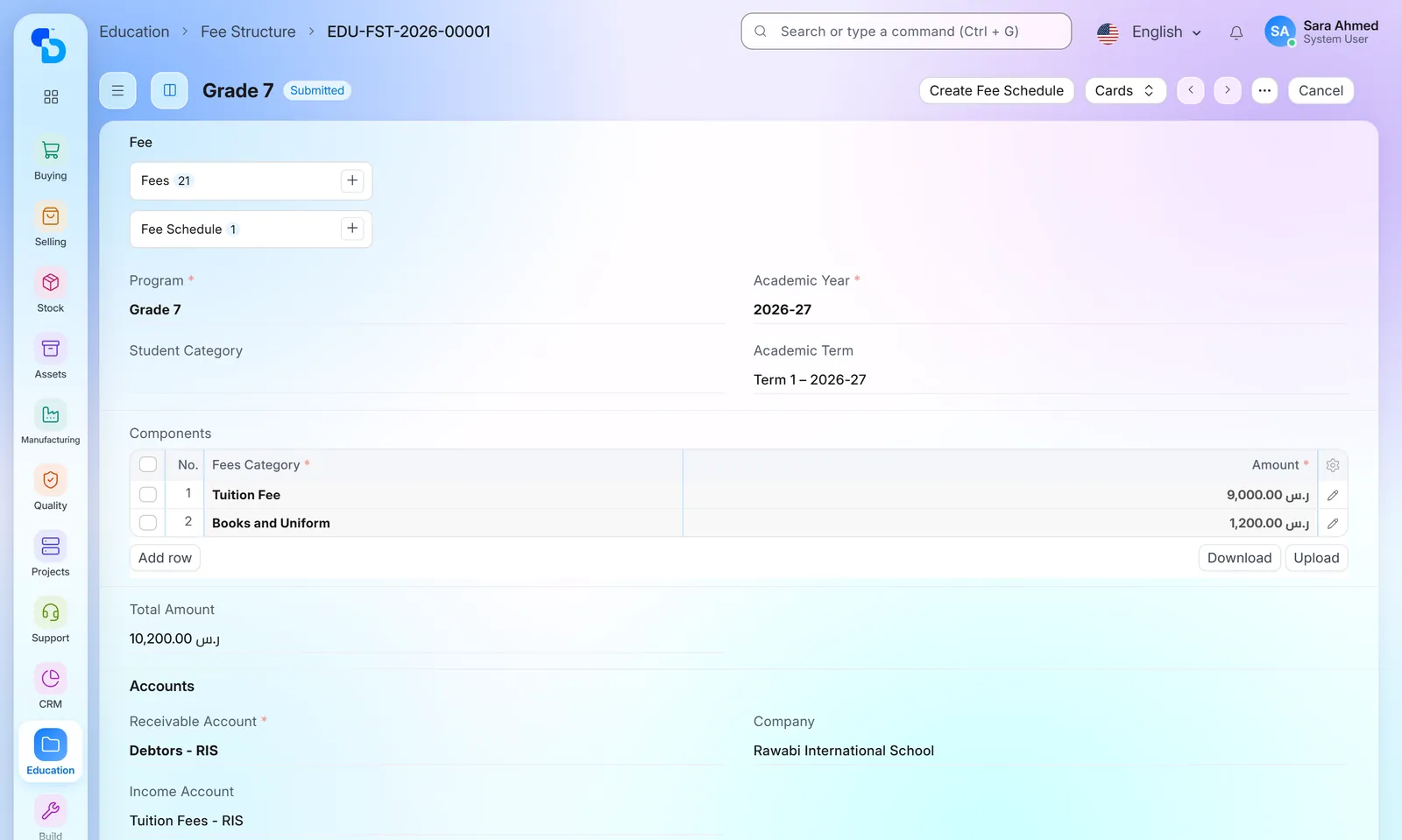
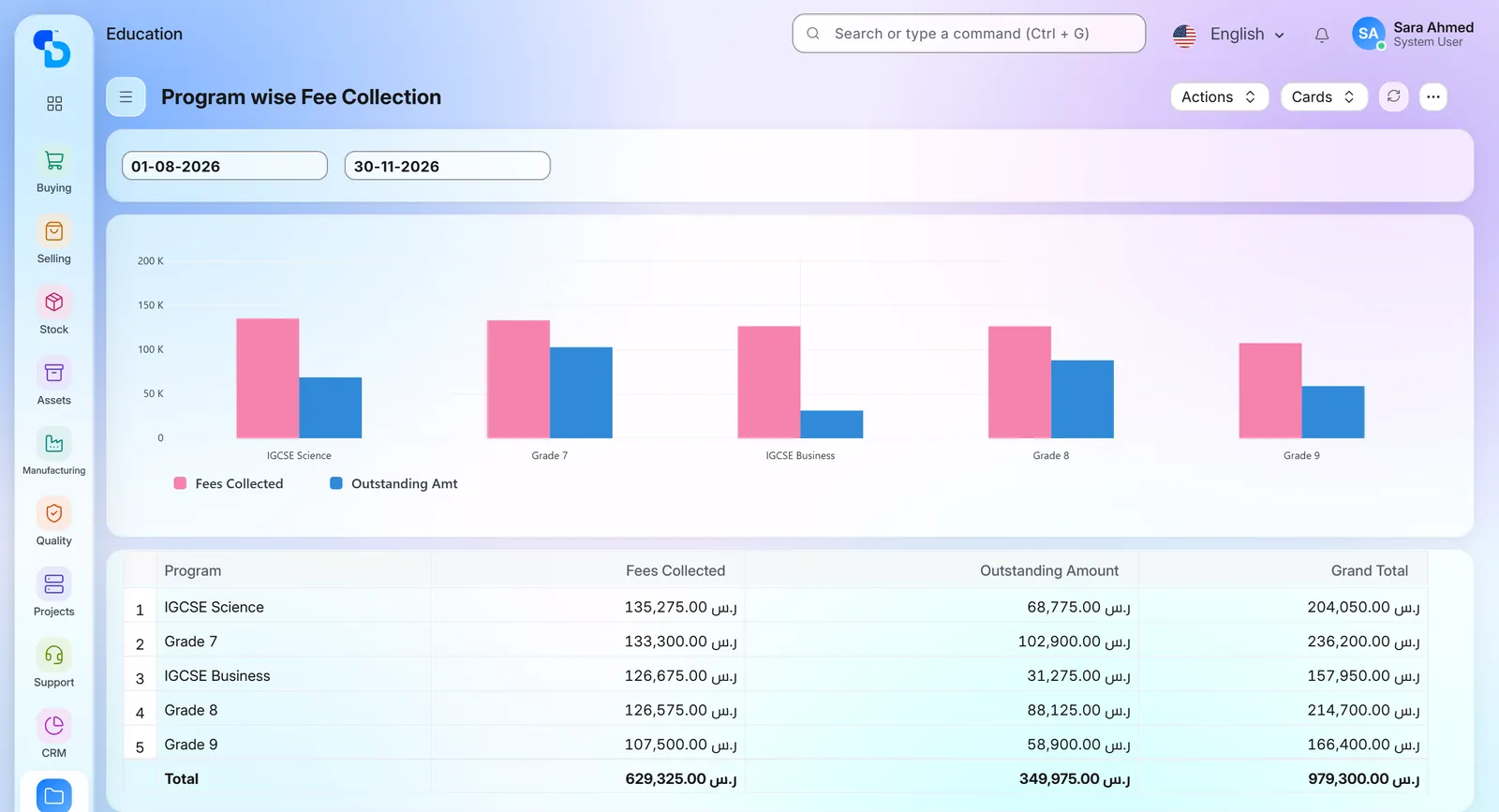
A fee structure lists the components for a programme and term, such as tuition, books and uniform, each with its amount. A fee schedule then bills a whole group at once and raises one ERPNext sales invoice per student. Once submitted, each invoice posts to your accounts. For a school group we also added family quotations with category and sibling discounts, instalment plans by fee type, and a reception desk screen. There, the cashier sees the payment schedule and then records one payment split across several payment methods. A report by programme shows the amounts collected and those still outstanding.
A fee structure for one programme and term: components, total and the receivable account
School bus lines and subscriptions
For a school group we also built bus transport into the same system. Each line serves a set of neighbourhoods and has its buses, drivers and seat capacity. When a student enrols with the bus option, the system creates a subscription for the line and the year. A bus group then lists the subscribed students with a supervisor. The system stops a group from exceeding the bus capacity, and it removes a student who already sits in another group that term. Bus fees per line also appear on the family quotation.
Fees collected and outstanding per programme (school demo site; bus screens are not on the demo yet)
Training centres: batches, branches and profit per batch
For training centres, we organise learners into batches per branch, each with its weekly timetable. One screen lists a batch’s learners with total, paid and outstanding amounts, so staff can transfer or invoice several learners together. When a learner moves, a transfer record keeps the old and new batch, the branch and the reason. A batch profit report sets deposits and instalments collected against trainer and certificate costs. There is also a trainers report, which counts each trainer’s sessions and hours with the amount due. Online courses and NELC reporting come from our e-learning solution.
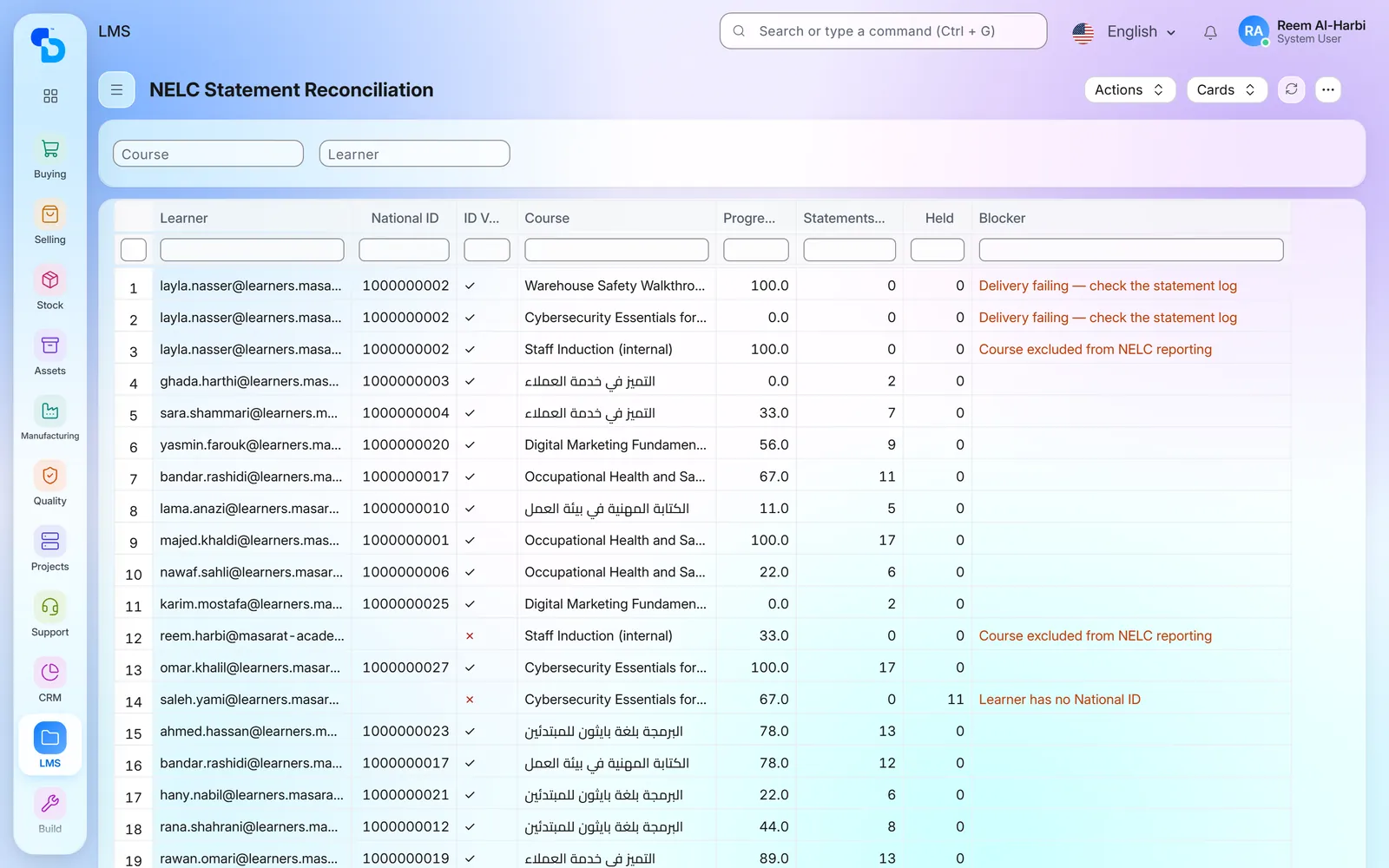
NELC reconciliation from the e-learning solution: every enrolment, the statements sent and what blocks the rest (batch screens are not on a demo yet)
Staff, payroll, accounts and assets
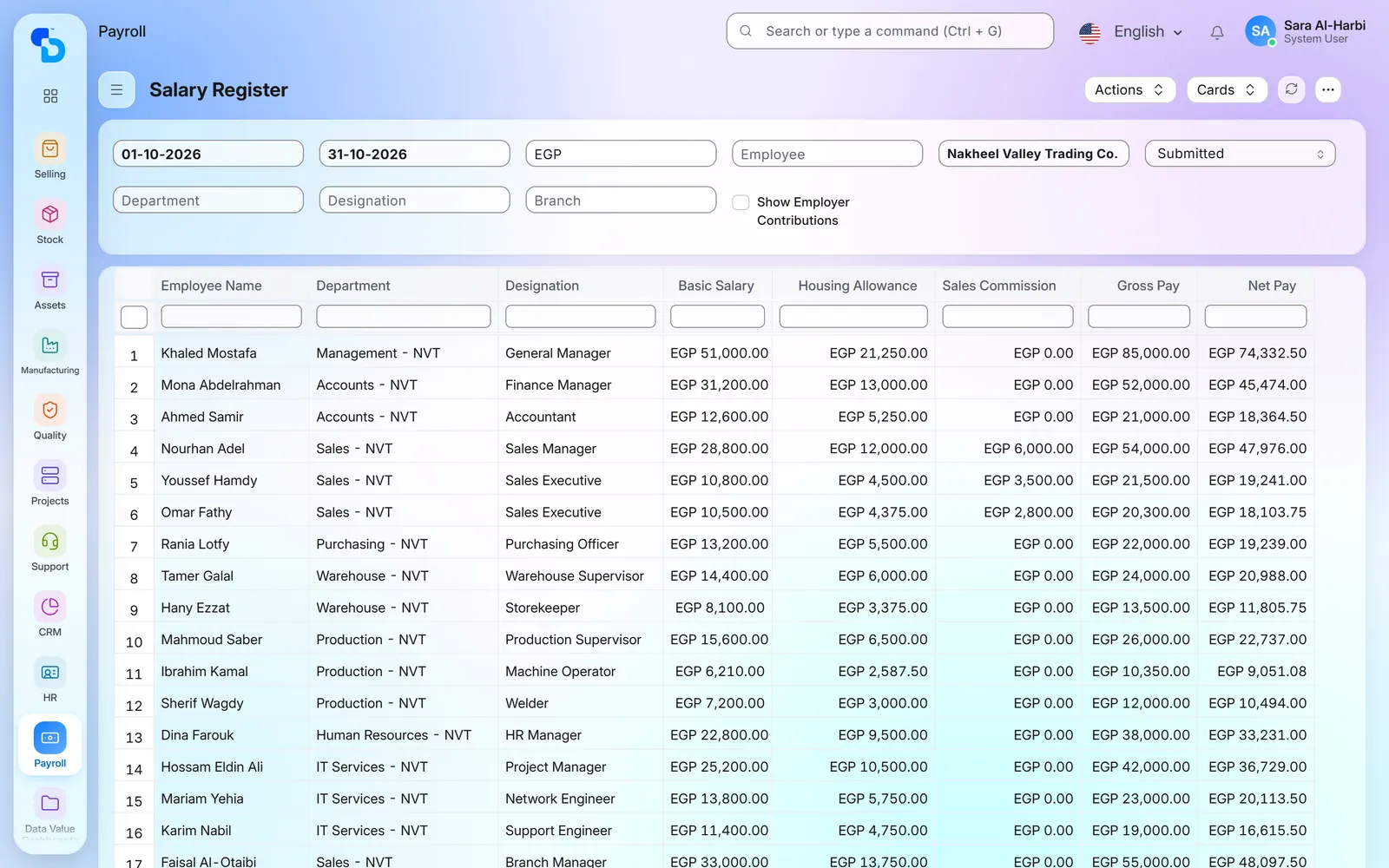
Teachers and administrators are employees in the same system, so HR keeps their records, attendance and leave. Payroll runs salary structures per grade, then posts the month to the accounts. Cost centres can separate activities such as tuition and transport, and you compare budgets with actual spending. Purchases of books and supplies flow into stock and the ledger. Lab devices, buses and furniture sit in the asset register, together with depreciation schedules and planned maintenance.
Salary register for a month: one row per employee with department and designation (general ERPNext demo, not a school)
Screens show demo data.
Solutions and modules
Solutions, modules and integrations behind ERPNext for education
Schools, kindergarten to high school · Saudi Arabia
Student fees, purchasing, stock and assets tied to the accounts.
What we set up
Admissions and enrolment linked to fee invoices and collections
Family quotations with parent-category and sibling discounts
Instalment plans and a reception desk for payments
Bus lines, subscriptions and bus groups
Purchasing and stock posted to the accounts
Fixed assets with depreciation
Education
Accounting
Sales
Purchasing
Inventory
Fixed Assets
Client name withheld
An education quality platform in Egypt
Education quality · Egypt
Programmes, learners and assessments in one system, ready for quality reporting.
What we set up
Programmes, courses and learner records in one system
Enrolment, scheduling and attendance managed in the system
Assessment and results reporting drawn from system data
Education
Screens
More ERPNext for education screens
These six screens show ERPNext for education on the school and e-learning demo sites, covering daily attendance, grades, fees and learner reporting.
Fees collected and outstanding for each programme over a term (school demo site)
Attendance for a whole class on one screen, by student group and date
Monthly attendance sheet for a class: a mark for each student and day, with totals
Final assessment grades for a group: a chart and the grade and score per course
Fee collection by programme: the amounts collected and still outstanding
NELC reconciliation: every enrolment, the statements sent and the reason for any gap
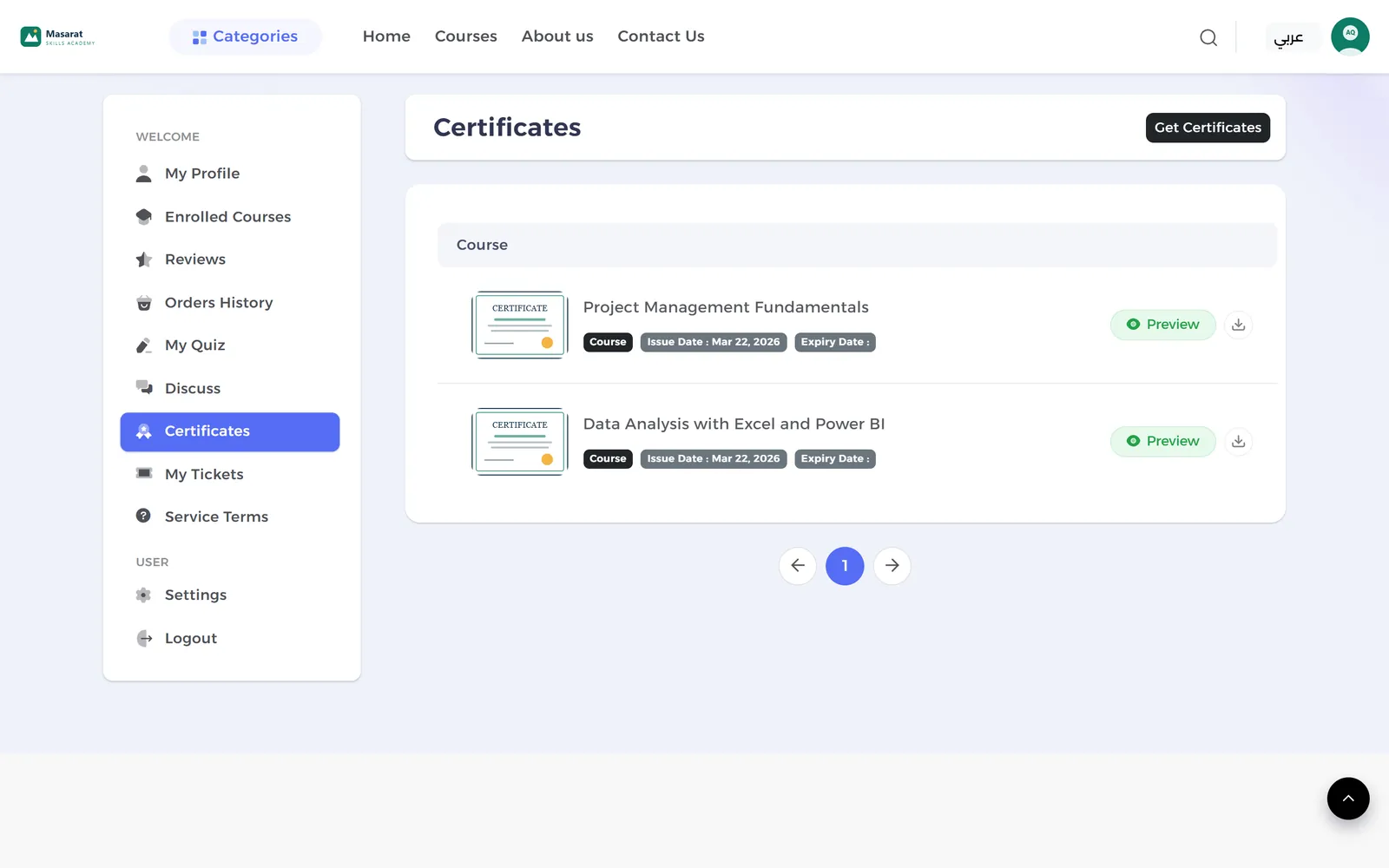
A learner's certificates, ready to preview and download
Screens show demo data.
FAQ
Frequently asked questions about ERPNext for education
What is ERPNext for education built on?
The school solution runs on Frappe Education, the open-source education app for ERPNext, so fees, accounts, purchasing and payroll share one system. Data Value implements, extends, translates and supports it.
Can parents and students follow fees online?
Yes. Students get a login to a web portal, and guardians get one once the school invites them. The portal shows the timetable, grades, attendance and fee invoices, and a guardian first picks which child to view. Published admission rounds also appear on a public admissions page. During implementation we set up online applications to match your policy.
Can we give sibling and staff discounts?
Yes, for a school group we set one discount per parent category and a further discount by each child’s order in the family. The family quotation then shows every child’s fees before and after discount.
Can families pay fees in instalments?
Yes, for a school group we set up payment terms that split each student’s fees into instalments with due dates. Before the reception desk takes a payment, it shows the amount paid and the amount still outstanding.
Does ERPNext for education manage school buses?
Yes, as an addition we built for a school group. It covers lines by neighbourhood, buses and drivers, a subscription per student, as well as bus groups with a seat limit. The family quotation also lists bus fees with the tuition.
Do you support NELC reporting in Saudi Arabia?
Yes, our training and e-learning solution sends learner activity to NELC automatically. It also logs every statement and shows which learners are not yet reported, and why.
Can ERPNext for education run several campuses or branches?
Yes, each school or branch can have its own fee structures, while reports run per campus or for the whole group.
Does ERPNext for education work in Arabic?
Yes, Frappe and ERPNext run right to left in Arabic. The education app ships with only a few Arabic labels, so translating its screens is part of our implementation.