Industries · ERPNext for real estate and contracting
ERPNext for real estate developers, landlords and contractors
ERPNext for real estate runs the whole cycle in one system, from the construction site to the lease. Contractors control BOQs, budgets and payment certificates. Developers and landlords reserve, sell, lease and collect, while every amount posts to the ERPNext accounts.
We have implemented ERPNext for developers in Egypt and Saudi Arabia, and for contractors in Egypt, Saudi Arabia and Iraq.
Project cost against budget, by cost code
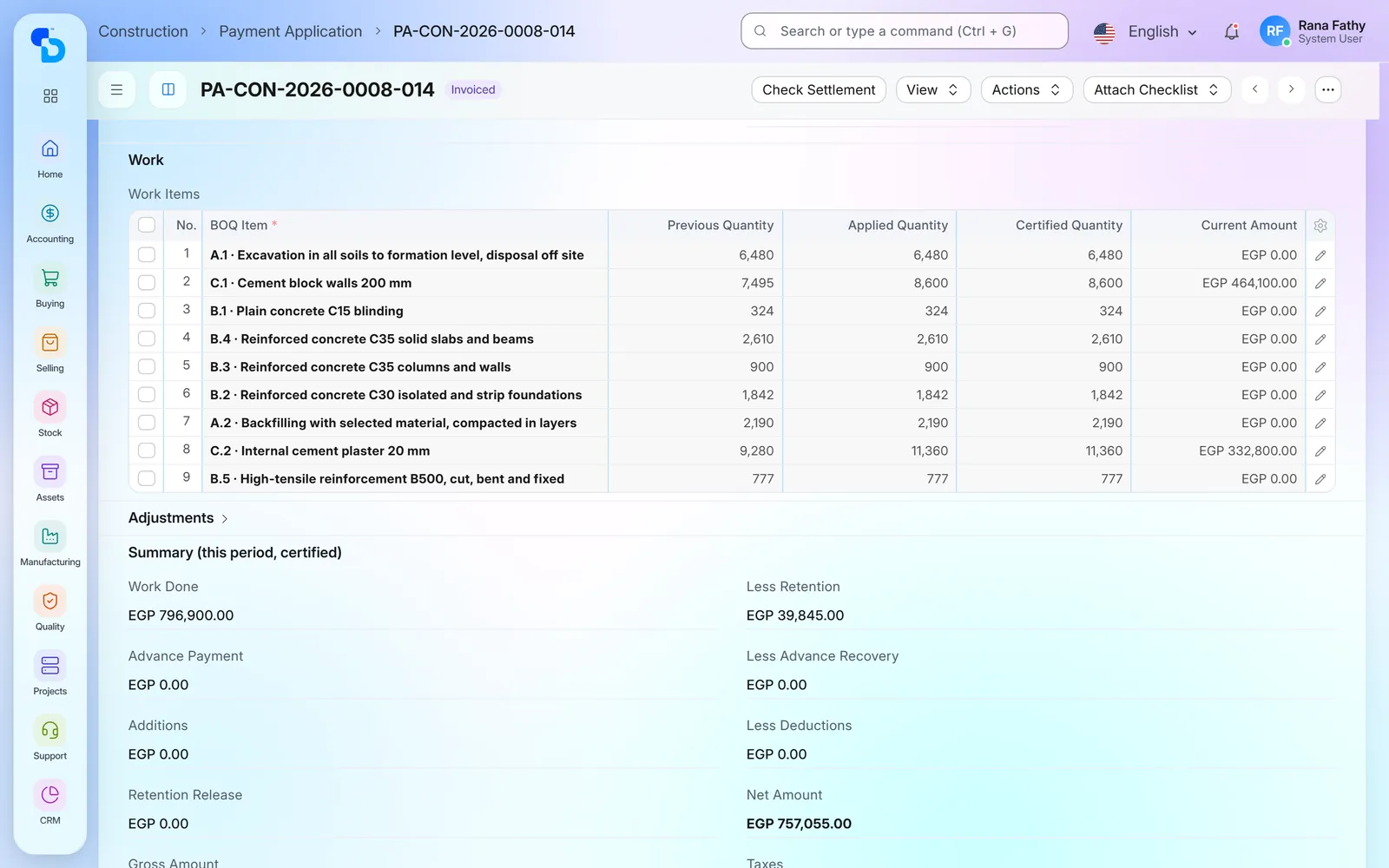
Payment certificates for the client as well as every subcontractor
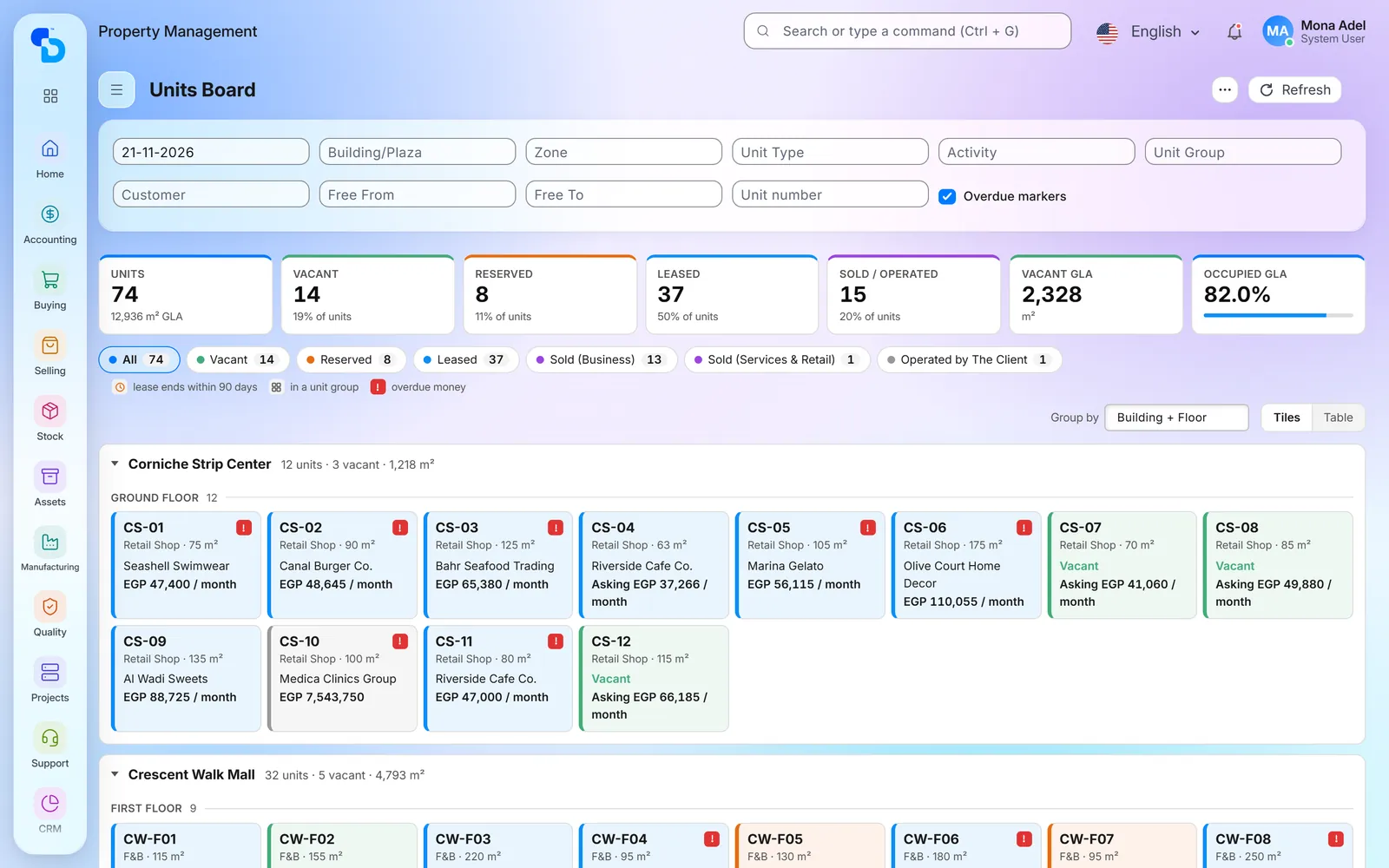
Every unit and its status on one board
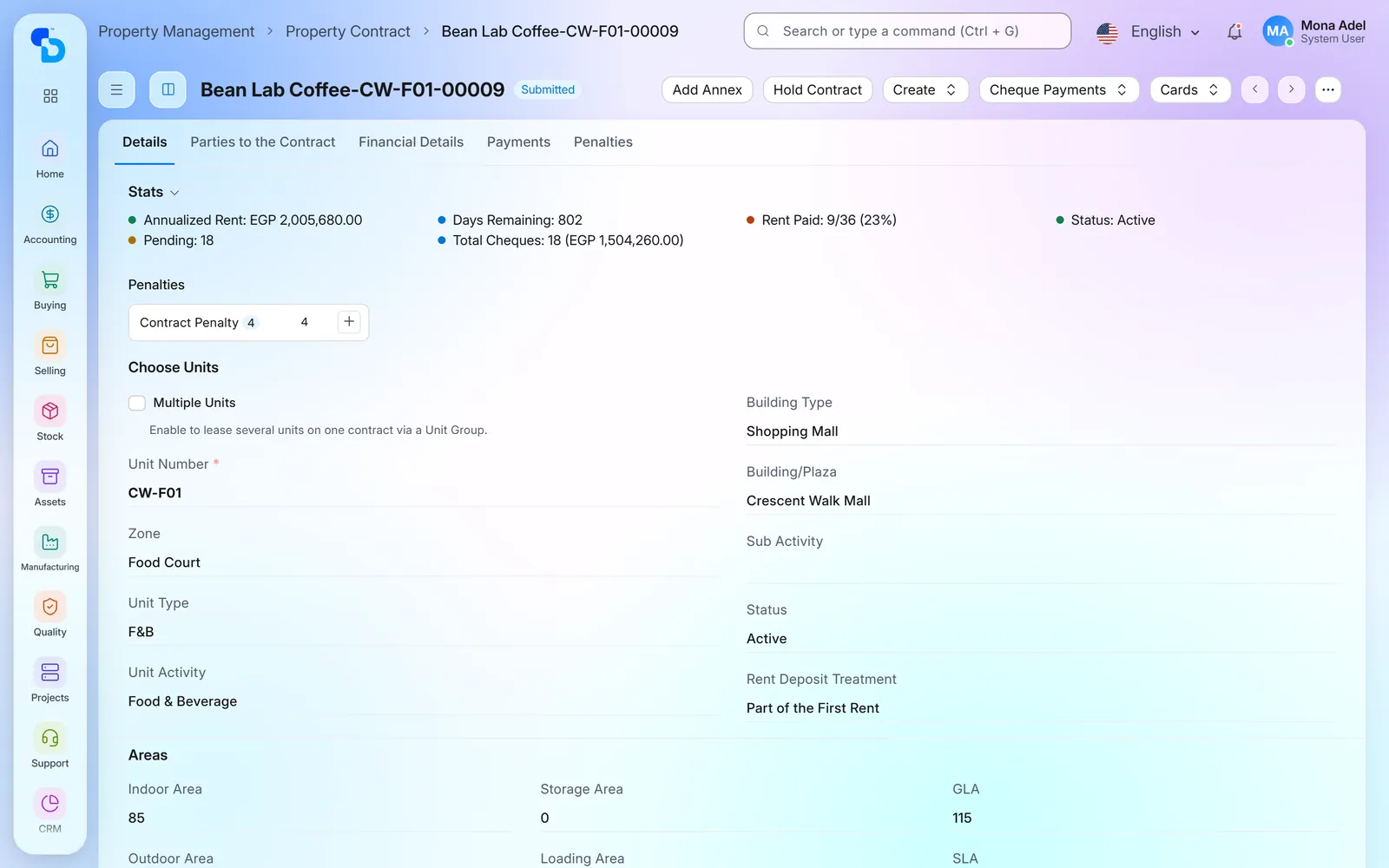
Leases and instalment sales that build their own schedules
The process
From the construction site to the lease with ERPNext for real estate
1
Project and budget
Each project gets its contract BOQ, then a budget for each cost code.
2
Purchasing and subcontracts
The system checks each purchase order against the remaining budget before you commit.
3
Site and certificates
Site teams report each day, while you certify work done for the client and subcontractors.
4
Properties and units
We set up the portfolio as properties, floors, zones and units, including their areas and asking rents.
5
Reserve, sell or lease
A reservation later becomes a sale contract or a lease, and each builds its own payment schedule.
6
Invoice and collect
Schedule rows become ERPNext invoices, so one collections desk can follow everything overdue.
7
Run the buildings
Maintenance tickets, permits and inspections stay linked to the unit they concern.
Problems we solve
What holds real estate developers and contractors back, and what ERPNext does about it
Project costs show up too late
When costs reach the books at month end, you see the overrun after you have committed the money.
Cost control shows budget, committed and actual cost for each cost code as you book costs. The system also warns when a purchase order goes over the remaining budget.
Payment certificates live in spreadsheets
Teams work out retention, advance recovery and earlier certificates by hand, so every certificate can carry an error.
Cumulative certificates value the work to date against the BOQ, then deduct retention and advance recovery. The same certificate works on the client side and for each subcontractor.
Nobody agrees on unit status
Sales, leasing and finance keep their own lists, so two people can promise the same unit.
One units board shows every unit by building and floor as vacant, reserved, leased or sold. Each tile also carries the tenant and the rent, and can mark overdue amounts.
Instalments and rent sit outside the accounts
Teams type sale instalments and rent schedules into spreadsheets, while the ledger that should record them stays apart.
Sale contracts and leases build their own payment schedules. Each row then becomes an ERPNext invoice, so receivables stay in the ledger.
Late payers surface too late
Without one list of what is overdue, a reminder depends on someone’s memory.
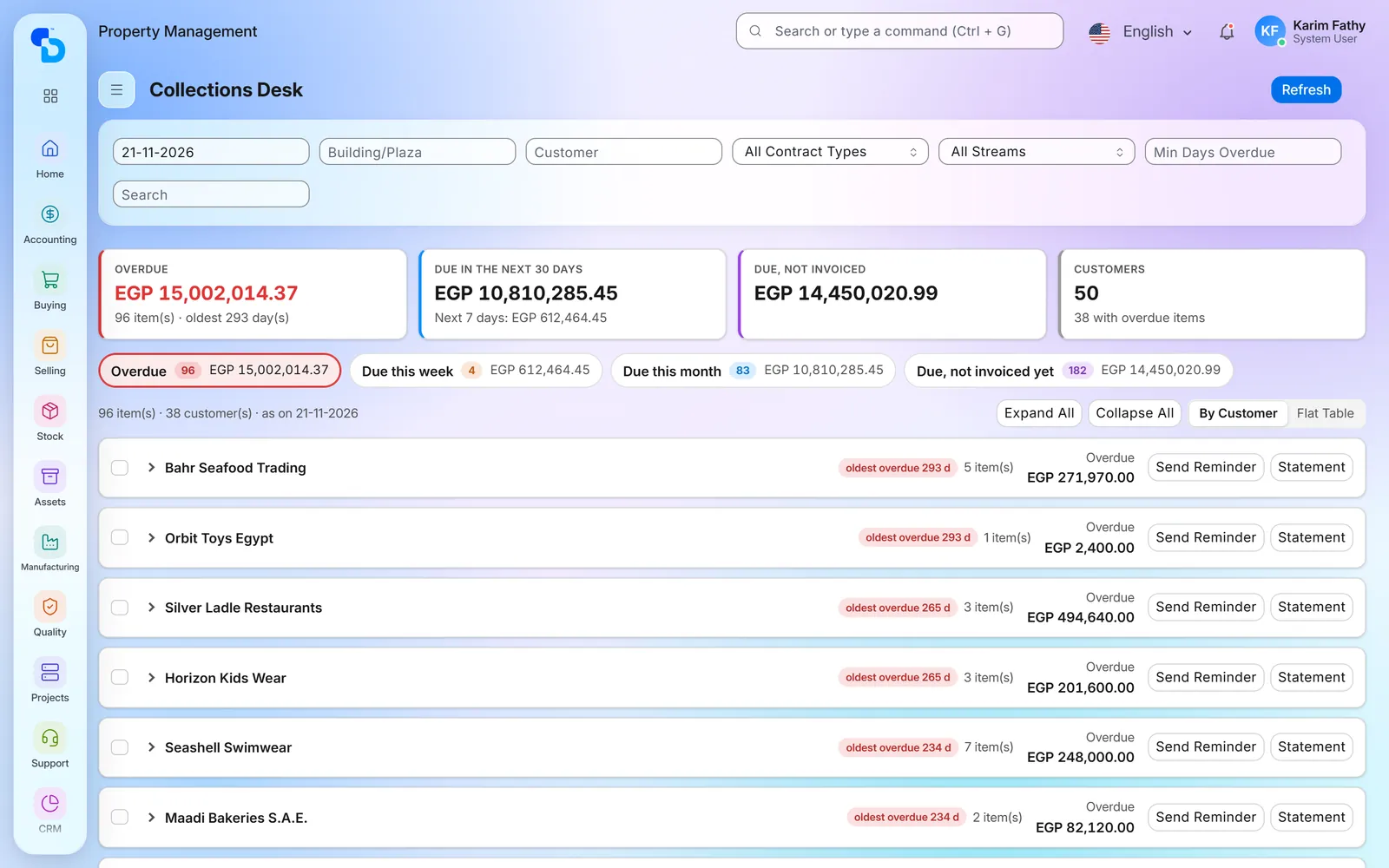
The collections desk lists everything overdue, due soon, or due but not yet invoiced, by customer. When a payment is late, the penalty follows the terms written in the contract.
Building operations run on paper
Maintenance requests, work permits and safety checks stay on paper, so nobody can trace them later.
Instead, maintenance tickets, work permits and safety inspections become records in the system, each linked to its unit.
What it covers
What ERPNext for real estate and contracting covers
The cycle in eight parts. Each one is a working screen in ERPNext for real estate, shown on the demo sites of our construction and property solutions.
BOQs, budgets and cost control
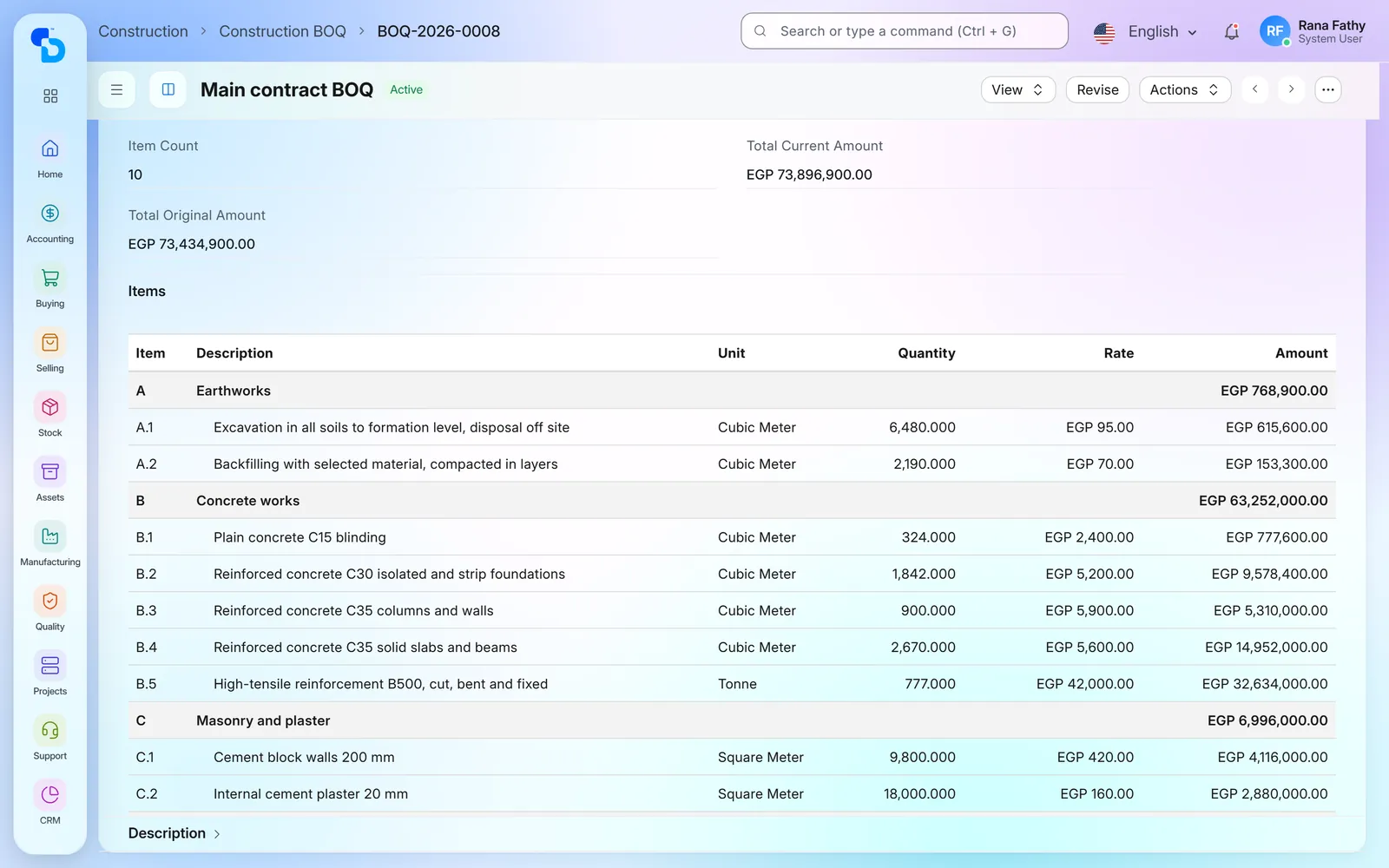
Every contract and subcontract has its own BOQ, grouped into sections with units, quantities, rates and amounts. When the scope changes, you revise the BOQ and set a new baseline, while the original and current totals stay separate. Cost control then shows budget, committed, actual cost, exposure and variance for each cost code. Before you commit a purchase order, the system checks the remaining budget of its cost code and warns you when the order goes over it.
Project cost control by cost code: budget, committed, actual cost, exposure and variance
Payment certificates, variations and final accounts
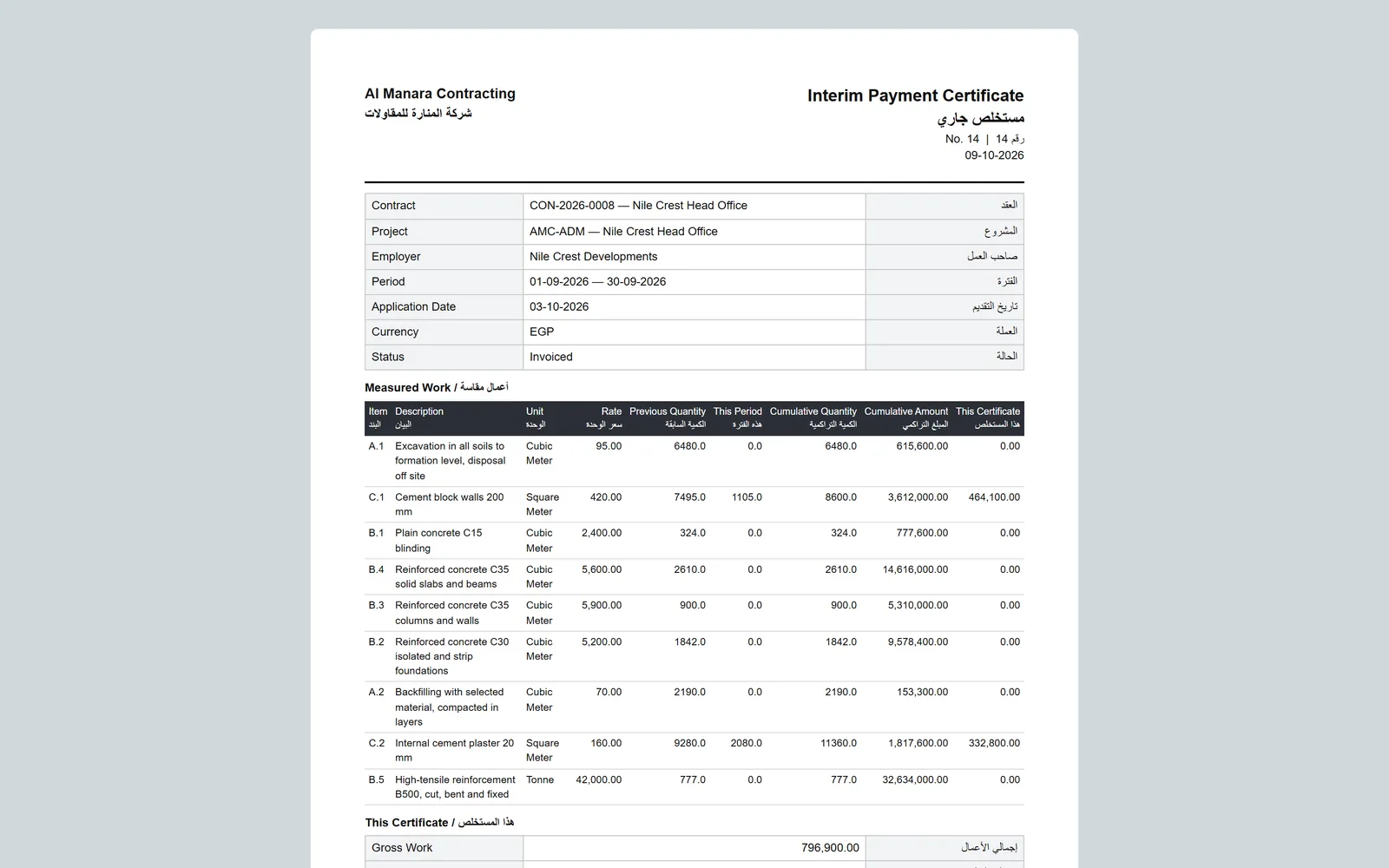
Each interim certificate values the work done to date against the BOQ. It then deducts retention, advance recovery and other deductions, adds taxes and works out the net amount due. The same certificate runs on the client side and for every subcontractor. It then becomes an ERPNext invoice, and the retention goes to its own journal entry. Variation orders adjust the BOQ and the contract value, and draft a budget revision. The final account then works out the final contract value and the remaining balance. Certificates also print in English and Arabic side by side.
Payment certificate: quantities to date per BOQ item, then retention and the net amount
Properties, floors, zones and units for real estate portfolios
We set up the portfolio as it stands on the ground. Each property has its floors and zones, and each unit carries its type, activity, areas and asking rent per square metre. The system also records tenant brands. The units board then shows every unit as a tile, grouped by building and floor. Each tile shows the status, the tenant and the monthly rent and, with overdue markers switched on, any overdue amount.
Units board: every unit by building and floor, including status, tenant, rent and overdue markers
Reservations and unit sales on instalments
Your sales team can hold a unit for a buyer or a tenant against a deposit. The reservation later becomes a sale contract or a lease. If it does not, you refund the deposit or forfeit it. A sale contract holds the price, the down payment, the payment on delivery and the instalments before and after delivery. You can invoice each schedule row in ERPNext. A linked service contract then bills the new owner a service charge.
Unit sale contract: total price, down payment, delivery payment and post-delivery instalments
Leases that build their own schedules
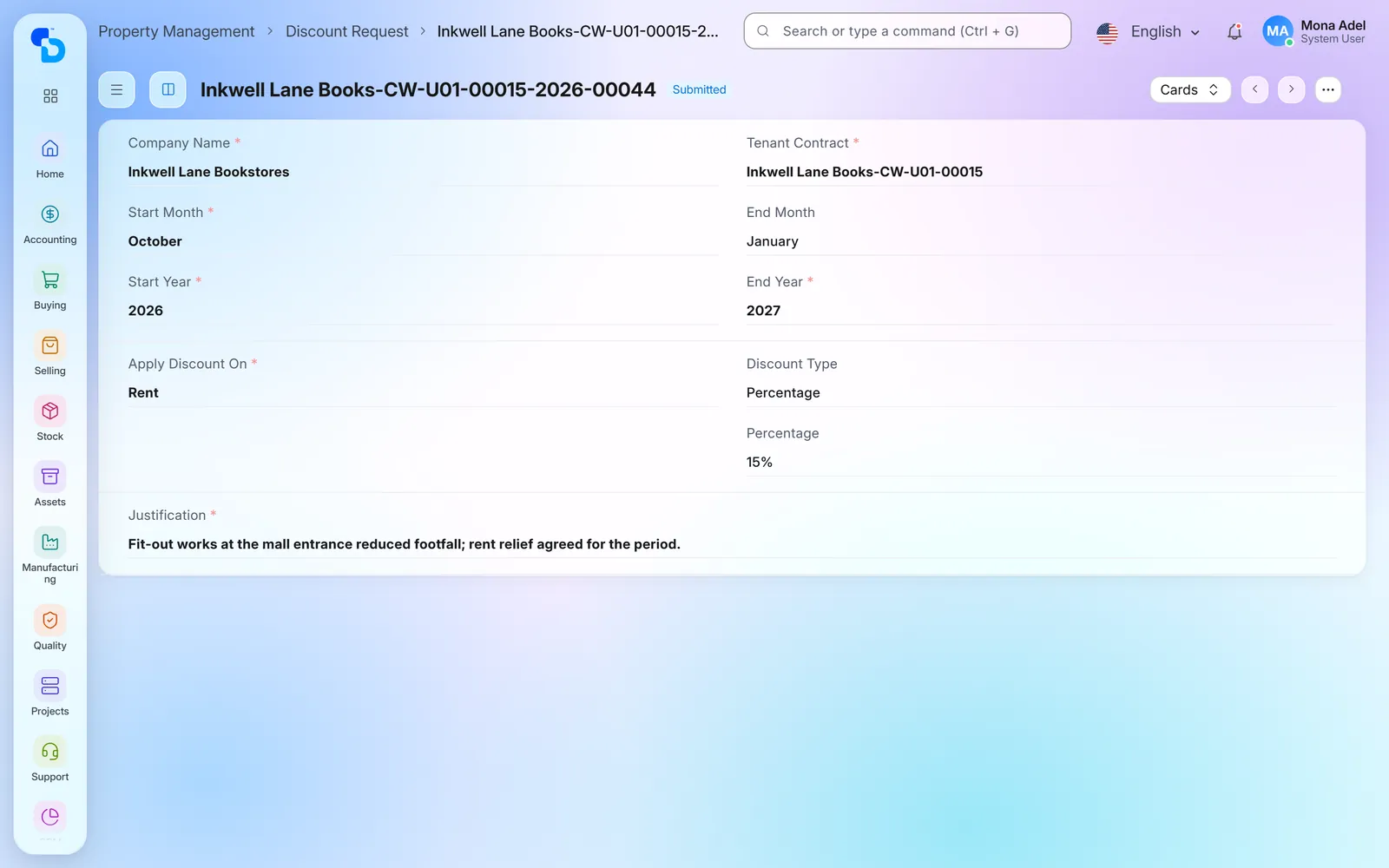
A lease contract turns its terms into rent, service-charge and marketing schedules. It also handles annual increases and deposits. For revenue-share leases, tenants report their monthly sales. When the agreed share of those sales exceeds the rent, the system invoices the difference. A discount request, with its period and justification, lowers the rows that still have no invoice. The rent roll, tenancy and lease expiry reports all read from the same contracts.
Lease contract with annualised rent, rent paid, cheques and days remaining
Monthly contract invoices and the collections desk
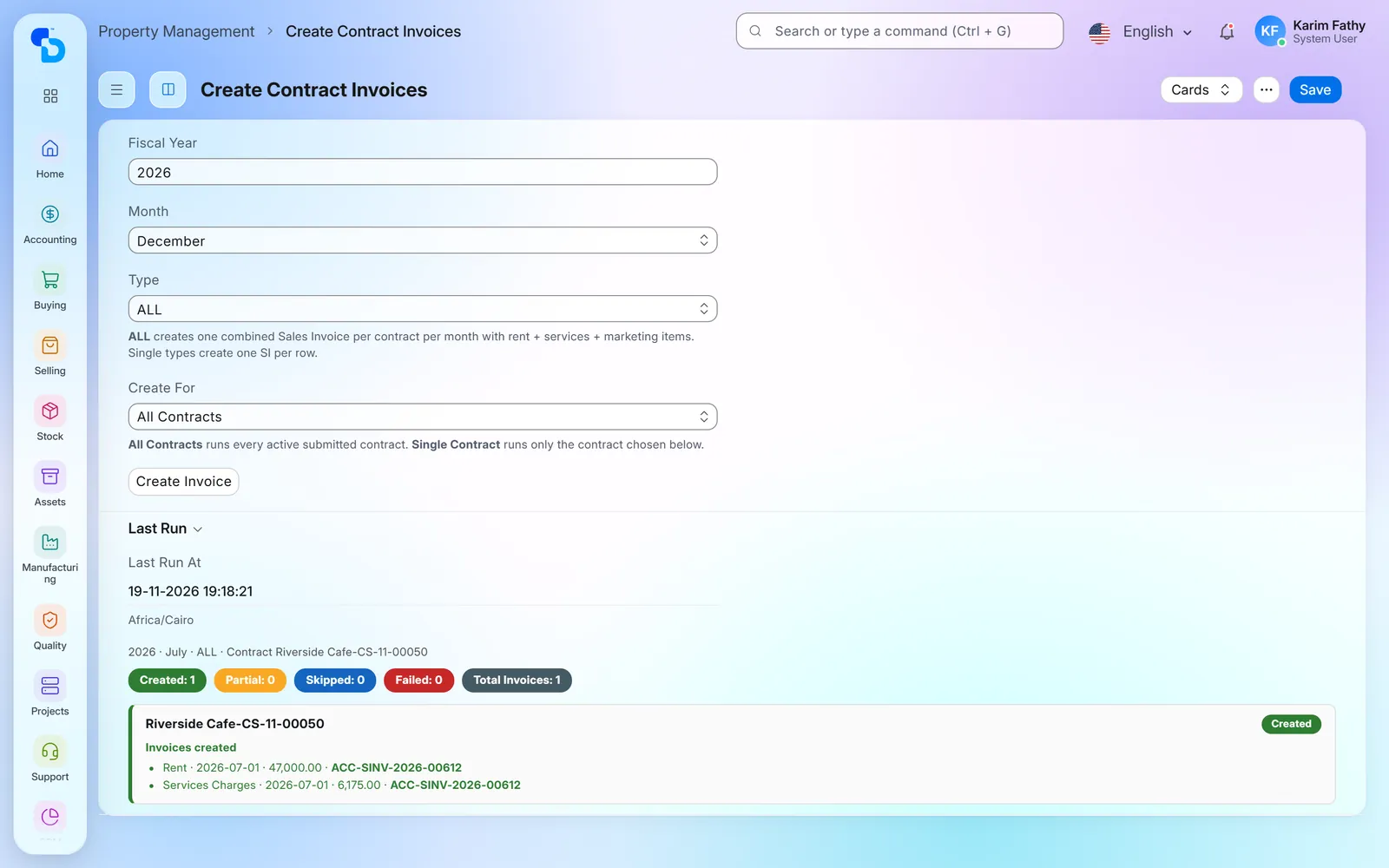
Each month, one tool creates a contract’s invoices for the month. It runs for rent, service charges or both, then keeps a summary of its last run. The collections desk then lists what is overdue, due soon, or due but not yet invoiced, grouped by customer. Each row has a reminder button and a statement button. A cheque tracker report also follows the cheques received against each contract.
Collections desk: overdue, due in the next 30 days and due but not invoiced, by customer
Late-payment penalties and debts
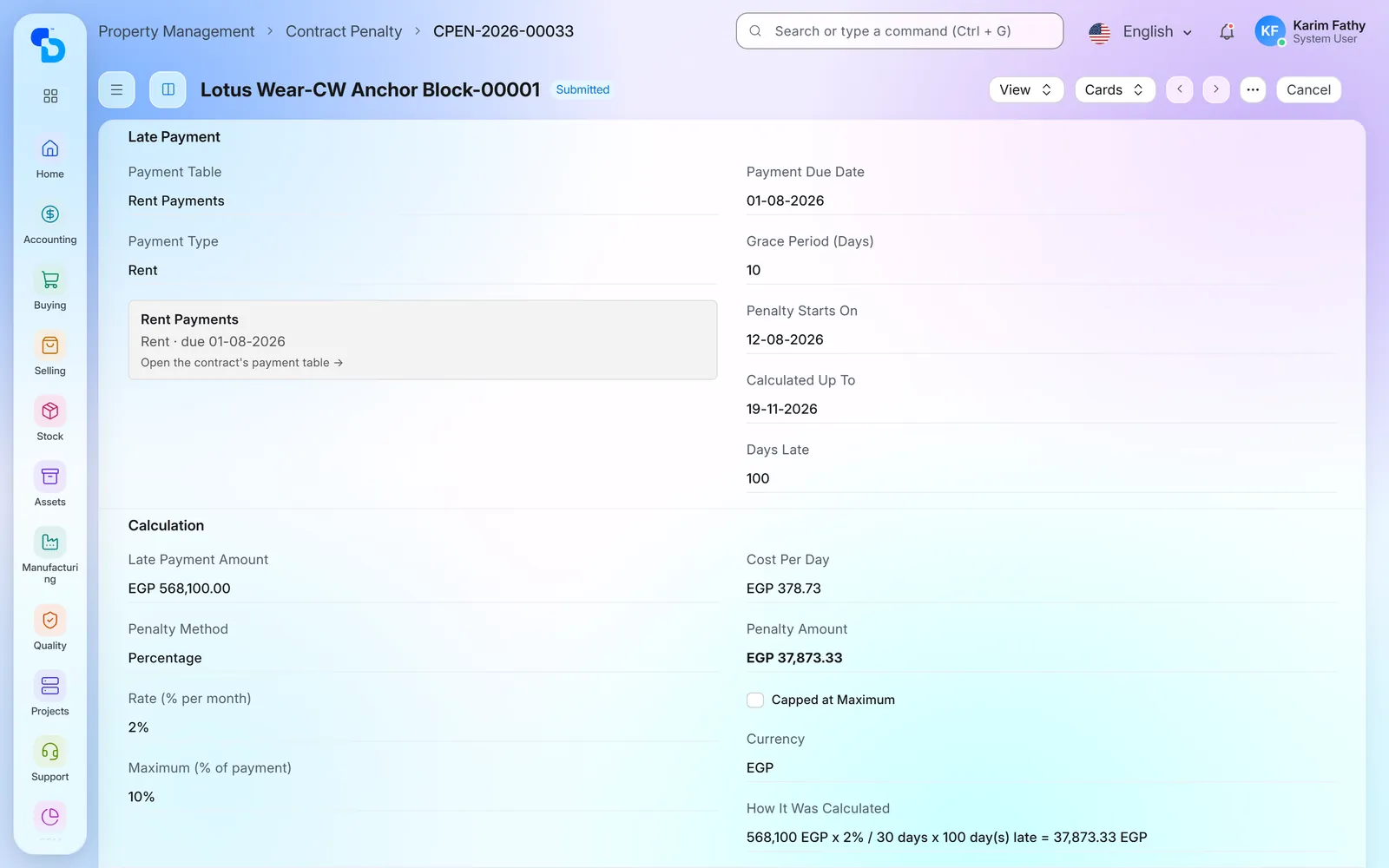
The system raises a penalty for each overdue row after the grace period. The penalty is a monthly percentage of the late amount, capped at a maximum share of the payment. Each penalty also shows how it was calculated. A separate penalty applies when a tenant opens after the agreed operating date. The debts report shows who owes what by contract and unit, and the aging report by customer.
Contract penalty: due date, grace period, days late, method, cap and the calculation line
Maintenance, permits, inspections and surveys
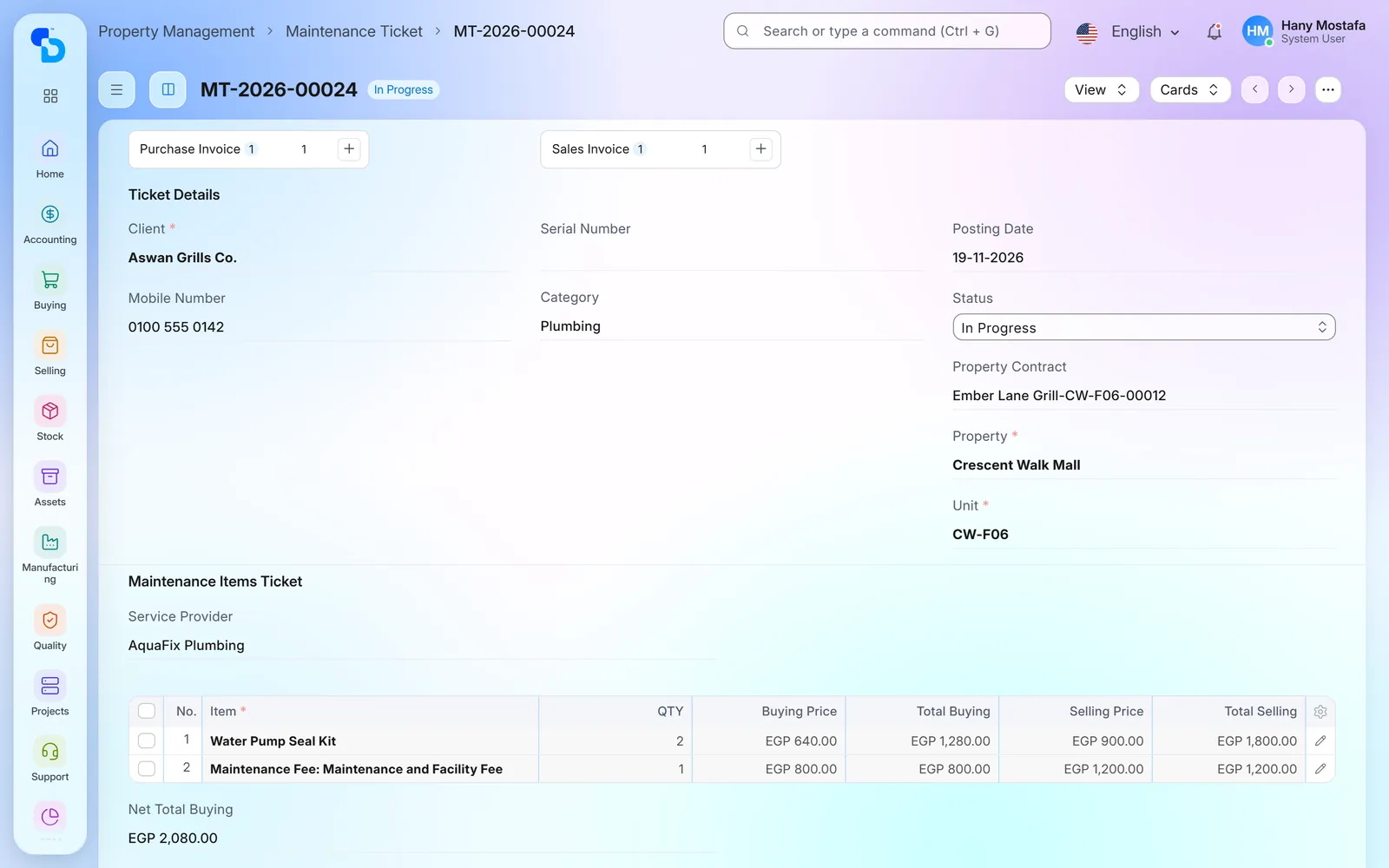
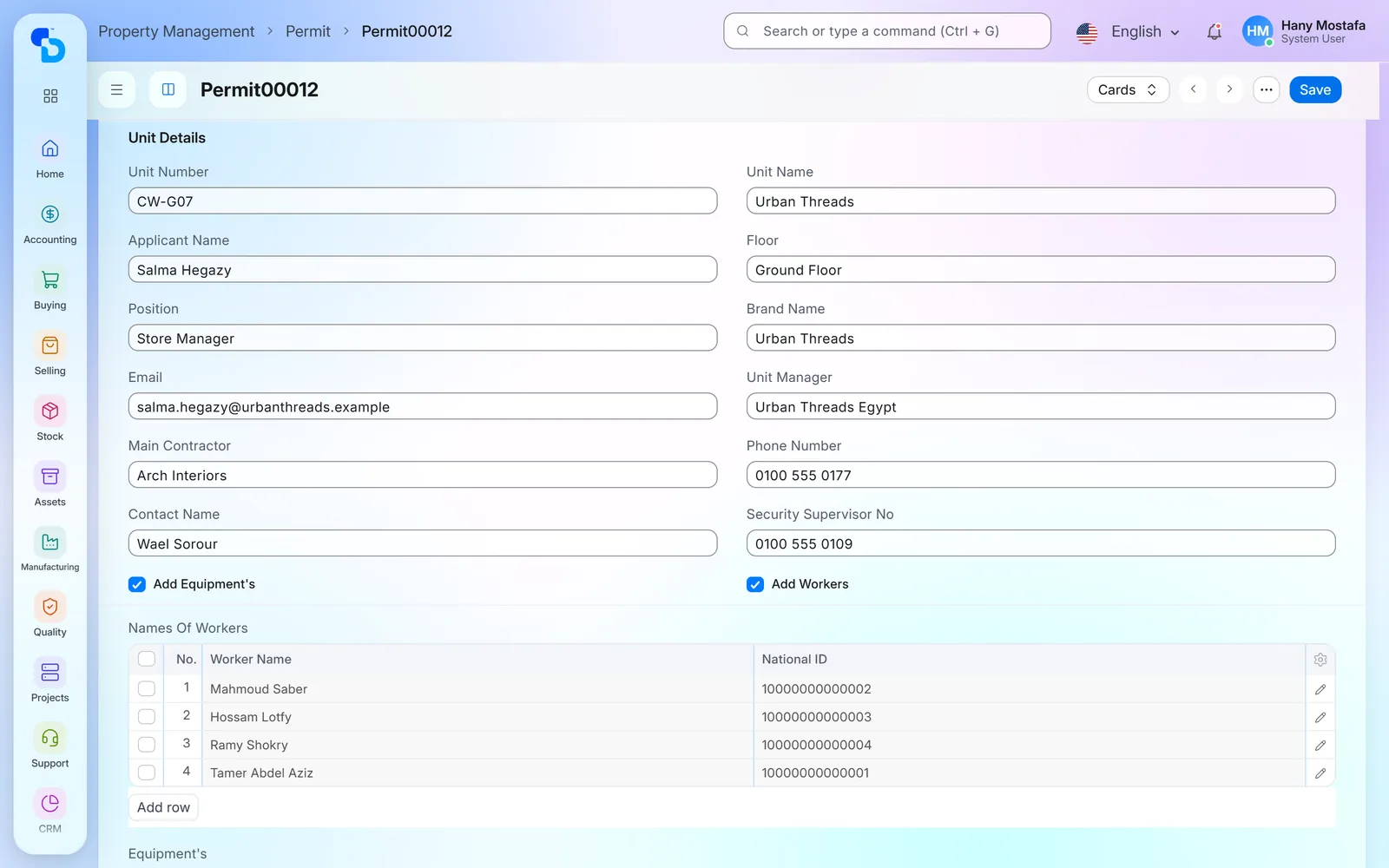
Building operations live in records, not on paper. A maintenance ticket carries the property, the unit, the category, the service provider and the status. It also lists parts and fees, with a purchase invoice and a sales invoice linked to it. Work permits name the workers, the equipment and the terms, then print in Arabic. The system also records safety inspections and tenant and guest surveys.
Maintenance ticket: unit, category, service provider, parts and fees, as well as linked invoices
Screens show demo data.
Solutions and modules
Solutions, modules and integrations behind ERPNext for real estate
Where we have delivered ERPNext for real estate and contracting
Client name withheld
ERPNext for a residential and commercial real estate developer in Egypt
Real estate development · Egypt
Every project followed from purchasing to unit sales, then collections.
What it covers
Financial records kept per project
One purchasing flow from material request to payment
Unit sales and instalments tied to collections in the accounts
Treasury and cheques across all bank accounts
Accounting
Purchasing
Sales
Inventory
Treasury
Cheque Management
Client name withheld
ERPNext for a real estate developer in Saudi Arabia
Real estate development · Saudi Arabia
Projects, purchasing and finance connected on ERPNext.
What it covers
Projects linked to the purchases, stock and costs they generate
Purchasing from project and stock needs through to supplier invoices
Sales posted straight to the accounts
A fixed-asset register with depreciation
Projects
Accounting
Purchasing
Sales
Inventory
Fixed Assets
Client name withheld
A contracting company in Egypt
Construction and contracting · Egypt
Projects, construction work and finance in one system.
What it covers
Projects planned and tracked with their purchases, stock and costs
Construction operations recorded in the same system as projects and finance
Purchasing driven by project needs and stock levels
Equipment, fixed assets and staff records on the same platform
Projects
Construction operations
Accounting
Purchasing
Inventory
Fixed Assets
Client name withheld
A contracting and MEP group in Iraq
Contracting and MEP · Iraq
Sites and subsidiaries on one platform.
What it covers
Projects linked to purchases, stock movements and costs
Sales, purchasing and accounting on shared data
Human resources in the same system as projects and finance
Projects
Accounting
Sales
Purchasing
Inventory
Human Resources
More real estate screens from the same ERPNext system
Six more screens from ERPNext for real estate, all taken on our demo sites.
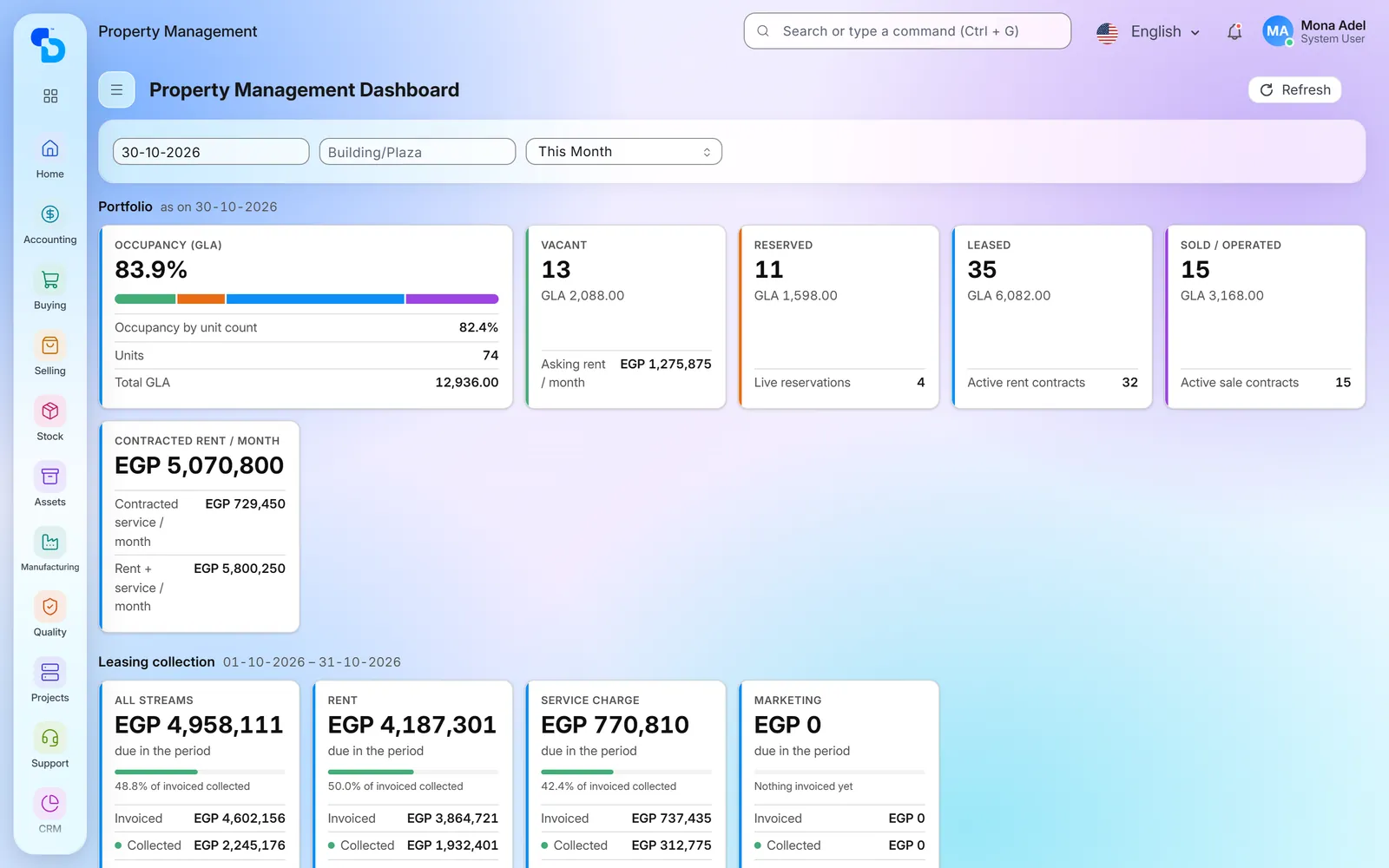
Portfolio dashboard: occupancy, unit status, contracted rent and the month's collection
Create Contract Invoices: month, type and the summary of the last run
Tenant sales report: monthly sales, the revenue share and the amount to invoice above the rent
Discount request: tenant contract, period, discount on rent and justification
Work permit: unit, main contractor, security supervisor and the list of workers
Contract BOQ by section, with quantities, rates and amounts
Interim payment certificate printed in English and Arabic
Screens show demo data.
FAQ
Frequently asked questions about ERPNext for real estate
Have you implemented ERPNext for real estate developers and contractors before?
Yes. We have implemented ERPNext for real estate developers in Egypt and Saudi Arabia, as well as for contractors in Egypt, Saudi Arabia and Iraq.
Can ERPNext for real estate serve both our contracting and our property arms?
Yes. ERPNext keeps each company’s accounts separate inside one system, and both companies use the same customer and supplier records.
Do you handle retention and advance recovery on payment certificates?
Yes, each certificate deducts retention and advance recovery, then carries the earlier certificates forward. This works for the client as well as every subcontractor.
Can we sell units on instalments?
Yes, a sale contract holds the down payment, the payment on delivery and the instalments before and after it. You can then invoice each schedule row in ERPNext.
Can one tool create a month's rent invoices?
Yes, one tool creates a contract’s invoices for the month. It covers rent, service charges or both.
Which real estate reports come with the system?
The property solution includes rent roll, service charge roll, tenancy, debts and receivables aging reports. The TOR report also compares each tenant’s sales with the revenue share and the base rent. A lease expiry and renewals report shows which leases end soon.
Can site teams report without a stable connection?
Yes, site managers record daily reports, snags and safety observations in a field web app. Once opened, the app keeps working offline, then sends the records when the connection returns.
Is the system available in Arabic?
Yes, dashboards, desks and reports work in Arabic from right to left, while contract documents print in both languages. However, many property forms still show part of their labels in English, so we complete them during the implementation.
Building, selling or leasing real estate? Ask about ERPNext for a similar project
Tell us how you run your projects, units and collections. We will then walk you through ERPNext for real estate on demo data. You will see a project budget, a payment certificate and a lease.