

 ERPNext
Egyptian e-invoice and e-receipt from ERPNext
Sales invoices, credit notes and POS receipts go from ERPNext to the Egyptian Tax Authority, and the status ETA returns is kept on each document, with supplier invoices pulled back for matching.
- Invoices, credit and debit notes
- POS sales as e-receipts
- Rejections with their reason
- Supplier invoices pulled from ETA
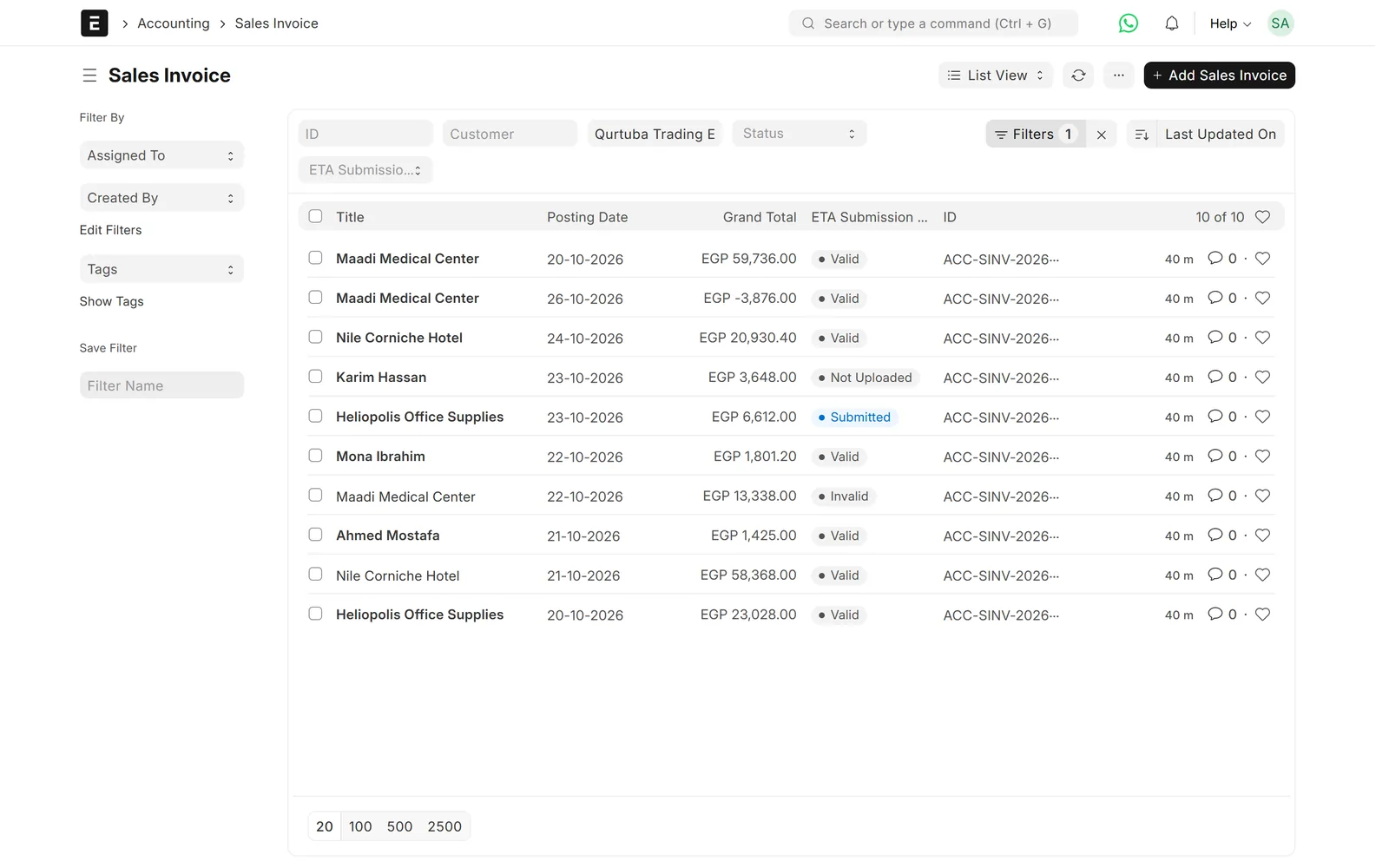
Sales invoices with their ETA submission status
Problem → outcome
What changes when ERPNext talks to ETA directly
-
Without the integrationInvoices are typed again on the ETA portalWith the Data Value integrationSubmitted invoices go to ETA from ERPNext: on submit, every hour, or at set times in the evening.
-
Without the integrationNobody knows which invoices were rejectedWith the Data Value integrationEach invoice shows Valid, Invalid or Submitted, and an invalid one shows why ETA rejected it.
-
Without the integrationCustomer rejection requests are missedWith the Data Value integrationA rejection lifecycle tracks requests, the dispute window and the final state on each invoice.
-
Without the integrationSupplier invoices are checked by handWith the Data Value integrationDocuments issued to you on ETA are pulled into ERPNext and matched to your purchase invoices.
What syncs
What moves between ERPNext and ETA
ERPNext
Sales invoices, credit notes, POS receipts, purchase invoices
- Sales invoices, credit and debit notesERPNext → ETAE-invoice submissionon submit or scheduled
- POS salesERPNext → ETAE-receiptson submit or every hour
- Submission resultETA → ERPNextStatus, UUID, long ID and reasonpolled every hour
- Customer rejectionsETA → ERPNextRejection state and deadlinespolled every hour
- Documents issued to youETA → ERPNextETA Inbound Document, matched to purchase invoicesscheduled pull
ETA
Egyptian e-invoice and e-receipt systems
Features
What you get, screen by screen
Real screens from our demo site, with a fictional demo company.

Status
The ETA status on every invoice
The submission status, date and ETA identifiers are kept in an ETA tab on the invoice.
- Valid, Invalid, Submitted, Cancelled
- UUID, long ID and submission ID
- Resubmissions counted

Rejections
Clear reasons when ETA says no
An invalid invoice shows the reason in plain words, and it can be corrected and sent again.
- Resubmit from the invoice
- Daily log of valid, invalid and unsent invoices
- Customer rejection requests tracked
Purchases
Supplier invoices from ETA
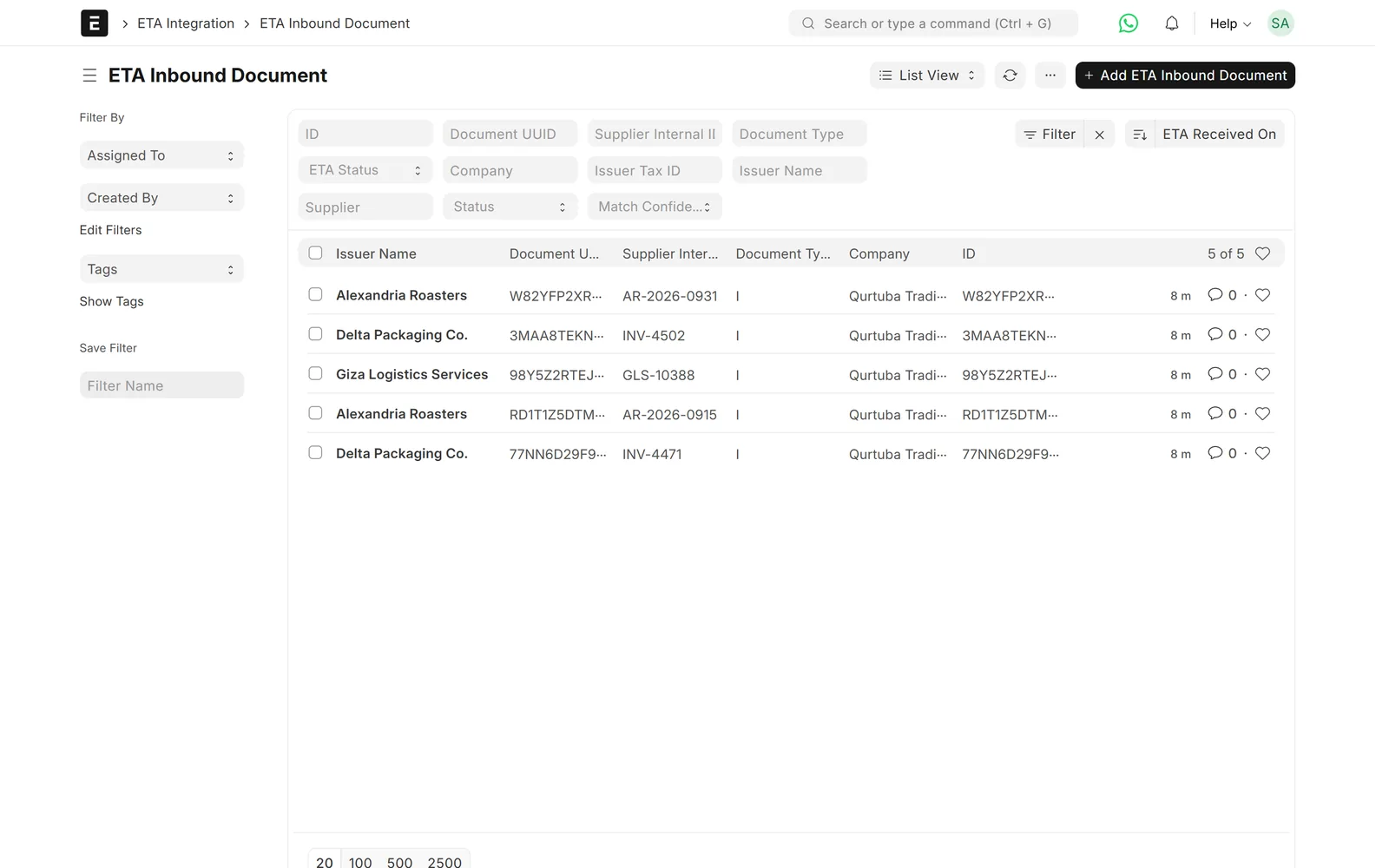
Documents your suppliers issued to you are pulled from ETA and matched to purchase invoices.
- New, matched, unmatched and ignored
- Match confidence shown
- Suppliers missing a tax ID listed

Settings
One setting per company
Issuer data, activity code, API environment and the submission schedule live in one place.
- Pre-production and production
- Every hour, 5 pm, 11 pm or 11:55 pm
- Item codes as EGS or GS1

Overview
One workspace for ETA
Sales, purchase and rejection lists are grouped in one ETA workspace.
- Shortcuts to what needs attention
- Branches set per company
Limits & versions
What it does not do (yet)
Versions and setup
- ERPNext v14 and v15.
- ERPNext v16: our rewritten pair of apps for e-invoices and e-receipts, which also runs on v14 and v15.
- Signing with a USB token uses our signing agent on a Windows PC.
- Each item needs an EGS or GS1 code registered on the ETA portal.
- Client ID and secret come from your ETA portal account.
Not covered
- Invoices issued outside ERPNext.
- Registering item codes on the ETA portal for you.
Setup
How we set it up
- ScopeWe go through your current process, the documents you need and the settings on the other side.
- ConnectYou register the ERP on the ETA portal, and we connect it in pre-production first, then in production.
- MapWe set branches, activity codes, item codes and the submission schedule, and check customer tax data.
- Test on your dataWe run real cases on a test copy of your site before go-live.
- Go live and supportWe switch it on and support it under a support agreement.
Related
Works together with
Integrations
Related connectors
ERPNext modules
Runs on these modules
FAQ
Frequently asked questions
Does it send credit notes and POS receipts too?
Yes. Sales invoices, credit and debit notes are sent as e-invoices, and POS sales can be sent as e-receipts.
How do I know an invoice was rejected?
Its ETA status turns Invalid and the invoice shows why ETA rejected it. You correct it and resubmit from the invoice.
Do I need a USB token?
Documents must be signed. Signing with your USB token uses our signing agent on a Windows PC. We go through the options during setup.
Can it bring in invoices my suppliers issued to me?
Yes. Documents issued to you on ETA are pulled into ERPNext and matched to your purchase invoices for review.
Does it run on ERPNext v16?
Yes, through our rewritten pair of apps for e-invoices and e-receipts, which runs on v14, v15 and v16 from one codebase. We pick the right app for your version during setup.
How much does it cost?
Prices are on request. They depend on the number of companies and branches and on whether you need e-receipts.
ETA e-invoice and e-receipt ⇄ ERPNext
See ETA e-invoicing running in ERPNext
Book a demo and we will show you submission, rejections and supplier documents on real-looking invoices.
Free demo · No commitment · Prices on request