ERPNext mall management: units, leases, rent and maintenance in one system
ERPNext mall management from Data Value gives leasing, finance and operations one shared system. Units, leases, rent and service-charge invoices, collections, tenant sales and building operations all run on ERPNext. So rent, charges and payments post to your accounts without retyping.
We have implemented ERPNext for property management and leasing companies in Saudi Arabia and Egypt.
A units board by building, floor and zone
Leases that build their own rent and service-charge schedules
Revenue-share rent worked out from tenant sales
One collections desk for everything due
The process
How mall management runs in one ERPNext system
1
Units
You set up buildings, floors, zones and units with their areas and asking rent.
2
Leasing
A reservation or a lease fixes the tenant, the unit and the terms.
3
Schedules
The lease then builds its rent, service-charge and marketing-fee schedules.
4
Invoicing
Each month’s rows become ERPNext sales invoices in one run.
5
Collection
One desk follows payments, cheques and late-payment penalties.
6
Operations
Meanwhile, your team logs maintenance tickets, permits and inspections against the unit.
7
Reporting
Occupancy, rent roll, expiries and receivables all come from the same data.
Problems we solve
What mall management teams struggle with, and how the system answers
Nobody agrees on what is vacant
Leasing keeps one list of units and finance keeps another. So a simple question about a free shop means checking two lists.
Every unit sits on one board by building and floor, coloured by status, and the same records feed every report.
Lease terms are hard to apply by hand
Annual increases, deposits, grace periods and several units on one lease turn each month’s billing into a calculation.
The lease holds the terms once, and the system then builds the payment schedules from them.
Part of the rent depends on tenant sales
Tenants send their sales figures by e-mail, and someone then works out the share in a spreadsheet.
Your team enters tenant sales per period, and the system then calculates the share, compares it with the rent and invoices the difference.
Monthly invoicing is slow and error-prone
Accountants type rent, service charges and marketing fees tenant by tenant, so mistakes slip in.
Instead, one run raises the month's invoices for all leases and skips rows it has already invoiced.
Overdue rent surfaces too late
Receivables sit in the ledger, but the collector has no single list of who owes what today.
The collections desk groups everything overdue or due soon by tenant, with the statement beside each name.
Building operations live on paper
Maintenance calls, work permits and safety rounds still sit in paper files that nobody can search.
Tickets, permits, inspections and checklists become records on the unit, and they also print in Arabic where needed.
What we set up
What our ERPNext mall management covers
Our ERPNext mall management software has eight parts for shopping malls, office towers, mixed-use complexes and retail strips. We agree each part with your leasing, operations and finance teams before we set it up.
Units by building, floor and zone
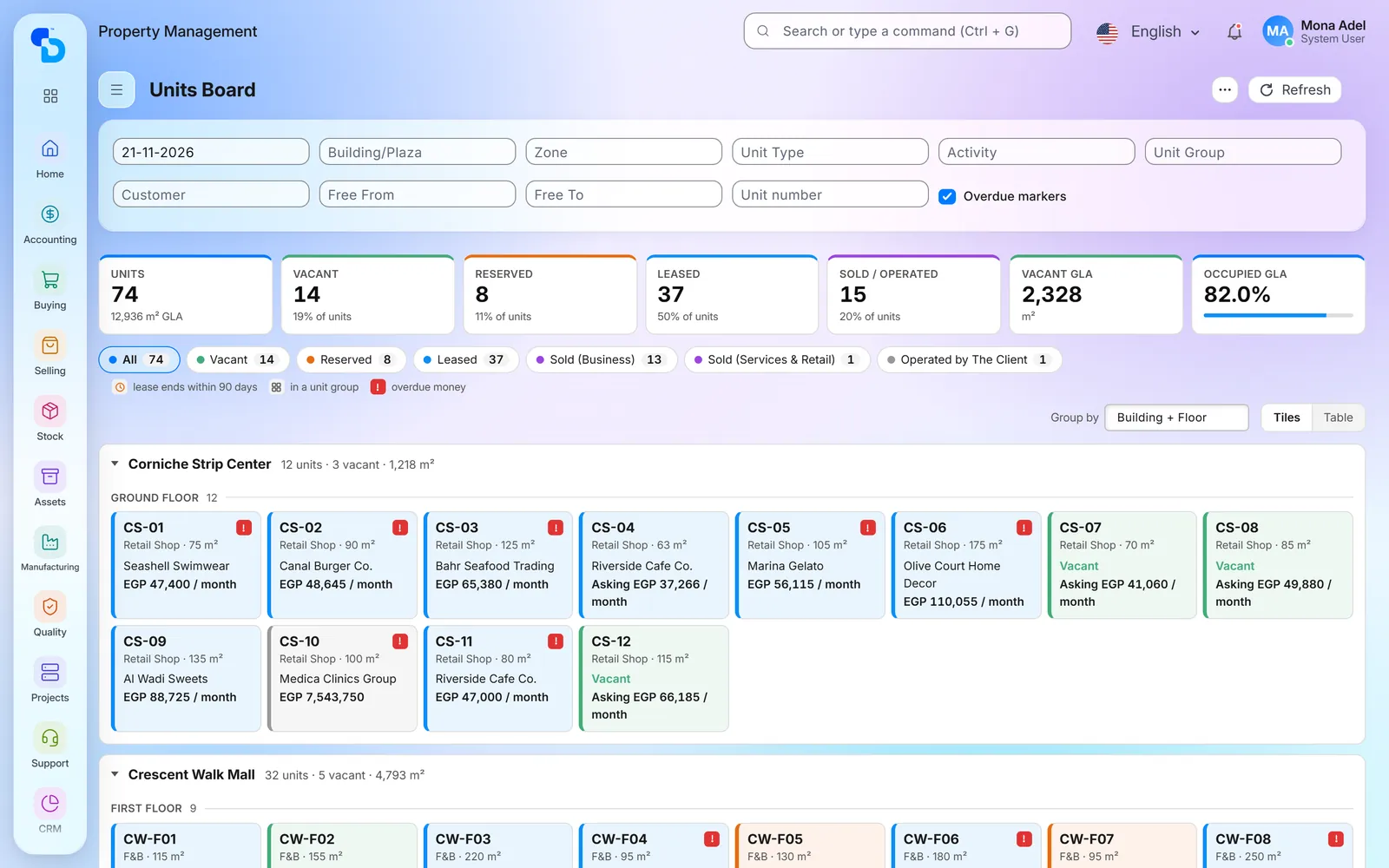
Every shop, kiosk, food court unit and office is a record with its building, floor, zone, type and activity. The record keeps its areas apart: indoor, outdoor and terrace add up to the leasable area, while storage and loading areas stay separate. You then set asking rent and service charge per square metre. On the units board, each unit appears as a tile in the colour of its status: vacant, reserved, leased, sold or operated by the client. The tile also shows the tenant, the monthly rent and a marker for overdue money. An availability calendar shows when each unit becomes free.
Units board: shops, food and beverage units and kiosks by building and floor, with tenant, rent and overdue markers
Lease contracts that build their own schedules
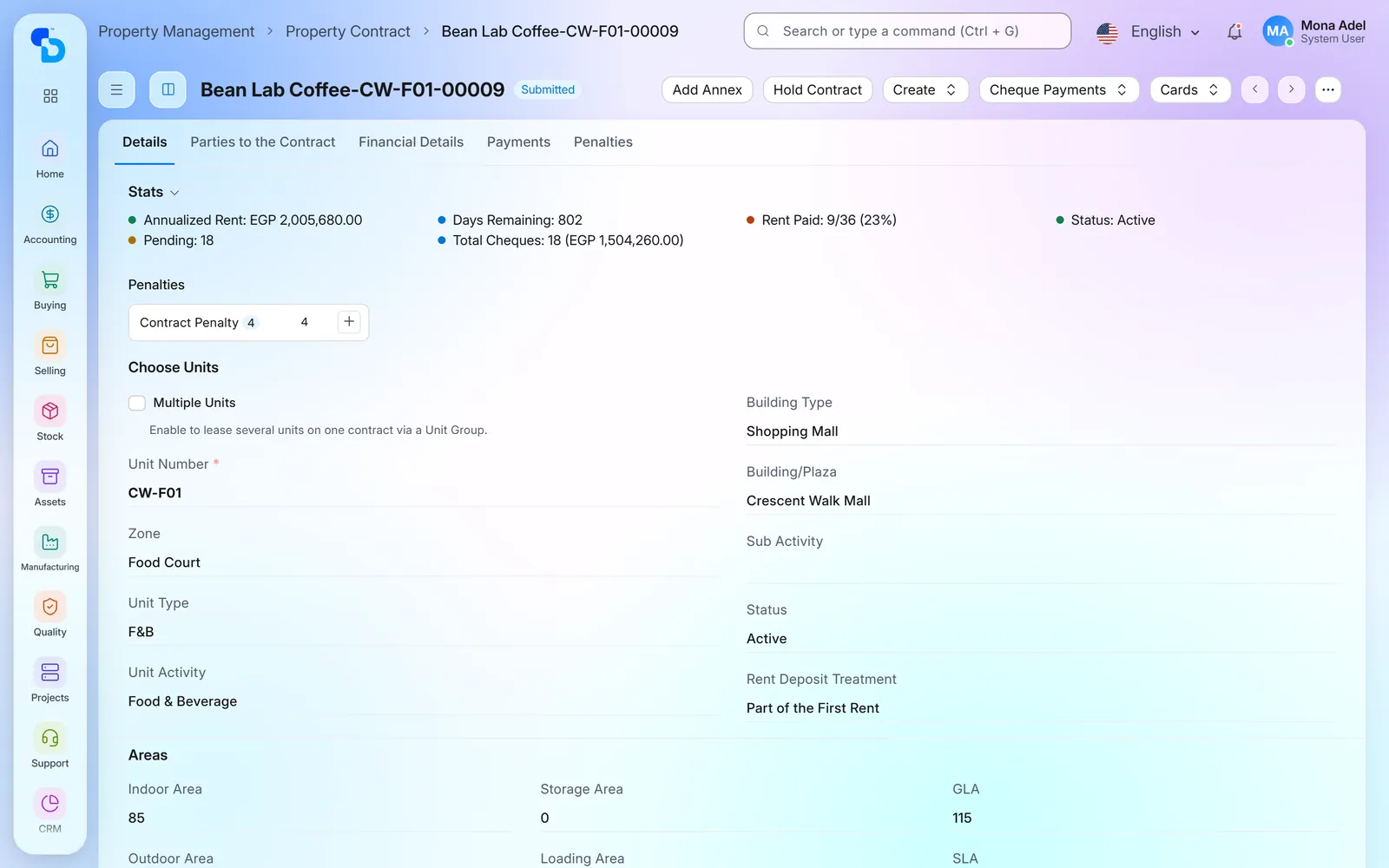
A lease names the tenant, the brand, the unit or a group of units, the dates and the terms. From those terms, the system then builds separate schedules for rent, service charges and marketing fees. Annual increases can be regular or irregular, set either as a percentage or as an amount. A security deposit, a grace period, annexes and a hold status also sit on the same record. Before the lease, a reservation can hold the unit against a deposit. A discount request records any rent concession, so the change stays visible. The Lease Expiry and Renewals report shows which leases end and what rent ends with them.
Lease contract for a food court unit in a shopping mall: annualised rent, rent paid, cheques and days remaining
Revenue-share rent from tenant sales
Many mall leases add a share of the tenant’s sales to the base rent. The lease therefore carries the share percentage and the settlement period, from monthly to yearly. For each period, the tenant’s sales go into a tenant sales report. The system then multiplies the sales by the share and compares the result with the rent for the same period. It invoices only the amount above the rent, either inside the rent invoice or on its own. Two reports follow these leases: TOR lists sales, share and the gap from base rent, while Effort Rate compares rent and service charge with sales.
Tenant sales report: monthly sales, the share percentage, the rent for the period and the amount to invoice
Rent, service-charge and marketing invoices in one run
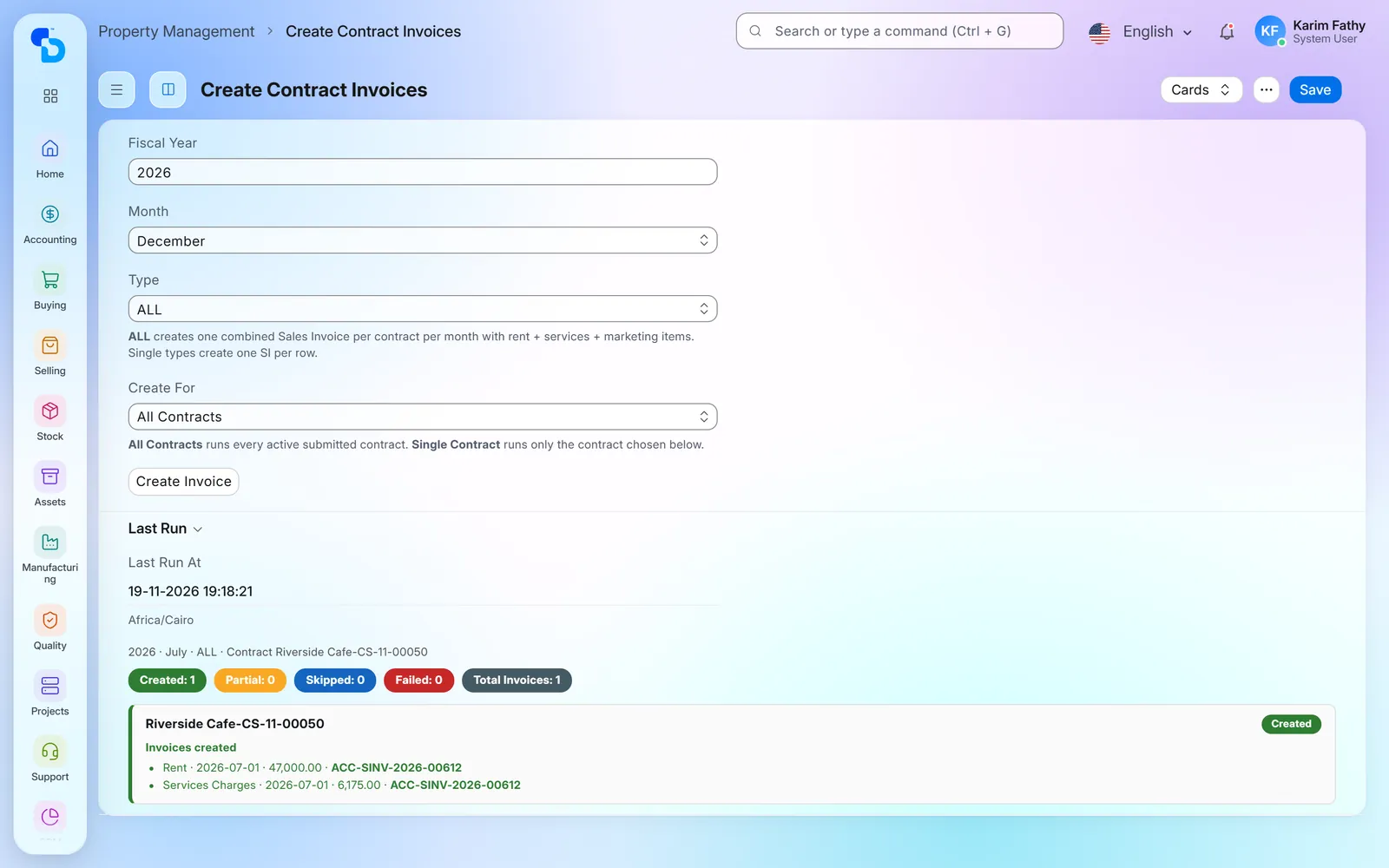
At the start of the month, the accountant does not open leases one by one. Instead, the Create Contract Invoices tool takes a month and a type: rent, service charges, marketing or all. It then raises ERPNext sales invoices for every row due that month and skips rows it has already invoiced. A summary of the run then lists every invoice it created and every row it skipped, with the reason. Service charges follow each lease’s rate per square metre for indoor, outdoor and terrace areas. They also have their own schedule and their own annual increase, and the Service Charge Roll lists them lease by lease.
Create Contract Invoices: one run for a month, with the summary of invoices created, partial and skipped
A collections desk and late-payment penalties
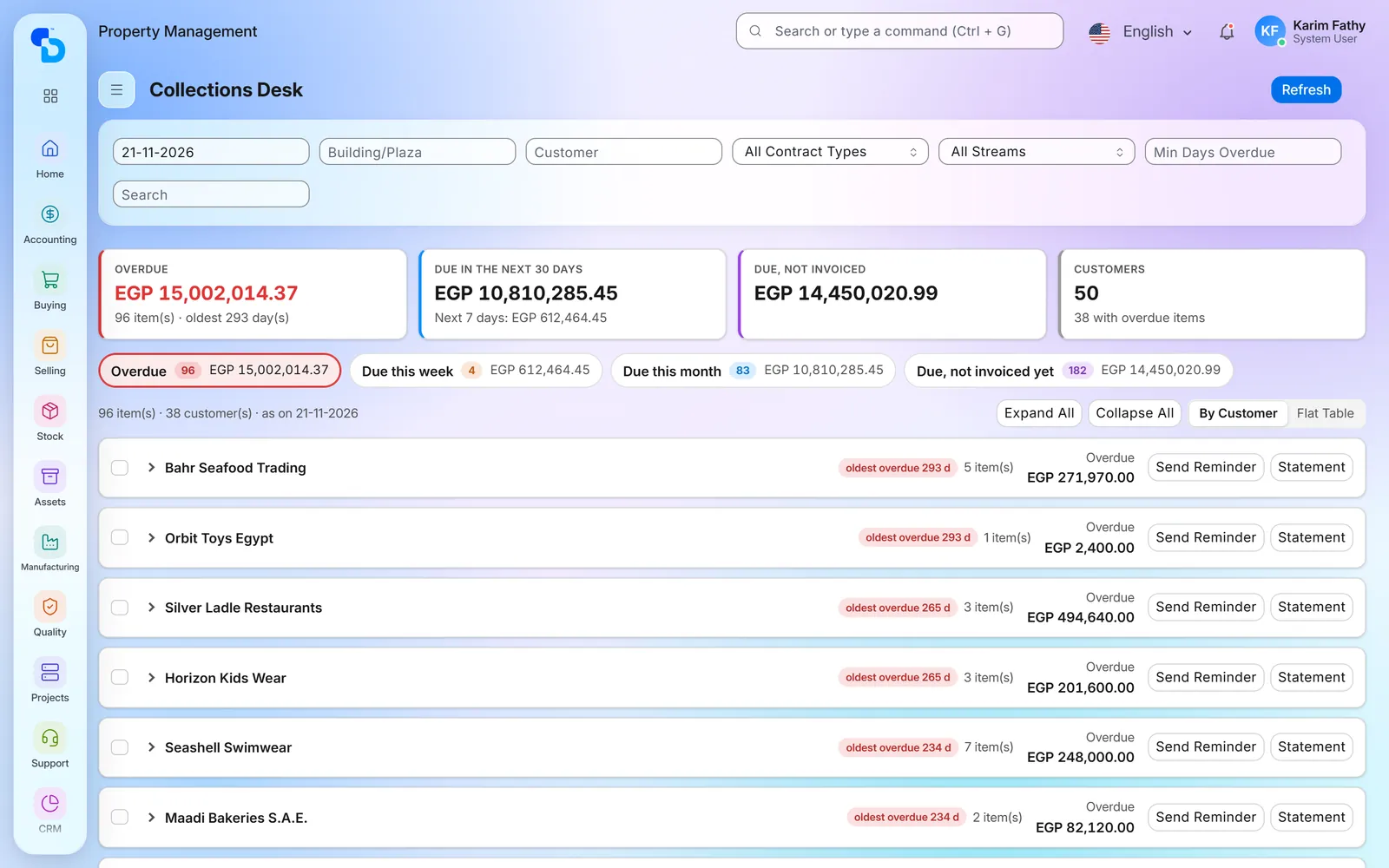
The collections desk is one worklist of everything still to invoice or collect. Queues then split it into overdue, due this week, due this month and due but not yet invoiced. The desk also groups rows by tenant, and each tenant shows its oldest overdue item. From the desk, the collector creates the invoice, opens the statement or prepares a reminder e-mail. Late-payment penalties follow rules you set once: a rate or a fixed amount per month, a grace period and a maximum. Each penalty shows its calculation before you invoice it. A cheque tracker report also follows post-dated cheques.
Collections desk: overdue, due this week, due this month and due but not invoiced, grouped by tenant
One page for every tenant
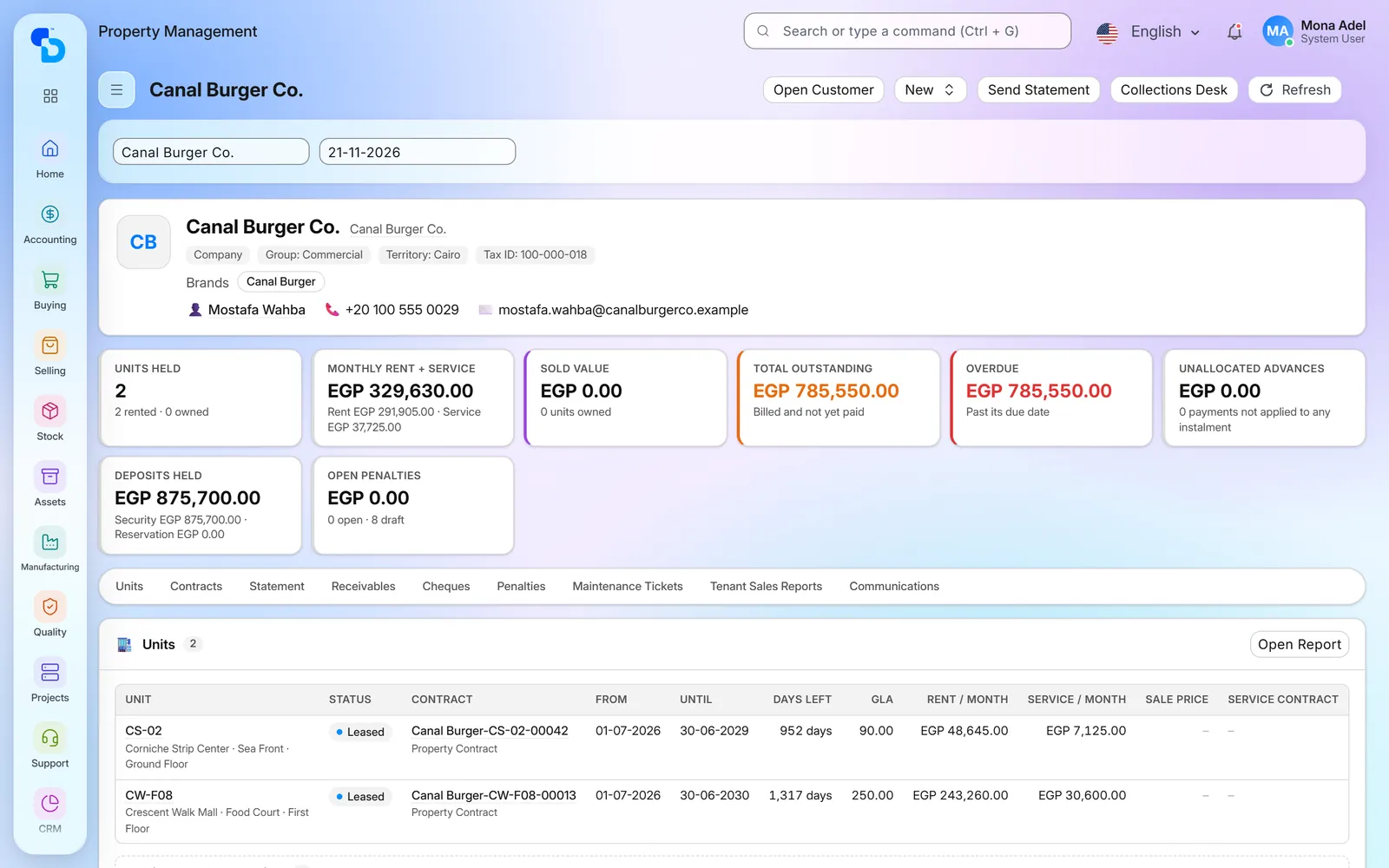
A tenant is more than an account balance. Customer 360 puts one tenant on one page: brands, contacts, units held, monthly rent and service charge, deposits held and the overdue balance. Tabs then list the tenant’s leases, statement, receivables, cheques, penalties, maintenance tickets and tenant sales reports. Because a company can trade under several brands, each lease names both the company and the brand. Units also carry an activity and a sub-activity, such as food and beverage or fashion. So you can read the rent roll by brand, zone or category.
Customer 360: one tenant's brands, units, monthly rent and service charge, deposits held and overdue balance
Maintenance tickets and service providers
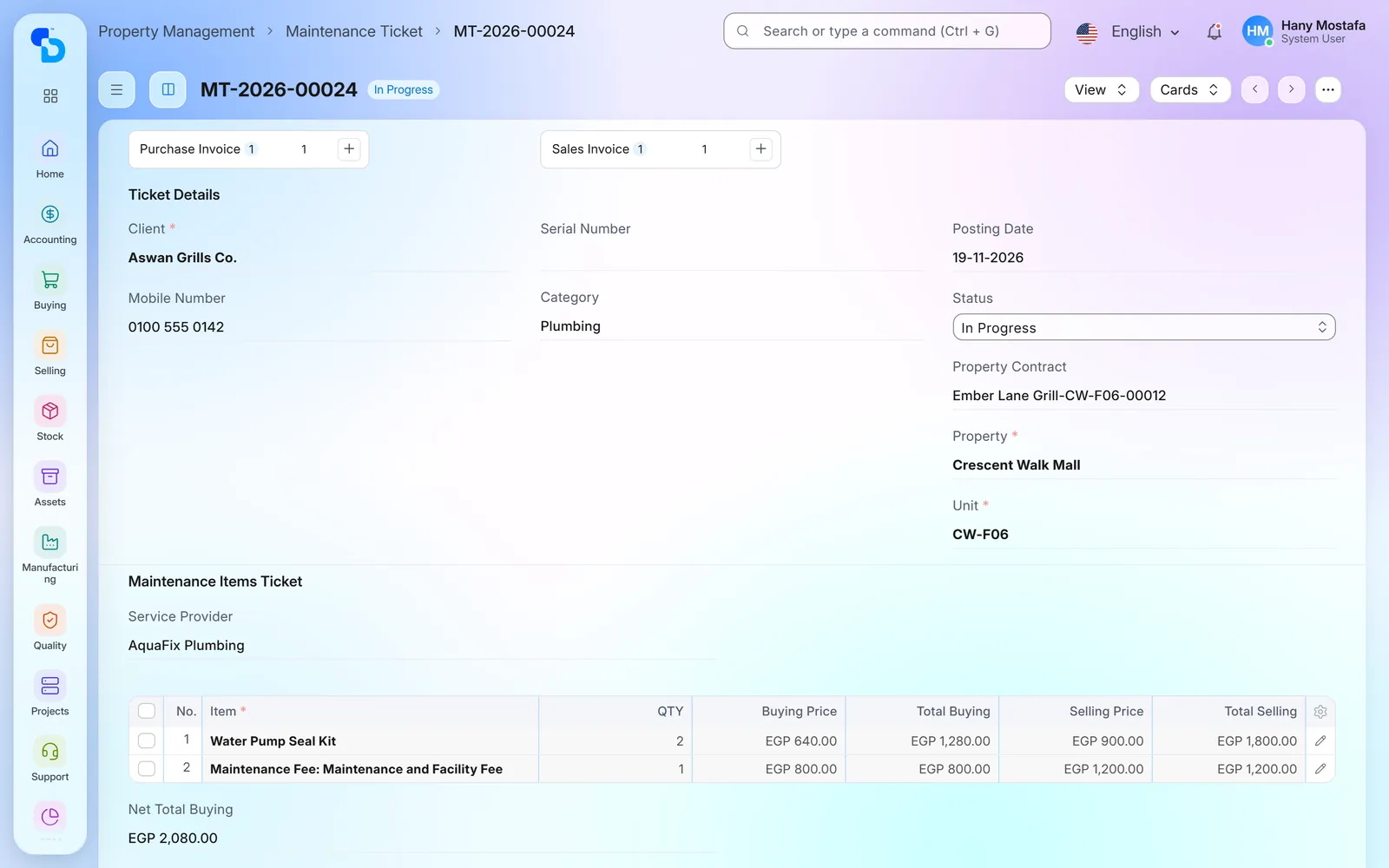
A maintenance ticket records a fault against the building, the unit and, where relevant, the lease and the tenant. It names the category, the service provider and the responsible user, and moves from Open to Completed. The ticket also lists parts and services, each with its cost and its charge. From the ticket, you raise the provider’s purchase invoice and, when the tenant pays, the tenant’s sales invoice. The Maintenance Tickets Register then totals cost, charge and margin, and compares cost with charge by category. For planned maintenance of lifts, chillers and generators, see our Facility Management solution.
Maintenance ticket for a mall unit: category, service provider, parts with cost and charge, and the linked invoices
Work permits, inspections and tenant surveys
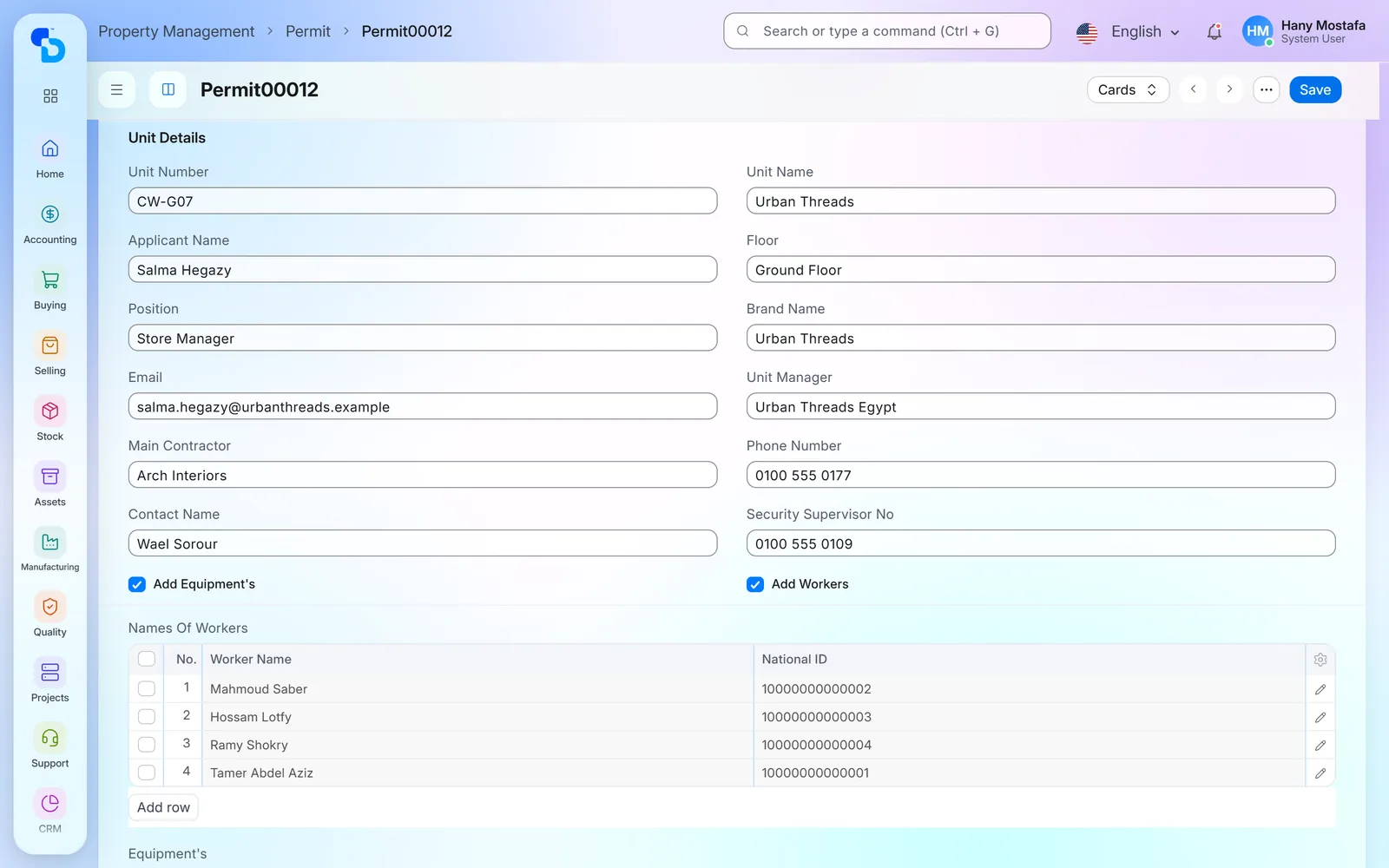
Before a tenant’s contractor works in the building, a permit records the dates, the unit and brand, the main contractor and the security supervisor. It also lists workers with their ID numbers, and equipment with its quantity. The permit then moves through Open, Approved, Rejected, Hold and Closed. Printed Arabic permits cover light maintenance, goods leaving the building and workers staying overnight. Safety and security checklists for units, restaurants and storerooms also print as Arabic inspection lists. Tenants and guests answer short surveys on web forms.
Work permit for a mall unit: applicant, main contractor, security supervisor and the list of workers
Screens show demo data.
Reports
Mall management dashboard, reports and more screens
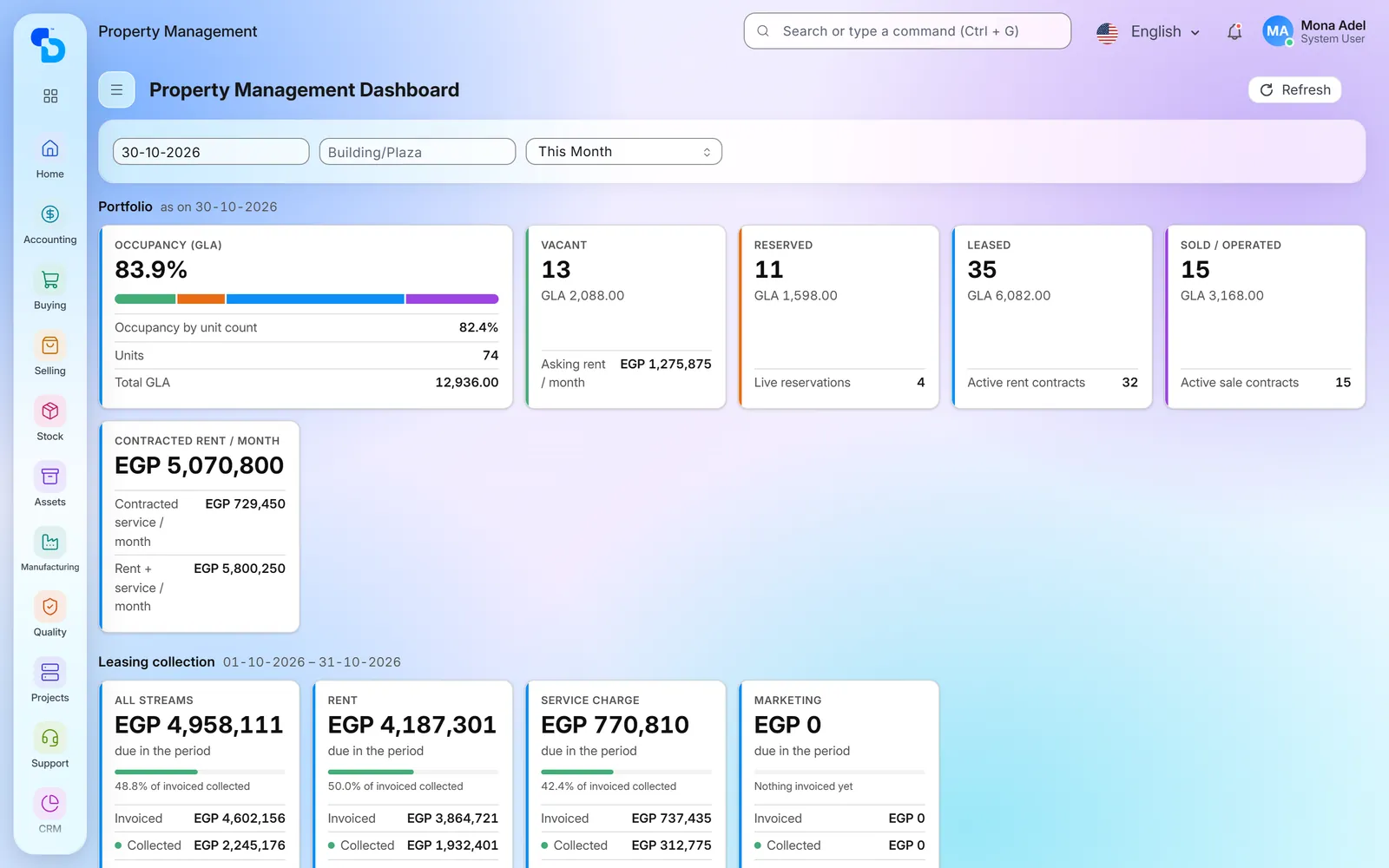
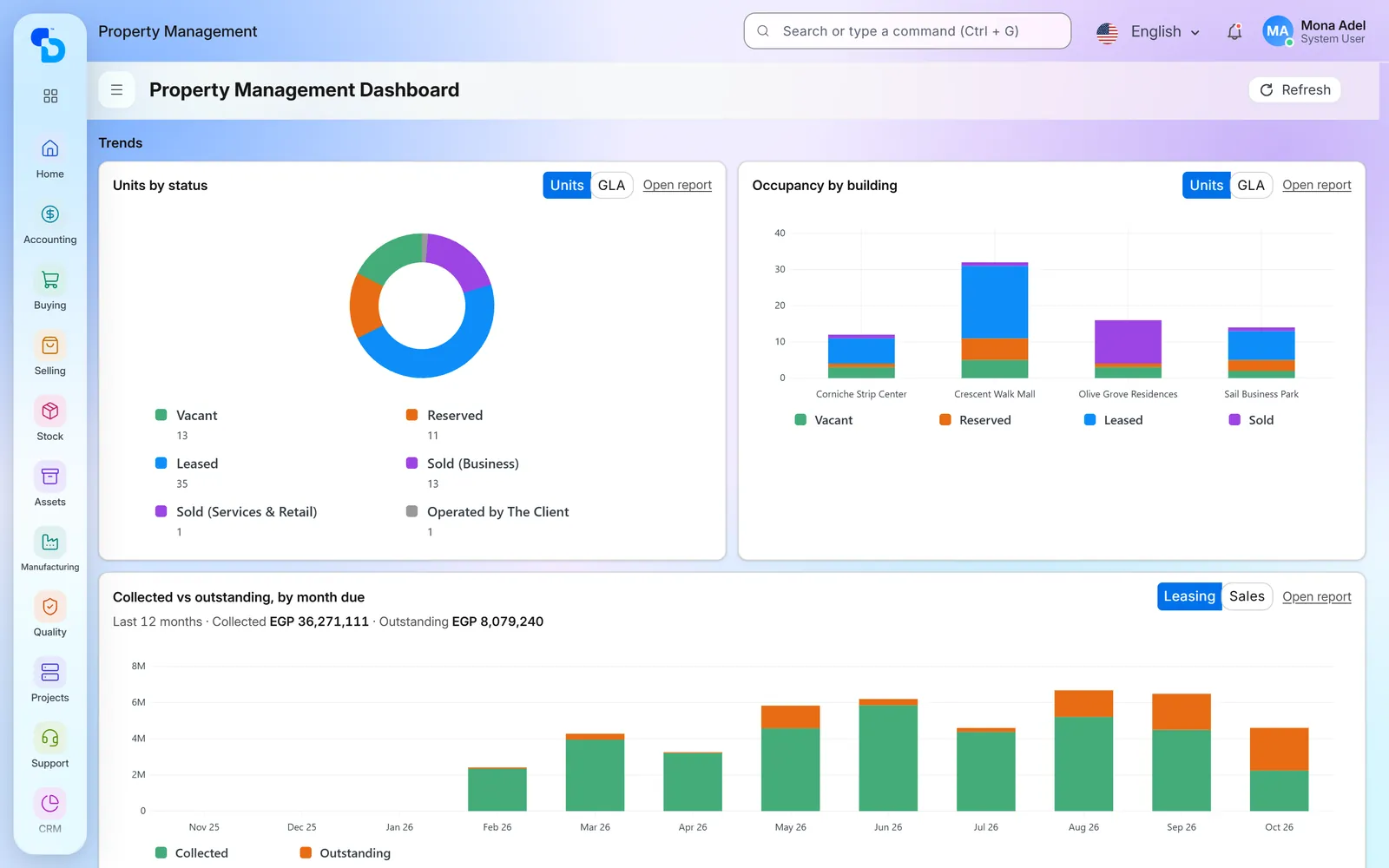
The dashboard of our ERPNext mall management system opens on occupancy, by leasable area and by unit count. It also shows contracted rent and service charge, and the month’s collection. Each chart opens the report behind it. Every rent invoice names its lease, building and unit, so you can list invoices by building or by unit. A user with access to certain buildings sees only those buildings in dashboards, desks and reports.
Portfolio dashboard: occupancy, vacant, reserved and leased units, contracted rent and the month's collection
Trends: units by status, occupancy by building, and collected against outstanding rent by month
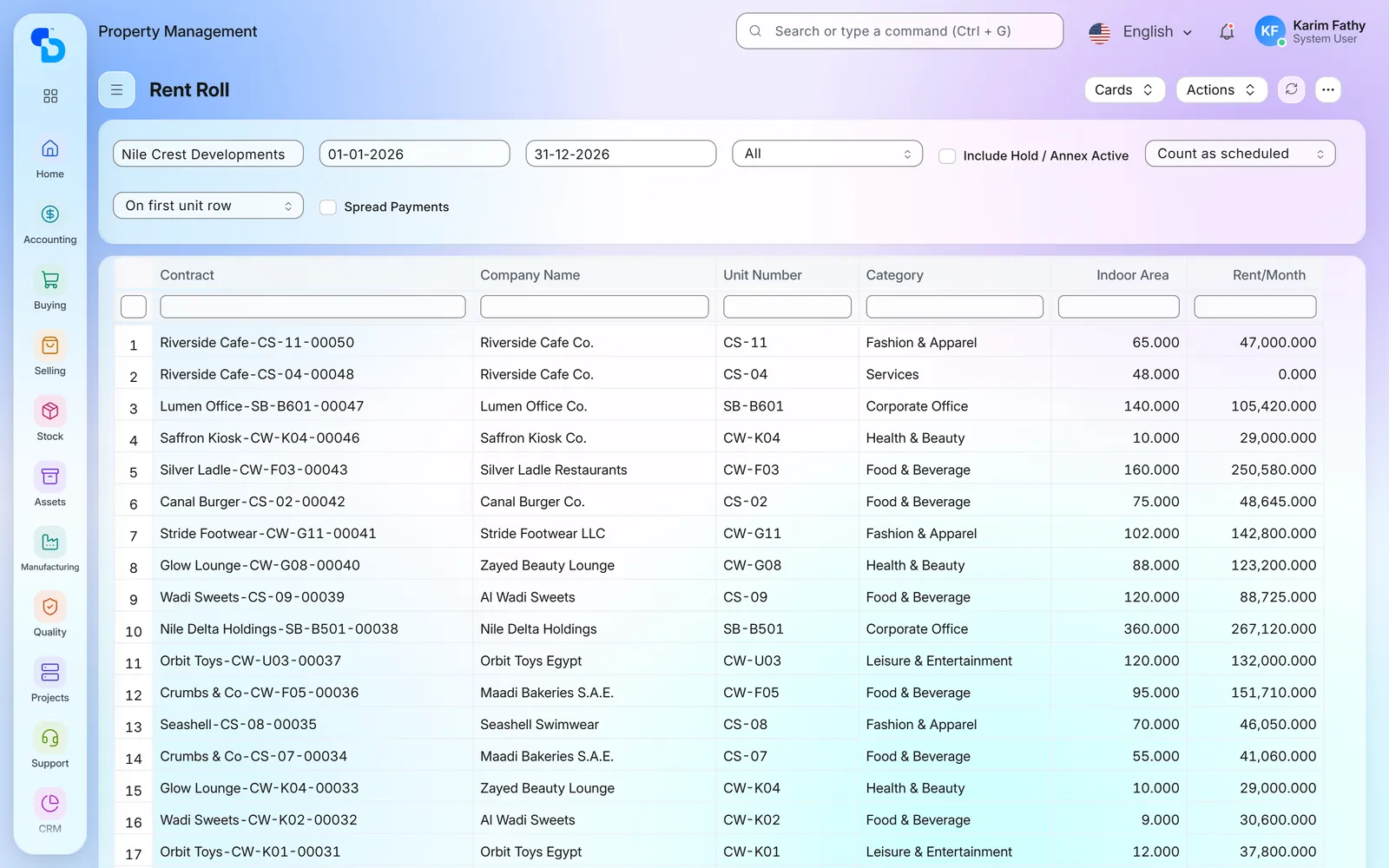
Rent roll: active leases with company, brand, unit, zone, building and category
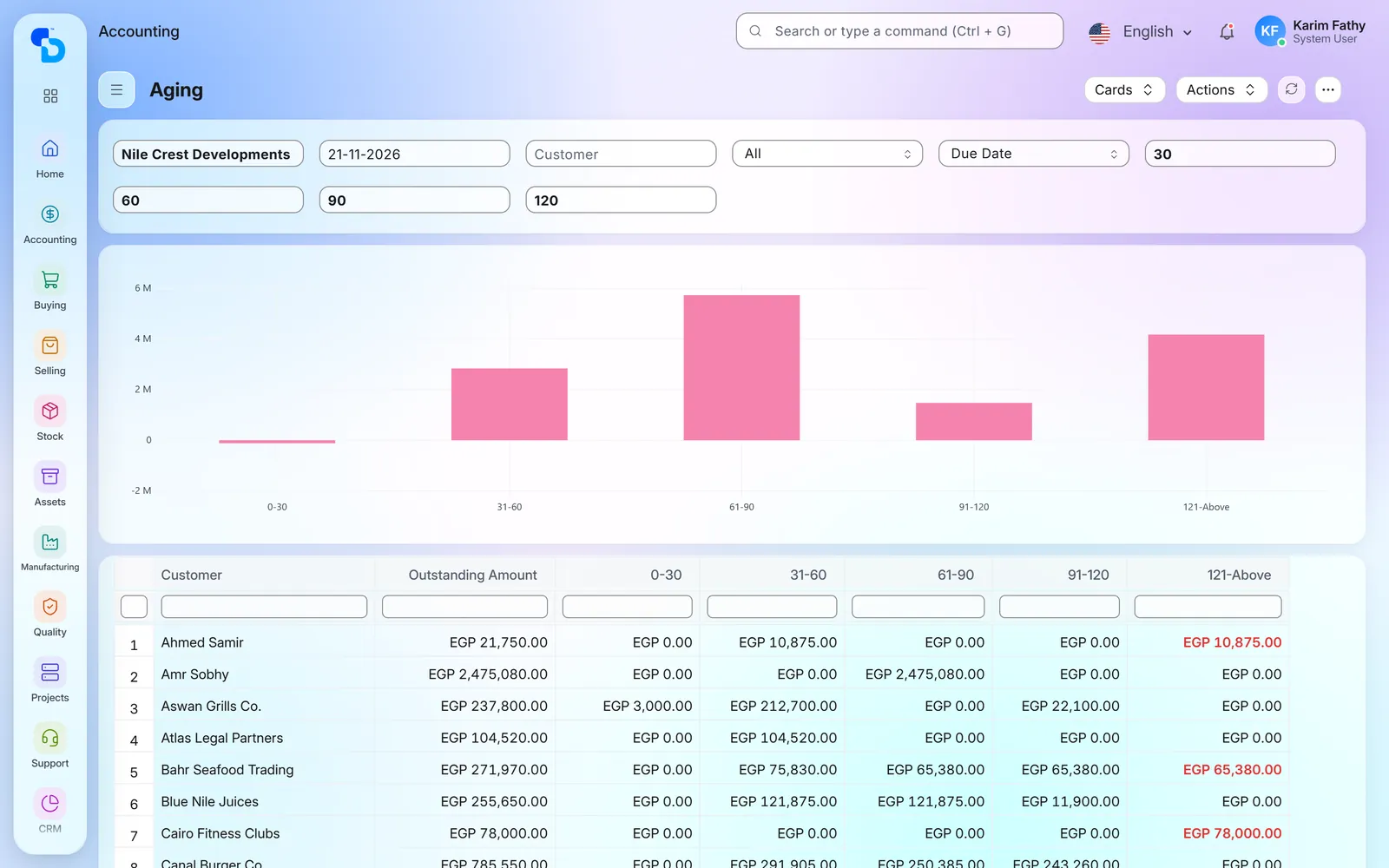
Receivables aging: what each tenant owes, by age of the debt
Lease expiry and renewals: rent ending and units with nothing booked after
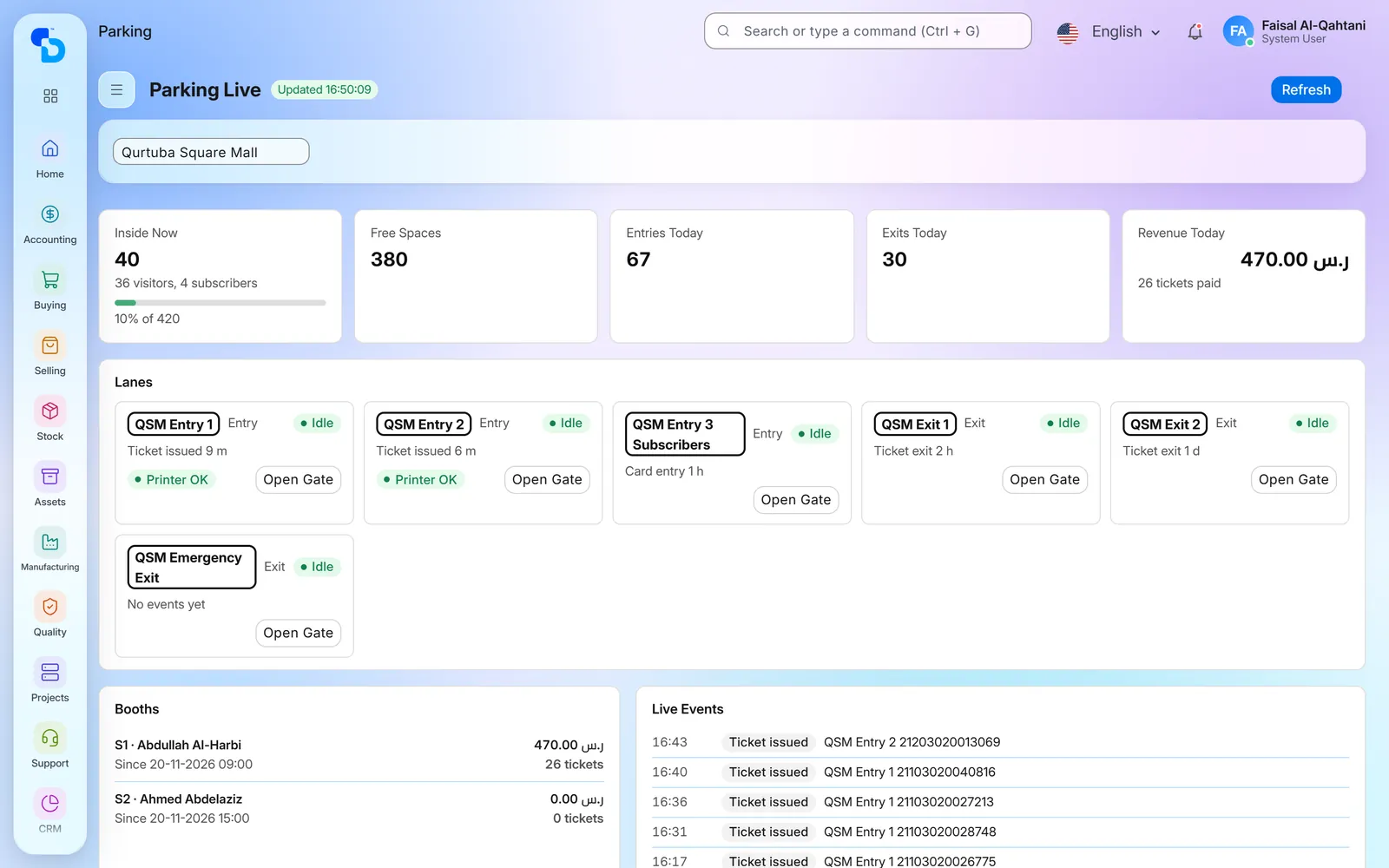
Parking Live from our Parking Management solution: cars inside, free spaces, lanes and booths of a mall car park
Screens show demo data.
Modules
Solutions and modules behind ERPNext mall management
Can ERPNext mall management handle shops, food courts, kiosks and offices in one system?
Yes. Each unit has its own type, activity, floor, zone and areas. So retail, food and beverage, kiosk and office units share one register, one board and one set of reports.
How does ERPNext mall management create the monthly rent and service-charge invoices?
They come from each lease’s schedule: you can invoice one row, work from the collections desk or create the whole month in one run. Because they are normal ERPNext sales invoices, receivables and the ledger stay in ERPNext.
Does it handle rent based on a share of tenant sales?
Yes. The lease carries the share percentage and the settlement period. Your team enters tenant sales per period, and the system compares the share with the rent. It then invoices only the amount above the rent. The TOR and Effort Rate reports follow these leases.
How are service charges calculated?
Each lease carries a service-charge rate per square metre for its indoor, outdoor and terrace areas. The system then bills the charge on its own schedule, and the Service Charge Roll lists the charges lease by lease.
Can tenants report maintenance problems?
Not directly, because the property solution has no tenant self-service portal today. Instead, your helpdesk logs each request as a maintenance ticket against the unit and the tenant. The team then assigns the ticket, follows it to completion and records its cost.
Can we see income per building or per unit?
Yes, through the invoices. Every rent and service-charge invoice names its lease, building and unit, so you can filter sales invoices by building or by unit.
Is the ERPNext mall management system available in Arabic?
Yes. Dashboards, desks and reports work in Arabic from right to left, and permits and inspection lists print in Arabic. Some forms still show English labels; we complete those during implementation.
Can the mall car park run on the same ERPNext system?
Yes, with our Parking Management solution on the same ERPNext. It covers visitor tickets, subscriptions, shop validations and cashier shifts, and it also posts each shift’s cash to the accounts.
Running a mall or a commercial tower? See how ERPNext mall management fits your units
Book a demo of our ERPNext mall management system. We will then walk you through the units board, a lease, a month’s invoices and a maintenance ticket.