Skip to content

Finance · Egypt & the region

Bank loans, overdrafts and deposits under one treasury view

Treasury Management is Data Value's own ERPNext app for companies that borrow from and place money with several banks.

Every facility's limit, schedule, interest and repayments live inside your ERPNext books, so finance sees what is used, what is due and what is overdue without a separate spreadsheet.

  • Loans, leases and overdrafts
  • Interest on Corridor and SOFR
  • Cheque discounting at present value
  • Time and call deposits
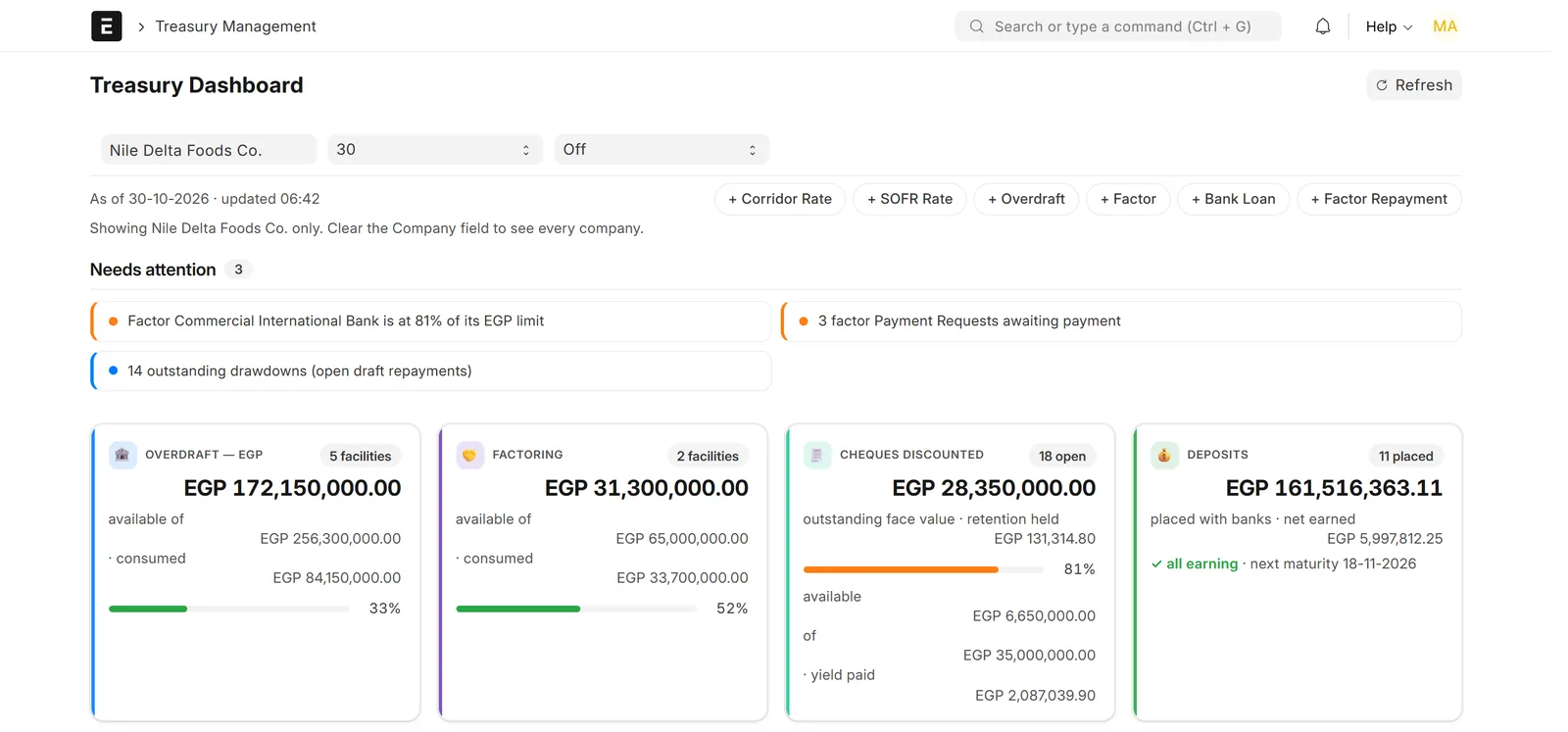
Treasury dashboard with attention alerts and cards for overdrafts, factoring, discounted cheques and deposits of a demo company
The treasury dashboard: limits, utilisation and the items that need attention. Screens show demo data.

Who it is for

Built for the people who run it every day

  • Companies with several bank facilities
  • Treasury managers and CFOs
  • Bank accountants
  • Companies that discount customer cheques
  • Finance teams placing deposits
  • Companies in Egypt and the region

Industry

Part of ERPNext for Trading & Distribution

Treasury Management fits trading and distribution companies that run several bank facilities.

Explore the industry page →

What you get

What you get with Treasury Management

9 capabilities in 3 groups, each shown next to its screen in the real system.

Borrowing

Bank loans and leases

Enter the loan terms and the app builds the schedule.

  • Principal and interest schedule for medium-term loans
  • Leases kept with their own instalment table
  • Schedule progress on every loan
  • Next principal and interest instalments shown
Bank loan form for an EGP 45,000,000 loan with principal and interest progress bars and next instalment dates
A medium-term bank loan with its schedule progress and next instalments.

Borrowing

Overdrafts with limit tracking

Know what each overdraft has left.

  • Limit, tenor and bank accounts per facility
  • Consumed and available amounts on the form
  • Open repayments listed
  • Every limit change kept in a log
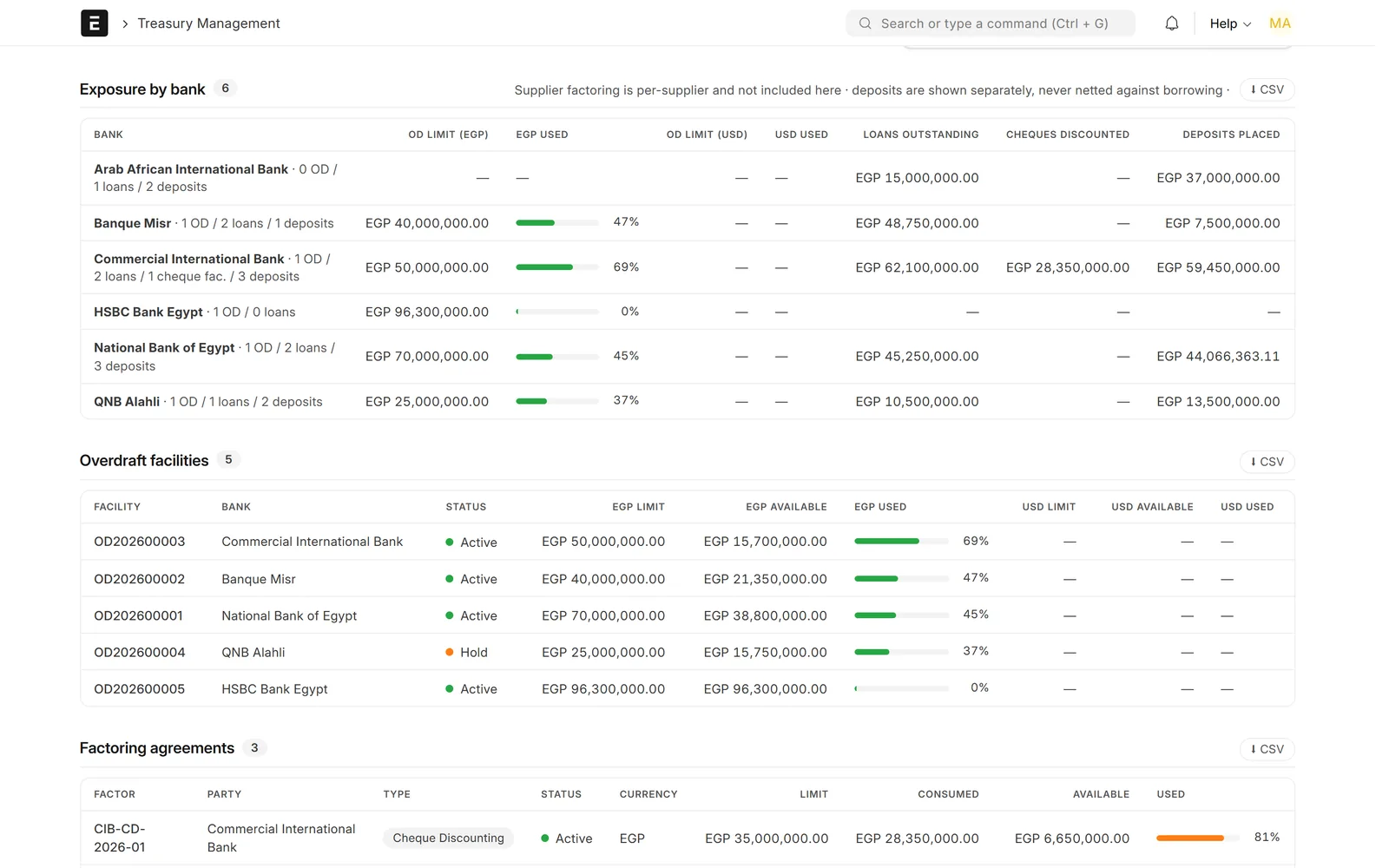
Dashboard tables showing exposure per bank and overdraft facilities with limit, available and used bars
Exposure by bank and every overdraft facility, with limits and utilisation.

Borrowing

Drawdowns from supplier payments

Supplier payments from an overdraft account become drawdowns.

  • Repayment record created from the Payment Entry
  • Due date and interest schedule set
  • Tracked as Not Due, Overdue or Paid
  • Listed with their due dates
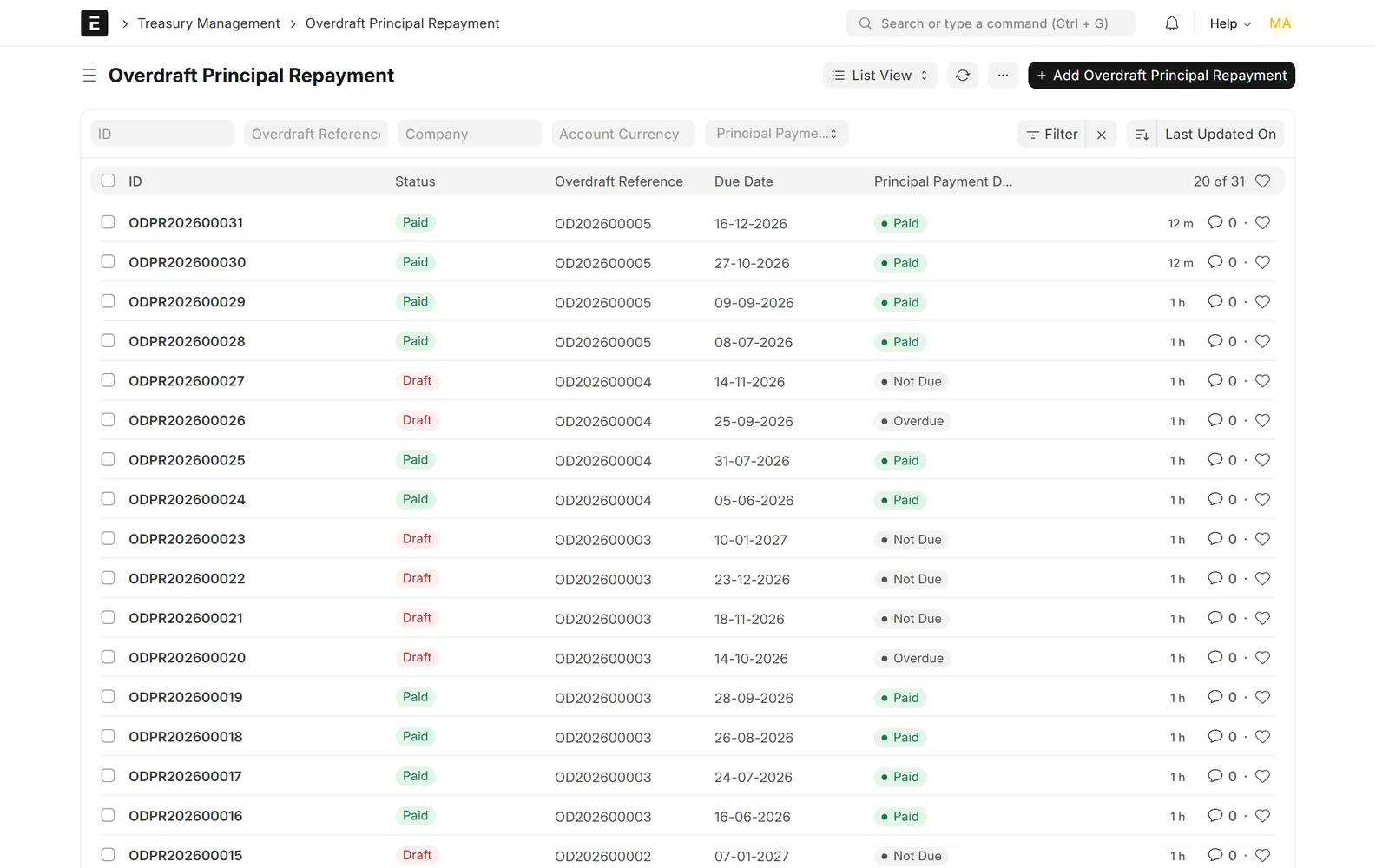
List of overdraft principal repayments with due dates and Not Due, Overdue and Paid status tags
Drawdowns created from supplier payments, tracked as Not Due, Overdue or Paid.

Borrowing

Interest on Corridor and SOFR

Interest follows the benchmark rate you enter.

  • Corridor rate for EGP facilities
  • SOFR averages (30, 90 or 180 days) for USD
  • Rows not yet posted are recalculated when rates change
  • Interest journal entries posted directly or as drafts
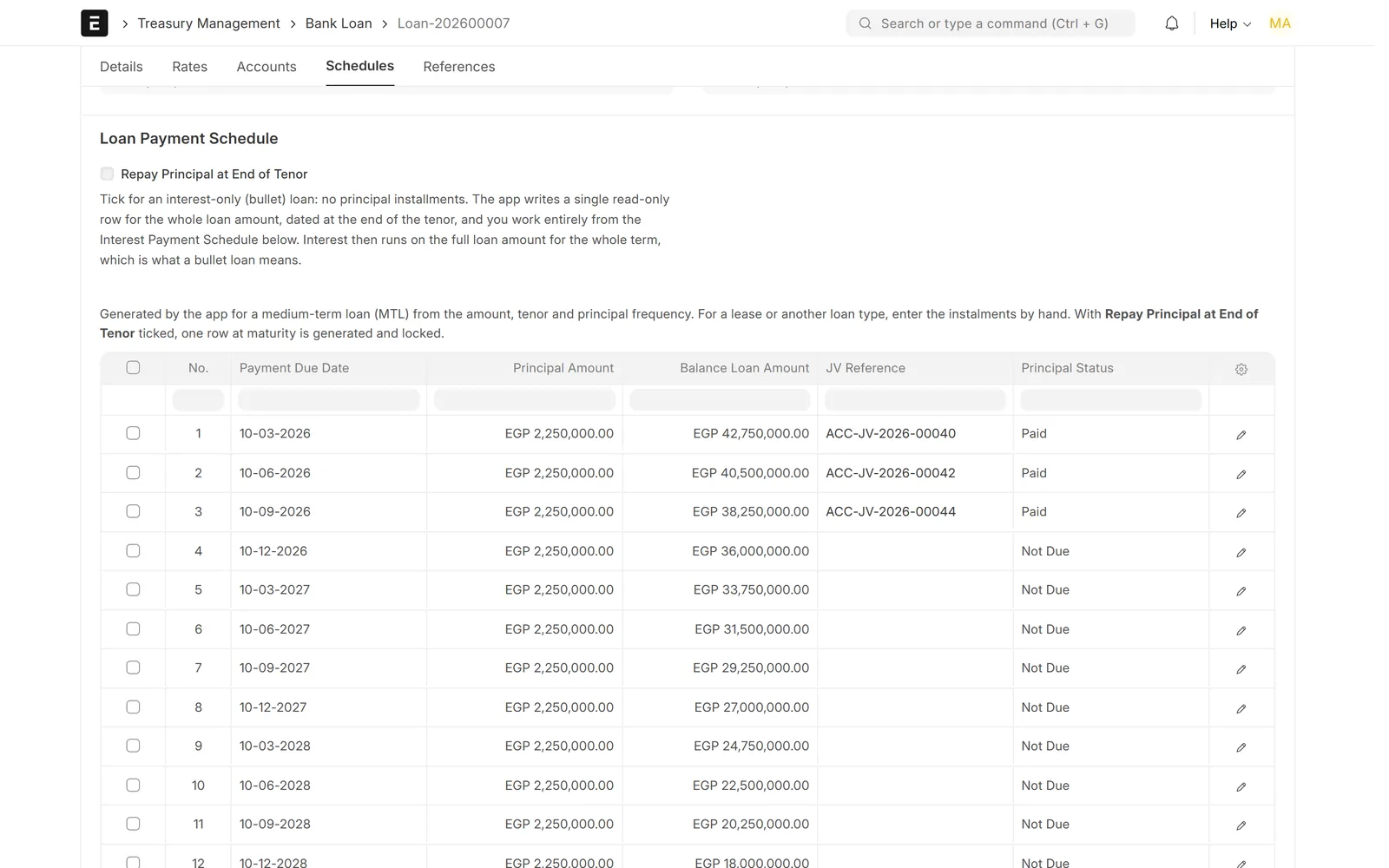
Loan payment schedule with quarterly instalments, the first three marked Paid with journal entry references
The principal schedule generated for a medium-term loan, with paid instalments linked to their Journal Entries.

Factoring, cheques & deposits

Supplier factoring

Factoring lines with their own limits and fees.

  • Limit, commission and admin fees per agreement
  • Delay interest
  • Each advance tracked as a repayment record
  • Paid through standard Payment Requests and Payment Entries
Dashboard tables showing exposure per bank and overdraft facilities with limit, available and used bars
Exposure by bank and every overdraft facility, with limits and utilisation.

Factoring, cheques & deposits

Cheque discounting at present value

Price each received cheque at present value.

  • Pull received customer cheques from Payment Entries
  • Present value on a working-day calendar
  • Bank yield, retention and net proceeds
  • One balanced journal entry per batch; no cheque discounted twice
Cheque discounting summary tiles for 18 cheques and the start of the discounted cheques table
Cheque discounting: face value, present value, bank yield, retention and net proceeds.

Factoring, cheques & deposits

Time and call deposits

Time and call deposits on the asset side.

  • Interest schedules and accrual
  • Withholding tax, received or capitalised interest
  • Minimum-balance checks
  • Renewal, maturity and early break
Deposit interest schedule with monthly rows showing balance times rate times days, tax and net amounts
Each deposit interest figure shown with its calculation and withholding tax.

Dashboard & reports

Treasury dashboard

Limits, interest and overdue items on one page.

  • Available and used limits for overdrafts, factoring and cheque discounting
  • Loan principal outstanding and interest due this month
  • Overdue items and alerts that need attention
  • CSV export for each section
Treasury dashboard with attention alerts and cards for overdrafts, factoring, discounted cheques and deposits of a demo company
The treasury dashboard: limits, utilisation and the items that need attention.

Dashboard & reports

Treasury reports and settings

Reports and one settings page for the whole app.

  • Cash flow forecast and overdue aging
  • Interest expense, deposit and discounted-cheque registers
  • Defaults and alert thresholds in one settings page
  • Optional daily digest email
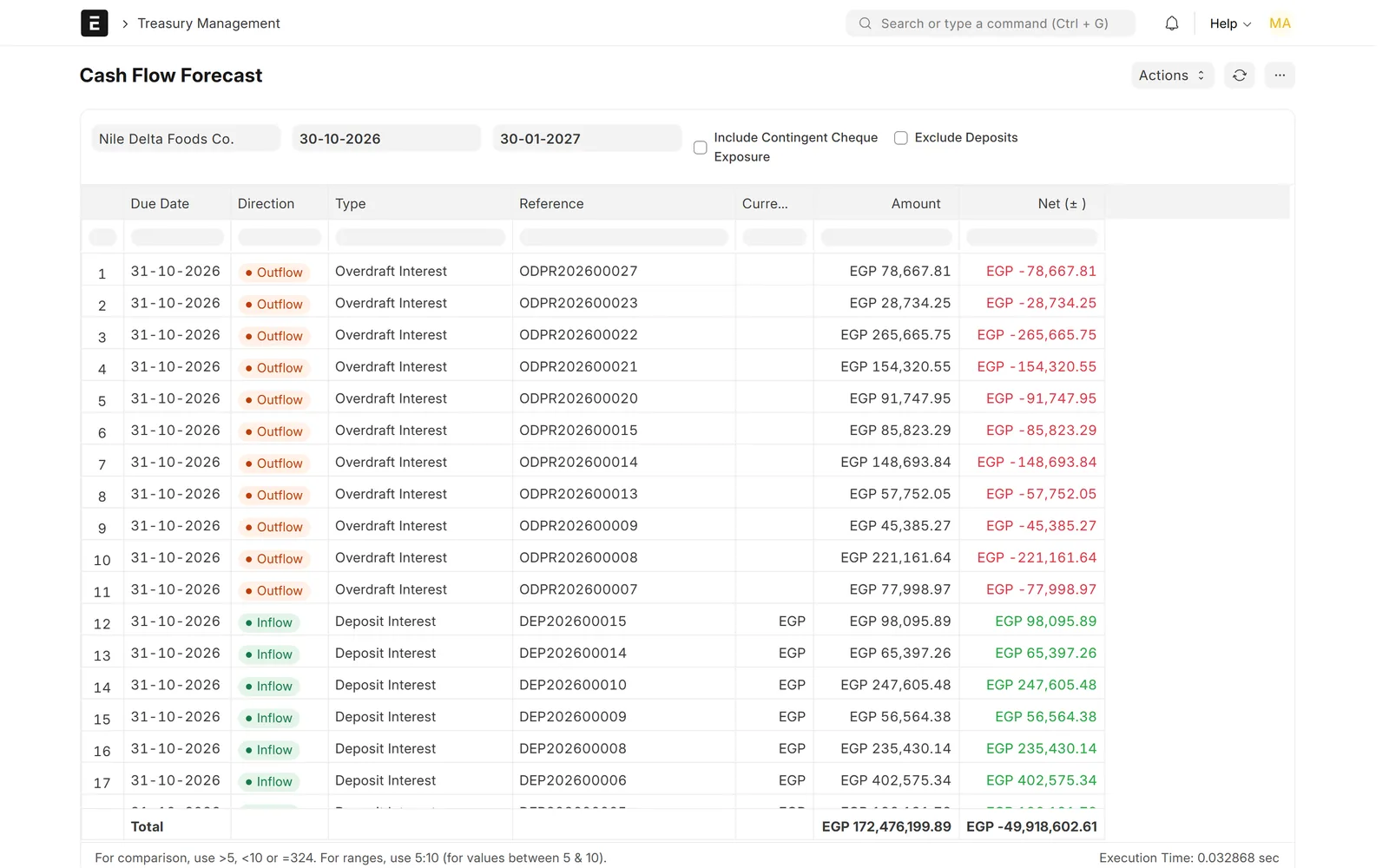
Cash flow forecast report with outflow rows for overdraft interest and inflow rows for deposit interest
Cash Flow Forecast: upcoming outflows and inflows from overdrafts and deposits.

Screens show demo data.

Challenges vs. solutions

Common challenges, and how Treasury Management answers each one

ChallengeHow Data Value solves itTraditional approach
Facilities spread across bank spreadsheetsLoans, leases, overdrafts, factoring lines and deposits recorded in ERPNext with their limits and schedulesOne spreadsheet per bank, updated by hand
Knowing the limit still availableLimit-utilisation panel per overdraft, a utilisation alert percentage and a log of limit changesCalling the bank or adding up statements
Calculating and posting interestInterest on Corridor or SOFR rates, posted as journal entries directly or as drafts for reviewSpreadsheet formulas and manual journal entries
Tracking overdraft drawdownsA supplier payment from an overdraft account creates the drawdown with its due date and interest scheduleA separate list of drawdowns and due dates
Pricing discounted chequesPresent value per cheque on a working-day calendar, with bank yield, retention and one balanced entry per batchCopying the figures from the bank advice
Following deposit interest and maturityInterest schedules, accrual, withholding tax, renewal, maturity and early break on each depositMaturity dates in a calendar and accruals by hand
Spotting overdue repaymentsOverdue items and alerts on the dashboard, an overdue aging report and an optional hold on the facilityFound during month-end reconciliation

Why Data Value

Why teams choose it

Every facility in one place

Loans, leases, overdrafts, factoring, cheque discounting and deposits in the same ERPNext site.

Posts to your ledger

Standard Journal Entries and Payment Entries on your existing chart of accounts.

Rate-driven interest

Corridor and SOFR rates, with unposted interest rows recalculated when rates change.

Limits under control

Utilisation panels, an alert percentage, a limit-change log and an optional hold on overdue facilities.

Treasury reports

Cash flow forecast, overdue aging, interest expense and deposit and discounted-cheque registers.

Set up by Data Value

Our own app, configured for your banks by a Frappe Certified Gold Partner. We complete the Arabic wording during implementation.

How it works

From setup to daily use

  1. Set up your banks, bank accounts and Corridor or SOFR rates, and the default accounts in Treasury Management Settings.
  2. Record each loan, lease, overdraft, factoring line or deposit with its limit, rate and dates; the app builds the schedules.
  3. Work in ERPNext as usualpayments from an overdraft account create drawdowns, received cheques can be discounted and interest is posted to your ledger.
  4. Watch limits, due dates and the cash-flow forecast on the dashboard, workspace and reports.

Related

Works together with

FAQ

Frequently asked questions

Does it work with my existing ERPNext?

It is an app for Frappe / ERPNext version 15. It posts standard Journal Entries and Payment Entries into your existing chart of accounts and uses your ERPNext banks, suppliers and customers.

Which interest benchmarks are supported?

The Corridor rate for EGP facilities and SOFR averages (30, 90 and 180 days) for USD facilities. You enter rates as they change and the app recalculates interest rows not yet posted.

Can we review interest entries before they hit the ledger?

Yes. Interest posting can be set to Draft so entries wait for review, or to Submit so they post directly.

Do we need the Cheque Management app for cheque discounting?

No. Cheque discounting works on its own with cheques received in Payment Entries. If Data Value's Cheque Management app is installed on the same site, the two work together.

Is the interface available in Arabic?

Partly. Form labels, lists and the workspace switch to Arabic and right-to-left. Some help texts, dashboard texts and report labels are still in English, and Data Value completes the Arabic wording during implementation.

Does it connect directly to our banks?

No. There is no bank API or statement import; facilities, rates and transactions are recorded in ERPNext, and the app handles the schedules, interest and posting.

See it with your own data

Book a demo and our team will walk you through the system and how it fits your business.

Free demo · No commitment