Skip to content

Telecom contracting · Egypt & Saudi Arabia

Telecom site rollouts, from work order to collection

Telecom Contracting is Data Value's ERPNext app for contractors that build and upgrade telecom sites for operators, tower companies and network vendors.

Each site job becomes a work order carrying its TCR, site, action type and project, and every subcontractor order, invoice, payment and expense is traced back to it.

  • Site work orders with TCR and site ID
  • Done dates drive the status
  • Subcontracting within done value
  • Progress invoicing both ways
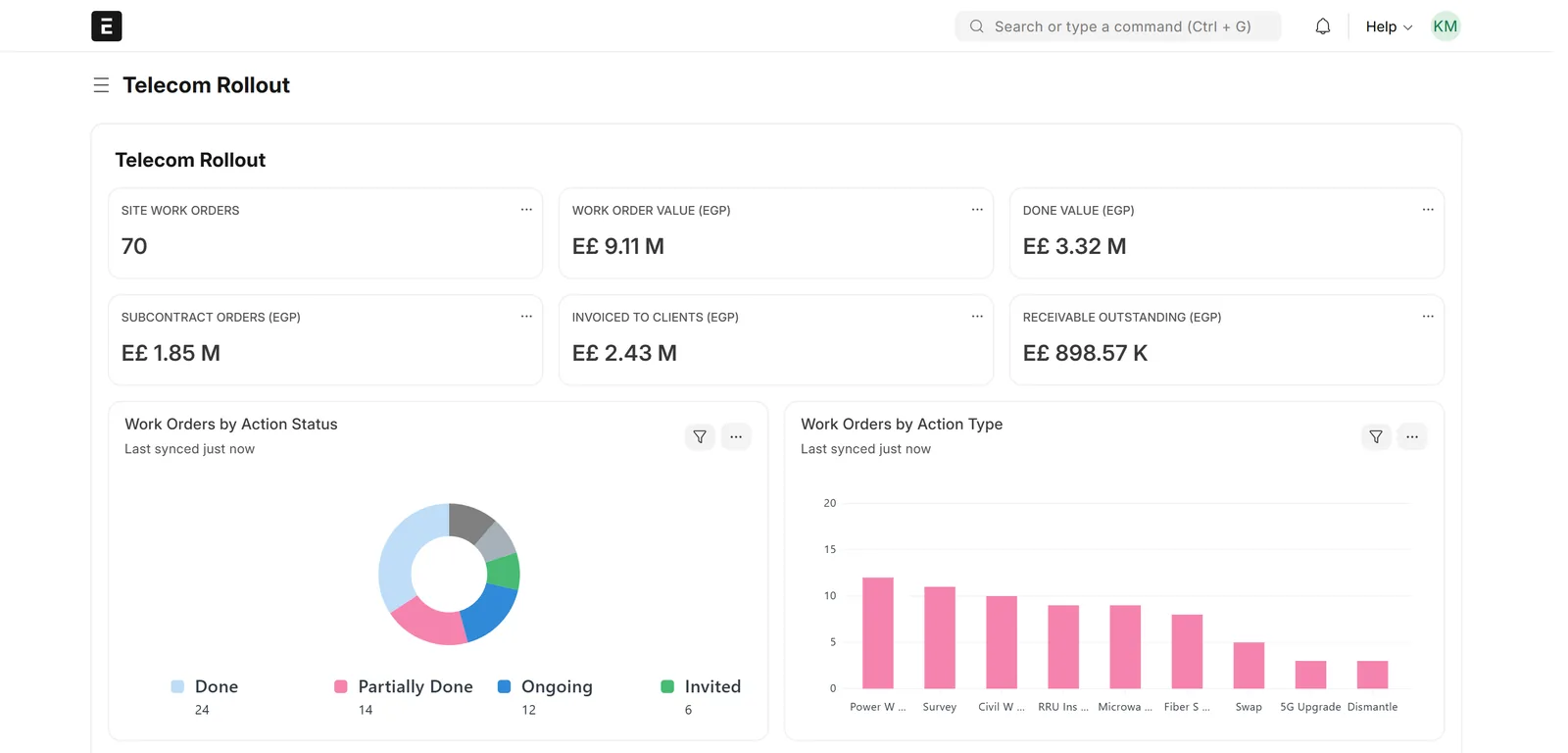
Telecom rollout workspace with six number cards for work orders, order value, done value, subcontract orders, invoicing and receivables, plus charts by action status and action type
The rollout workspace: work orders, done value, subcontracting, invoicing and receivables at a glance. Screens show demo data.

Who it is for

Built for the people who run it every day

  • Telecom rollout contractors
  • Tower and RAN contractors
  • Fiber and microwave contractors
  • Rollout and project managers
  • Site engineers
  • Subcontracting and procurement teams
  • Chief accountants and auditors

Industry

Part of ERPNext for Real Estate & Contracting

See how Data Value serves contractors and developers on ERPNext, from site work to collection.

Explore the industry page →

What you get

What you get with Telecom Contracting

9 capabilities in 3 groups, each shown next to its screen in the real system.

Site jobs

Site work orders

Each job is a work order with its customer, TCR, dashboard code, site ID, action type, owner, project and items. By default a TCR or dashboard code already used on another work order is rejected.

Report view of site work orders with customer, site ID, action type, action status, total and total done
Every site job with its site, action type, status and done value.

Site jobs

Done dates drive the status

Engineers record done quantity, amount and date per item, within the ordered amount and valid dates, and the status moves to Partially Done or Done by itself. Only a Done Date Editor can change a date once set.
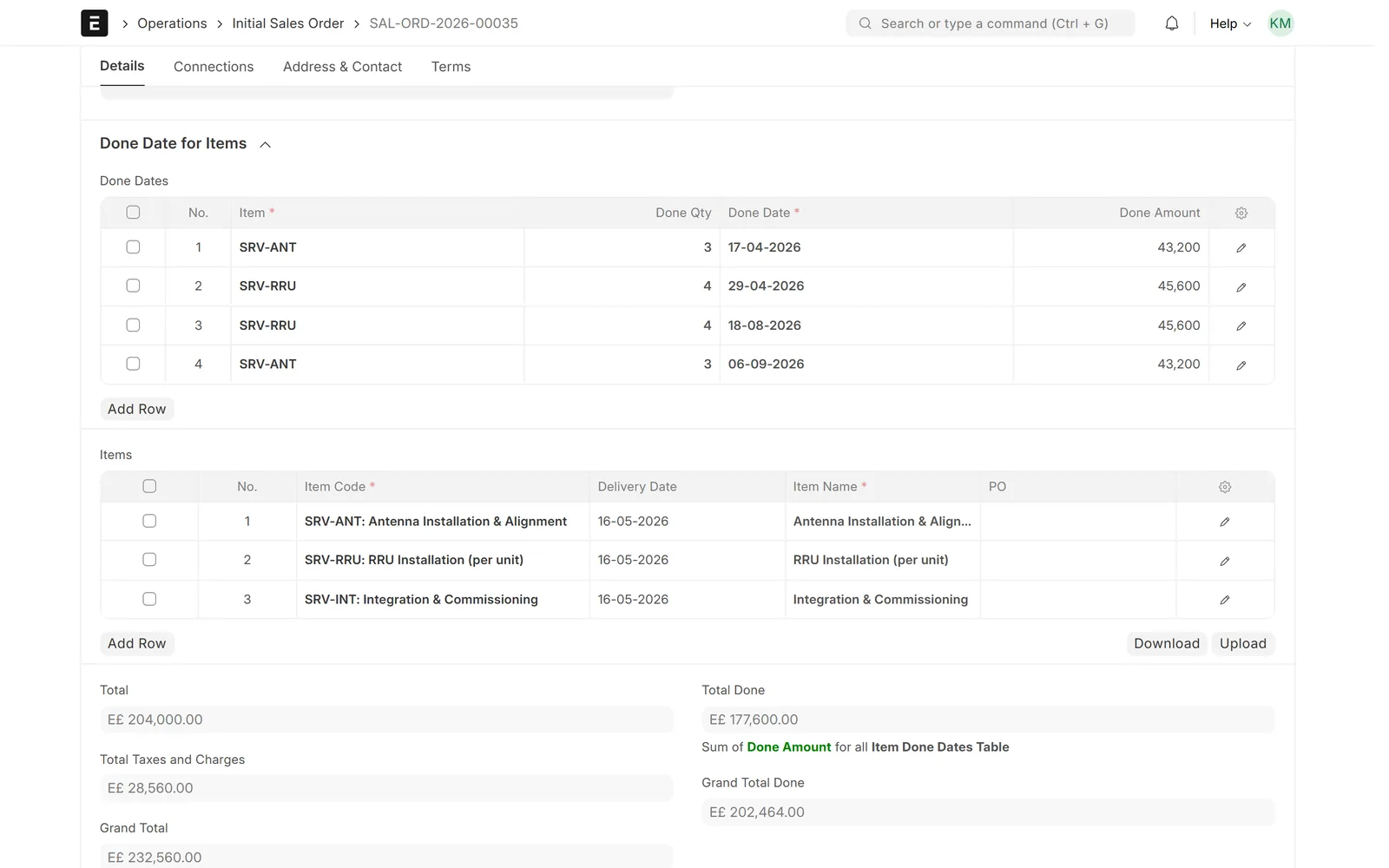
Done dates table with item, quantity, date and amount, the items table and totals for ordered and done value
Done quantities, dates and amounts per item add up to the work order's done value.

Site jobs

Rollout pipeline at a glance

Follow work orders in lists, a report view and a Kanban board by action status, from Invited and Accepted to Ongoing, Hold and Done.
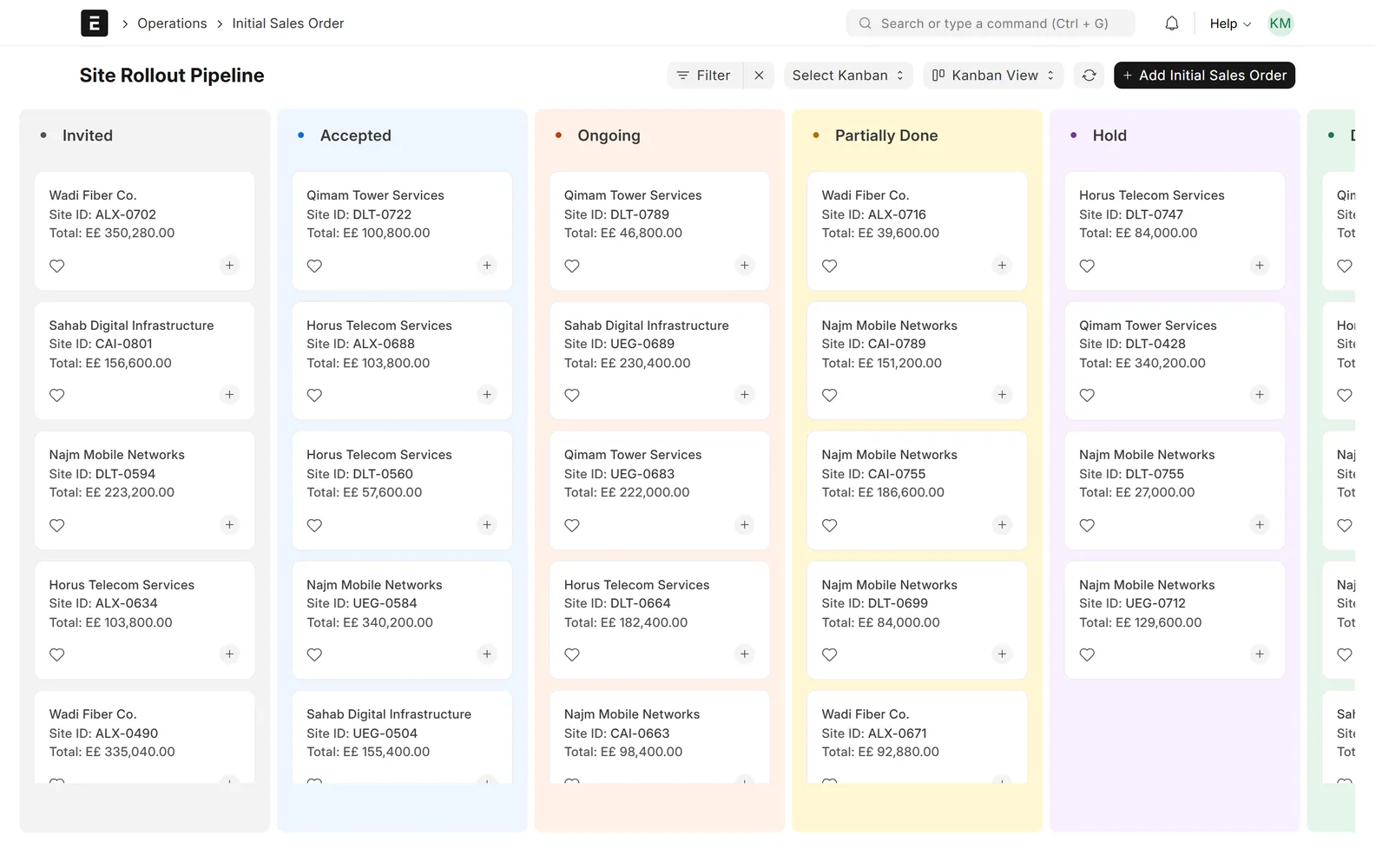
Kanban board of site work orders in columns Invited, Accepted, Ongoing, Partially Done and Hold
The site rollout pipeline as a Kanban board.

Subcontracting

Subcontractor orders tied to done work

Raise a subcontractor order from a work order for a chosen supplier and percentage. The app blocks orders that would take subcontract commitments above the work order's done amount.

Completed subcontractor order with supplier, percentage, TCR, site ID, action type and links to the work order and purchase invoice
A subcontractor order raised from the work order, carrying the same site and TCR.

Subcontracting

Bulk subcontracting tool

Filter work orders by customer, site, action type or project, see their done, allocated and remaining amounts, and create one subcontractor order for the pool within its remaining done amount.
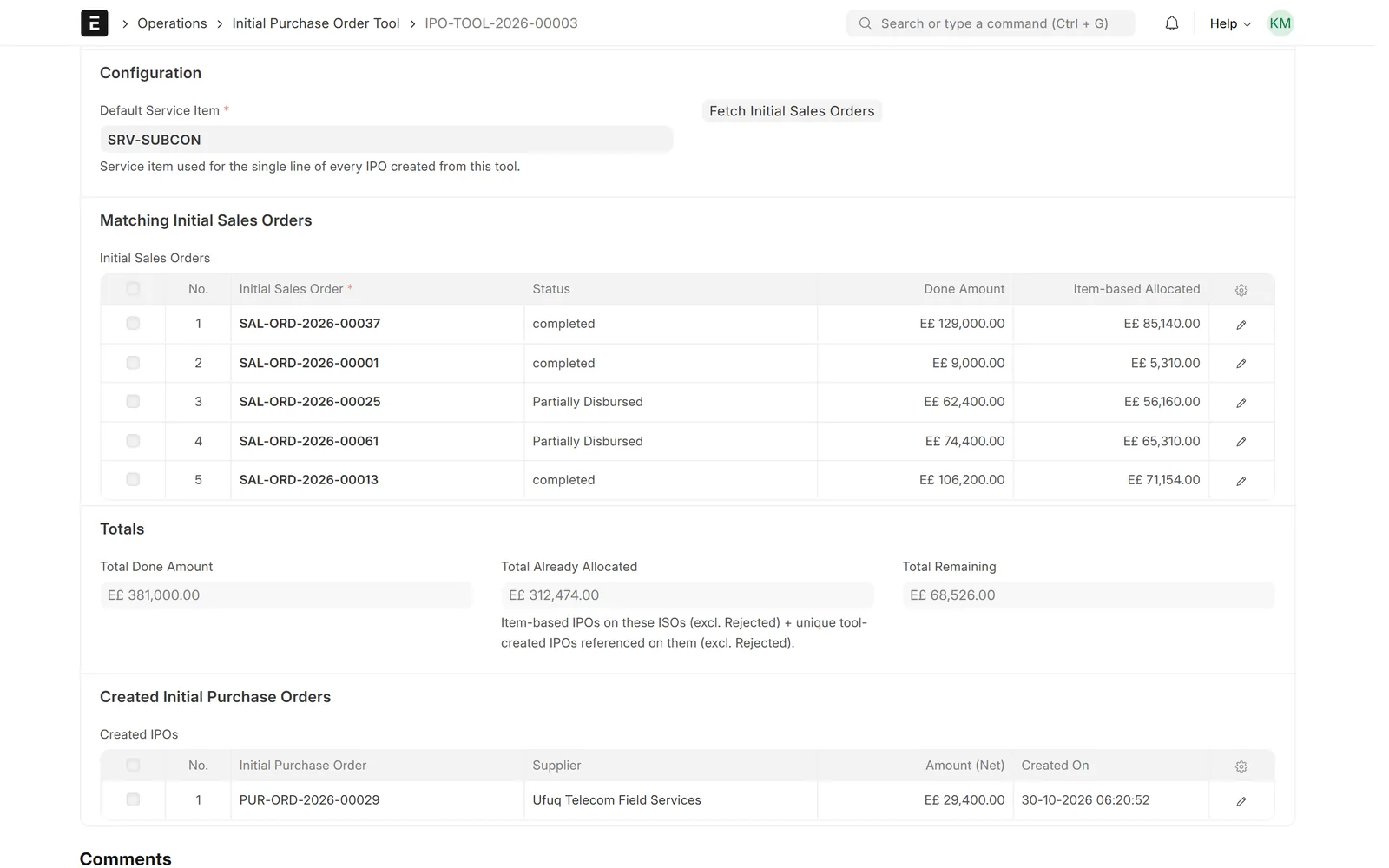
Bulk subcontracting tool listing matching work orders with done and allocated amounts, pool totals and the created subcontractor order
The bulk tool pools done work from several orders into one subcontractor order.

Subcontracting

Everything linked to the site job

A Linked Vouchers panel on each work order shows its order, done and expense values and lists its subcontractor orders, invoices, payments and expense claims.
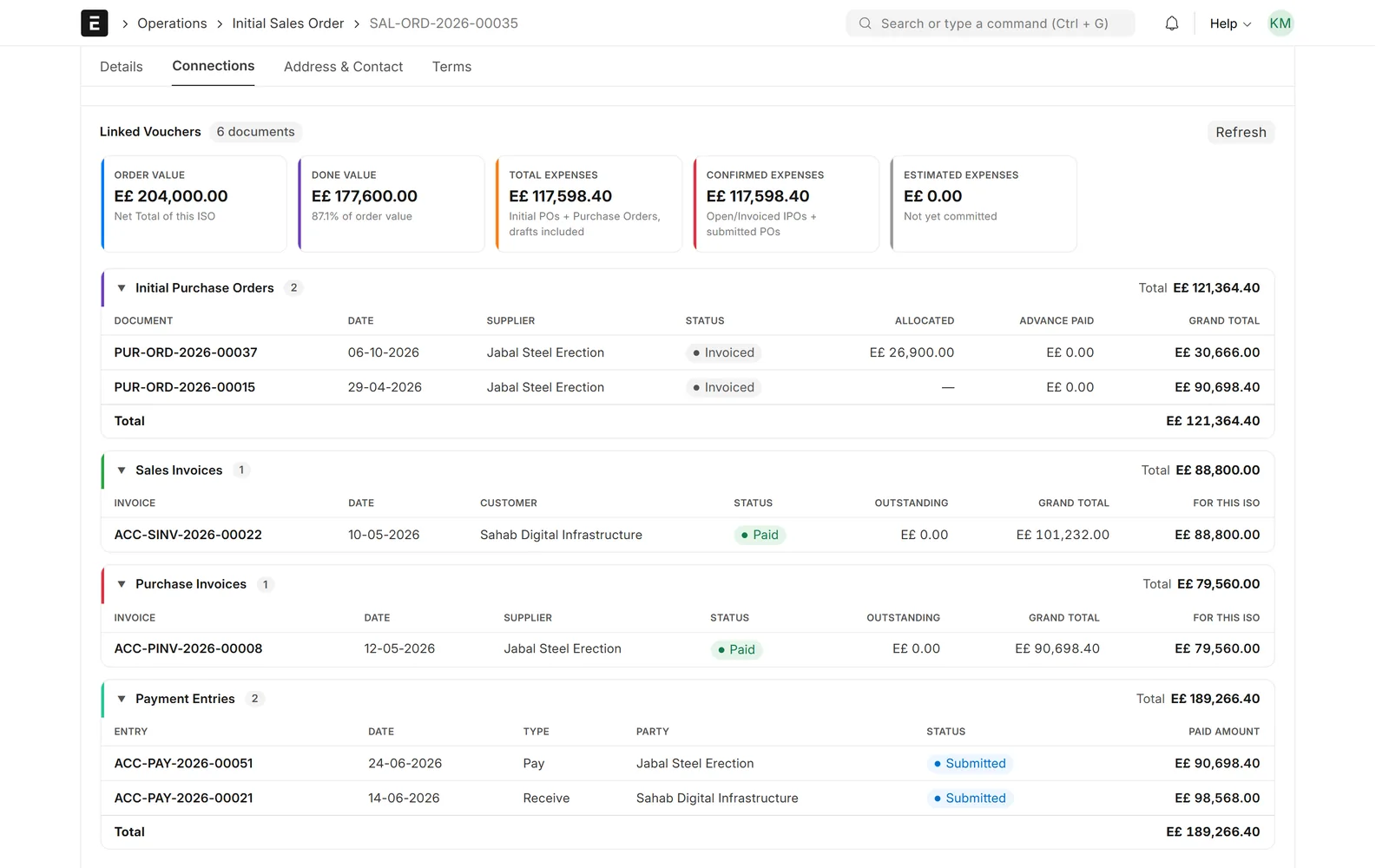
Linked vouchers panel of a work order with order, done and expense values and lists of subcontractor orders, sales and purchase invoices and payments
Every subcontractor order, invoice and payment linked to the site job.

Billing & reports

Progress invoicing both ways

Create sales invoices from one or more work orders and purchase invoices from subcontractor orders. Quantities are checked against the order, and statuses update as invoices are submitted or cancelled.
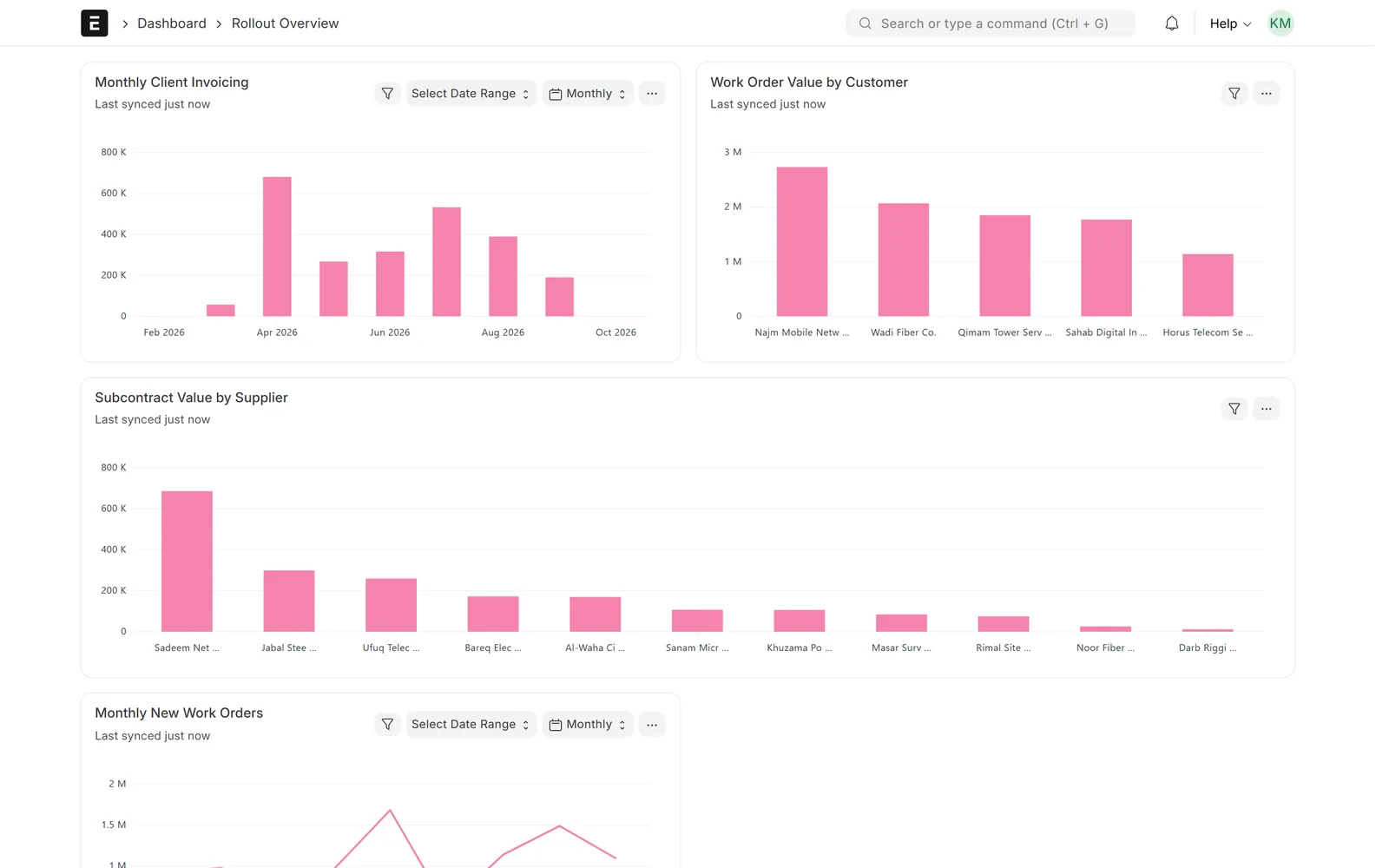
Rollout dashboard with monthly client invoicing, work order value by customer and subcontract value by supplier
Monthly invoicing, order value by customer and subcontract value by supplier.

Billing & reports

Client PO budgets

Record each client purchase order with its amount and taxes; the remaining amount and percentage are calculated from the consumed amount on the record. A work order can only use a Client PO from its own project.

Client PO form with amount 1,100,000, 84.7% consumed, E£931,800 consumed, E£168,200 remaining and VAT 14%
A client PO with its budget, consumed and remaining amounts.

Billing & reports

Contracting reports

Revenue per work order (done, invoiced, collected, VAT, withholding tax), subcontractor balances, a P&L overview by customer and parent project, invoice-to-payment tracing, and site-level stock and ledger reports.

Subcontractor balance report with order, supplier, parent project, amount, released amount, due amount and pending percentage
Subcontractor balances: amount, released, due and pending percentage per order.

Screens show demo data.

Challenges vs. solutions

Common challenges, and how Telecom Contracting answers each one

ChallengeHow Data Value solves itTraditional approach
Following hundreds of site jobsEach job is a work order with TCR, site ID, action type and project, followed in lists, a report view and a Kanban boardRollout trackers in spreadsheets
Duplicate TCRs and dashboard codesBy default the app rejects a TCR or dashboard code already used on another work orderManual cross-checks
Knowing what was done on siteDone quantity, amount and date per item; the status moves to Partially Done or Done by itselfProgress reported by email and phone
Committing more to subcontractors than the work doneSubcontractor orders are blocked above the work order's done amount, or above the pool's done amount in the bulk toolCommitments checked by hand
Invoicing many sites at onceSales Invoices built from one or more work orders, with invoiced quantities checked against each orderInvoices assembled from site lists
Tracing cost and cash to the site jobA Linked Vouchers panel lists the subcontractor orders, invoices, payments and expense claims of each work orderSearching the accounts by site code
Knowing what each subcontractor is owedSC Balance report with amount, released, due and pending percentage per subcontractor orderSeparate statements per subcontractor

Why Data Value

Why teams choose it

The site job at the centre

Every subcontractor order, invoice, payment and expense traces back to its work order.

Subcontracting within done value

Subcontract commitments cannot go above the work actually done.

Standard ERPNext documents

Invoices, payments and accounts are ERPNext documents; expenses and advances use Frappe HR.

Status from the field

Done dates move the status, and only a Done Date Editor can change a date once it is set.

Contracting reports

Revenue per work order, subcontractor balances and collections traced to their invoices.

Data Value's own app

Built and supported by Data Value, a Frappe Certified Gold Partner with offices in Cairo and Riyadh.

How it works

From setup to daily use

  1. Set up customers, projects, site IDs, action types and your service items and price lists.
  2. Open a work order per site job; engineers add done dates as work is completed and the status follows.
  3. Subcontract the completed work from one work order or a pool, within the done amount.
  4. Invoice the client, book subcontractor invoices, and record collections and payouts in ERPNext.
  5. Follow progress, invoicing, collections and subcontractor balances per customer and project.

FAQ

Frequently asked questions

Does it run on ERPNext?

Yes. It is an app for Frappe / ERPNext version 15 that uses your ERPNext customers, suppliers, items, projects and accounts; its invoices and payments are standard ERPNext documents. Expense and advance features use Frappe HR.

Can several subcontractors work on the same site job?

Yes. A work order can have more than one subcontractor order. Orders from the work order stay within its done amount, and orders from the bulk tool stay within the combined done amount of the pooled work orders.

Who can change a done date after it is entered?

Anyone with access can fill an empty done date, but once it is set only users with the Done Date Editor role can change it. Future dates and dates before the order date are rejected for other users.

Can I invoice several sites on one invoice?

Yes. A sales invoice can be built from several work orders, and the app checks the invoiced quantities against what was ordered on each one.

Is the interface available in Arabic?

Partly. Menus, the workspace, charts and most work-order labels switch to Arabic and right-to-left. Some app labels, report columns and the linked-vouchers panel are still English, and Data Value completes the Arabic wording during implementation.

See it with your own data

Book a demo and our team will walk you through the system and how it fits your business.

Free demo · No commitment