Skip to content

Real estate & contracting · For contractors

Construction contracts, costs and payment certificates in one system

Data Value's construction solution runs a contractor's projects on ERPNext, from the contract BOQ and the budget to every payment certificate with the client and the subcontractors.

Site teams report from their phones, managers see each project's cost, progress and cash position, and every amount still posts to ERPNext as standard invoices and payments.

  • BOQ and cost control by cost code
  • Client and subcontract certificates
  • Bilingual printed certificates
  • Field app that works offline
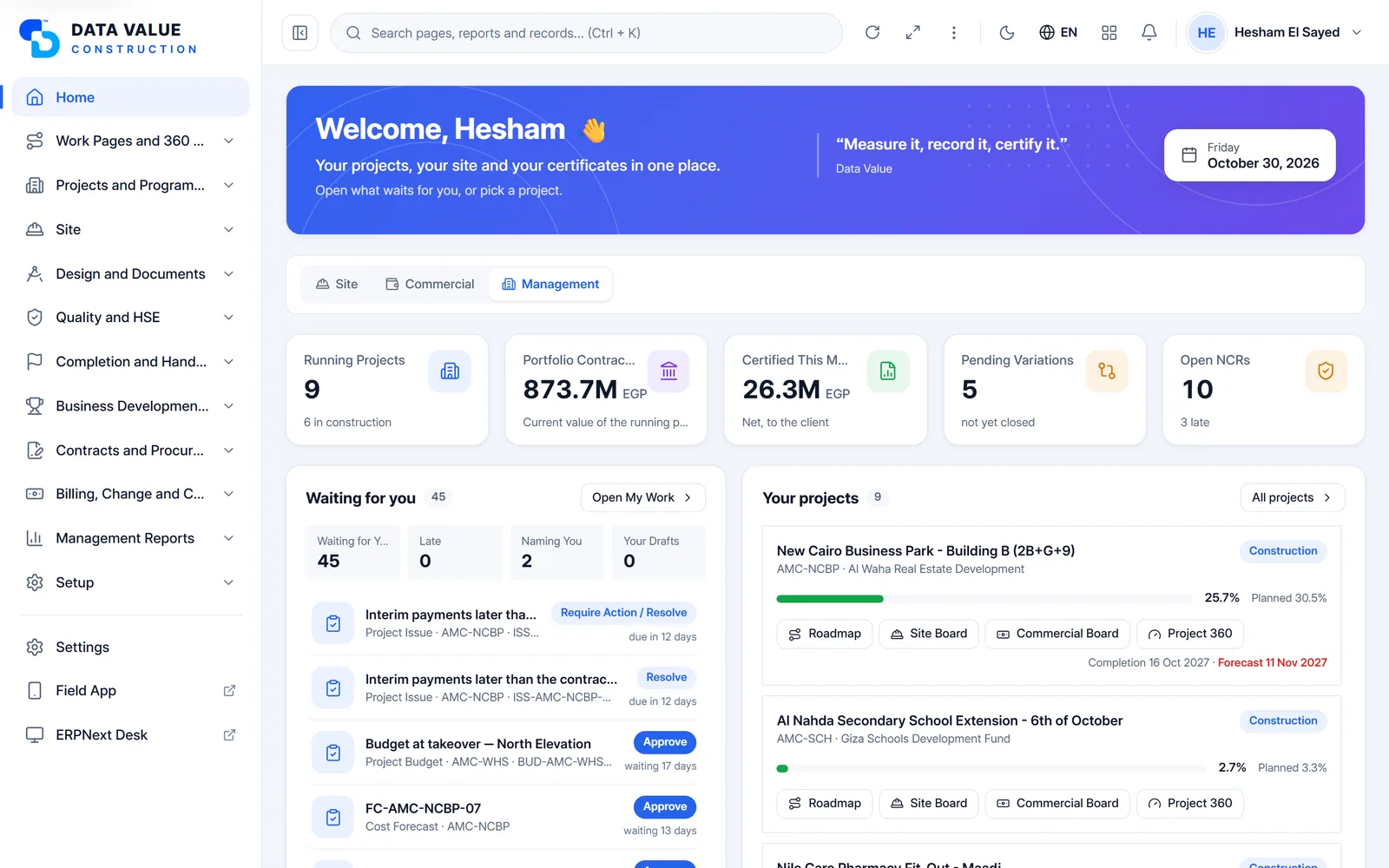
Construction Portal home with running projects, portfolio contract value, certified this month, pending variations and open NCRs, pending actions and project cards with progress bars
Construction Portal: portfolio figures, what waits for you and your projects. Screens show demo data.

Who it is for

Built for the people who run it every day

  • General contractors
  • Building contractors
  • Design-and-build firms
  • Engineering consultancies
  • Quantity surveyors and commercial teams
  • Project and site managers
  • Cost controllers and accountants

Industry

Part of ERPNext for Real Estate & Contracting

See how property, construction and tender management fit together for developers and contractors.

Explore the industry page →

What you get

What you get with Construction Management

9 capabilities in 3 groups, each shown next to its screen in the real system.

BOQ & cost control

Bills of quantities with sections and revisions

Contract and subcontract BOQs, organised by section.

  • Sections with units, quantities, rates and amounts
  • Revise a BOQ and set its baseline
  • Original and current totals kept apart
  • The same structure for main contracts and subcontracts
Bill of quantities with earthworks, concrete and masonry sections and their items
Contract BOQ by section, with quantities, rates and amounts

BOQ & cost control

Cost control by cost code

Know where each cost code stands against its budget.

  • Budget, committed, invoiced and actual cost per cost code
  • Commitments from subcontracts and purchase orders
  • Exposure and variance
  • Forecast cost at completion
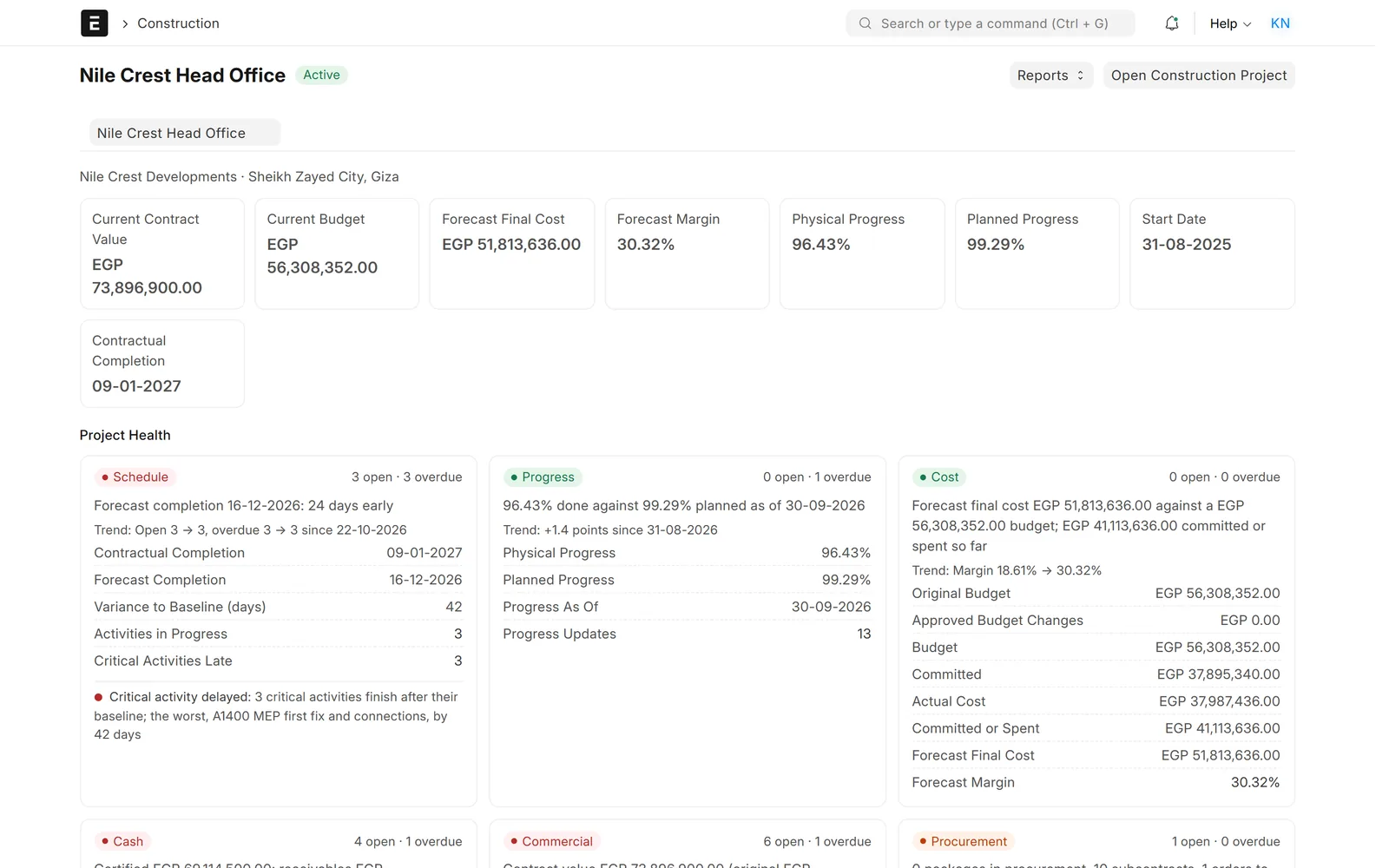
Project page with KPI tiles and health cards for schedule, progress and cost
Project 360: contract value, budget, forecast cost, margin and progress

BOQ & cost control

Budget check on every commitment

Catch an overrun before the money is committed.

  • Purchase orders checked against the cost code's remaining budget
  • Subcontracts checked the same way
  • Your company chooses to warn, stop or ignore
  • Set to warn unless you change it
Project page with KPI tiles and health cards for schedule, progress and cost
Project 360: contract value, budget, forecast cost, margin and progress

Contracts & certificates

Main contracts and subcontracts in one register

Main contracts and subcontracts in one register.

  • Value, dates, parties and BOQ on each contract
  • Payment terms: retention, retention cap and advance
  • A controlled lifecycle from draft to final account and closure
  • Contract 360 with value, certified to date and retention
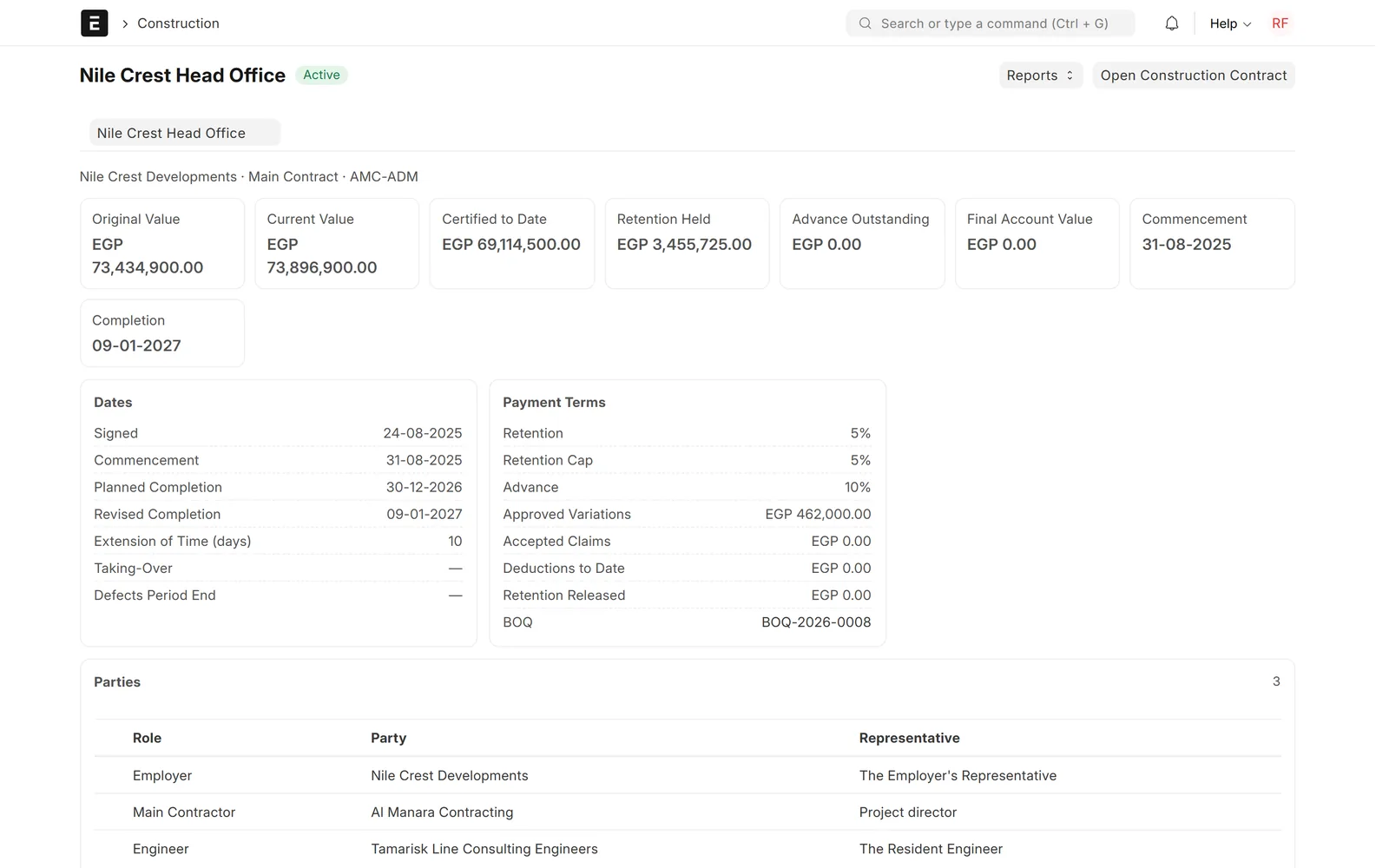
Main contract page with value tiles, key dates, payment terms and parties
Contract 360: value, certified to date, retention and payment terms

Contracts & certificates

Cumulative payment certificates both ways

Cumulative certificates for the client and for every subcontractor.

  • Work valued to date against the BOQ
  • Retention, advance recovery and other deductions
  • Taxes added and the net amount due worked out
  • Settled through ERPNext invoices, payments or journal entries
Payment application with previous, applied and certified quantities per BOQ item and a summary with retention and net amount
Payment certificate: quantities to date, retention and net amount

Contracts & certificates

Bilingual printed documents

Contract and site documents that read in either language.

  • English and Arabic side by side on one page
  • Payment certificates, variation orders and final accounts
  • Daily site reports, among more than thirty bilingual formats
  • A QR code that verifies the printed copy
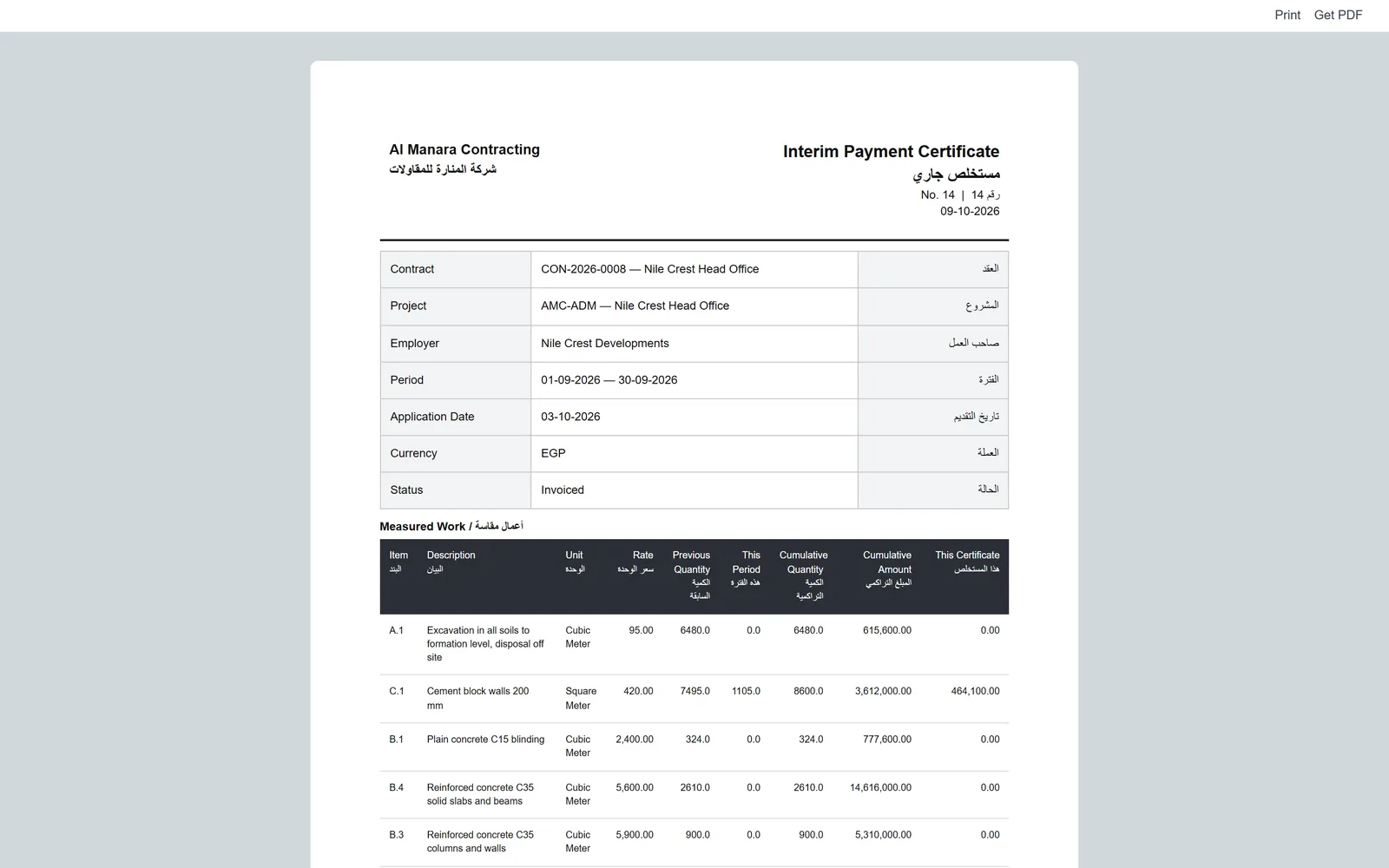
Printed interim payment certificate in English and Arabic with contract details and a measured work table
Bilingual interim payment certificate, ready to print

Changes, progress & site

Variations, claims and final accounts

Changes to the contract, followed through to the final account.

  • Variation orders adjust the BOQ, value, time and budget
  • Claims logged and assessed
  • Delay events recorded and assessed
  • The final account works out the final value and remaining balance
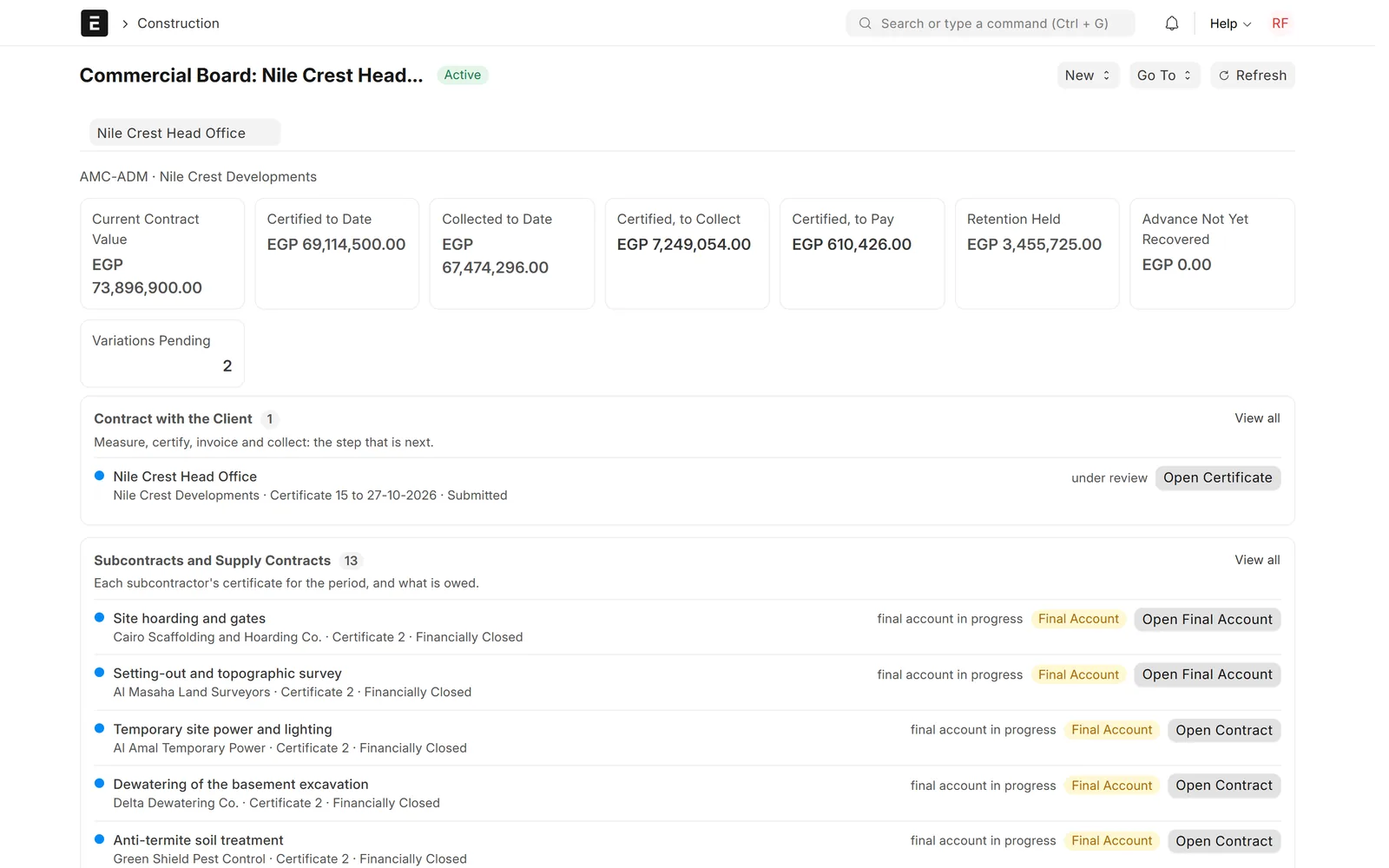
Commercial board with certified, collected and retention tiles and lists of client and subcontract certificates with next actions
Commercial board: what to measure, certify, invoice and collect next

Changes, progress & site

Project 360, commercial board and S-curve

Each project's cost, progress and health on one page.

  • Contract value, budget, forecast cost and margin
  • Health cards for schedule, progress, cost, cash, commercial and procurement
  • Planned-against-actual S-curve from approved progress
  • Programmes imported from Primavera P6 or Microsoft Project
Chart of the planned progress line and actual progress bars by month above a table of percentages
Progress S-curve: planned against actual by month

Changes, progress & site

Field app and portal

Site teams, clients and subcontractors work in the same system.

  • Daily site reports, snags and safety observations from the phone
  • A field web app that keeps working offline once loaded
  • Clients follow their projects and certificates in the portal
  • Subcontractors submit applications and progress in the portal
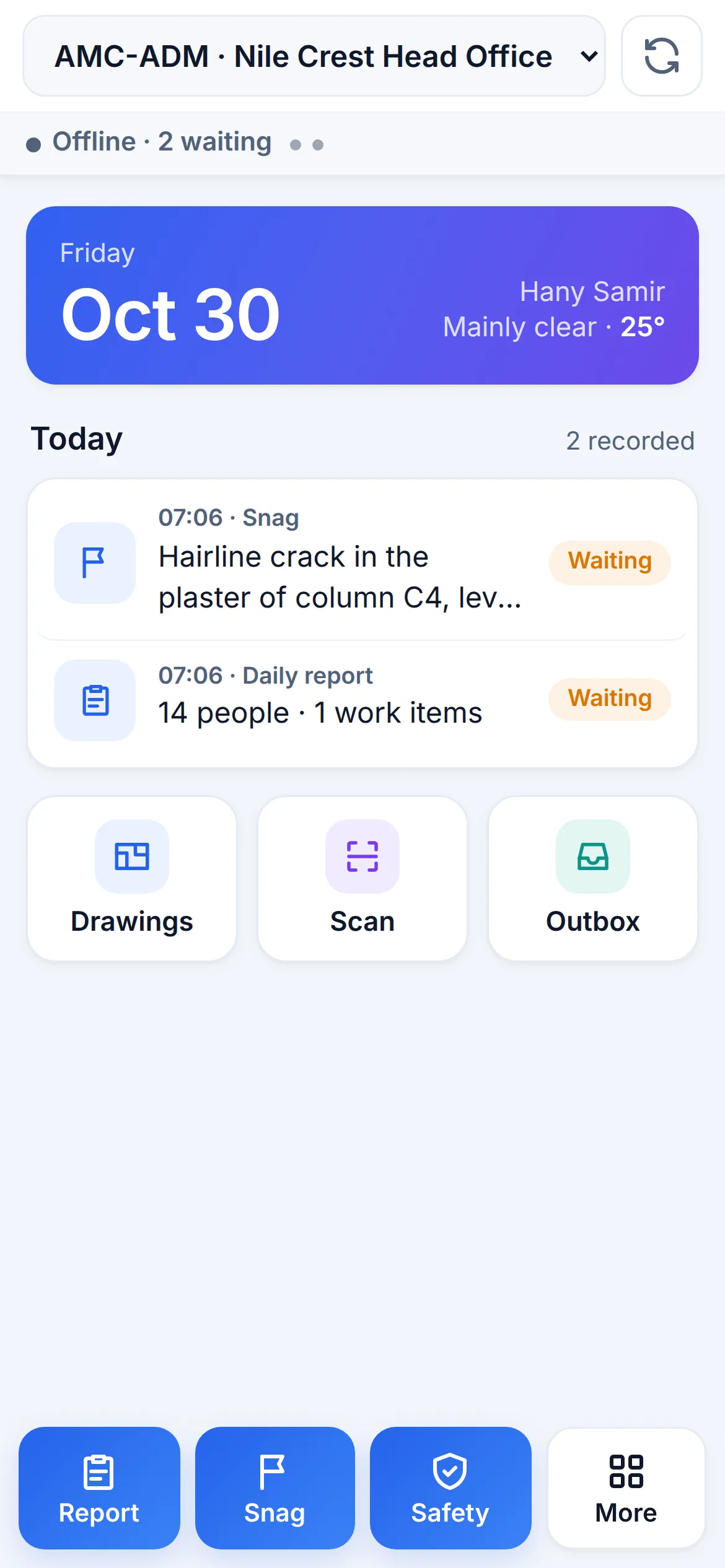
Mobile field app with date and weather, today's records waiting to send, and buttons for report, snag and safety
Field app: today's site records, kept offline until they can be sent

Screens show demo data.

Challenges vs. solutions

Common challenges, and how Construction Management answers each one

ChallengeHow Data Value solves itTraditional approach
Keeping the BOQ and its revisions straightSectioned BOQs with revisions and a baseline; original and current totals kept apartSeveral Excel versions of the same BOQ
Knowing cost against budgetBudget, committed, actual, variance and forecast at completion per cost codeCost reports built by hand at month end
Commitments that exceed the budgetEvery purchase order and subcontract checked against the remaining budget: warn, stop or ignoreOverruns found after the money is committed
Preparing payment certificatesCumulative certificates with retention, advance recovery and deductions, settled through ERPNextSpreadsheet certificates typed again into the accounts
Tracking variations and claimsVariation orders adjust BOQ, value, time and budget; claims and delays are logged and assessedLetters and files outside the system
Getting reports from the siteA field web app for daily reports, snags and safety that works offline once loadedPaper diaries and messages

Why Data Value

Why teams choose it

From BOQ to final account

BOQ, budget, contracts, certificates and final accounts in one system.

Accounting stays in ERPNext

Certificates settle through standard ERPNext invoices, payments and journal entries.

Both sides of every contract

The same cumulative certificate for the client and for each subcontractor.

Bilingual documents

Arabic and English interface, and printouts in both languages side by side.

Works on site

The field app keeps working offline once loaded and sends records when the connection returns.

Brings in your programme

Import from Primavera P6 or Microsoft Project, and export as Microsoft Project XML.

How it works

From setup to daily use

  1. Set up the project, its main contract with payment terms and BOQ, and the budget by cost code.
  2. Award subcontracts and purchase orders against the budget, and load or import the programme.
  3. Site teams send daily reports and progress from the field app; approved progress updates the S-curve.
  4. Measure, certify and invoice the client each period, certify each subcontractor, and handle variations and claims.
  5. Agree the final accounts, release retention and close the project, with cost, profit and cash visible all along.

FAQ

Frequently asked questions

Does it run on ERPNext?

Yes. It is a Frappe app built by Data Value that requires ERPNext. Accounting stays in ERPNext: each certificate is settled through standard sales or purchase invoices, payment entries or journal entries.

Does it handle subcontractor payment certificates as well as the client's?

Yes. The same cumulative certificate is used on the revenue side for the client and on the cost side for subcontractors and suppliers, each with its own retention, advance recovery and deductions.

Is it available in Arabic?

Yes. The interface works in Arabic (right to left) and English, and the printed contract documents are bilingual.

Can site teams use it without a stable connection?

Yes. The field app is a web app that keeps working offline once it has been opened, and sends the records when the connection returns.

Can we bring in our existing programme?

Yes. Programmes can be imported from Primavera P6 (XER) or Microsoft Project (XML), and exported back as Microsoft Project XML.

See it with your own data

Book a demo and our team will walk you through the system and how it fits your business.

Free demo · No commitment