

- Home
- ERPNext modules
- Manufacturing
ERPNext manufacturing: plan, make and cost every product
From raw material to finished goods, in one system
Data Value sets up ERPNext manufacturing from your bills of materials to the finished goods warehouse. From then on, every work order shows the materials it consumed, the operations it went through and what it cost.
- Multi-level bills of materials, including scrap and process loss
- Work orders linked to stock as well as accounts
- Operations scheduled against workstation hours
- Quality inspections during production
ERPNext Manufacturing module: a short guide
ERPNext manufacturing covers the whole path from recipe to finished stock: bills of materials, production planning, work orders, job cards, capacity planning and subcontracting. It also covers quality inspection, batch traceability and production costing. Everything runs in one system, so sales, purchasing, inventory and accounting work from the same figures.
Production plans start from sales orders and stock levels, then tell you what to make and which materials to buy.
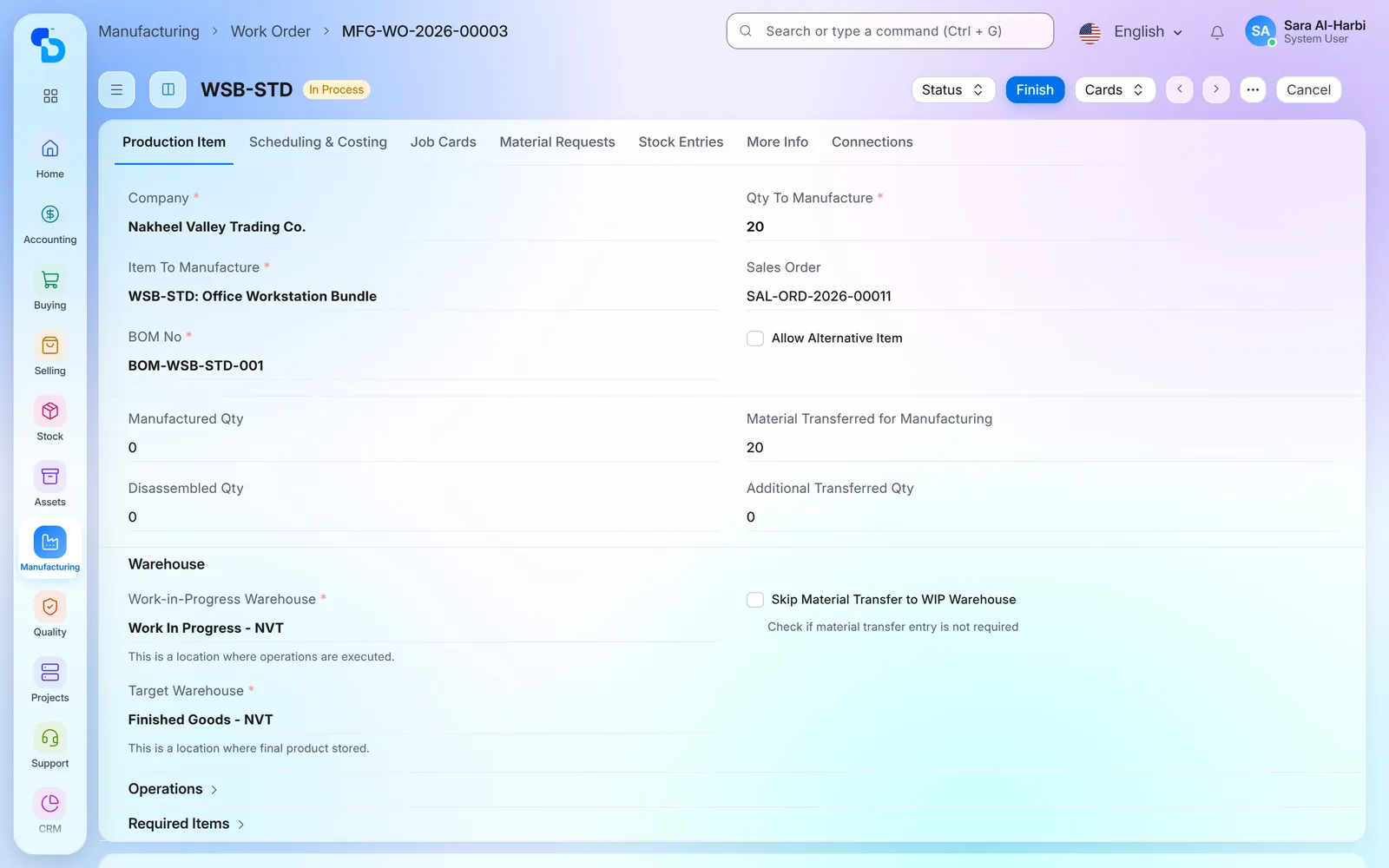
Each work order collects the materials consumed and the cost of every operation, so finished goods carry their real cost into the books.
What ERPNext manufacturing covers
12 features in four groups, all on the page, each with its screen.
Bill of materials
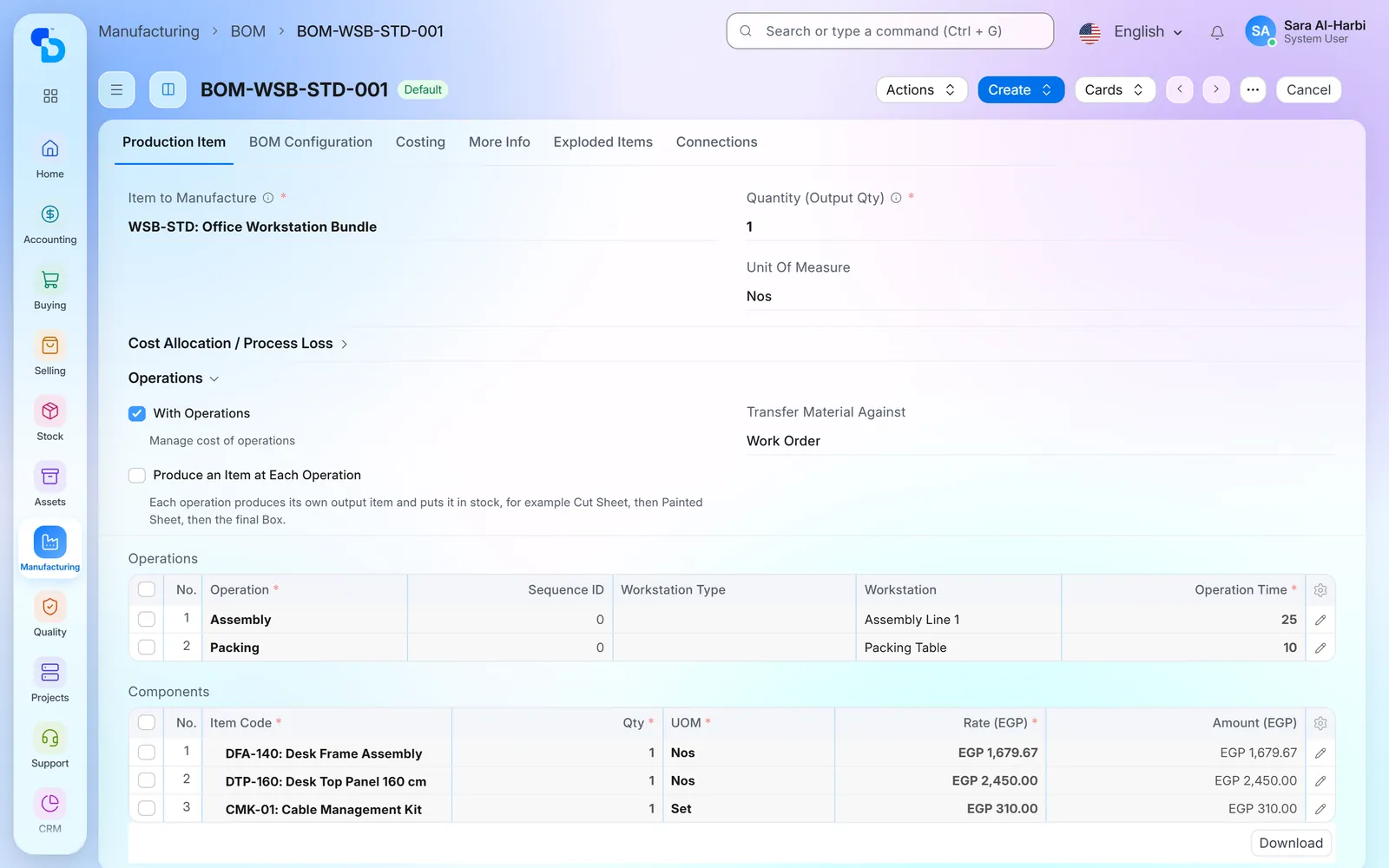
One recipe per product: materials, quantities, operations and cost.
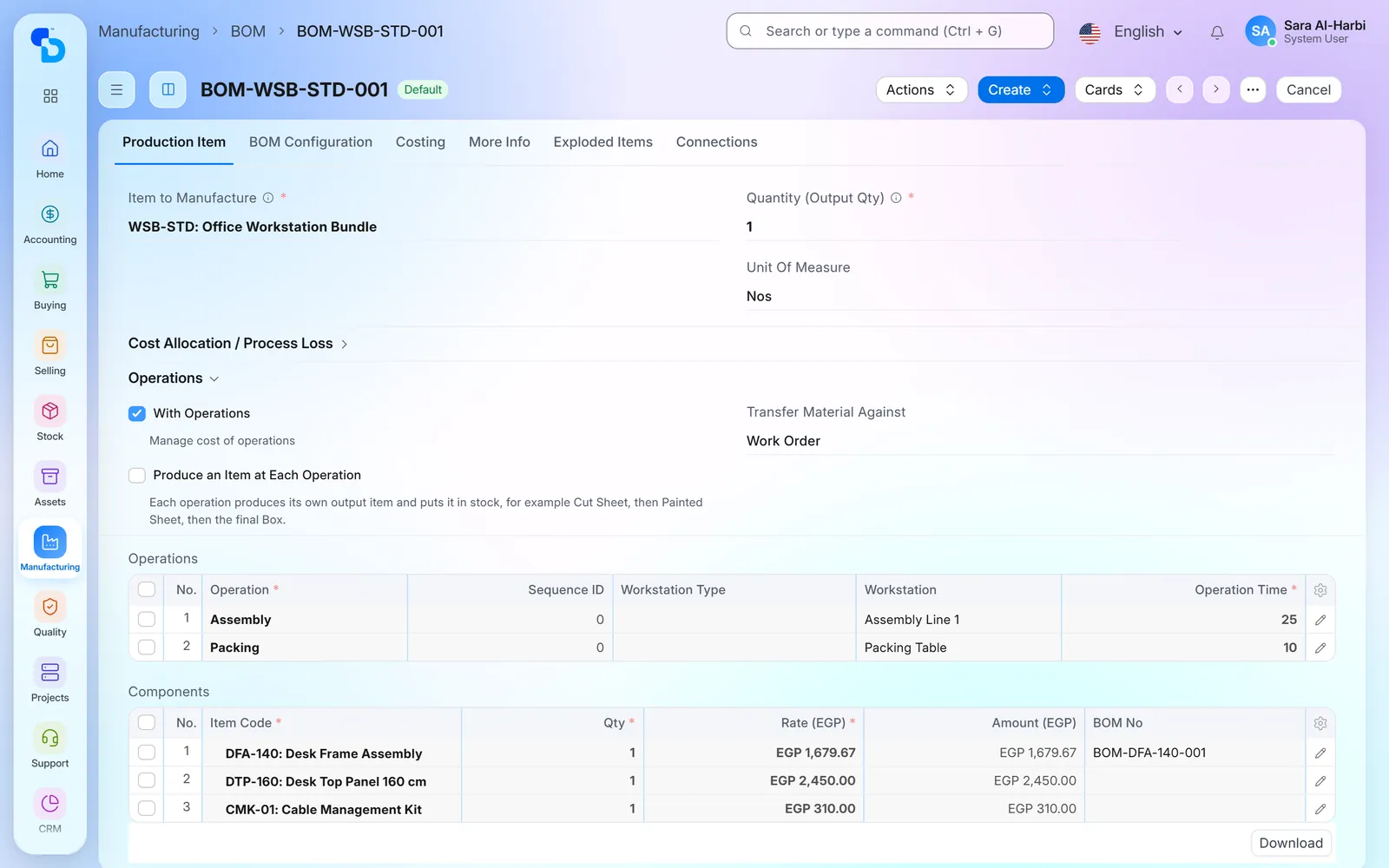
A bill of materials (BOM) lists every raw material and the quantity needed to make your product. It also lists the operations, each with its workstation and time. One document therefore drives planning, material issue and costing. ERPNext prices the materials at rates you choose, so every BOM shows its expected cost. When a recipe changes, you save a new version, and the old one stays on record.
- Quantity and unit of measure for each material
- Operations with workstation and time, or a reusable routing instead
- Material rates from valuation, last purchase or a price list
- Material cost and operating cost totalled on the BOM
- Default and active versions per product
Multi-level BOMs
Sub-assemblies inside the finished product, costed level by level.
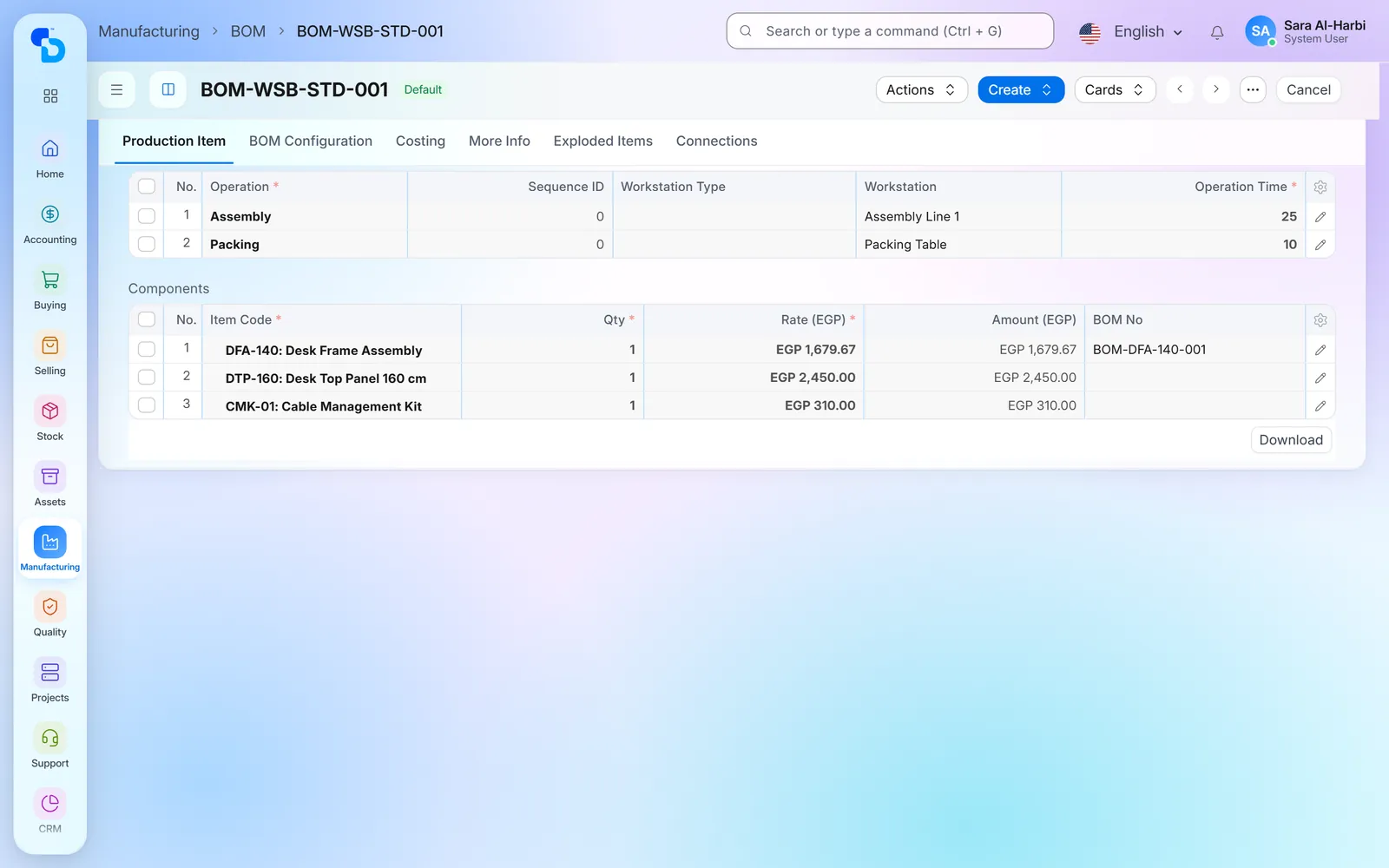
Complex products consist of sub-assemblies, and each sub-assembly has its own BOM. ERPNext links them, so the parent BOM takes its sub-assembly cost from the level below. A work order can also explode all levels into one list of raw materials. When a sub-assembly changes, the BOM Update Tool swaps the old BOM for the new one in every parent BOM.
- A BOM per sub-assembly, linked to the parent BOM
- BOM tree view and the BOM Explorer report
- Costs rolled up across all levels, so the parent BOM shows the full cost
- BOM Comparison Tool for two BOMs
Alternative materials, scrap and process loss
Substitutes when a material runs out, and waste you can count.
Stock-outs and waste are part of production, so ERPNext records both. You list the materials that may replace a component, and the planner then swaps one in on the work order. The BOM also holds the scrap items you expect and a process loss percentage. Each work order then shows the quantity lost, and the Process Loss Report gives its value.
- Alternative items per material, one-way or two-way
- Scrap items with their quantities on the BOM
- Process loss as a percentage of the output quantity
- Process Loss Report per work order
Production plan
Turn open sales orders into work orders and material requests.
A production plan starts from real demand. It pulls open sales orders or material requests, then lists the products to make. After that, it works out the sub-assemblies and raw materials from each BOM and compares them with stock. You choose the warehouses it checks, so the shortage list matches where the stock really is. Finally, it creates the work orders and raises material requests for what is short.
- Items pulled from sales orders or material requests
- Sub-assemblies made in house or sent to a subcontractor
- Stock on hand and projected quantity beside each requirement
- Material requests for purchase or transfer
- A planned start date for every item

Work orders
One document follows each job from release until you receive the finished goods.
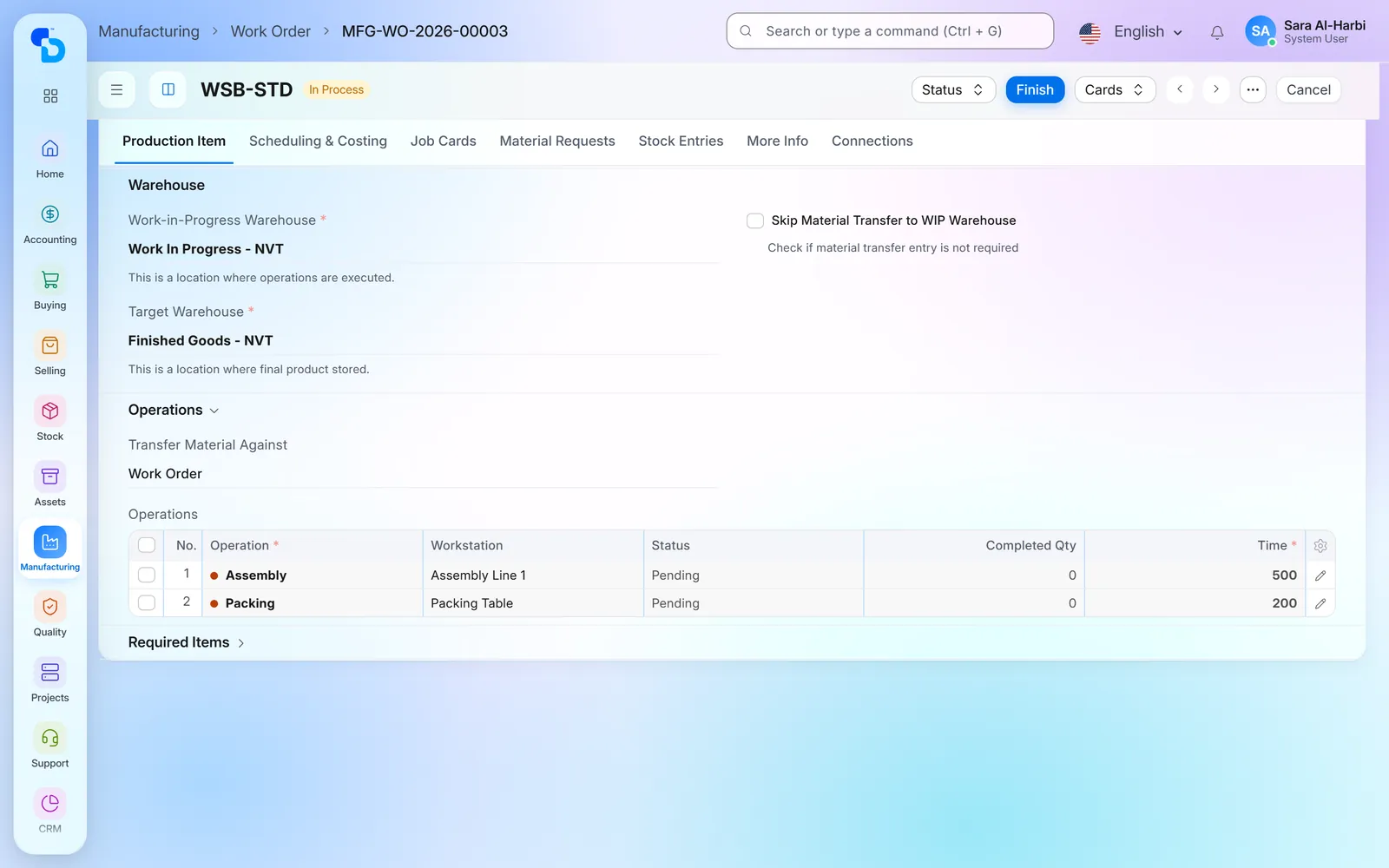
The work order is the shop floor’s instruction to make a quantity of one product. You create it from the production plan, from a sales order or by hand. Then you issue the materials, record each operation and receive the finished goods into their warehouse. At every step, the status tells everyone whether the job is not started, in process or completed.
- Required, transferred and consumed quantity per material
- Job cards created for each operation
- Manufactured quantity updated with every production entry
- Stop, close or reopen an order when plans change

Capacity planning and workstations
Schedule operations into the hours each workstation really has.
A schedule only works if the workstation is actually free, so each workstation has its working hours and a holiday list. When capacity planning is on, ERPNext places each operation of a submitted work order in the next free slot of its workstation. If no slot is free inside the planning window, it tells you. When a machine stops, a downtime entry records the stoppage and its reason.
- Working hours and holiday list per workstation
- Planning window in days, with or without overtime
- Planned start and end time on every operation
- Calendar and Gantt views of work orders and job cards
- Downtime Analysis report by machine and reason

Material availability and issue to the shop floor
Check the materials first, then move them to work in progress.
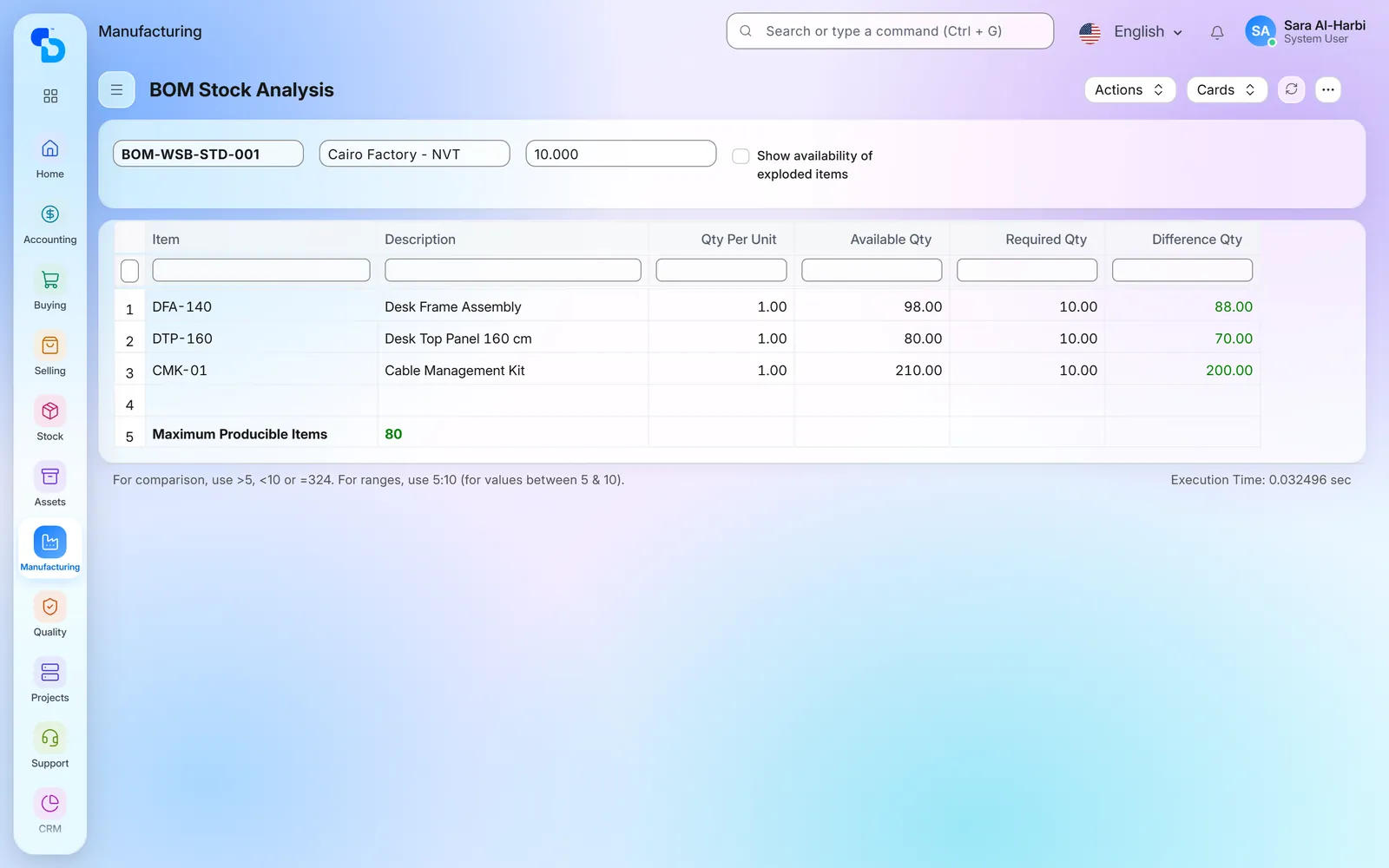
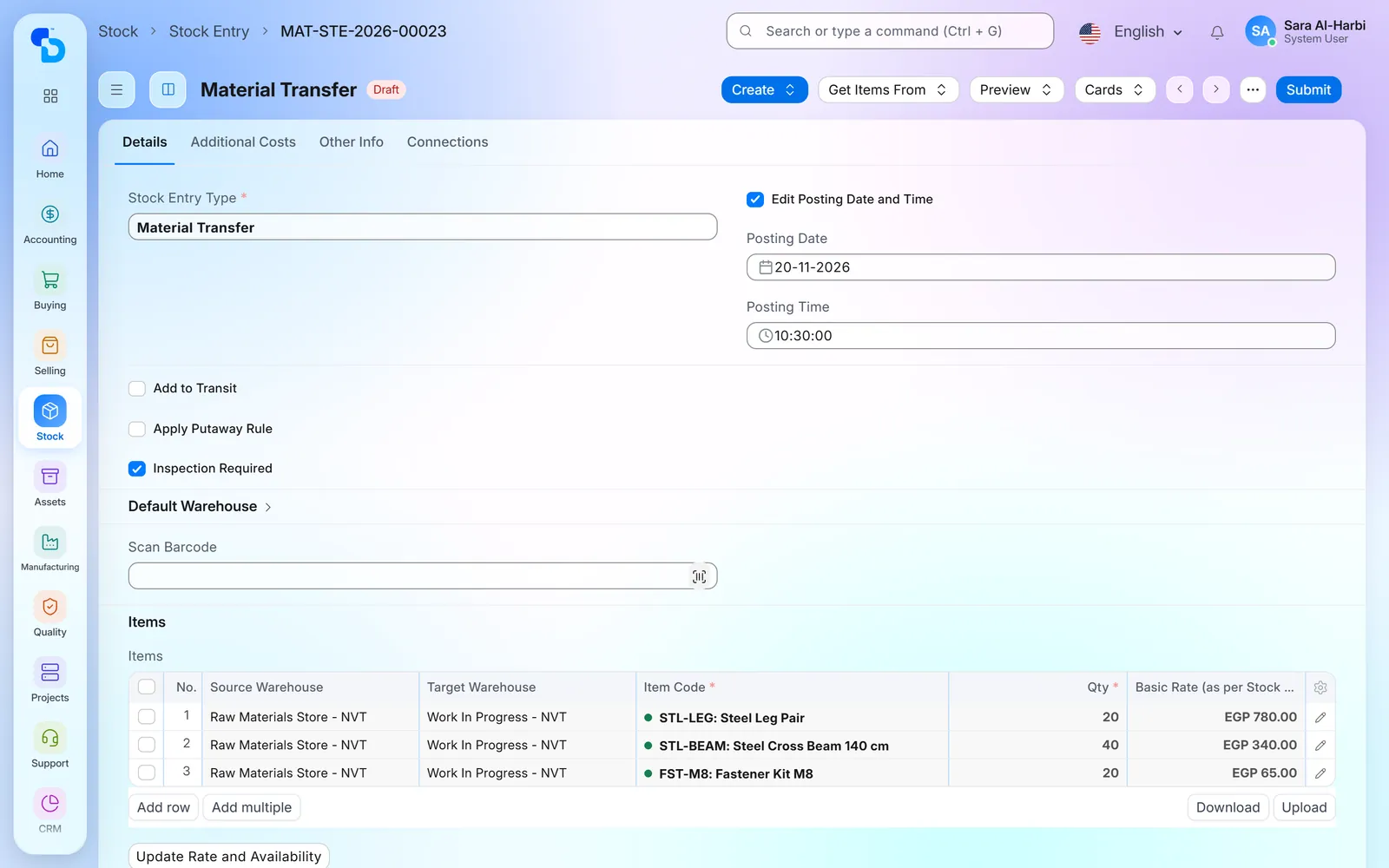
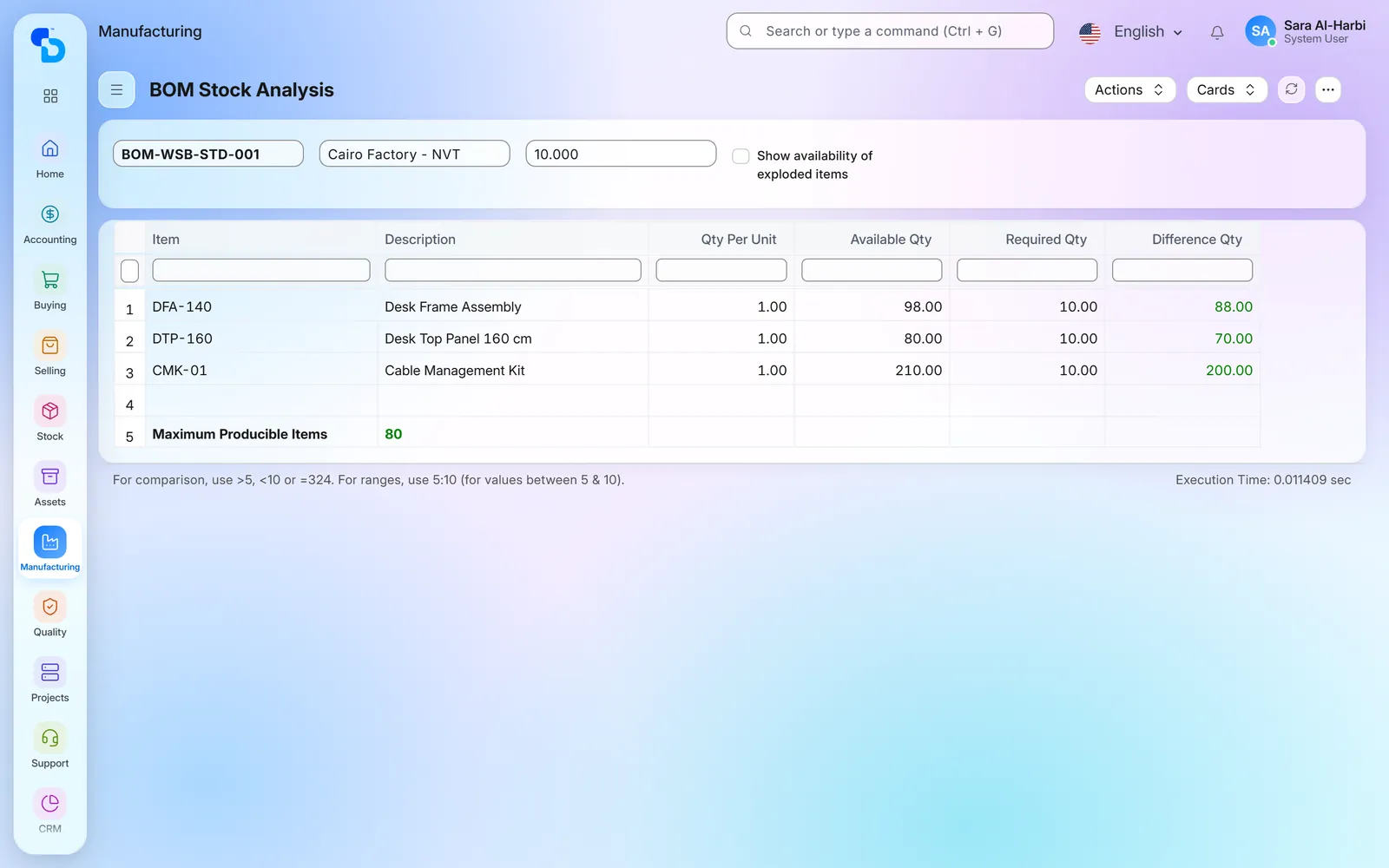
Before a job starts, the BOM stock report compares each material’s required quantity with stock in the warehouse you pick. Then one action on the work order creates the transfer from the raw material store to the work-in-progress warehouse. Stock moves when you submit the entry. When the two warehouses have separate stock accounts, the value moves between them as well.
- Transfer entry created from the work order
- Partial issues, with the transferred quantity tracked per material
- Pick list for the storekeeper
- Unused materials returned to the store when the job is done
Batch traceability in production
Know which raw material batch went into which finished batch.
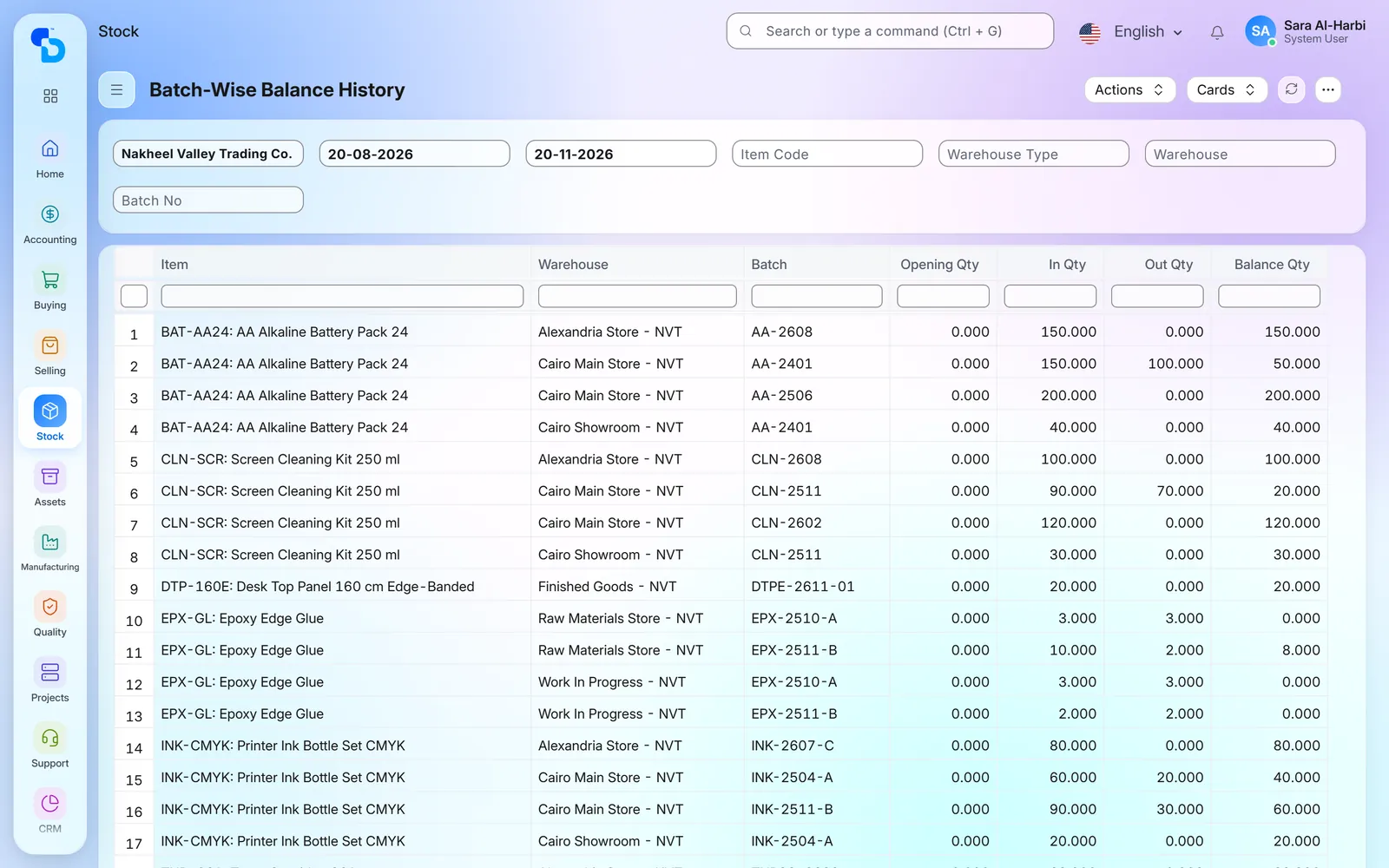
When quality matters, each finished batch must lead back to its inputs. Raw materials carry a batch number as soon as you receive them. The work order’s transfer and production entries then record the batches they consume, and the finished product receives its own batch number on the production entry. As a result, the stock ledger of a work order shows the batches that went in and the batch that came out.
- Batch numbers on raw materials as soon as they are received
- Consumed batches recorded on the work order's stock entries
- A batch number for the finished product, with an optional batch size
- Batch-Wise Balance History report
- In ERPNext 16, a traceability report backward and forward from any batch
Subcontracting
Send materials to an outside manufacturer, then receive the finished item.
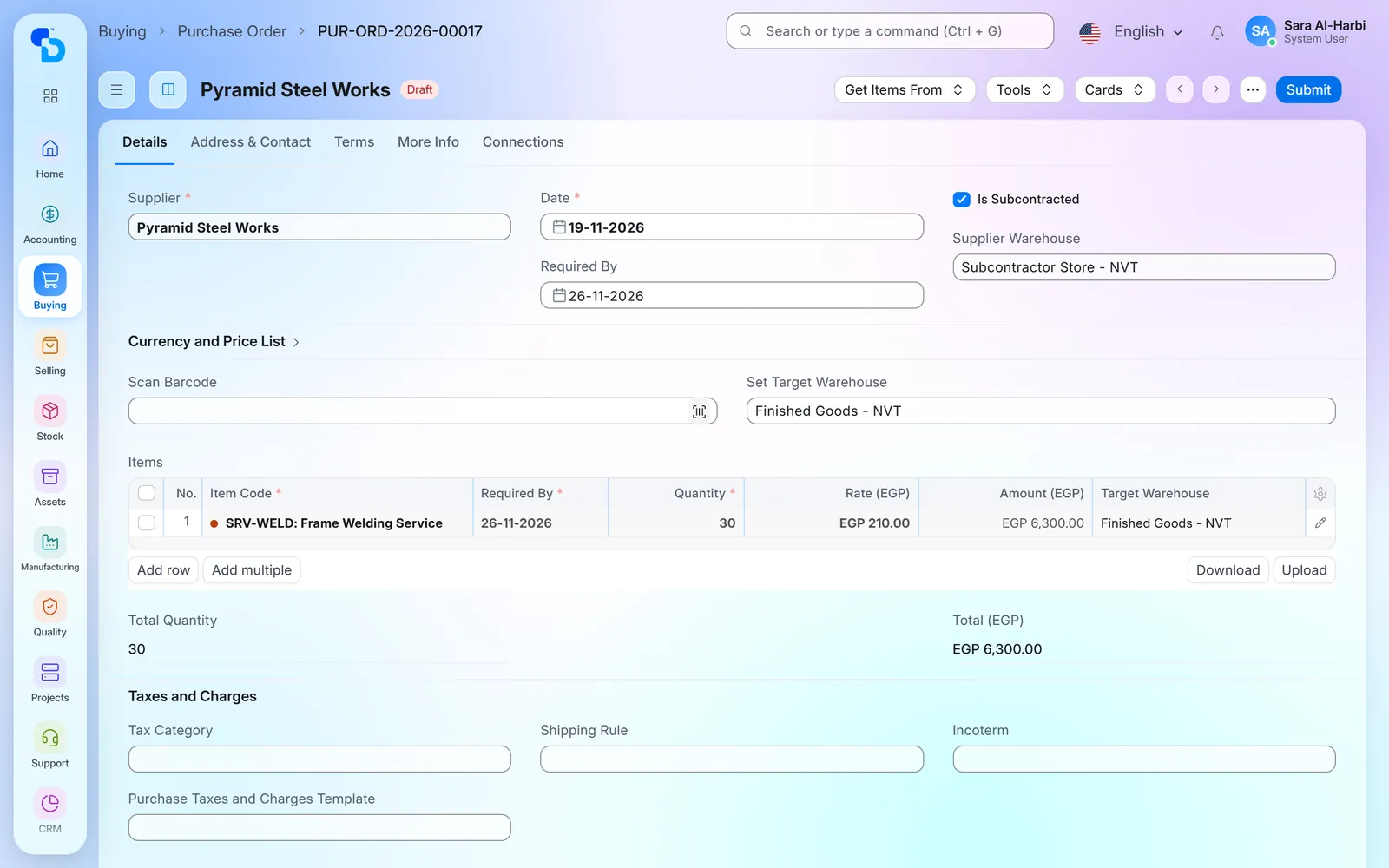
When a step happens outside your factory, ERPNext still follows it. A subcontracting order names the finished item, the service you pay for and the materials you supply. You then transfer those materials to the subcontractor’s warehouse, where they stay in your stock. When you receive the finished item, it enters your warehouse at the cost of the supplied materials plus the service.
- Subcontracting order raised from a purchase order
- Materials supplied and consumed, tracked per order
- Accepted and rejected quantities on the receipt
- Finished item valued at materials plus service cost
- Reports of items to receive and materials to send
Quality inspection in production
Set the checks once, then record them where the work happens.
Quality rules belong inside the process rather than in a paper file. A quality inspection template lists the parameters to check and their accepted values. You can require an inspection on incoming materials, on a job card, on the finished goods entry and before delivery. Each inspection then records its readings and ends as accepted or rejected. A setting decides whether a rejected inspection stops the transaction or only warns.
- Templates with parameters and acceptance criteria, numeric or formula-based
- Incoming, in-process and outgoing inspections
- Inspection linked to the job card or stock entry
- Rejected quantity kept in a rejected warehouse on receipts
- Quality Inspection Summary report
Job cards and shop-floor time
Time and quantity per operation, recorded by the people doing it.
Labour and machine time are costs, so the system captures them where they occur. Each operation of a work order gets a job card for its workstation. During the job, the operator starts and stops the timer, or enters the times, and records the completed quantity. The work order then shows actual against planned time for every operation. If a job needs rework, a corrective job card records the extra time.
- Start, pause and complete from the job card
- Time logs with employee and completed quantity
- Material transfer per job card, if you set it up that way
- Planned compared to actual time per operation
- Job Card Summary report
Production cost accounting
The real cost of each unit: materials, operations and extra costs.
A selling price is only safe when the unit cost is real. ERPNext values the finished goods of each work order at the materials actually consumed plus the operating cost. Operating cost is the workstation’s hourly rate multiplied by the time on the job cards. When perpetual inventory is on, the production entry posts these values to your accounts. The cost then moves to cost of goods sold when you deliver the product.
- Hourly rate per workstation, built from cost components such as wages, electricity and rent
- Planned and actual operating cost on the work order
- Additional costs added to a production entry when needed
- Scrap value deducted from the finished goods cost
- Work Order Consumed Materials report: required, consumed and extra consumption per order
Screens show demo data.
ERPNext manufacturing reports and the questions they answer
| Report | The question it answers |
|---|---|
|
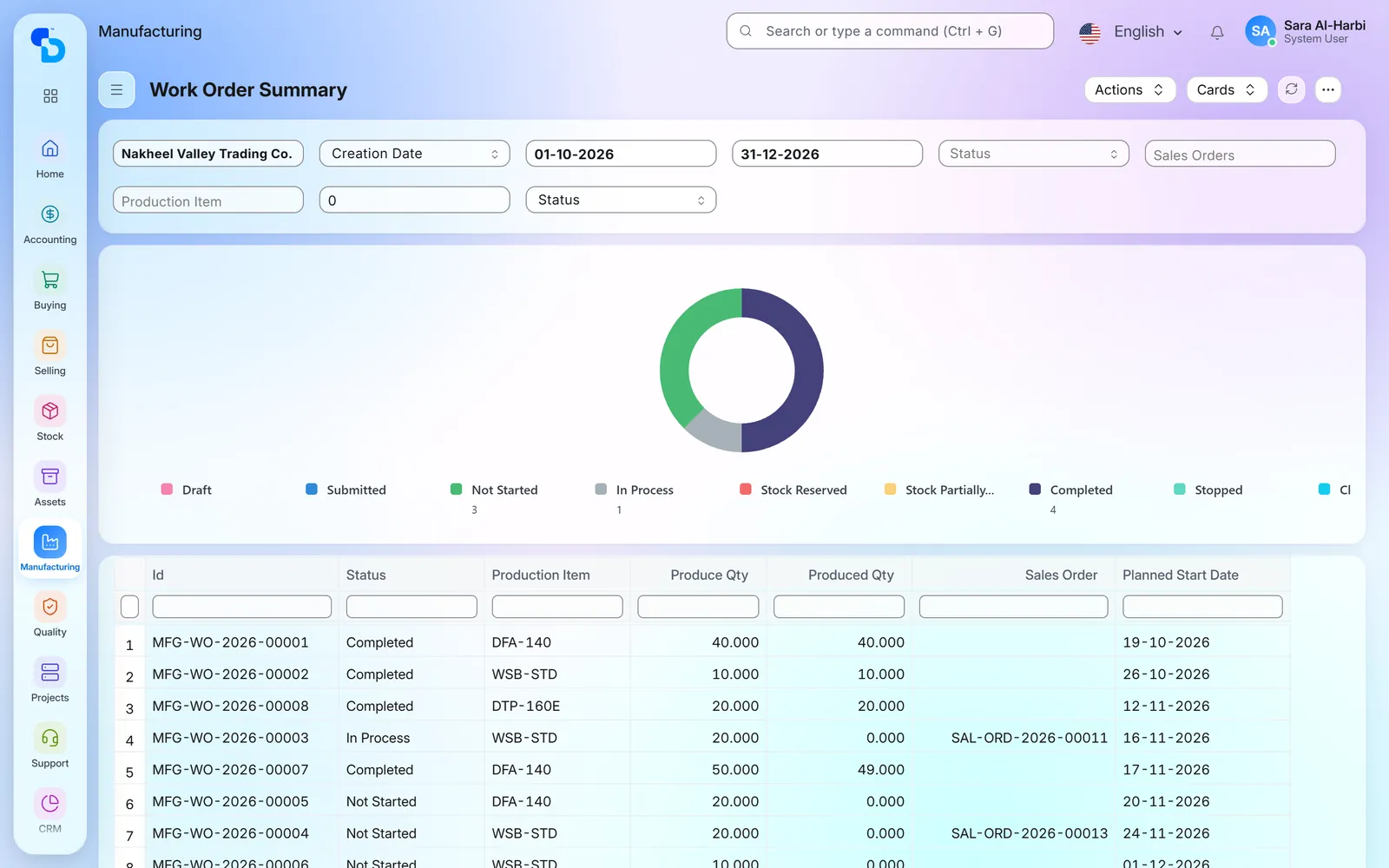
Work Order Summary |
How many work orders are in each status, and what was planned and produced? |
|
Production Analytics |
How many work orders fell into each status, week by week or month by month? |
|
Production Planning Report |
Which raw materials does each work order need, and when do the missing ones arrive? |
|
BOM Stock Report (BOM Stock Analysis in version 16) |
Is there enough of each material before you make a given quantity? |
|
Work Order Consumed Materials |
What did each work order require, receive and consume, including extra consumption? |
|
Job Card Summary |
Which operations ran on which workstation, for how long and for what quantity? |
|
Downtime Analysis |
Which machines stopped, for how long and why? |
|
Process Loss Report |
How much was lost on each work order, in quantity as well as value? |
|
Quality Inspection Summary |
Which inspections were accepted or rejected, by item and inspector? |
|
Stock Balance |
What are the quantity and value of raw materials, work in progress and finished goods? |
|
Itemwise Recommended Reorder Level |
What reorder level does past consumption suggest for each raw material? |

Why choose ERPNext for manufacturing?
The cost per unit comes from the materials actually consumed and the job card time at workstation rates, rather than from estimates.
Production plans and reorder levels raise material requests, so purchasing can start before stock runs out.
Inspectors record each inspection against the job card or stock entry, so quality records stay in the system for review and audit.
A sales order feeds the production plan, then the plan raises material requests, and production entries post to the accounts.
Screens and reports in both languages.
No fee per user for ERPNext itself.
E-invoicing in Egypt and Saudi Arabia
When you sell the products you make, ERPNext can send the sales invoices to ETA through our e-invoicing integration.
In Saudi Arabia, our Phase 2 integration clears tax invoices with ZATCA or reports them.
ERPNext manufacturing vs. spreadsheets and paper
| Challenge | ERPNext · Data Value | Traditional approach |
|---|---|---|
|
Unit production cost |
Consumed materials and job card time on each work order |
Excel sheets and estimates |
|
Raw material shortages |
Production plans and reorder levels raise material requests |
Reordering only when stock runs out |
|
Late production orders |
Operations scheduled against workstation hours, and a status on every work order |
Follow-up by phone and paper |
|
Quality control |
Inspections recorded against job cards and stock entries |
Paper records outside the system |
|
Production cost in the accounts |
Posted as soon as each production entry is submitted |
Entered by hand at month end |
|
Batch and serial number tracking |
From raw material to finished product |
Not available, or kept in a separate file |
|
Changing a recipe |
Versioned, multi-level BOMs with alternative materials and process loss |
Rigid recipes that are hard to change |
|
Outside processing |
Materials stay in your stock while at the subcontractor |
Followed outside the system |
Modules that work with ERPNext manufacturing
Raw materials and finished goods in separate, tracked warehouses.
Production plans raise the material requests that purchasing works from.
Sales orders feed production plans.
Production costs posted to the accounts when entries are submitted.
Machines and their depreciation.
ERPNext manufacturing: frequently asked questions
Does ERPNext manufacturing support multi-level bills of materials?
Yes, a BOM can include sub-assemblies with their own BOMs, and production plans can also create work orders for them.
Does production update inventory and accounting automatically?
Yes, every material issue and production entry moves stock as soon as you submit it. When perpetual inventory is switched on, the same entries post their value to the accounts.
Can we track the actual cost of a unit?
Yes, each work order collects the materials consumed and the operating cost from its job cards, and together they give the cost of the finished goods.
Can we track time per operation?
Yes, job cards record time and quantity per operation and workstation, and they also feed the work order cost.
Can we add quality checks?
Yes, you can require a quality inspection, based on a template, at receipt, in production or before delivery.
Does ERPNext manufacturing handle subcontracting?
Yes, you send materials to a subcontractor and then receive the finished items with their processing cost. Until then, the materials stay in your stock under the subcontractor’s warehouse.
What if a material is out of stock?
You can define alternative items for a material before you need them. If the BOM allows it, the planner then replaces the missing material with an alternative on the work order.
Does it work in Arabic?
Yes, ERPNext runs in Arabic, right to left, as well as in English. Screens and reports are available in both languages.
See your production in ERPNext manufacturing
Book a demo and we will walk through a bill of materials, a production plan and a work order using your own products.
Free demo · No commitment