Skip to content

Finance · Saudi Arabia, Egypt & the region

Control every riyal before it is spent

Masroof is Data Value's expense control app for ERPNext: requests are checked against your policy and budget before the money leaves, then executed as standard ERPNext documents.

Petty cash custody, company cards and travel per diem sit in the same books, and employees work from an Arabic self-service portal.

  • Policy and budget check before spend
  • Approval routing by amount
  • Petty cash on ledger balances
  • Arabic self-service portal
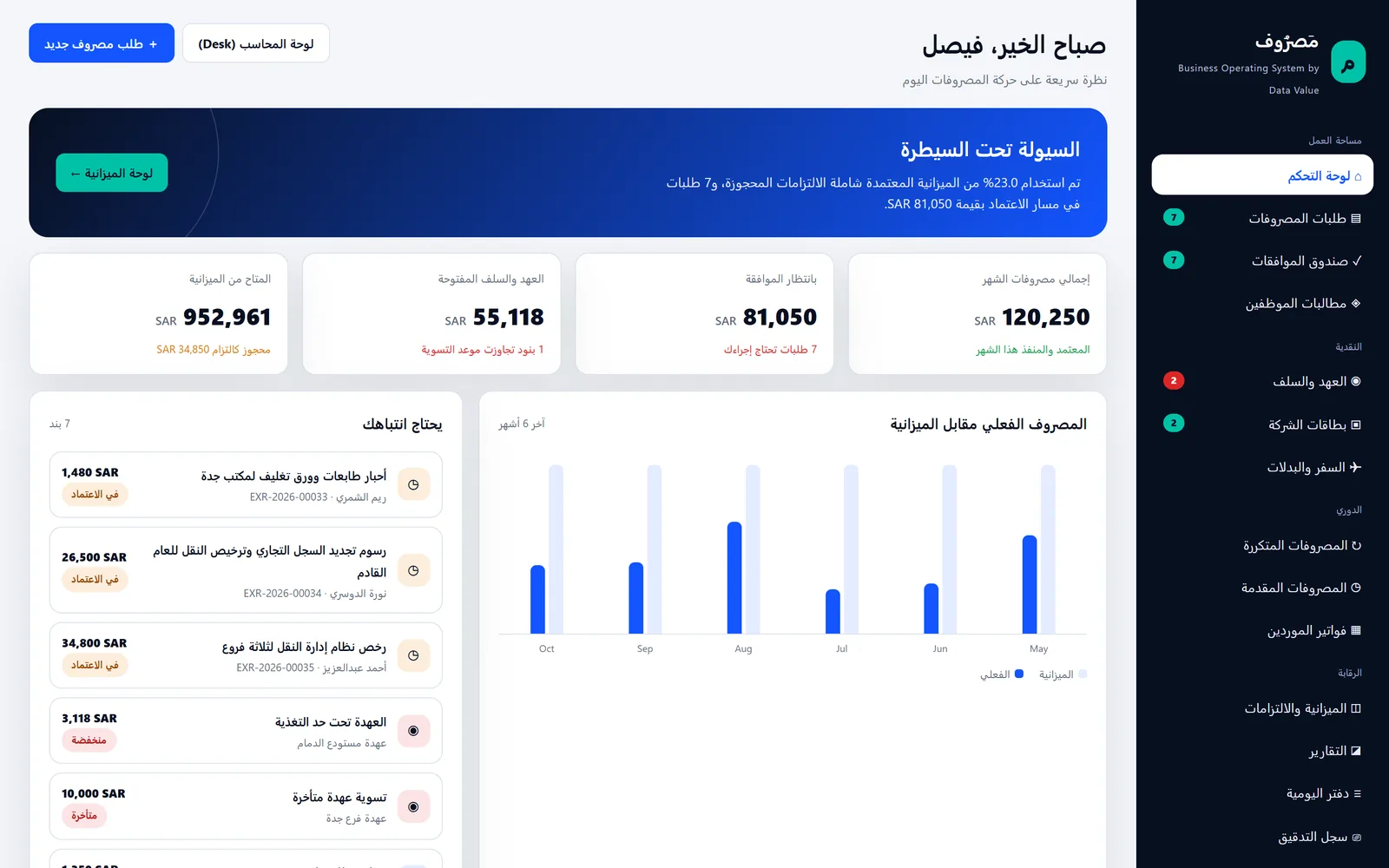
Masroof Arabic portal dashboard with spend KPIs, a six-month actual versus budget chart and an attention list for a demo company
The Arabic self-service portal: month spend, requests awaiting approval, open custody and budget headroom. Screens show demo data.

Who it is for

Built for the people who run it every day

  • Companies with petty cash at several sites
  • CFOs and finance managers
  • Expense accountants
  • Custodians and field supervisors
  • Companies with corporate cards
  • Teams that travel for work

Industry

Part of ERPNext for Trading & Distribution

Masroof suits trading and distribution companies with branches, warehouses and field teams that spend from petty cash.

Explore the industry page →

What you get

What you get with Expense Control & Petty Cash

12 capabilities in 3 groups, each shown next to its screen in the real system.

Request & approve

Arabic self-service portal

Employees, custodians, approvers and accountants work from one right-to-left portal at /masroof.

  • A dashboard per role with month spend, pending approvals and items that need attention
  • Requests, approvals, custody, cards, travel, budget, reports and policy screens
  • Each employee sees their own requests; accountants see the whole company
  • Works on a phone browser; no separate app to install
Masroof Arabic portal dashboard with spend KPIs, a six-month actual versus budget chart and an attention list for a demo company
The Arabic self-service portal: month spend, requests awaiting approval, open custody and budget headroom.

Request & approve

Expense requests before the spend

Spending starts as a request with an amount, cost center, payment mode and the receipt behind it.

  • Bank transfer, cash, petty cash, company card or payroll as the payment mode
  • Receipts stored as private PDF or image files on the request
  • Above the no-invoice limit a request cannot be submitted without a receipt
  • Foreign-currency requests converted to company currency
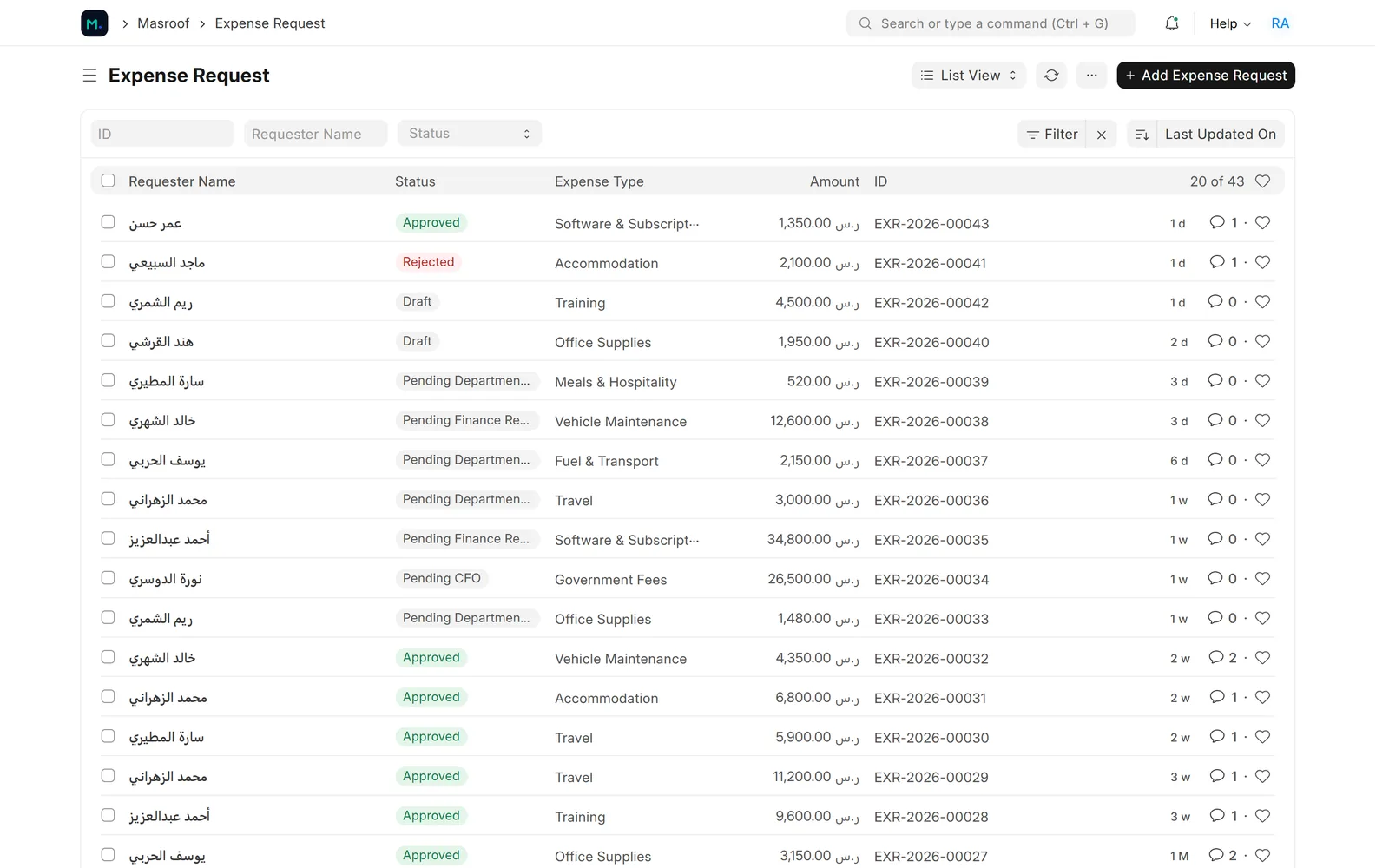
List of expense requests with requester, status, expense type and amount in SAR
Expense requests with their approval state, from draft to approved or rejected.

Request & approve

Live policy and budget check

While the request is filled in, a panel shows the caps, the budget left and anything that will stop it.

  • Per-transaction and monthly caps for the employee's grade
  • Budget, actual, committed and available for the cost center and account
  • Warnings such as the daily meal cap, and stops such as a missing receipt
  • The approval path the request will follow
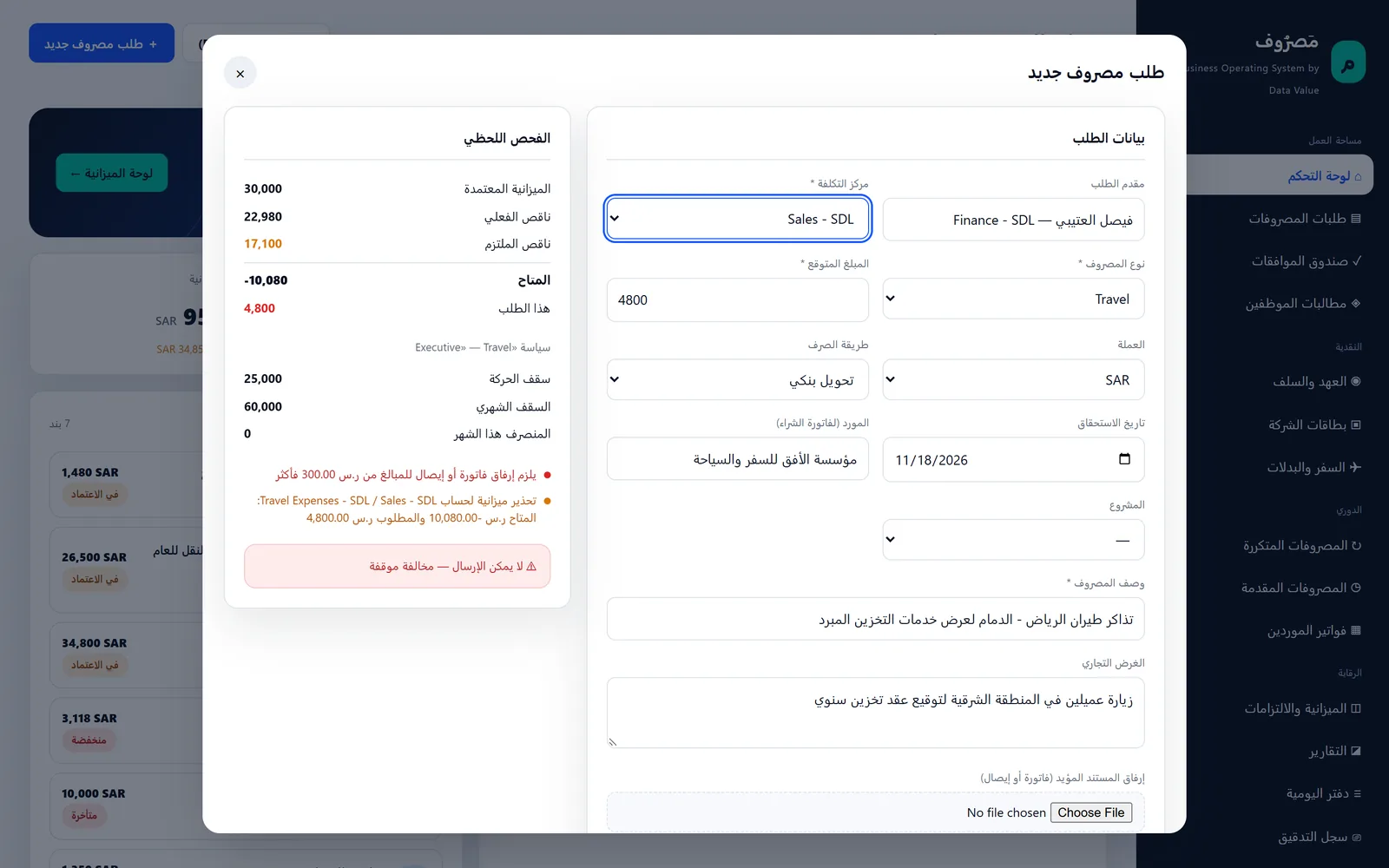
New expense request form with a live check panel showing budget, caps and a missing-receipt stop
A new request is checked against policy and budget while it is being filled in (Arabic portal).

Request & approve

Approval routing by amount

Requests go to the department approver, then finance review and the CFO as the amount grows.

  • Finance review from 10,000 in company currency
  • CFO approval above a threshold set globally or per policy rule
  • Rejection requires a written reason that is kept on the request
  • Approvers get a Desk notification when a request reaches their step
Expense request form waiting for CFO approval, with requester, cost center, amount in SAR and an Actions menu
An expense request at the CFO step after department and finance review, with the workflow actions.

Policy, budget & control

Expense policy by type and grade

One active, dated policy per company sets the rules for each expense type and employee grade.

  • Caps per transaction and per month
  • Default expense account per expense type
  • No-invoice limit, daily meal cap and custody settlement days
  • Optional block on new requests while an advance is overdue
Expense policy rules with per-transaction and monthly caps by expense type and grade
The expense policy: per-transaction and monthly caps for each expense type and employee grade.

Policy, budget & control

Budget commitments

Approval reserves the amount against the ERPNext budget, so available budget drops before any invoice exists.

  • Uses ERPNext budgets with their stop, warn or ignore action
  • Budget, actual, committed and available per cost center and account
  • The commitment is consumed by the invoice or claim and the rest released
  • Commitments past their date are released by a daily job
Budget versus committed versus actual report by cost center and expense account
Budget, committed and actual per cost center and account, with what is still available.

Policy, budget & control

Execution in standard ERPNext documents

An approved request becomes a supplier invoice, an employee expense claim or a payroll addition.

  • Purchase Invoice for supplier spend, with withholding tax from the policy rule
  • Expense Claim for reimbursing employees (with HRMS)
  • Additional Salary for the payroll payment mode (with HRMS payroll)
  • Spending above the approved amount needs an accountant override with a reason
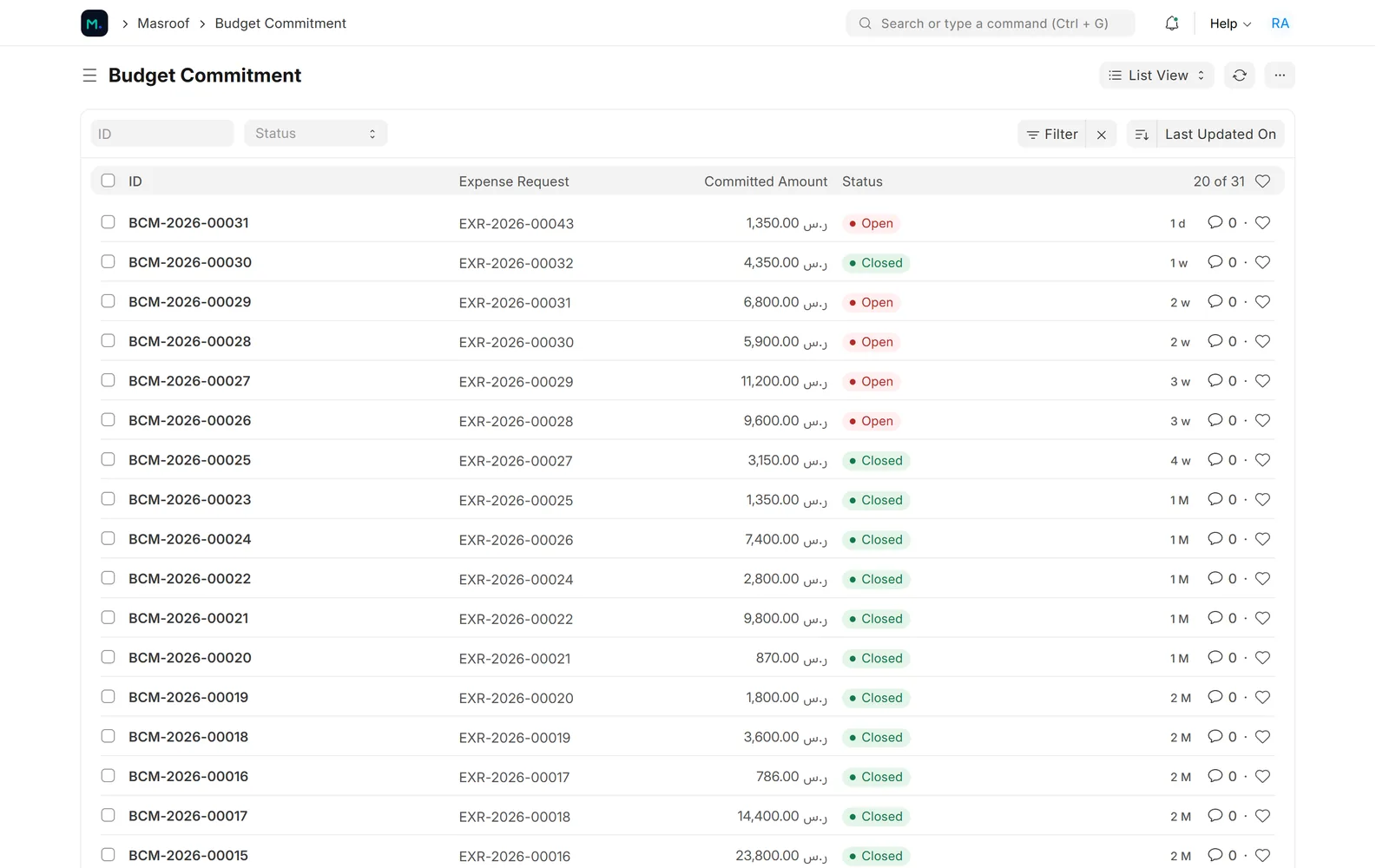
Budget commitment list with open and closed commitments per expense request
Every approved request reserves a budget commitment that is consumed when it is executed.

Policy, budget & control

Control reports and audit trail

Finance sees what was spent, against which rule, and who acted on it.

  • Policy violations with warnings, stops and recorded overrides
  • Spend by cost center and top spenders, exportable to CSV
  • Custody aging per fund
  • An audit trail of the comments the automation writes on each document
Policy violations report with meal cap and budget warnings and a duplicate invoice stop
Policy violations: meal cap and budget warnings, and a duplicate invoice stopped on a custody settlement.

Cash, cards & travel

Petty cash custody on ledger balances

Each fund has a custodian, its own custody account, a ceiling and a replenish threshold.

  • Opening the fund posts the funding journal entry
  • The balance is read from the general ledger, not typed in
  • Alerts when a fund drops below its threshold or a settlement is overdue
  • Employee advances shown with their due date and overdue days (with HRMS)
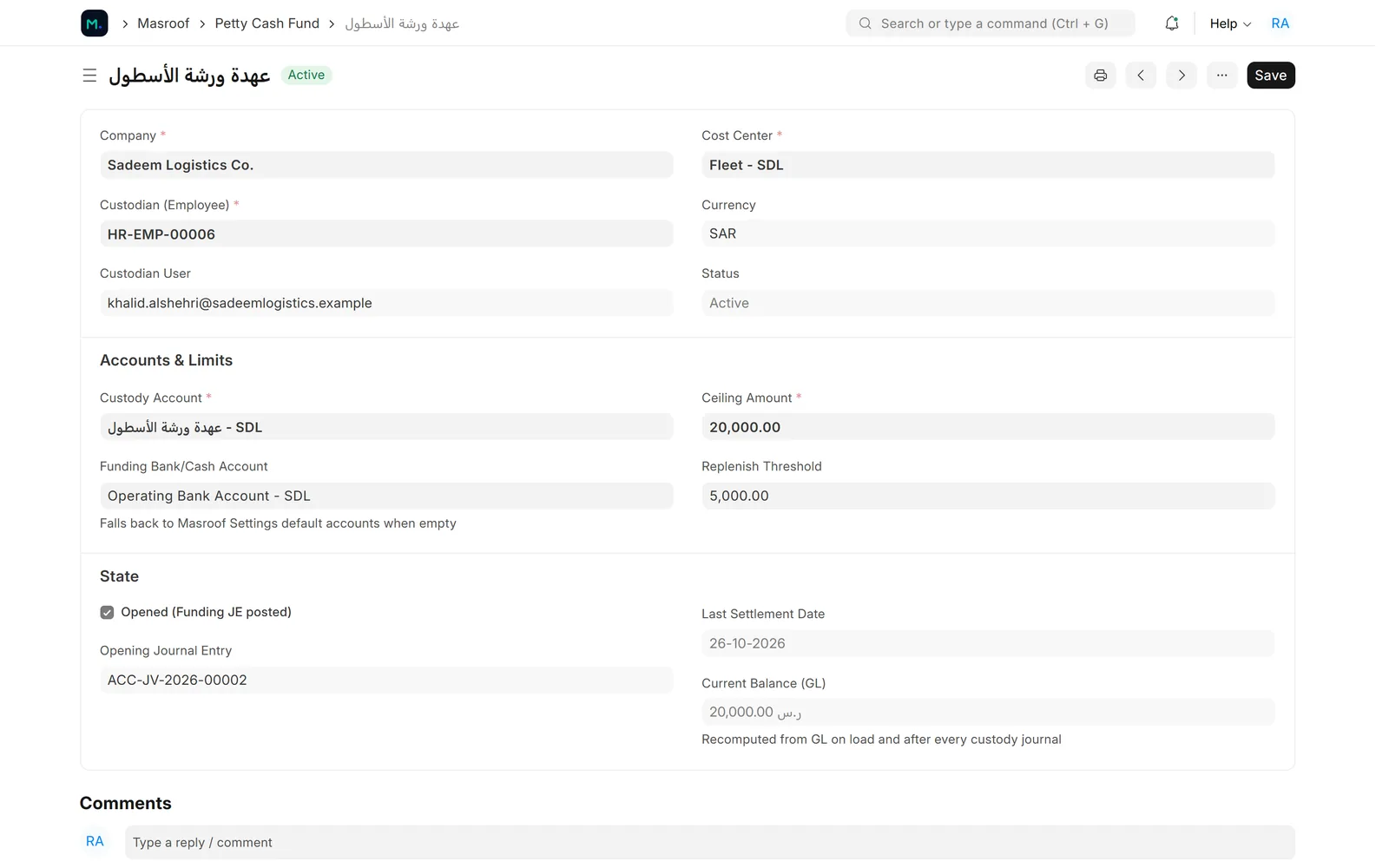
Petty cash fund form with custody account, ceiling, replenish threshold and GL balance
Petty cash funds with their ceiling, replenish threshold and balance read from the ledger.

Cash, cards & travel

Custody settlements with duplicate check

The custodian lists receipts, and the settlement posts one balanced journal entry and tops the fund back up.

  • Expense type, cost center, supplier, invoice number and VAT per line
  • VAT posted to the input VAT account
  • Same supplier, invoice number and amount within 90 days is stopped
  • Only an accountant can override a duplicate, with a reason that is logged
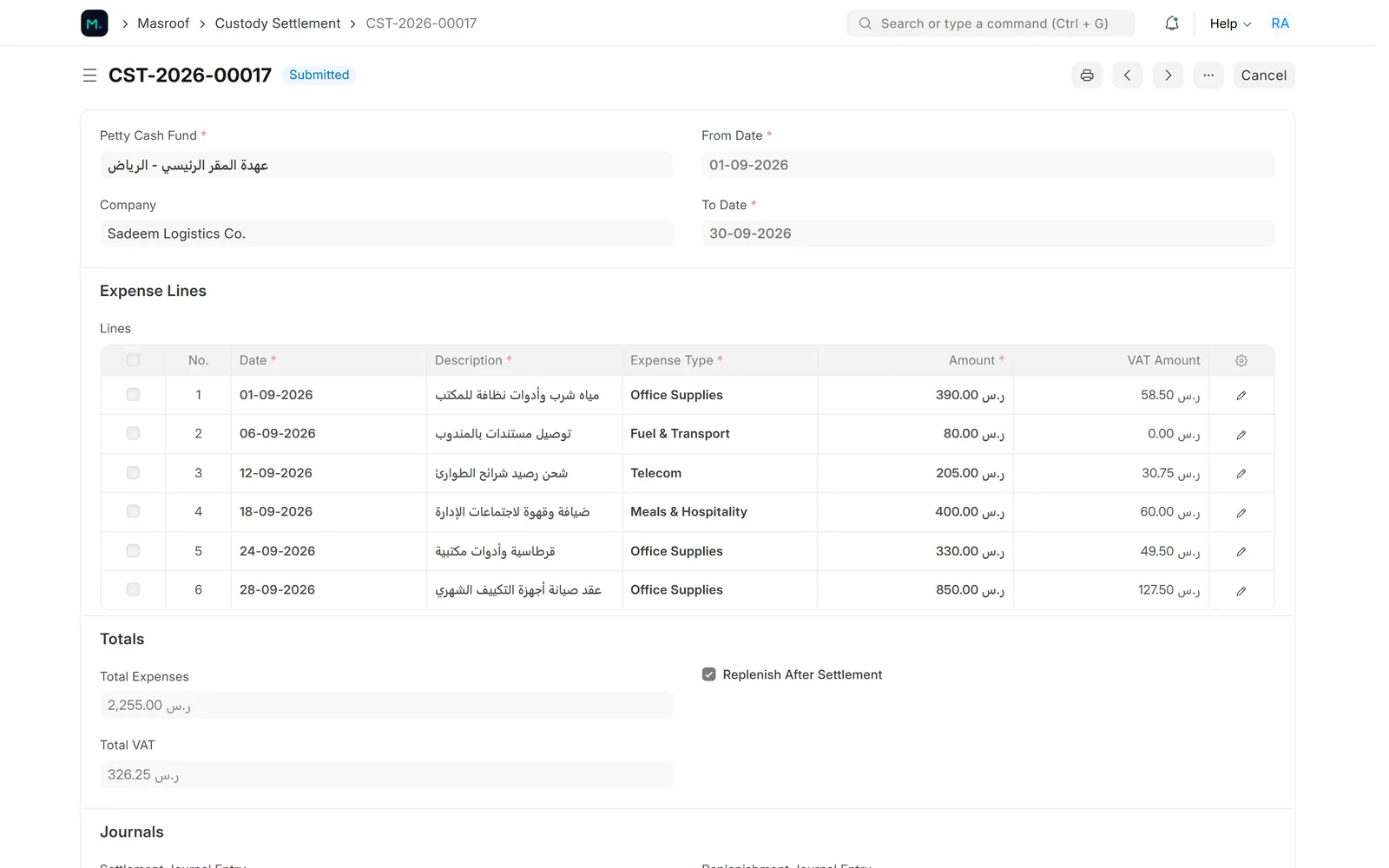
Submitted custody settlement with expense lines, VAT amounts, totals and the replenish-after-settlement option
A submitted custody settlement with VAT on each line and replenishment back to the fund ceiling.

Cash, cards & travel

Corporate card reconciliation

Card statements are imported from a CSV file and each line is matched, disputed or marked duplicate.

  • Re-importing the same file creates nothing twice
  • Matching posts the expense against the card liability account
  • Card limits and usage per holder
  • Unmatched card lines appear on the accountant's attention list
Card transaction list with card, transaction date, merchant and amount
Corporate card statement lines imported from CSV, by card, merchant and amount.

Cash, cards & travel

Travel per diem

A calculator works out the per diem from the city, the employee's grade and the trip dates.

  • Daily rates per city and grade, effective-dated
  • Travel days paid at a set percentage, plus a kilometre rate
  • Creates the HRMS Travel Request and the expense request from it
  • The request then follows the normal approval path
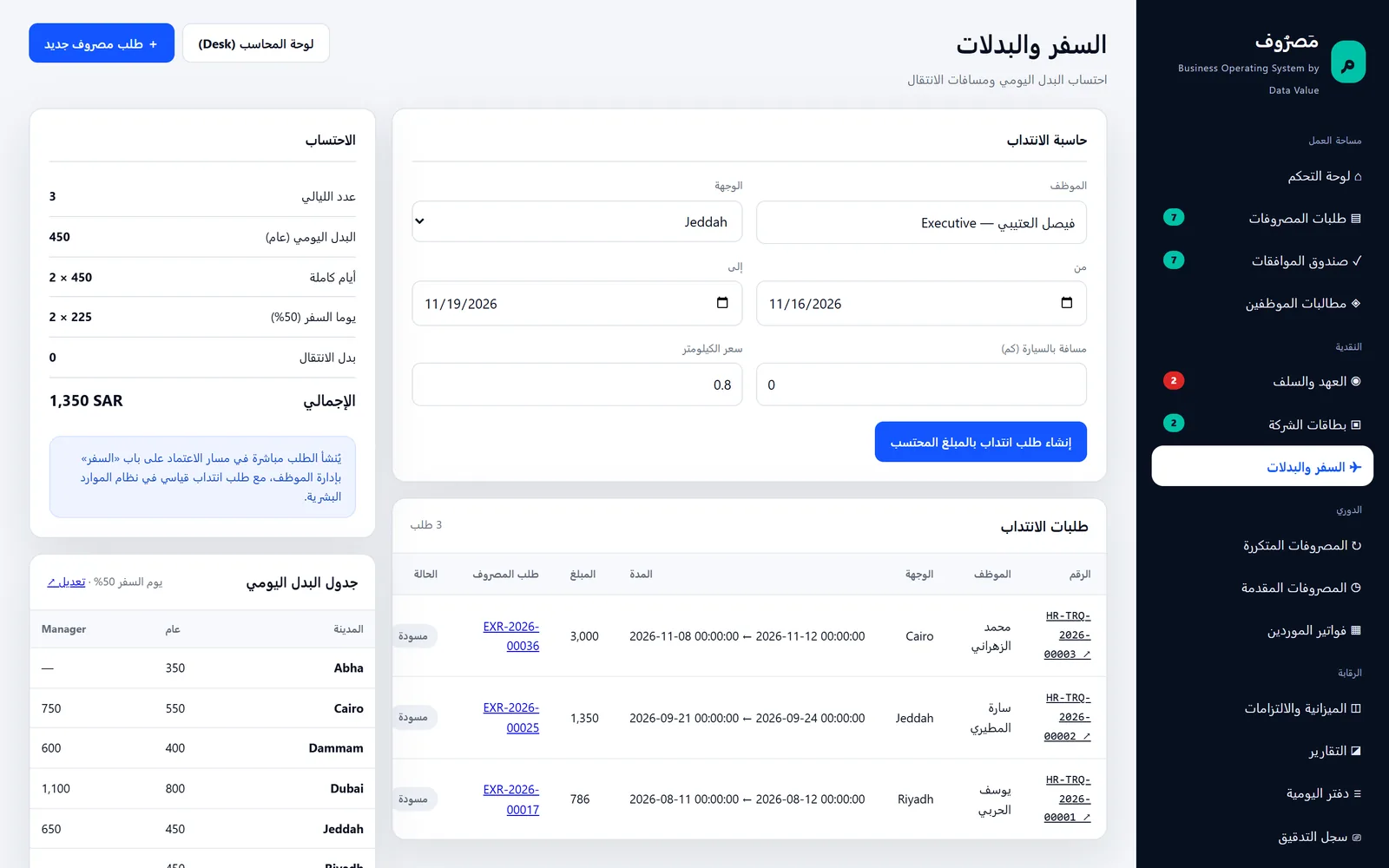
Travel per diem calculator for a three-night trip to Jeddah with the per diem rate table
Per diem calculator by city and grade, with the travel requests it created (Arabic portal).

Screens show demo data.

Challenges vs. solutions

Common challenges, and how Expense Control & Petty Cash answers each one

ChallengeHow Data Value solves itTraditional approach
Spending discovered after the money is goneRequests checked against policy and budget and approved before the spendReceipts collected at month end
Budgets that look available but are already promisedApproved requests reserve a commitment, so available budget drops at approvalBudget reports that count invoices only
Petty cash balances nobody trustsEach fund has its own custody account and its balance comes from the ledgerA cash box and a notebook per custodian
The same invoice claimed twiceSame supplier, invoice number and amount within 90 days is stopped; overrides need a logged reasonManual checking, when someone remembers
Card statements reconciled in spreadsheetsCSV statement import, matching with a journal entry, disputes and duplicates flaggedHighlighting the bank statement by hand
Per diem worked out differently each tripRates per city and grade with the same rule for travel days and kilometresEach manager's own calculation

Why Data Value

Why teams choose it

Control before the spend

Policy, receipt and budget checks run while the request is written, not at month end.

Inside your ERPNext books

Invoices, claims, payments and journal entries are standard ERPNext documents.

Arabic portal

A right-to-left self-service portal for employees, custodians and approvers.

Petty cash you can trust

Fund balances come from the ledger, with VAT and replenishment posted for you.

Overrides are recorded

Duplicate and over-approval overrides need an accountant and a reason, and are logged.

Works on a phone

The portal is responsive, so requests and approvals work from a phone browser.

How it works

From setup to daily use

  1. Set up the rulesexpense types, the expense policy with its caps per grade, ERPNext budgets per cost center and the default accounts in Masroof Settings.
  2. Raise the requestthe employee fills it in the portal, attaches the receipt and sees the policy and budget check before sending it.
  3. Approve itthe request goes through the department approver, finance review and the CFO depending on the amount, and approval reserves the budget.
  4. Execute and settlethe accountant turns it into an invoice, claim or payment, custodians settle their funds and card lines are matched, all posted in ERPNext.

FAQ

Frequently asked questions

Does it work with my existing ERPNext?

Masroof is an app for ERPNext version 15. It uses your chart of accounts, cost centers, suppliers and ERPNext budgets, and creates standard Purchase Invoices, Journal Entries and Payment Entries.

Do we need the HR module (HRMS)?

No. Requests, approvals, budget commitments, petty cash, cards and supplier invoices work without it. With HRMS installed you also get employee expense claims, advances, travel requests and the payroll payment mode.

Is the interface in Arabic?

The self-service portal is built in Arabic, right to left. The ERPNext Desk screens follow each user's language; some field help texts and a few control messages are still in English.

Can it read receipts automatically or pull card transactions from the bank?

No. Receipts are attached as files and amounts are typed in, and card statements are imported from a CSV file. There is no OCR and no direct bank or card feed.

How much does it cost?

Prices are on request. Contact Data Value and we will scope it with you.

See it with your own data

Book a demo and our team will walk you through the system and how it fits your business.

Free demo · No commitment