Skip to content

Real estate & contracting · Arabic-first, on ERPNext

From tender to handover, one workspace for contractors

Madarij takes a contractor's bid from prequalification through costing, pricing, approval and submission, then turns the awarded tender into a live project with its contract, baseline and progress certificates.

It is built in Arabic on ERPNext, so invoices, purchasing and project costs land in your accounting without re-keying.

  • BOQ costing with supplier quotes
  • Profit scenarios and a price waterfall
  • Approval chain up to the CEO
  • Progress certificates to ERPNext invoices
Project workspace with planned and actual progress, SPI, CPI, EV, AC and EAC, the contract value with approved changes and retention, and a register of risks, issues and milestones
Project PMO dashboard with earned value. Screens show demo data.

Who it is for

Built for the people who run it every day

  • General contractors
  • MEP and fit-out contractors
  • Operation and maintenance contractors
  • Tender and estimating teams
  • Commercial managers and CEOs
  • Project managers and PMO
  • Document controllers

Industry

Part of ERPNext for Real Estate & Contracting

See how property, construction and tender management fit together for developers and contractors.

Explore the industry page →

What you get

What you get with Madarij: Tenders & Projects

9 capabilities in 3 groups, each shown next to its screen in the real system.

Tender study & pricing

Prequalification to tender in one click

Keep prequalifications in one list and turn a qualified one into a tender.

  • Track active prequalifications
  • Convert a qualified one into a tender in one click
  • Its data and checklist carry forward to the tender
  • A stage track from opportunity to result
Workspace of an operation and maintenance tender ready for submission, with a 100 percent readiness checklist, cost base and final bid, and tender dates in Gregorian and Hijri
Tender workspace with readiness gates and key dates

Tender study & pricing

BOQ requirements and cost study

Break the tender into BOQ lines, then cost each line by category.

  • Quantity, commercial type, delivery method and owner per line
  • Delivery in-house, by ERP supply or by a subcontractor
  • Cost by category: manpower, supply, equipment, lump sum, admin
  • Supplier quotes per cost item, with a confidence badge
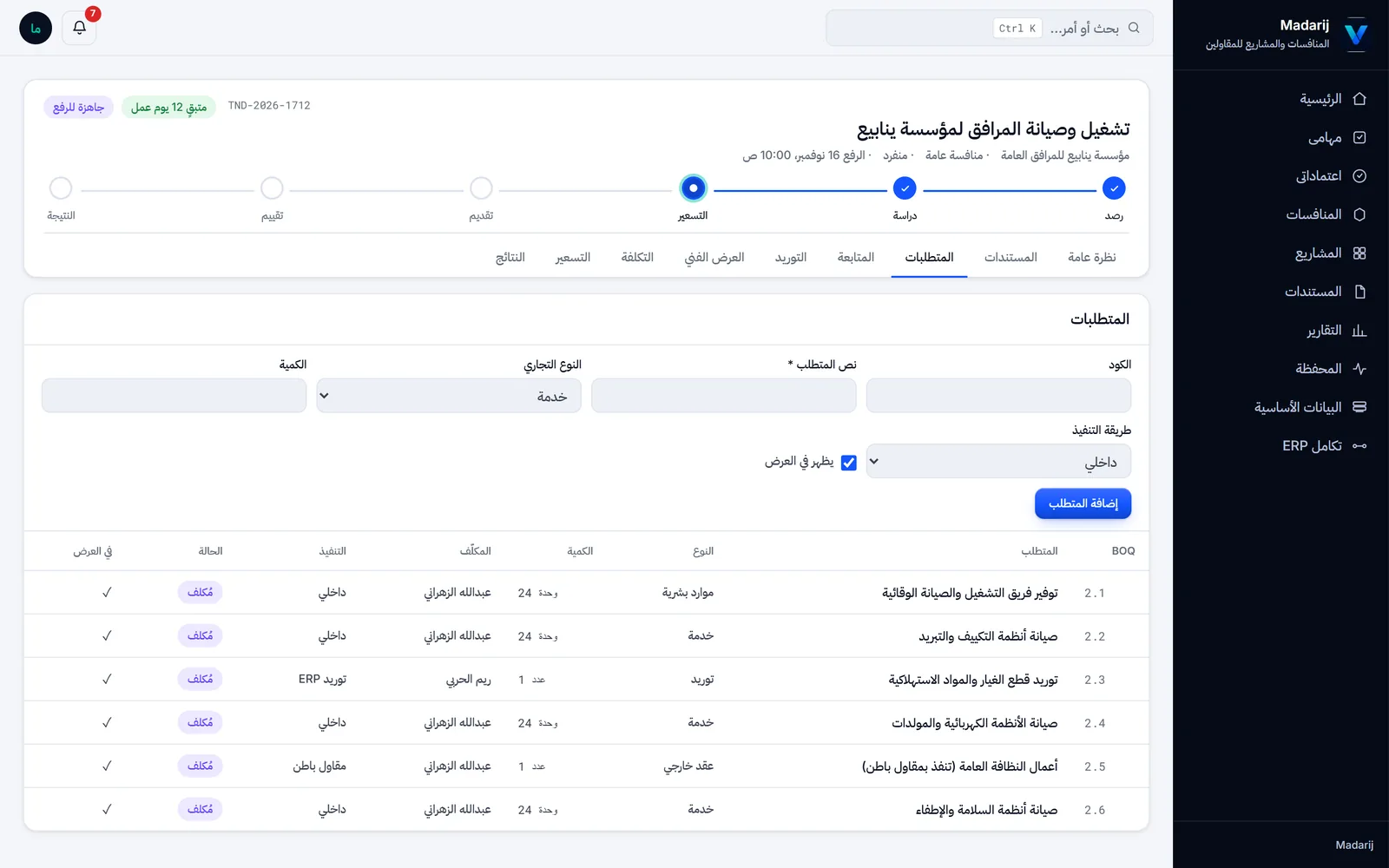
Requirements tab listing BOQ lines with type, quantity, owner, delivery method and costed status
BOQ requirements with type, delivery method and owner

Tender study & pricing

Pricing with profit scenarios

Choose the margin, then follow how the cost becomes the final bid.

  • Minimum, competitive, target, management or custom margin
  • Override the markup on any line
  • Lines priced on loaded cost, including hidden overheads
  • Waterfall from cost base and financing to VAT and final bid
Pricing tab with BOQ lines showing loaded cost, line markup, unit price, revenue and margin, the profit scenario picker, and the waterfall from cost base to VAT and final bid
Pricing on loaded cost, with line markups and a price waterfall

Readiness, approval & award

Readiness gates before submission

The tender cannot be marked Ready for Submission until every gate is complete.

  • Approved conditions booklet and mandatory documents
  • Insurance, closed addenda and answered inquiries
  • Every requirement costed and the technical proposal approved
  • Tender dates shown in Gregorian and Hijri
Workspace of an operation and maintenance tender ready for submission, with a 100 percent readiness checklist, cost base and final bid, and tender dates in Gregorian and Hijri
Tender workspace with readiness gates and key dates

Readiness, approval & award

Approval chain up to the CEO

Every pricing version is reviewed before the bid leaves the company.

  • Technical, finance and commercial review, then the CEO
  • An approval room with the full price waterfall
  • Approve the final bid, or return it with a note
  • Cost and selling figures hidden from roles not allowed to see them
Approval room for a revised pricing version showing cost base, financing, selling total, profit, blended margin, VAT and final bid, the gates check and the approve and return buttons
CEO approval room for a bid price

Readiness, approval & award

Award to project automatically

Recording the award sets the project up for you.

  • The project, with an ERPNext Project and Cost Center
  • A draft contract with frozen original values
  • A post-award checklist with an owner for each action
  • Actions such as the final guarantee and contract signing
Mobilization tab with nine completed post-award actions such as final guarantee, contract signing and checking the ERPNext project and cost center, each with an owner
Post-award checklist created at award

Project delivery & billing

PMO dashboard with earned value

Follow each project's progress and cost on one dashboard.

  • Planned vs actual progress
  • EV, AC, EAC, SPI and CPI
  • Actual cost from the project's cost center in ERPNext
  • A register of risks, issues, decisions and milestones
Project workspace with planned and actual progress, SPI, CPI, EV, AC and EAC, the contract value with approved changes and retention, and a register of risks, issues and milestones
Project PMO dashboard with earned value

Project delivery & billing

Progress certificates to invoice

Claim, certify and invoice the work done in each period.

  • Previous, current and cumulative quantities per line
  • Retention, advance recovery, deductions and VAT
  • A certified certificate becomes a draft ERPNext Sales Invoice
  • Collection tracked from the payments against it
Client-certified progress certificate with contract, previous, current and cumulative quantities per line, and a claim summary with advance recovery, retention, VAT and net certificate
Progress certificate with cumulative quantities and claim

Project delivery & billing

Change control, documents and alerts

Keep the contract value, subcontracts and company papers under control.

  • Variation orders update the contract value
  • Subcontract packages from scoping to execution
  • Company certificates with their expiry status
  • Daily alerts for bank guarantees and overdue tasks
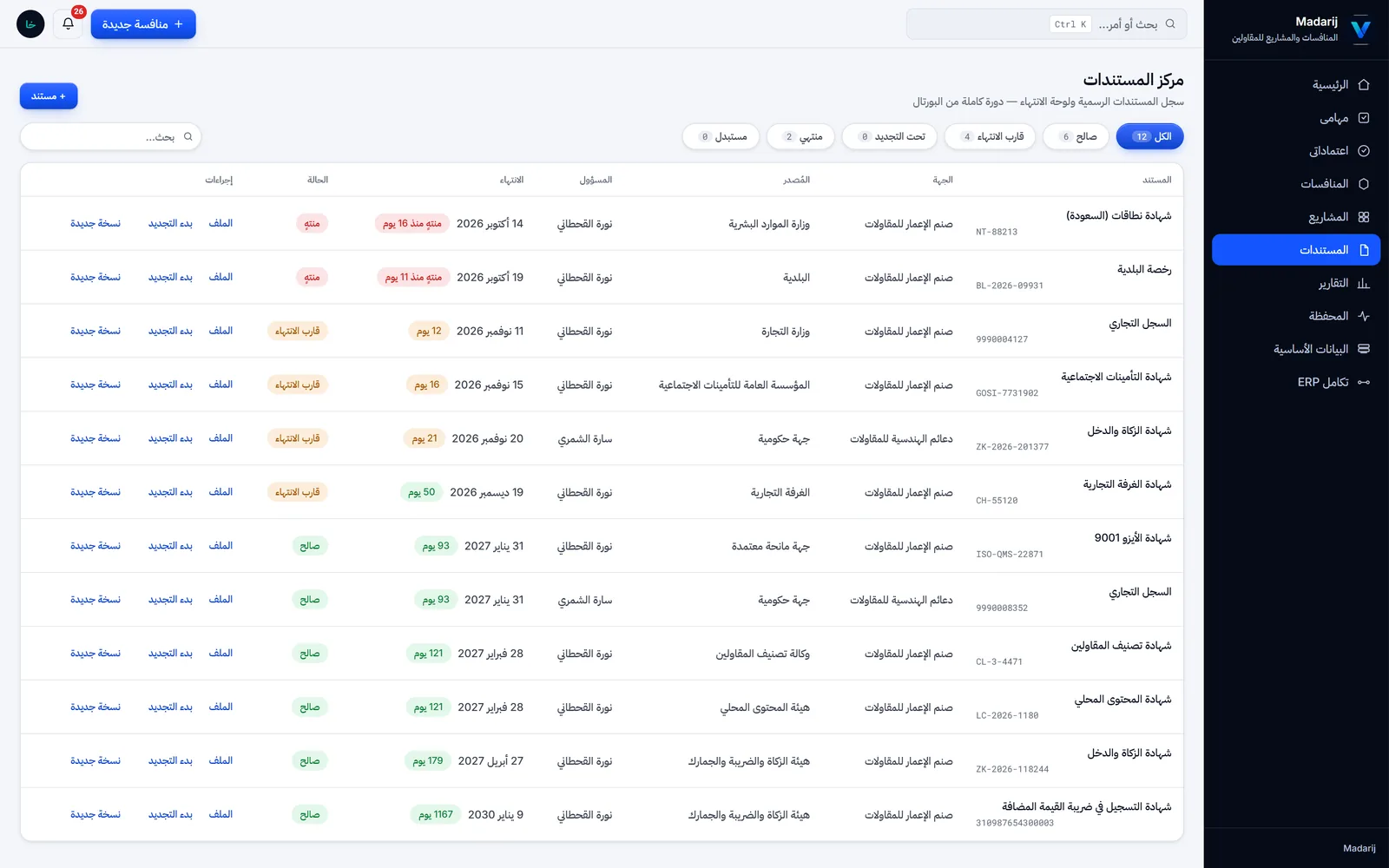
Document center listing company certificates such as commercial registration, GOSI, zakat, chamber and ISO 9001 with expiry dates, days left and status
Document center with expiry status

Screens show demo data.

Challenges vs. solutions

Common challenges, and how Madarij: Tenders & Projects answers each one

ChallengeHow Data Value solves itTraditional approach
Costing a tender with many BOQ linesBOQ requirements costed by category, with supplier quotes and a confidence badge on each cost itemOne spreadsheet per estimator
Overheads left out of the bid priceEach line priced on its loaded cost, including its share of site staff, vehicles, insurance and head officeA rough percentage added at the end
Submitting with something missingA readiness checklist blocks Ready for Submission until documents, insurance, addenda, inquiries and costing are completeManual checks just before the deadline
Getting the bid price approvedTechnical, finance and commercial review, then CEO approval in an approval room, with approve or return with a noteEmail chains and printed sign-offs
Starting the project after awardThe award creates the project, an ERPNext Project and Cost Center, a draft contract and a post-award checklistRe-entering tender data in other systems
Billing progress certificatesCumulative quantities with retention, advance recovery and VAT; a certified certificate becomes a draft Sales InvoiceSeparate certificate sheets and manual invoices
Expiring certificates and guaranteesA document center with expiry status, bank guarantee countdowns and daily alertsCalendar reminders kept by one person

Why Data Value

Why teams choose it

Built in Arabic

Designed in Arabic with a right-to-left layout, using the tender terms your team already uses.

Native to ERPNext

Material Requests, Projects, Cost Centers and Sales Invoices are standard ERPNext documents.

Figures for the right roles

Cost and selling figures are separate permission levels, so a role can work on a tender without seeing them.

From bid to closeout

The awarded tender becomes the project, its contract, its certificates and finally its closeout record.

Earned value on real costs

SPI, CPI and EAC use the actual cost booked to the project's cost center in ERPNext.

Approvals from a phone

The portal is responsive with a bottom navigation, so approvals, tasks and certificates work in a phone browser.

How it works

From setup to daily use

  1. Register the prequalification or opportunity and convert it into a tender.
  2. Build the BOQ requirements, cost every line with market quotes and pick a profit scenario.
  3. Clear the readiness gates and route the pricing version through technical, finance, commercial and CEO approval.
  4. Record the awardMadarij creates the project, the contract and the ERPNext project and cost center.
  5. Run the project with the PMO dashboard, progress certificates, invoicing, change orders and closeout.

FAQ

Frequently asked questions

Does Madarij need ERPNext?

Yes. It is a Frappe app that requires ERPNext and creates standard ERPNext documents such as Material Requests, Projects, Cost Centers and Sales Invoices.

Is the interface in Arabic or English?

Madarij is designed in Arabic with a right-to-left layout. The navigation can switch to English, but most screens stay in Arabic.

Can we control who sees our costs and margins?

Yes. Cost figures and selling figures are separate permission levels, so a role can work on a tender without seeing them.

How are progress certificates calculated?

Each line carries previous, current and cumulative quantities against the contract quantity adjusted by approved variations. Advance recovery and retention are deducted before VAT.

Does Madarij connect to Etimad or issue ZATCA e-invoices?

No. Madarij does not connect to e-procurement portals and does not issue e-invoices itself; it creates draft Sales Invoices in ERPNext, where your own invoicing setup applies.

Does it work on a phone?

Yes, in the browser. The portal is responsive with a bottom navigation on small screens, so approvals, tasks and certificates can be handled from a phone. There is no separate native app.

See it with your own data

Book a demo and our team will walk you through the system and how it fits your business.

Free demo · No commitment