Services · Start & build
Data migration to ERPNext, checked before you go live
Customers, suppliers, items, opening balances and open documents moved from spreadsheets or your old system, then reconciled against the source.
You see the numbers match before anyone stops using the old system.
- Trial imports on a test site
- Row-by-row import log
- Reconciliation you sign off
- Arabic names kept as written
Who it is for
For companies moving their history into ERPNext
- Companies leaving spreadsheets
- Teams leaving older accounting software
- Groups merging companies or branches into one site
- ERPNext users moving to a new, clean site
- Companies adding a new company to ERPNext
Good to know
Not everything should move
Many companies move masters, open documents and balances, and keep the old system read-only for history. We help you decide what is worth moving.
What is included
What we move, and how we check it
Four layers of data, each with its own check.
Master data
Customers, suppliers, items, price lists, employees and the chart of accounts.
- Duplicates found and merged first
- Codes and naming rules agreed
Opening balances
Trial balance, customer and supplier balances, stock quantities and values at the cut-off date.
- Balances by invoice for ageing
- Stock by warehouse and batch
Open documents
Orders, contracts and cheques that are still running on the cut-off date.
- Open sales and purchase orders
- Post-dated cheques where relevant
Reconciliation
Reports that compare ERPNext with the source, for you to review and sign off.
- Totals by account and party
- Differences listed, not hidden
In practice
Import and check
Import and check
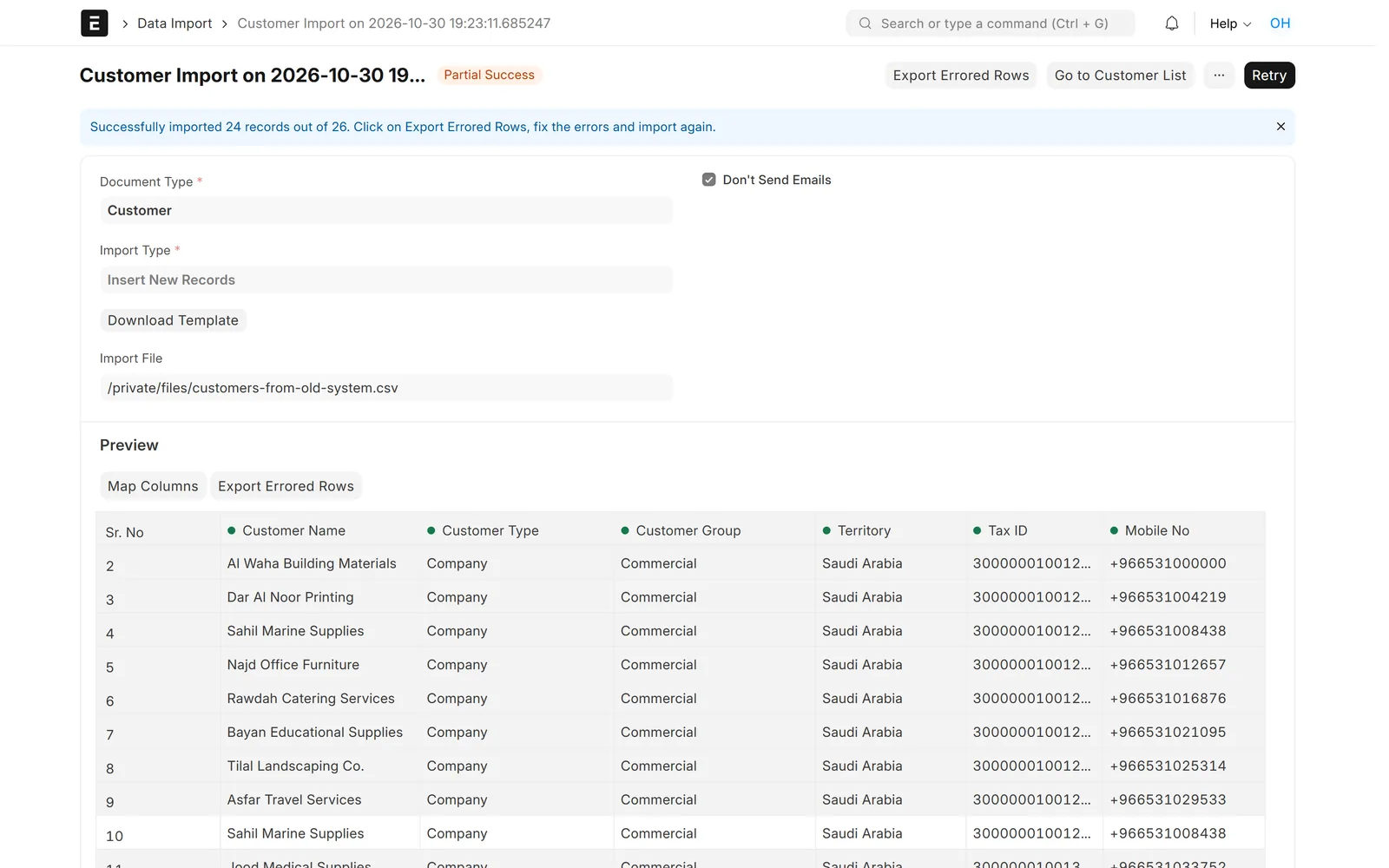
Every row accounted for
Each import shows which rows were saved and which failed, with the reason, so nothing is lost quietly.
- Failed rows fixed and imported again
- Same templates reused for each trial run
- Run first on a test site

Import and check
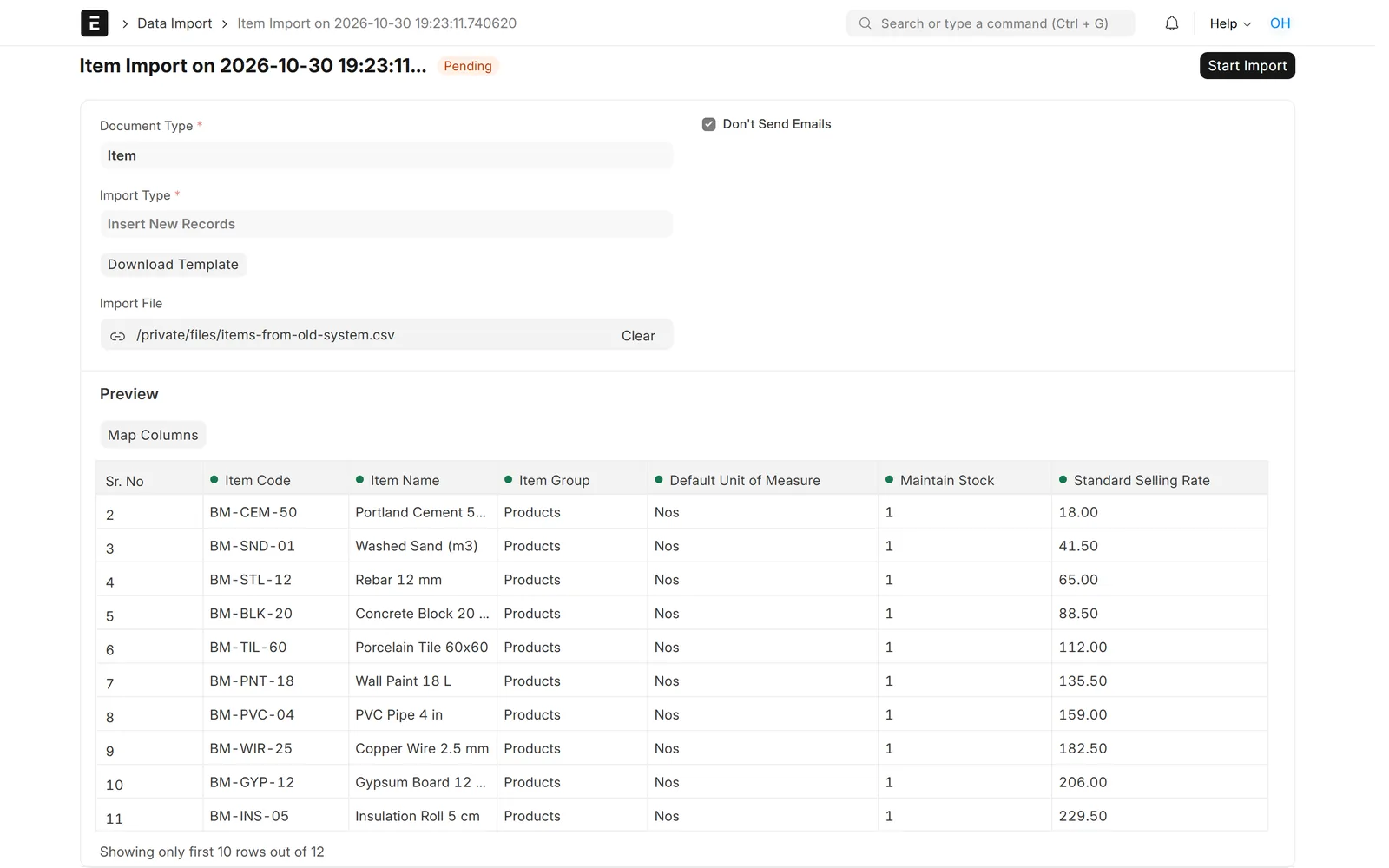
Your columns matched to ERPNext fields
Before anything is saved, the preview shows how each column of your file maps to an ERPNext field.
- Old codes kept for reference
- Arabic and English names
- Warnings shown before import
Import and check
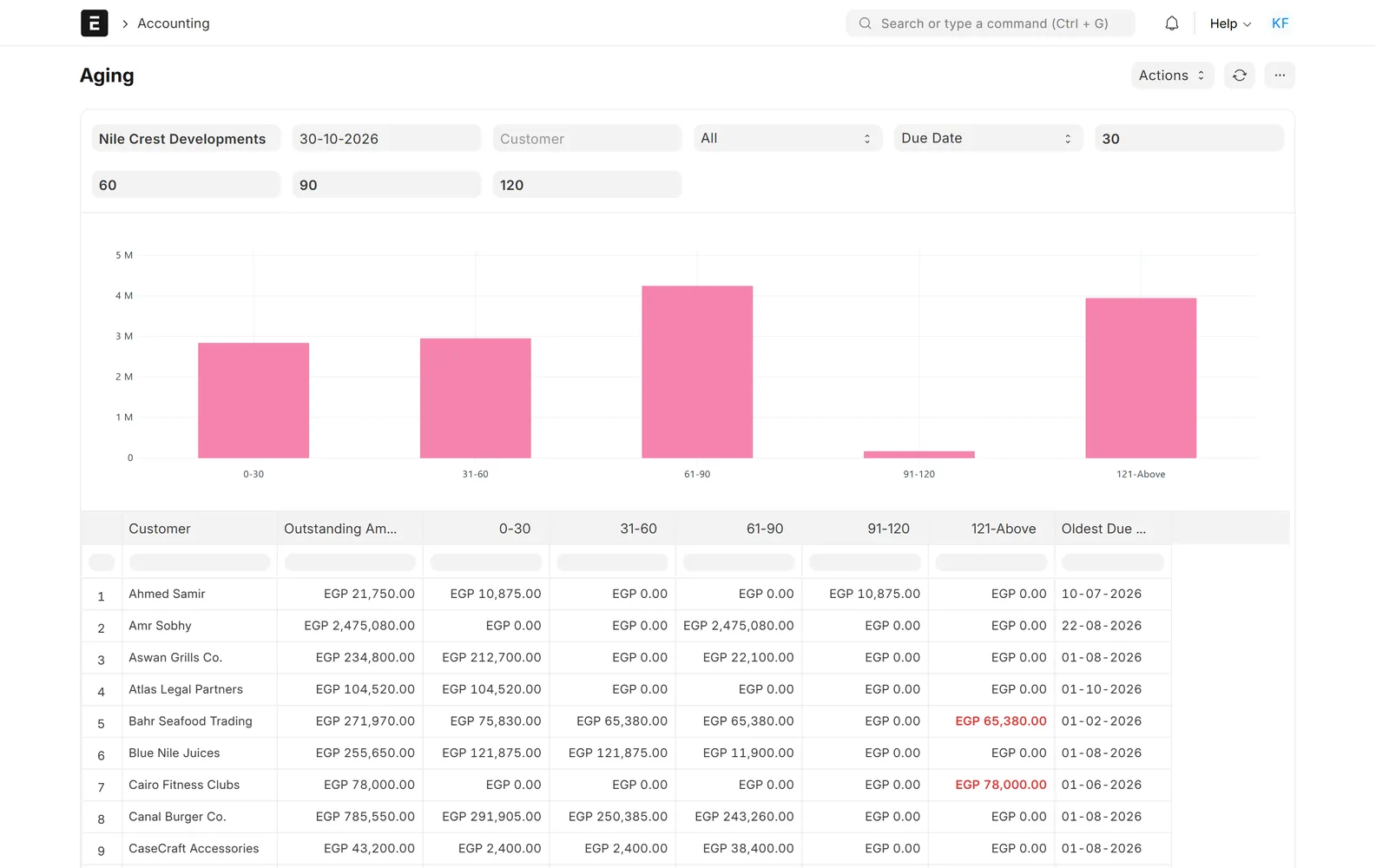
Ageing that matches the old system
After opening balances are loaded, ageing and party balances are compared with the source reports.
- Customer and supplier balances
- Differences explained line by line
- Signed off before go-live
Screens show demo data.
Challenges vs. solutions
Common migration problems, and how we avoid them
| Challenge | How Data Value does it | Common approach |
|---|---|---|
| Duplicate customers and items | Cleaned and merged before the first import | Importing everything and cleaning later |
| Balances that do not match | Reconciliation reports compared with the source and signed off | Checking a few totals by eye |
| One import on go-live day | Trial runs on a test site until the result is clean | First import straight into the live site |
| Rows that fail without notice | Import logs show every failed row and its reason | Finding missing data weeks later |
Why Data Value
Why teams choose us for this work
Tested before you see it
Work runs on a test site with your own cases first.
Repeatable templates
The same files are used for every trial run, so the final run holds no surprises.
Arabic done properly
Screens, prints and documents right to left, not translated as an afterthought.
200+ projects, 120+ clients
In 20+ industries and 8 countries, from offices in Cairo and Riyadh.
Frappe Certified Gold Partner
Recognised by Frappe, the company behind ERPNext.
Tax-ready data
Tax IDs and addresses checked for ETA and ZATCA e-invoicing.
How it works
How a migration runs
- InventoryWe list the sources, the data in each and the cut-off date.
- Clean and mapDuplicates are cleaned and columns mapped to ERPNext fields.
- Trial importsImports run on a test site and are checked with you.
- ReconcileBalances and counts compared with the source and signed off.
- Final runThe same steps run on the live site at the agreed cut-off.
Related
Works together with
FAQ
Frequently asked questions
Which systems can you migrate from?
Spreadsheets, older accounting software, another ERP or another ERPNext site. If the old system can export to Excel or CSV, we can usually work with it.
Do we have to move all our history?
No. Most companies move masters, open documents and balances at a cut-off date, and keep the old system for reference.
Who checks that the numbers are right?
We prepare reconciliation reports against the source, and your finance team reviews and signs them off before go-live.
Can you merge two ERPNext sites into one?
Yes, this is done as a planned project with trial runs, because the two sites usually share names and codes that must be mapped first.
How is migration priced?
It depends on the number of sources, the volume and how clean the data is. We review samples and send a written proposal.
Send us a sample of your data
Book a call and share a few exports from your current system. We will tell you what can move and how we will check it.
Free demo · No commitment