People & performance · Saudi Arabia & Egypt
KPI Management: weighted KPIs, monthly scorecards and performance ranking
Data Value's KPI Management app turns your balanced-scorecard KPIs into monthly employee scorecards inside Frappe and ERPNext.
Each scorecard scores every KPI against its weight and thresholds, and the reports rank your people and show where each one is slipping.
- Red, yellow and green thresholds
- Automatic weighted scoring
- Weights must total 100 to submit
- Ranked performance reports

Who it is for
Built for the people who run it every day
- HR and performance managers
- Department managers
- Leadership teams
- Companies already on ERPNext or Frappe HR
- Teams moving KPI reviews off spreadsheets
- Companies in Saudi Arabia and Egypt
What you get
What you get with KPI Management
9 capabilities in 3 groups, each shown next to its screen in the real system.
KPI library
KPI library with codes, owners and frequencies
Every KPI defined once, with its owner and period.
- KPI code, category and department
- Owning employee
- Frequency from daily to yearly
- Status and active period with start and end dates
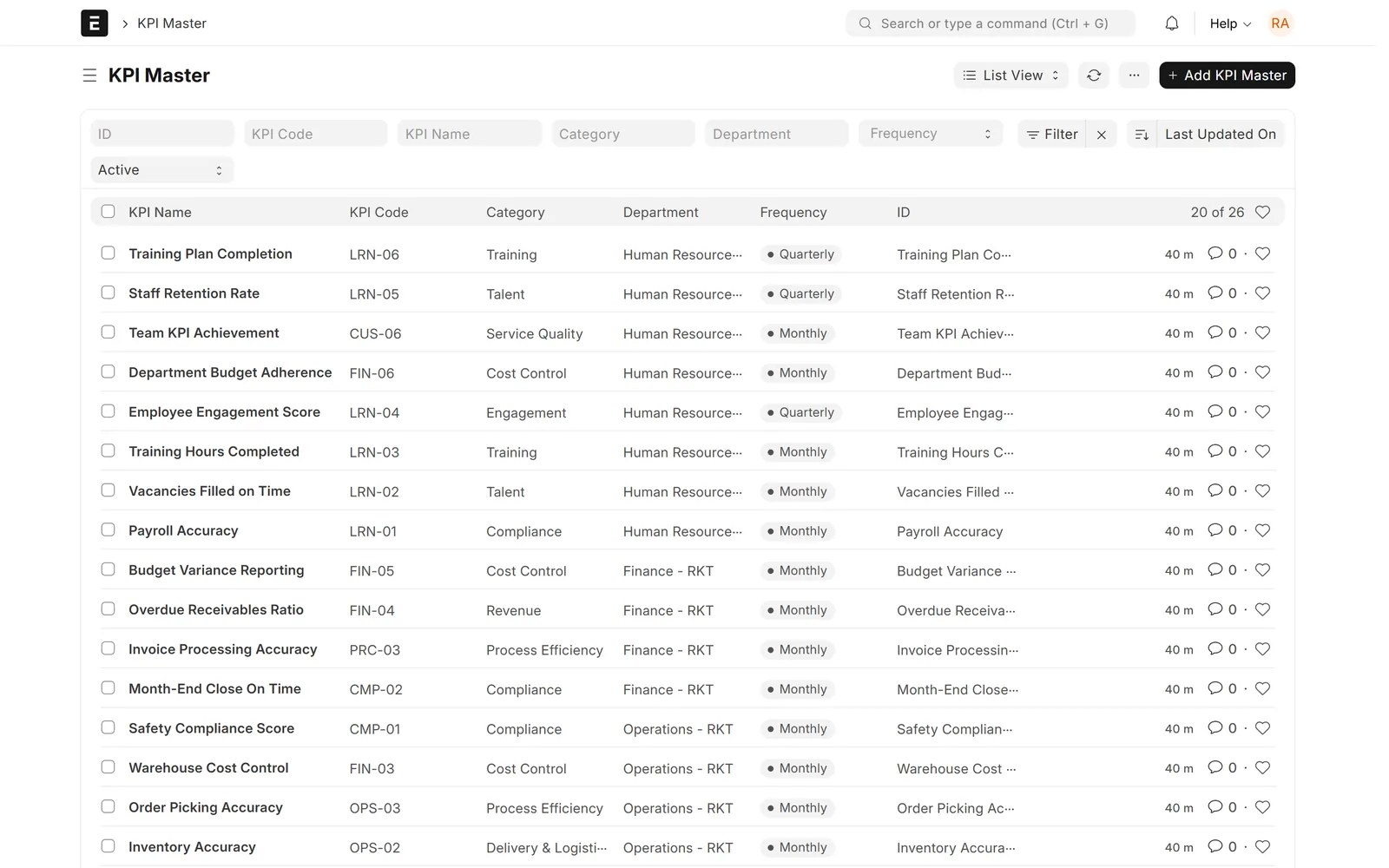
KPI library
Balanced-scorecard perspectives
Group KPIs under balanced-scorecard perspectives.
- Categories nested under parent categories
- A display colour per category
- Perspectives such as Financial and Customer
- Internal Process and Learning & Growth

KPI library
Red, yellow and green thresholds in either direction
Score each result red, yellow or green.
- Red, yellow and green thresholds per KPI
- Higher is Better or Lower is Better
- Each result scored in the direction you chose
- Suits cost or error-rate KPIs as well as revenue

Scorecards
Stakeholders with clear roles
Each KPI knows who owns it and who is measured on it.
- Owners and approvers
- Viewers
- Contributors: the employees measured on the KPI
- Contributors' KPIs load into their scorecards

Scorecards
Monthly scorecards with automatic scoring
Enter the achievement and the app does the scoring.
- "Load My KPIs" fills in active KPIs and weights
- Enter the achievement % per KPI
- Weighted score and variance calculated
- Red, yellow or green status per KPI
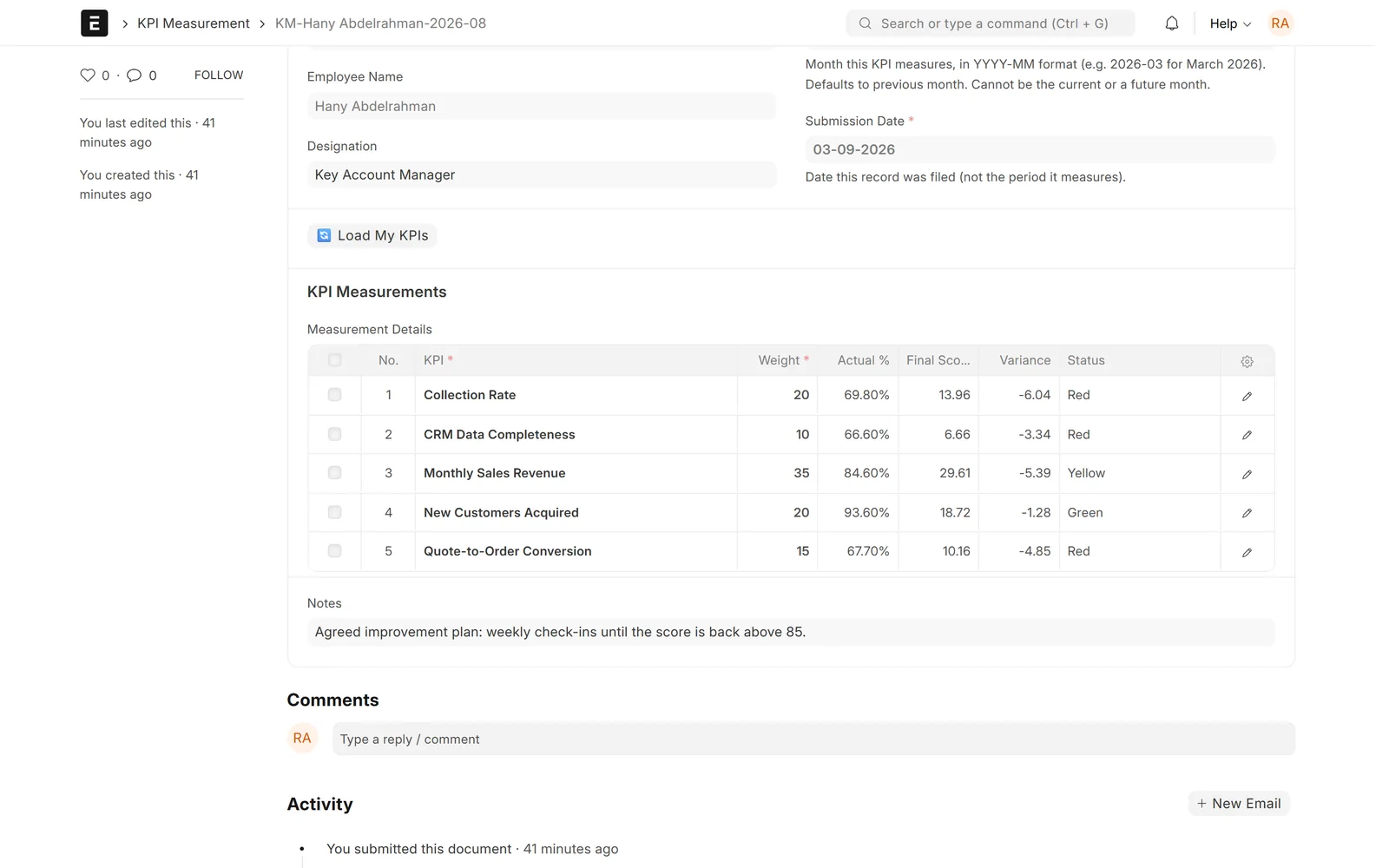
Scorecards
Checks before a scorecard is submitted
Incomplete scorecards cannot be submitted.
- Filed for a month that has ended
- Every KPI must have a value
- Weights must add up to exactly 100
- A preview of green, yellow and red counts first
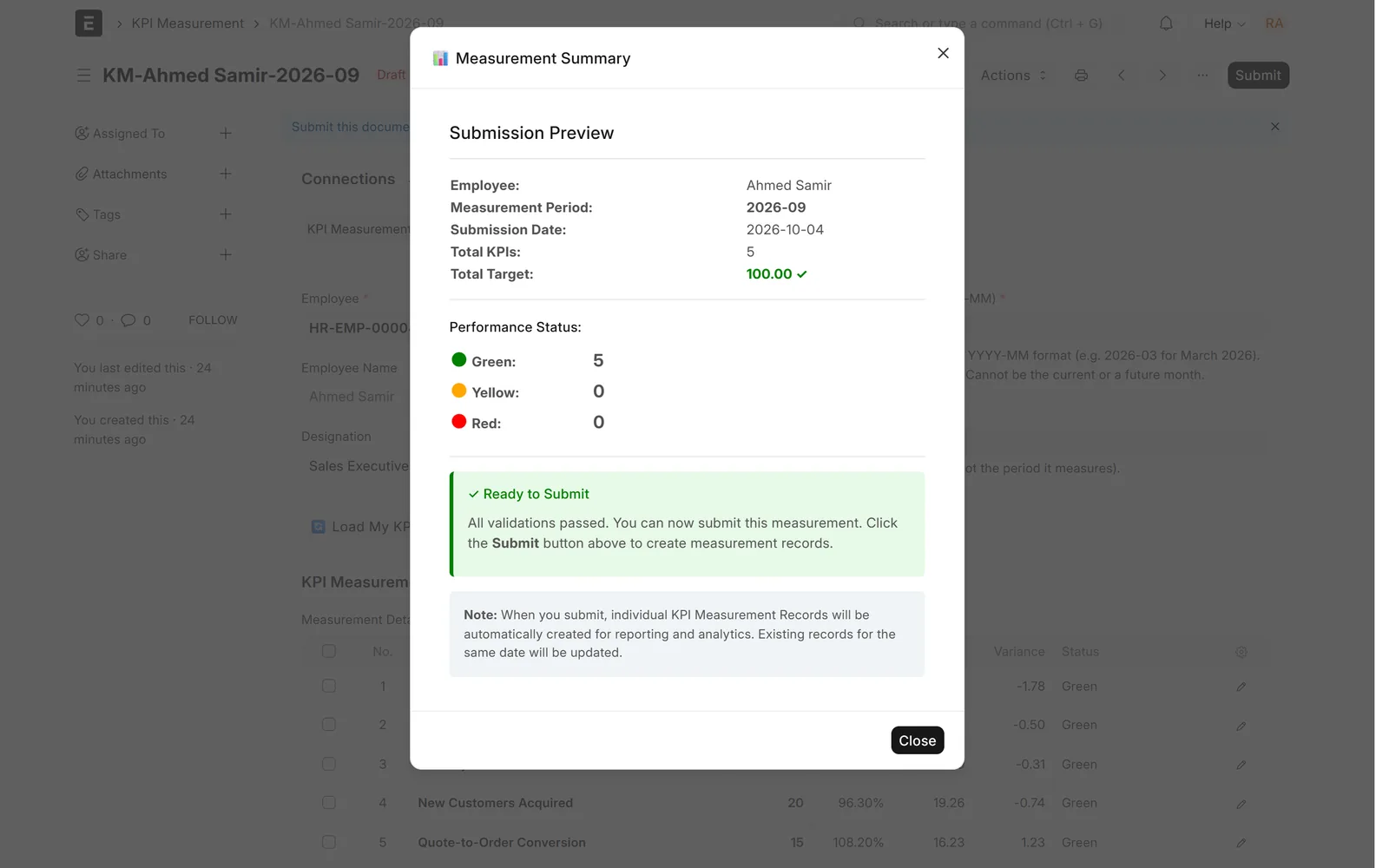
Team & reports
Draft, submit, cancel and amend
A clear approval flow for every scorecard.
- Employees save drafts
- Only the roles you allow submit
- One measurement record per KPI on submit
- Cancelling removes the records; a cancelled scorecard can be amended
Team & reports
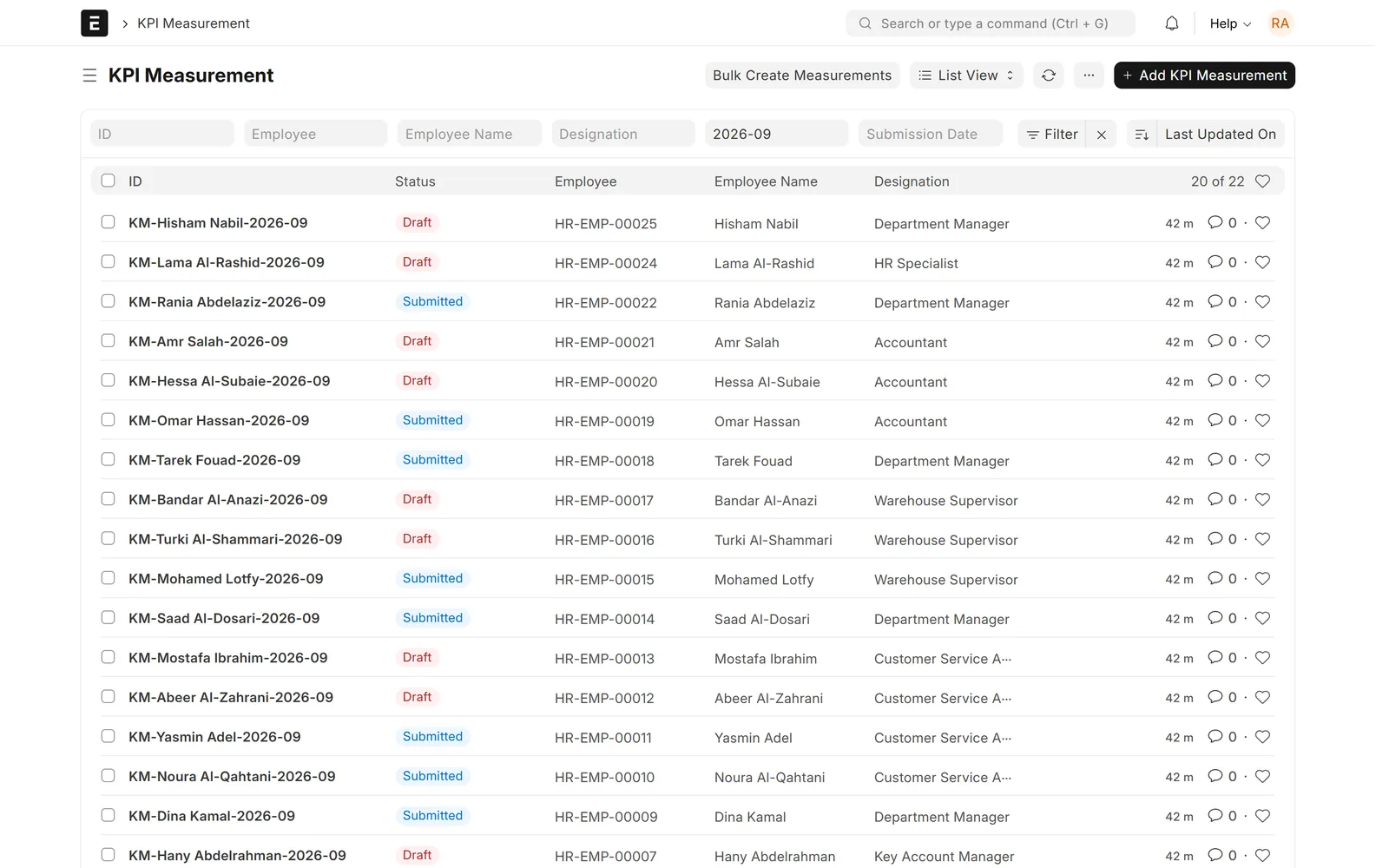
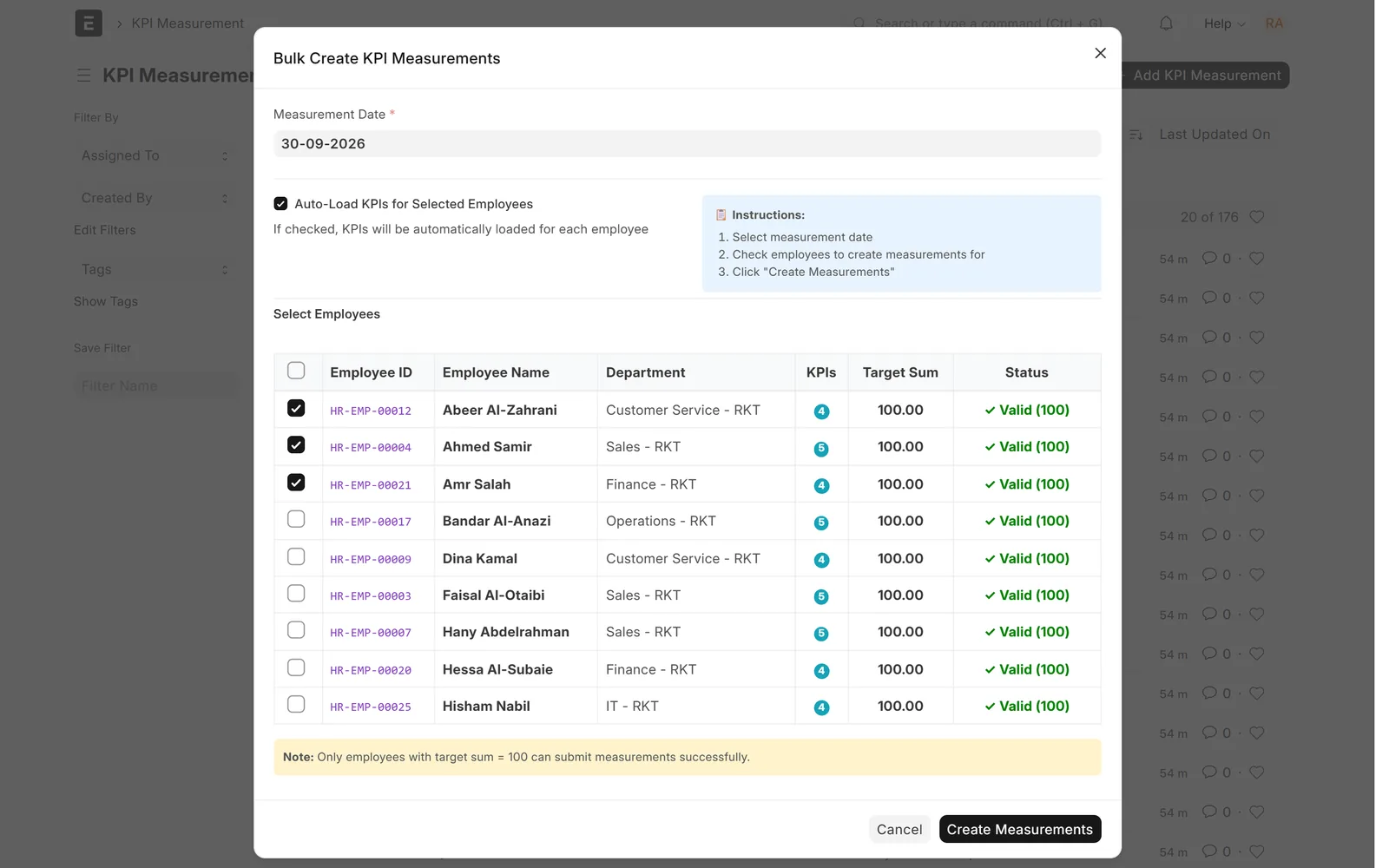
Bulk creation for the whole team
Open the month's scorecards for the whole team at once.
- Draft scorecards for many employees in one step
- KPIs loaded for each employee
- Flags anyone whose weights do not total 100
- Skips scorecards that already exist
Team & reports
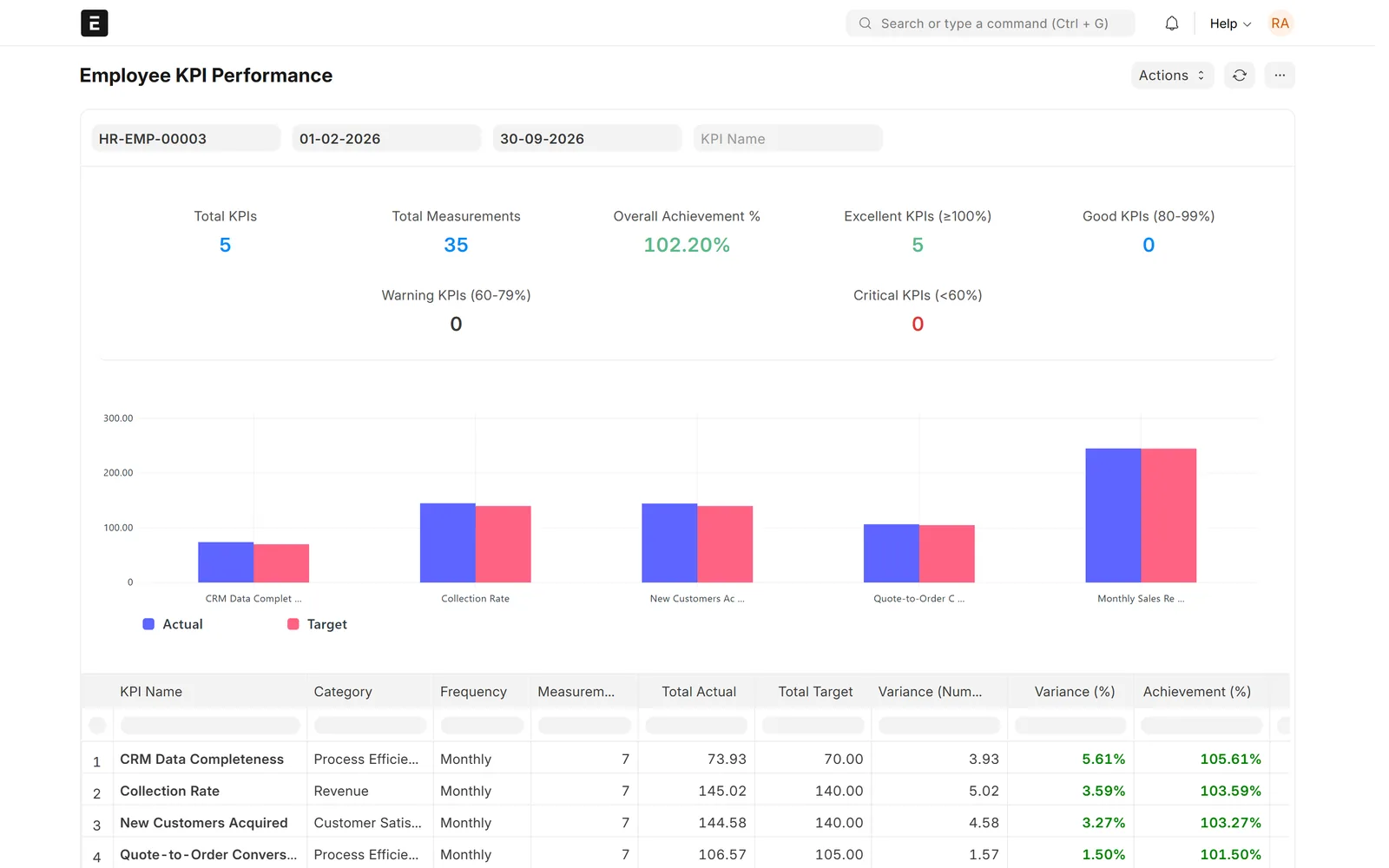
Performance reports with drill-down
Rank your people and see where each one is slipping.
- Employees ranked by achievement
- Summary cards and a chart
- Drill into any employee's KPIs and export to Excel
- Actual vs target per KPI for one employee
Screens show demo data.
Challenges vs. solutions
Common challenges, and how KPI Management answers each one
| Challenge | How Data Value solves it | Traditional approach |
|---|---|---|
| KPI reviews run in spreadsheets | Monthly scorecards inside Frappe and ERPNext, on the same employee records | One Excel file per department, merged by hand |
| KPIs where lower is better | A target direction per KPI, Higher is Better or Lower is Better, scored against red, yellow and green thresholds | Separate formulas for each type of KPI |
| Weighted scores calculated by hand | Enter the achievement % and the app calculates the weighted score, variance and status | Calculator and spreadsheet formulas |
| Incomplete or unbalanced scorecards approved | Submission blocked unless the month has ended, every KPI has a value and the weights total exactly 100 | Errors found after the review is closed |
| Preparing every employee's scorecard each month | Bulk creation of draft scorecards with KPIs loaded, skipping those that already exist | Copying last month's file for each employee |
| Comparing performance across the company | Reports rank employees by achievement, with a drill-down into each person's KPIs and export to Excel | Manual summary tables for leadership |
Why Data Value
Why teams choose it
Balanced-scorecard structure
Nested categories group KPIs under perspectives such as Financial, Customer, Internal Process and Learning & Growth.
Same employee records
Uses the Employee, Department and Designation records of ERPNext and Frappe HR.
Automatic scoring
Weighted score, variance and red, yellow or green status for each KPI, as soon as the achievement is entered.
Checks before approval
Ended month, a value for every KPI and weights totalling 100, or the scorecard is not submitted.
Ranked reports
Rank employees month by month and open any person's KPI breakdown.
Set up by Data Value
Our own Frappe app, set up with your KPIs by a Frappe Certified Gold Partner. Remaining English labels can be localised during implementation.
How it works
From setup to daily use
- Build the KPI librarycategories, weights, thresholds, target direction and each KPI's owner, approver and contributors.
- Open the month's scorecardsemployees press "Load My KPIs", or HR creates drafts for the whole team with Bulk Create.
- Enter the achievement % per KPI; the app calculates the weighted score, variance and status.
- The manager reviews the summary and submits; incomplete scorecards or weights that do not total 100 are blocked.
- Track and rankthe reports rank employees month by month and let you drill into anyone's KPIs.
Related
Works together with
FAQ
Frequently asked questions
Is this an add-on to ERPNext?
Yes. It is a Frappe app built by Data Value that uses the same Employee, Department and Designation records as ERPNext and Frappe HR. The demo runs on Frappe 15 with ERPNext 15.
Can a KPI be "lower is better", like cost or error rate?
Yes. Each KPI has a target direction, Higher is Better or Lower is Better, and results are scored red, yellow or green against its thresholds in that direction.
Can employees fill in their own scorecards?
Yes. An employee linked to their Employee record opens a new scorecard, presses "Load My KPIs" to get the KPIs they contribute to, and saves it as a draft for an authorised manager to submit.
What stops a wrong scorecard from being approved?
The scorecard must be for a month that has ended, every KPI must have a value and the weights must add up to exactly 100. Otherwise submission is refused with a message saying what to fix.
Does it work in Arabic?
The interface supports Arabic and right-to-left layout, and the KPI forms, lists and reports can show Arabic labels. Some pop-up summaries, report columns and chart legends are English only today; Data Value can localise them during implementation.
See it with your own data
Book a demo and our team will walk you through the system and how it fits your business.
Free demo · No commitment