Skip to content

Services · Connect & extend

Integration and API development for ERPNext

We connect ERPNext to the systems around it: tax portals, tills, online stores, messaging, devices and government platforms, so data is entered once.

Start from one of our connectors, or we build a new one over the other system's API.

  • Ready connectors first
  • REST and webhooks
  • Sync logs and retries
  • Built as separate apps
Example: a record sent to a government learning platform, with its HTTP status
Example: a record sent to a government learning platform, with its HTTP status. Screens show demo data.

Who it is for

For companies whose data lives in more than one system

  • Retailers and restaurants with POS in branches
  • Online sellers on store platforms
  • Companies that must report to tax or government portals
  • HR teams with attendance devices
  • Software vendors who need ERPNext connected to their product

Check first

We may already have the connector

The integrations page lists our connectors, all available today, with what each one covers.

See all integrations →

What is included

What an integration project includes

The connection itself is half the work; the other half is what happens when something fails.

Mapping

Which records move, in which direction, and how codes, taxes and discounts map on both sides.

  • Written field map
  • Rules for returns and cancellations

Connector app

A separate Frappe app with settings screens, so ERPNext itself stays standard.

  • REST APIs and webhooks
  • Scheduled or real-time sync

Logs and retries

Every call is logged with its result, and failed records can be sent again.

  • Records needing attention listed
  • Source IDs checked before a retry posts

Reconciliation

Reports that compare what the other system sent with what ERPNext posted.

  • Daily totals by source
  • Clear reason for each gap

In practice

An integration we built

An integration we built

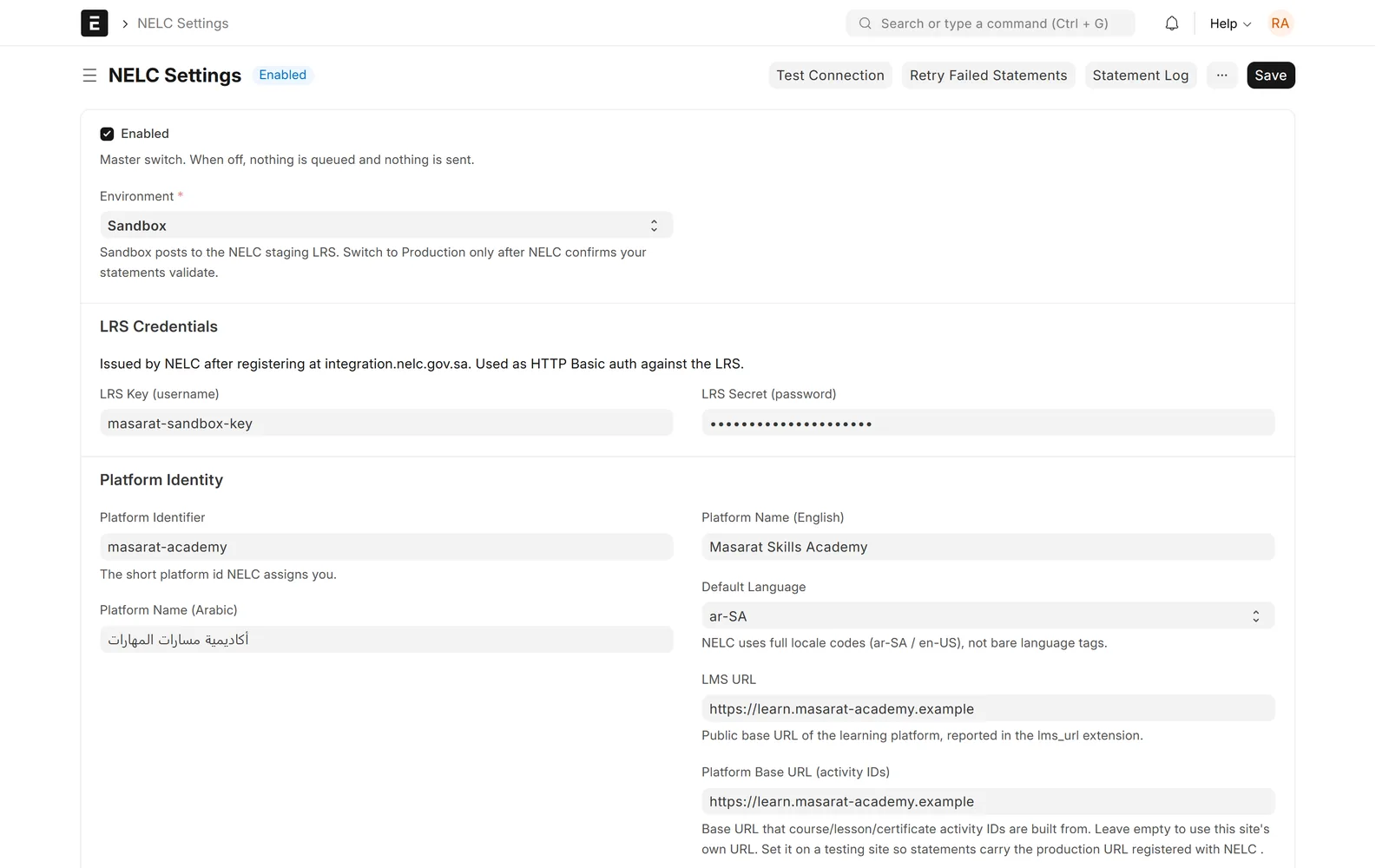
Connection settings your admin controls

Endpoints, credentials and switches live in a settings screen, not in code.

  • Test and live environments
  • Which records to send
  • Secrets stored encrypted
Example: settings of a connector to a government learning platform

An integration we built

Records that need a person

Anything the other side rejected appears in one list with the reason, ready to fix and resend.

  • Reason shown in plain words
  • Resend after fixing
  • Nothing lost silently
Example: records held back until data is fixed

An integration we built

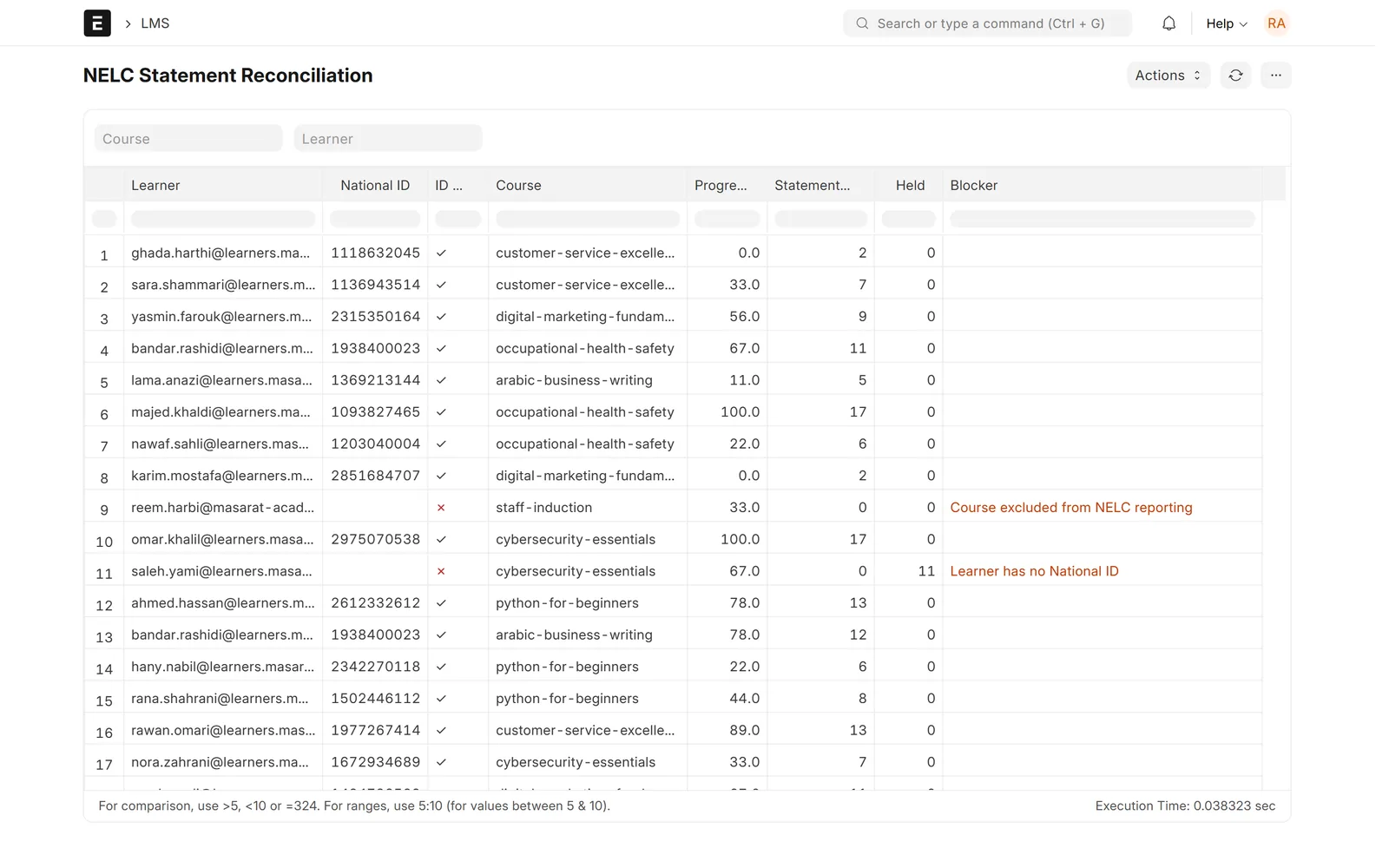
A report that proves both sides agree

One row per record, with what was sent, what is held and why.

  • Filters by date and type
  • Blockers explained
  • Export for audits
Example: reconciliation report of sent and held records

Screens show demo data.

Challenges vs. solutions

Common integration problems, and how we avoid them

ChallengeHow Data Value does itCommon approach
Sales typed twice, in the POS and in ERPNextSales posted automatically with taxes and discounts mappedRe-entering daily totals by hand
Failures nobody seesLogs, an attention list and alerts for failed recordsFinding gaps at month end
Duplicate postings after a retryEach record carries the source ID, so a retry cannot post it twiceManual clean-up of duplicates
Integration code mixed into ERPNextA separate connector app with its own settingsScripts edited on the server

Why Data Value

Why teams choose us for this work

Connectors we already run

Tax portals, POS, stores, WhatsApp and attendance devices, each with an honest status.

ETA and ZATCA experience

E-invoicing for Egypt and Saudi Arabia from inside ERPNext.

Tested before you see it

Work runs on a test site with your own cases first.

We build our own products

Ready-made solutions, App Store apps and connectors come from the same team.

Frappe Certified Gold Partner

Recognised by Frappe, the company behind ERPNext.

One team after go-live

The people who did the work stay on to support it.

How it works

How an integration is built

  1. DiscoveryWe read the other system's API and agree what moves and when.
  2. Field mapCodes, taxes and edge cases written down and agreed.
  3. Build and sandboxThe connector runs against the other side's test environment first.
  4. Parallel runBoth sides compared with the reconciliation report.
  5. Go live and supportSwitched on, monitored and supported by the same team.

FAQ

Frequently asked questions

Which systems do you already connect to ERPNext?

Tax portals in Egypt and Saudi Arabia, several POS systems, online stores, WhatsApp, attendance devices and more. The integrations page lists each one with its status.

Can you connect a system that is not on your list?

Usually yes, if the other system offers an API, a database we may read, or file exports. We check its documentation before we commit.

What happens when the other system is down?

Records wait in a queue and are retried. Anything that still fails shows in a list with the reason, so your team can act.

Will the integration survive ERPNext upgrades?

It is built as a separate app, so ERPNext stays standard. Each upgrade is tested on a copy of your site first.

How is an integration priced?

A ready connector is scoped as setup and mapping. A new one depends on the other system's API and the records involved. We send a written proposal after a call.

Tell us which systems need to talk

Book a call with the names of the systems and what should move between them. We will tell you whether a connector exists or what a new one needs.

Free demo · No commitment