Skip to content

Leisure · Clubs and academies on ERPNext

Run your club's members, memberships and facilities in one system

Data Value's Club Management app keeps members, families, membership plans, renewals, gate check-in and facility booking in one place, with a portal where members see their card, pay and book.

It is built on ERPNext, so every membership fee and every paid member booking becomes a real ERPNext invoice, and the club's accounts stay in one ledger.

  • Members, families and plans
  • Invoices raised in ERPNext
  • Gate check-in with QR cards
  • Court booking with peak rates
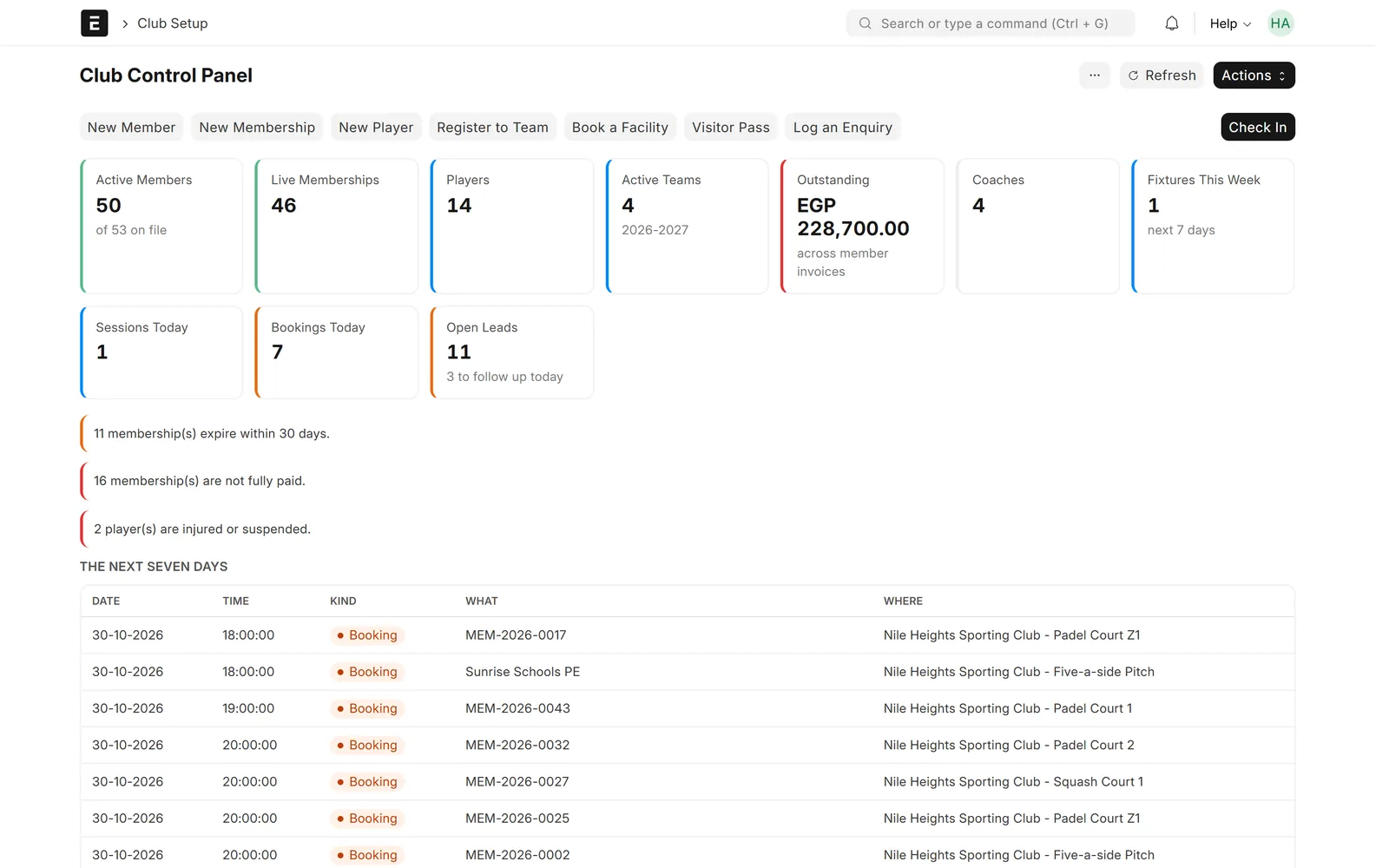
Club Control Panel with KPI cards for active members, live memberships, players, teams, outstanding invoices, coaches, fixtures, sessions, bookings and open leads, alerts for expiring and unpaid memberships, and the next seven days of bookings and training
Club control panel: members, memberships, money owed and today's alerts on one screen. Screens show demo data.

Who it is for

Built for the people who run it every day

  • Sports and social clubs
  • Family and membership clubs
  • Sports academies
  • Padel, tennis and squash centres
  • Clubs with several branches
  • Clubs already on ERPNext

What you get

What you get with Sports & Social Club Management

9 capabilities in 3 groups, each shown next to its screen in the real system.

Membership

Members and families on one record

One profile per person, grouped into households.

  • ID and passport numbers with expiry dates
  • Emergency contacts, documents and photos
  • Families with a head and a family discount %
  • An ERPNext customer created for each member
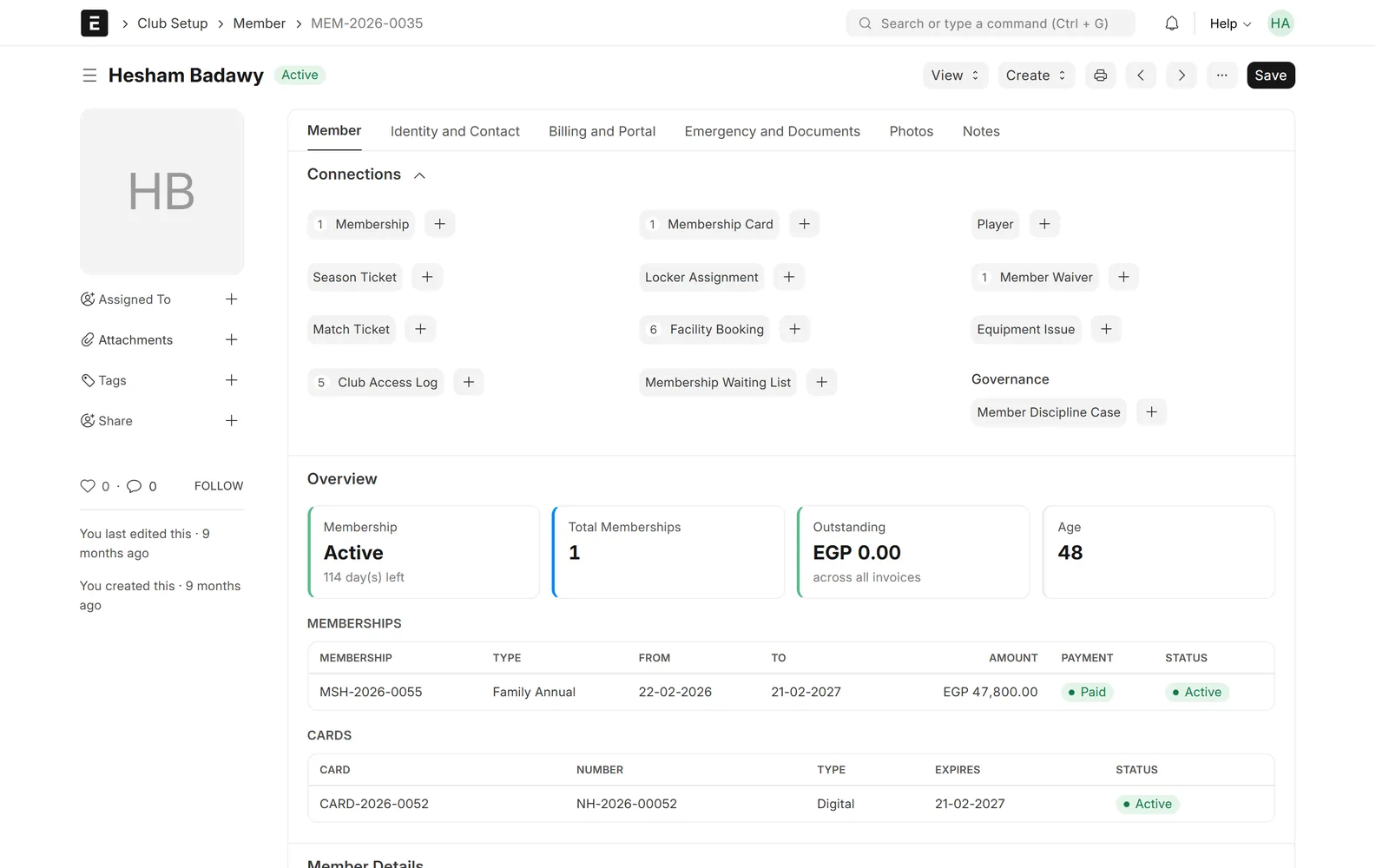
Member form for a family head with connections to memberships, cards, waivers, facility bookings and gate log, and an overview of the active Family Annual membership, days left, outstanding amount, age and the digital membership card
Member profile: current membership, card, outstanding balance and history

Membership

Membership plans you define

Each plan carries its own price and rules.

  • Duration in days, weeks, months or years
  • Fee, registration fee and grace period
  • Age limits, freeze days and included sports
  • Optional manager approval before activation
Membership Type Family Annual with live memberships, memberships issued and amount billed to date, a by-status table, and settings for category, duration and grace period
Membership plan with live count and amount billed to date

Membership

Subscriptions billed in ERPNext

The invoice is a real ERPNext document.

  • Sales invoice raised from the membership
  • Family discount applied automatically
  • Overlapping memberships refused
  • Paid, partly paid or unpaid shown on the membership
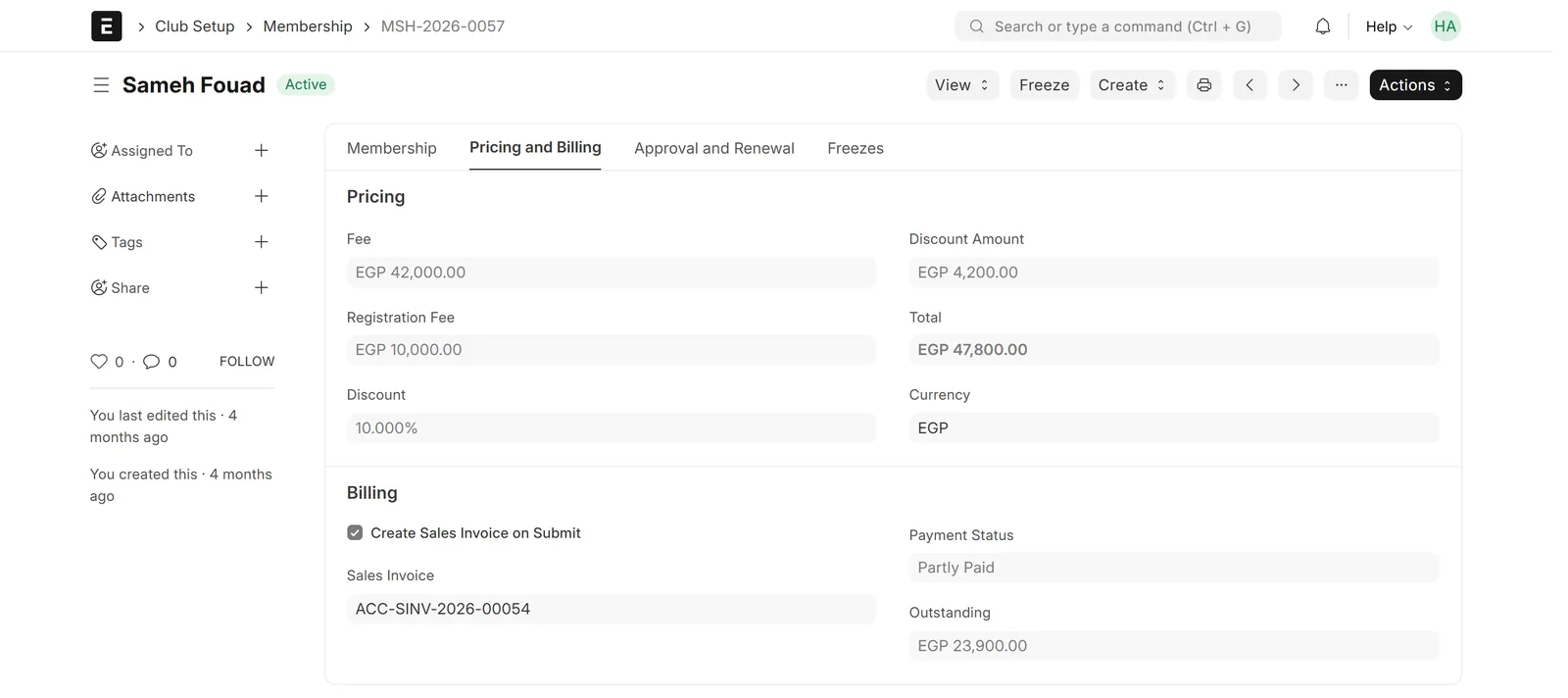
Pricing and Billing tab of a Family Annual membership: fee EGP 42,000, registration fee EGP 10,000, 10% family discount, total EGP 47,800, linked sales invoice, payment status Partly Paid and outstanding EGP 23,900
Family discount, registration fee and the ERPNext invoice on the membership

Membership

Renewals, freezes and expiry

The membership history stays in one chain.

  • Renew into the next period in one step
  • Freezes push the end date out
  • Expiry reminders by email or SMS
  • Nightly expiry and freeze resumption
Membership form showing status Active, 1 day left, total paid and 7 renewals, a term progress bar and a table of the previous monthly periods marked Expired
A monthly membership renewed seven times, with its earlier periods listed

Club operations

Gate check-in and access log

One screen at the entrance, one log behind it.

  • Card number, QR code, ID, mobile or name
  • Allowed or refused, with the reason
  • Unsigned waiver warnings
  • Recorded supervisor overrides
Member Check In page after scanning a member ID: green ALLOWED verdict, membership valid until date, an unsigned-waiver warning, check-out button, today's counts and a recent activity list with granted and denied entries
Member check-in: scan a card, see the verdict and the reason

Club operations

Facility booking with peak pricing

Courts and pitches sold without double bookings.

  • Clash, opening-hours and maintenance checks
  • Member rates and peak or off-peak rules
  • Late-cancellation and no-show fees
  • Weekly repeat bookings and utilisation report
Facility form for a padel court on the Pricing tab: standard and member hourly rates in EGP and a rate rules table with off-peak and peak time bands
Court pricing with member rates and peak and off-peak rules

Club operations

A member portal on any phone

Less calling the office, more self-service.

  • Status, due date and balance
  • QR membership card
  • Book and cancel courts
  • Family view and renewal requests
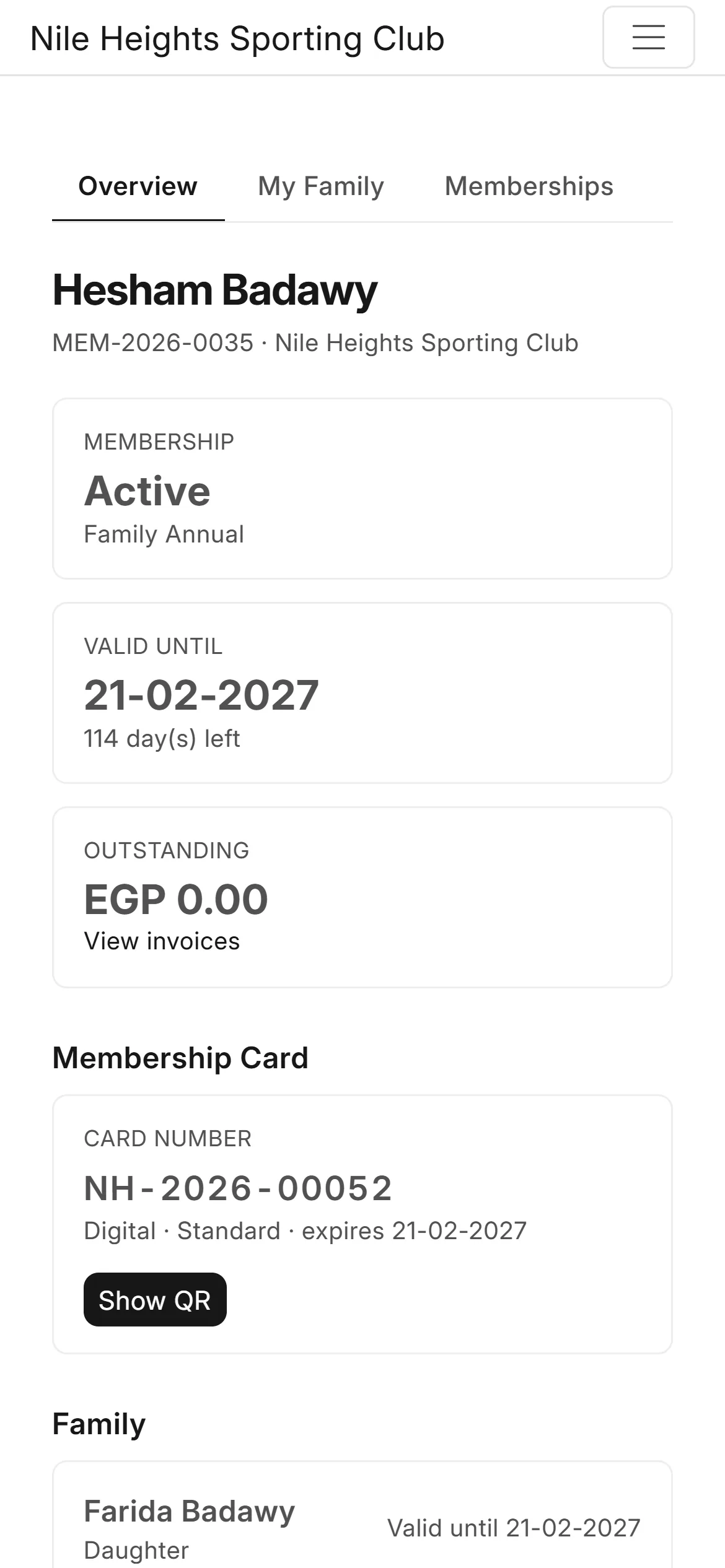
Member portal home page on a phone showing an Active Family Annual membership, valid-until date, days left, outstanding balance, membership card number and the family list
Member portal on a phone: status, expiry date, balance and family

Sports & insight

Teams, academies and fixtures

The sports side lives next to membership.

  • Players, coaches and squad registration
  • Academy programmes and training attendance
  • Fixtures, results and points
  • Injuries and suspensions block selection
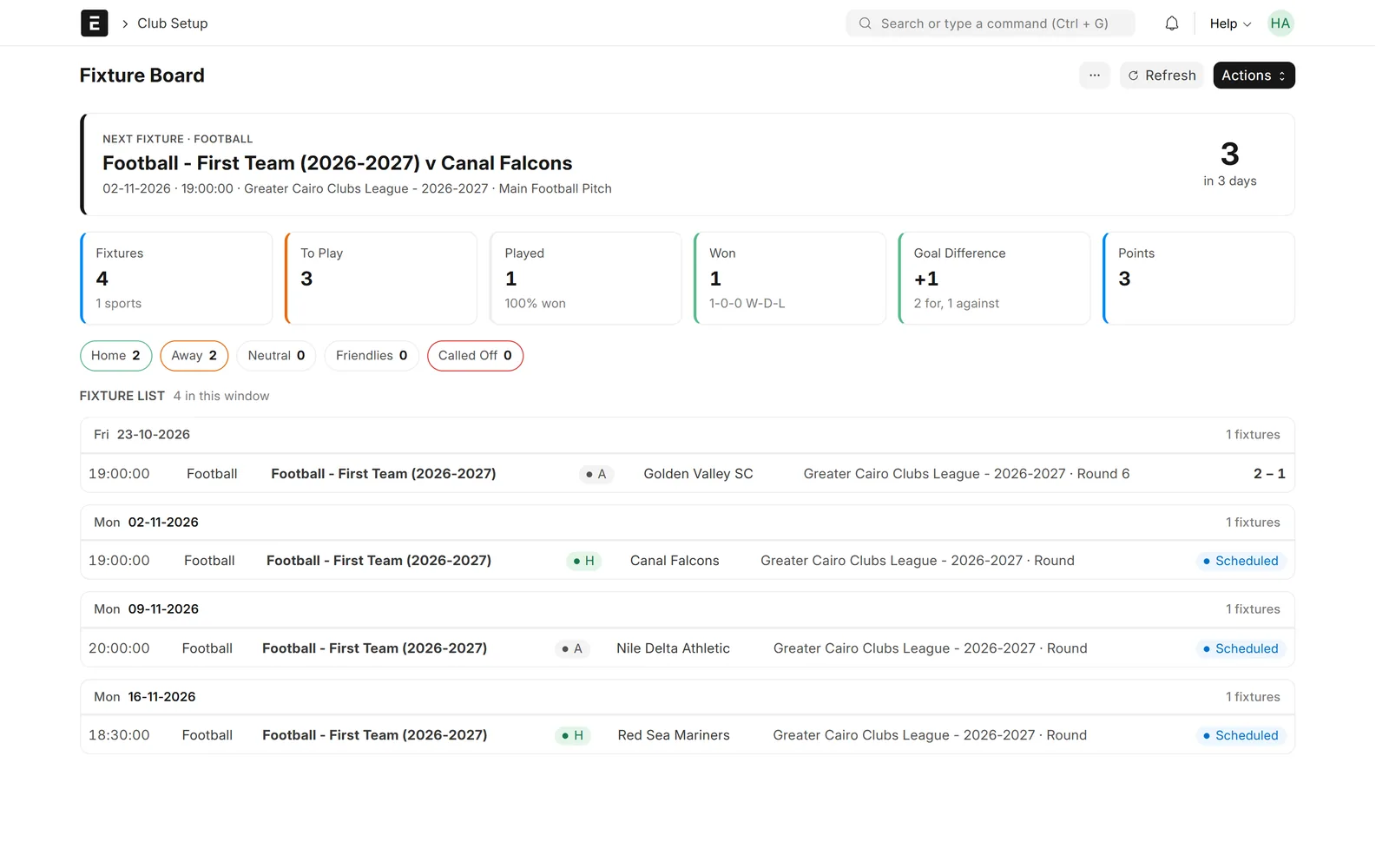
Fixture Board showing the next league fixture in three days, cards for fixtures, played, won, goal difference and points, home and away counts and a list of fixtures grouped by day
Fixture board: the next match, results and the season record

Sports & insight

Control panel and reports

What needs action today, and the numbers behind it.

  • KPIs and alerts on one screen
  • Membership expiry and register
  • Facility utilisation and gate traffic
  • Revenue per sport from the ledger
Club Control Panel with KPI cards for active members, live memberships, players, teams, outstanding invoices, coaches, fixtures, sessions, bookings and open leads, alerts for expiring and unpaid memberships, and the next seven days of bookings and training
Club control panel: members, memberships, money owed and today's alerts on one screen

Screens show demo data.

Challenges vs. solutions

Common challenges, and how Sports & Social Club Management answers each one

ChallengeHow Data Value solves itTraditional approach
Knowing who has a valid membership at the gateScan a card or QR code and get an allowed or refused verdict with the reasonPaper lists and staff memory
Chasing renewals and unpaid feesExpiry report, reminders and payment status on every membershipSpreadsheets checked at the end of the month
Double-booked courtsClash, opening-hours and maintenance checks before a booking is confirmedA shared booking notebook
Family pricingFamilies with a head and a discount applied to each member's membershipDiscounts typed by hand on each receipt
Membership money outside the accountsMembership fees and paid member bookings become ERPNext invoices in the club's ledgerReceipts re-entered into accounting later
Members calling the office for everythingA portal for the card, invoices, bookings and renewal requestsPhone calls and walk-ins

Why Data Value

Why teams choose it

Built on ERPNext

Membership fees, court hire and payments are real ERPNext documents in one ledger.

Families built in

Households, heads of family and family discounts are part of the member record.

A portal for members

Members see their card, invoices, bookings and family from their phone.

Arabic and English

Screens, reports and the portal are translated, with a right-to-left layout.

Rules you can set

Grace periods, freezes, booking windows, fees and approvals are settings, not code changes.

Frappe Certified Gold Partner

Data Value has delivered 200+ projects for 120+ clients since 2020, from offices in Cairo and Riyadh.

How it works

From setup to daily use

  1. Set up the clubbranches, opening hours, the season, membership plans and their prices, and the courts and pitches you rent.
  2. Sign members upcreate members and families, issue the membership, approve it and send the ERPNext invoice; the card is issued with it.
  3. Run the daycheck members in at the gate, take court bookings at the desk or from the portal, and record training attendance.
  4. Renew and follow upthe expiry report and reminders show who lapses soon and who owes money, and renewals continue the same membership history.

FAQ

Frequently asked questions

Do I need ERPNext?

Yes. The app is built on ERPNext and uses its customers, items, sales invoices, payments and accounts. It was built for Frappe and ERPNext version 15.

How are family memberships handled?

Members are grouped into a family with a head of family and a family discount that is applied to each family member's membership. Each person holds their own membership and card, so the gate and the portal know exactly who is covered.

Are renewals automatic?

Renewal is one action from the membership, and members can request it from the portal. The app sends expiry reminders, but it does not charge members automatically; each renewal is approved and invoiced by the club.

Can members pay online?

Members see their invoices in the portal and can pay them there when a payment gateway is set up in ERPNext for your club. Without a gateway they pay at the club and the payment is recorded in ERPNext.

Is it available in Arabic?

Yes. The app ships with an Arabic translation of its screens, reports and portal, and the system runs right to left when a user's language is Arabic.

How much does it cost?

Pricing depends on the number of members, branches and the modules you need. Contact Data Value for a quote.

See it with your own data

Book a demo and our team will walk you through the system and how it fits your business.

Free demo · No commitment