Skip to content

Clinics & hospitals · Egypt, Saudi Arabia & MENA

Run your clinic or hospital in one connected system

Data Value implements and extends Frappe Health (Marley Health), the open-source hospital information system built on ERPNext, for clinics, medical centres and hospitals.

Appointments, consultations, lab results, inpatient beds, therapy and billing share one patient record, with an Arabic interface and a guided setup path from Data Value.

  • Appointments and doctor schedules
  • Consultations with lab and drug orders
  • Inpatient admissions and beds
  • One invoice for all patient services
Healthcare workspace with cards for total patients, admitted patients, open appointments and appointments to bill, and a monthly appointments chart
Healthcare workspace: patients, admissions, open appointments and appointments to bill. Screens show demo data.

Who it is for

Built for the people who run it every day

  • Outpatient clinics and polyclinics
  • Medical centres and day-surgery units
  • Small and mid-size hospitals
  • Physiotherapy and rehabilitation centres
  • Medical directors and reception teams
  • Doctors, nurses and lab staff
  • Medical billing and accounts teams

Industry

Part of ERPNext for Hospitals & Healthcare

See how Data Value runs clinics, medical centres and hospitals on ERPNext.

Explore the industry page →

What you get

What you get with Healthcare & Clinic Management

9 capabilities in 3 groups, each shown next to its screen in the real system.

Outpatient care

Appointments and schedules

Book patients against each doctor's schedule and service unit, see the day in a calendar, and track every booking from Scheduled to Checked In, Closed, Cancelled or No Show. Fee validity can cover follow-up visits.
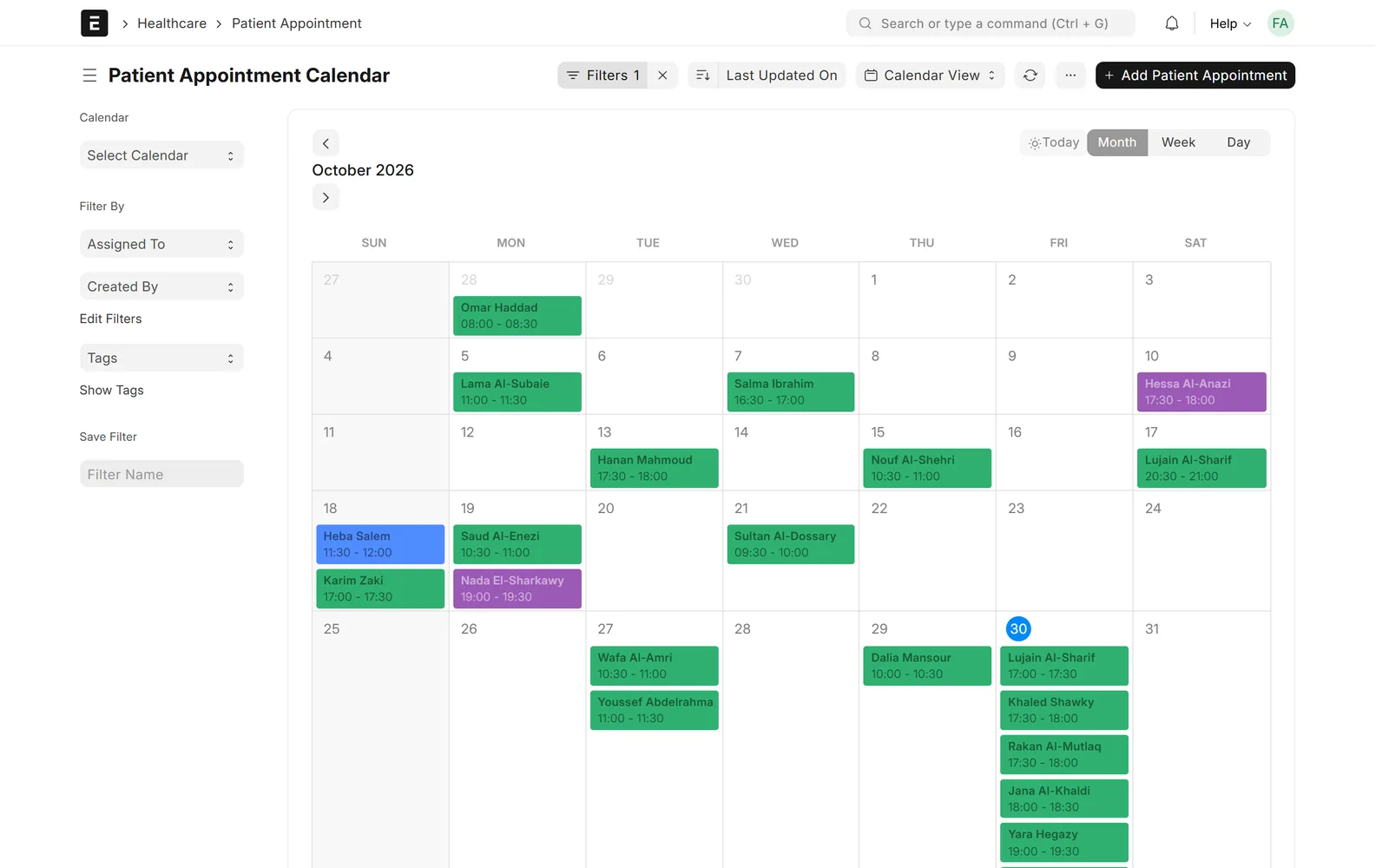
Month calendar with patient appointments and their time slots
Appointment calendar for the month

Outpatient care

Consultations with orders

The doctor records symptoms and a coded diagnosis, then prescribes medications, lab tests and procedures from the same encounter, which become medication and service requests.
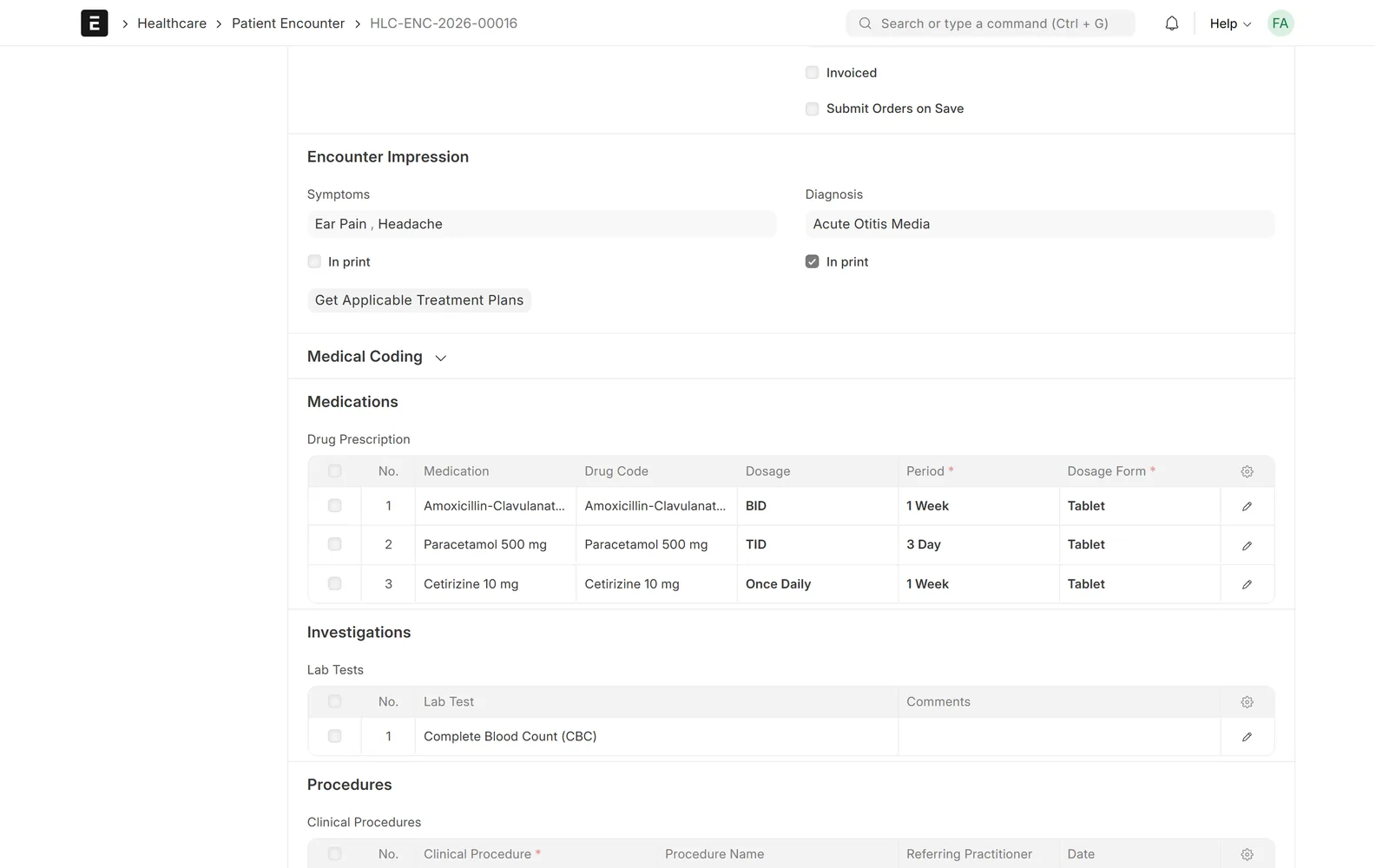
Patient encounter with symptoms, a diagnosis, three prescribed medications and a complete blood count order
Consultation with symptoms, diagnosis, prescriptions and lab orders

Outpatient care

Laboratory

Lab test templates carry units and normal ranges; results are entered per test and printed for the patient.

Completed complete blood count with five results, units and normal ranges
Lab results against normal ranges

Patient record & inpatient

Full patient history

One timeline shows every vital sign, encounter, lab test and procedure, with charts for blood pressure, pulse, temperature and BMI.
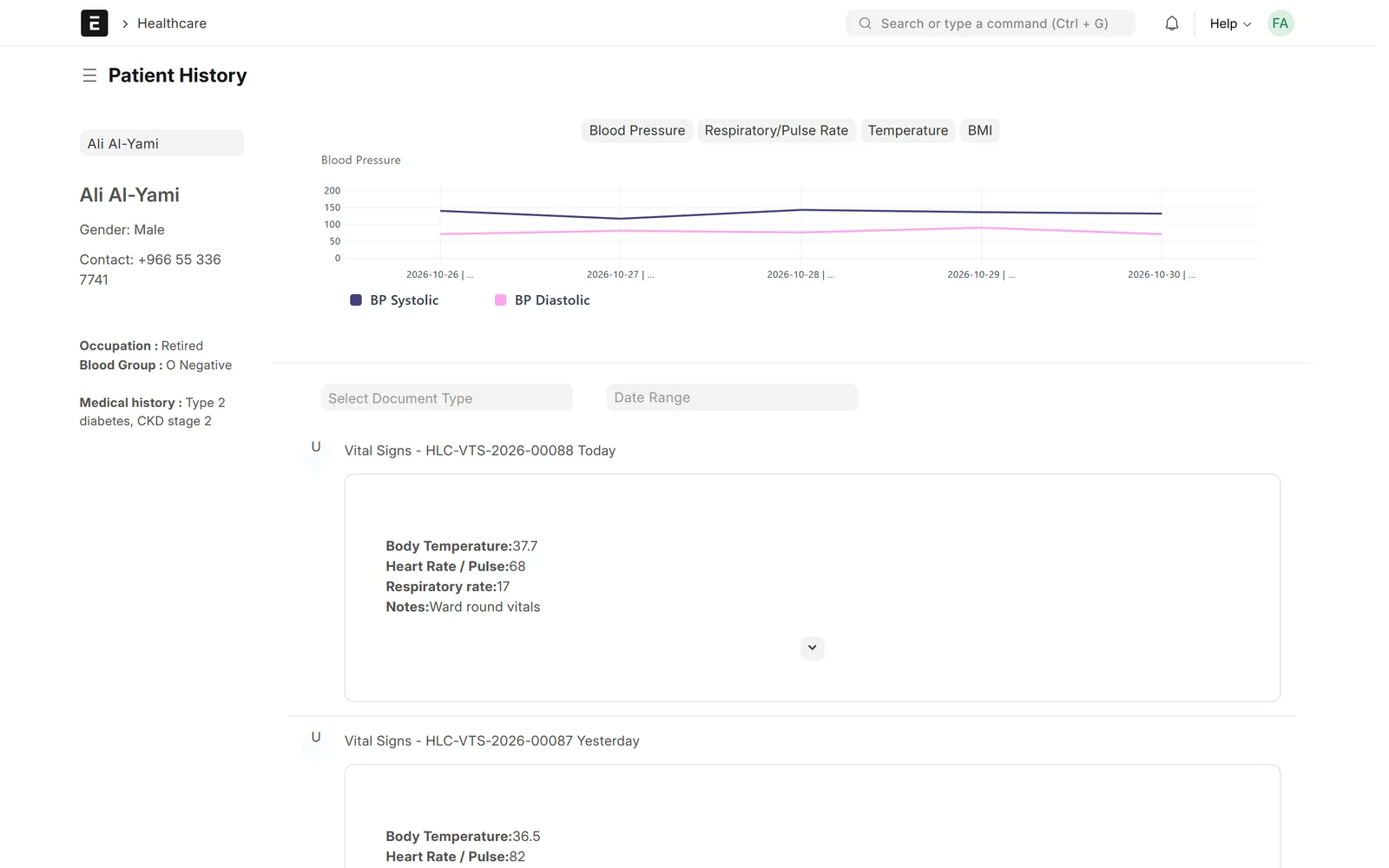
Patient history page with a blood pressure chart over five days and a timeline of vital-sign entries
Patient history with vital-sign charts and a full timeline

Patient record & inpatient

Inpatient admissions and beds

Admit, transfer and discharge patients, and see wards, rooms and beds as a tree with occupied and vacant counts. Nurses record each dose from inpatient medication orders, and admission checklists can create nursing tasks.
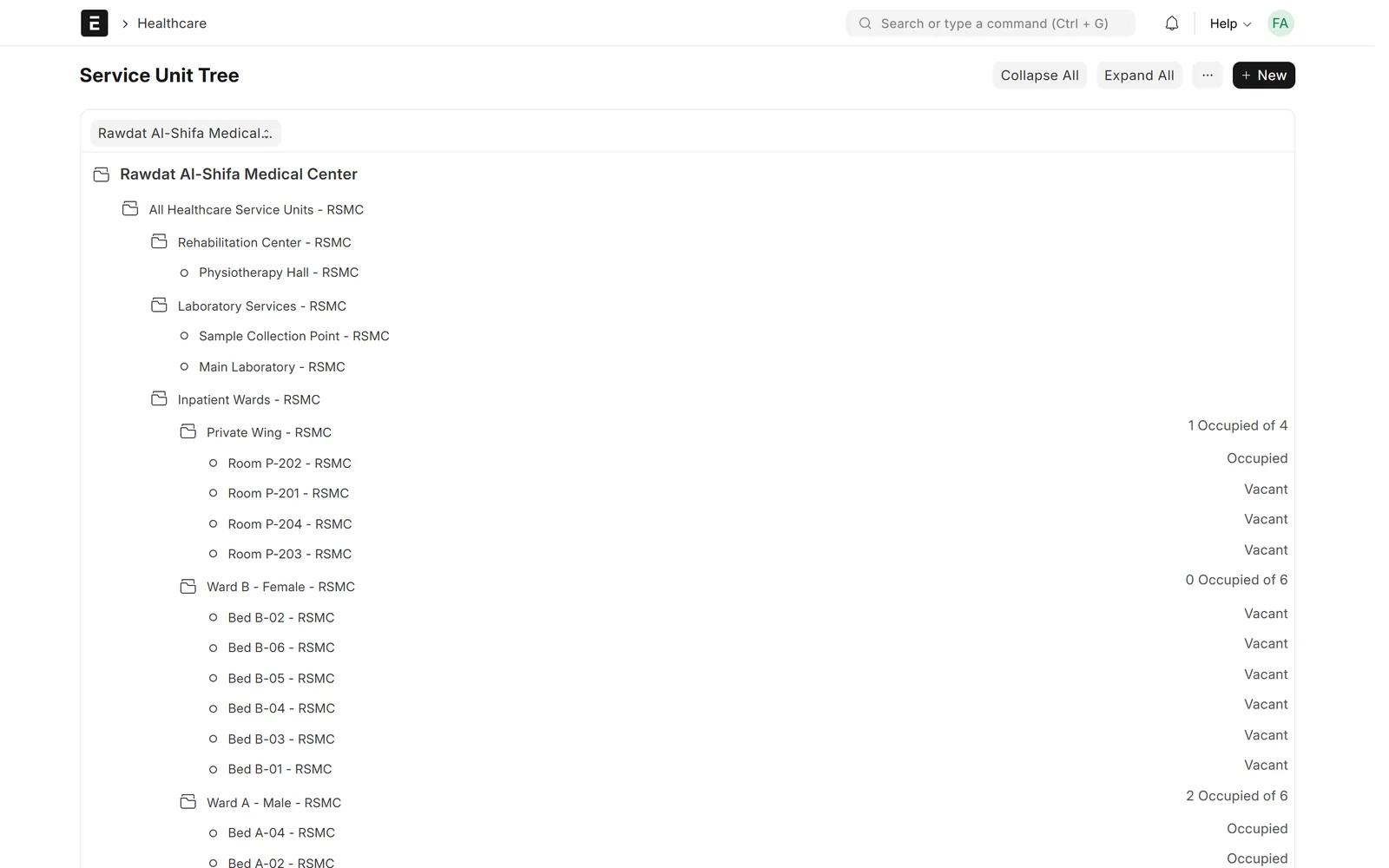
Service unit tree with rehabilitation, laboratory and inpatient wards showing occupied and vacant beds
Wards, rooms and beds with occupancy

Patient record & inpatient

Therapy and rehabilitation

Therapy plans track planned and completed sessions, and assessment scores are charted over time to show whether a patient is improving.
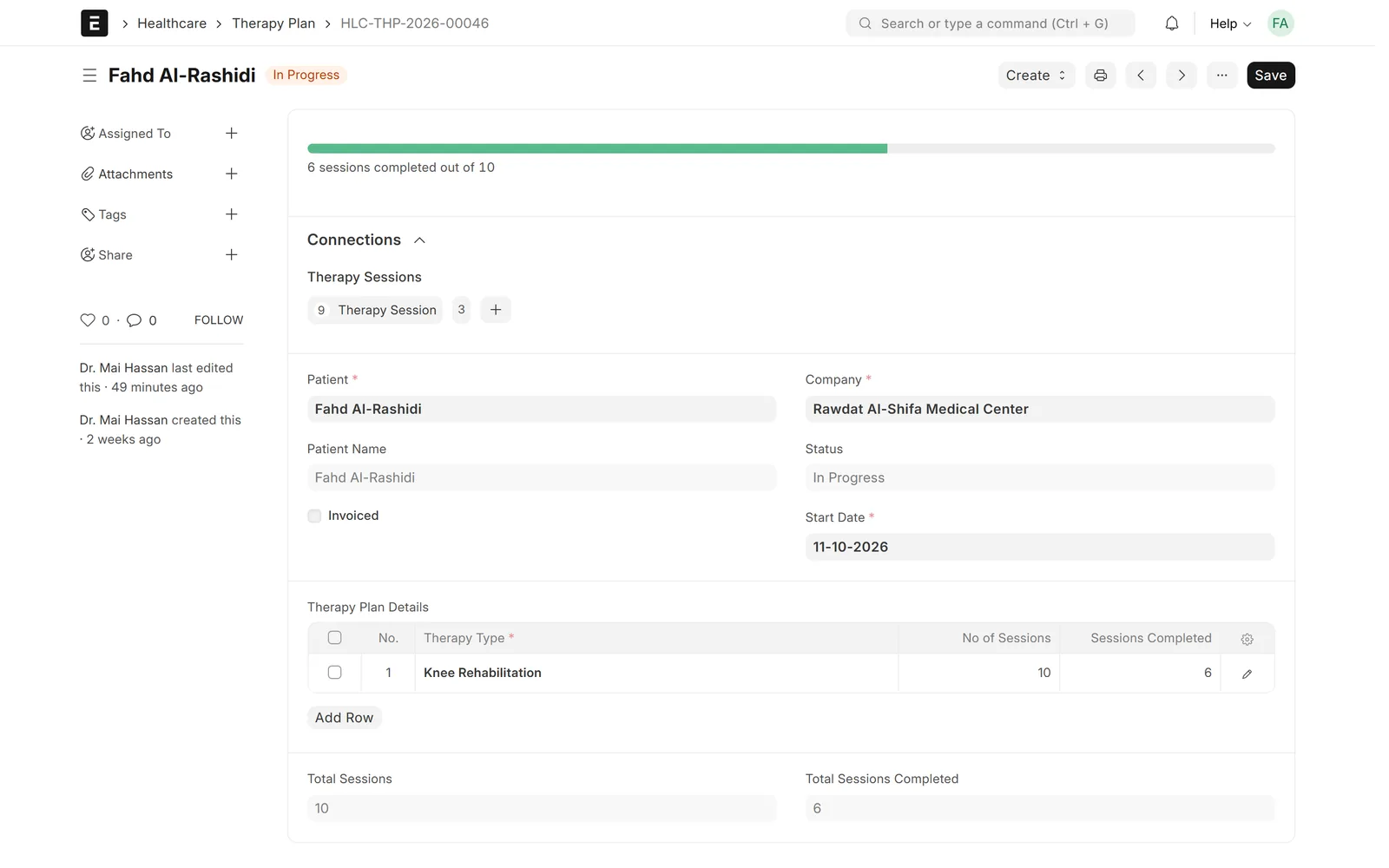
Knee rehabilitation therapy plan with 6 of 10 sessions completed
Therapy plan with session progress

Billing, reports & setup

Medical billing in ERPNext

Pull a patient's unbilled consultations, lab tests, medications, procedures, bed stays and therapy sessions into one sales invoice, then record payments in ERPNext accounting.
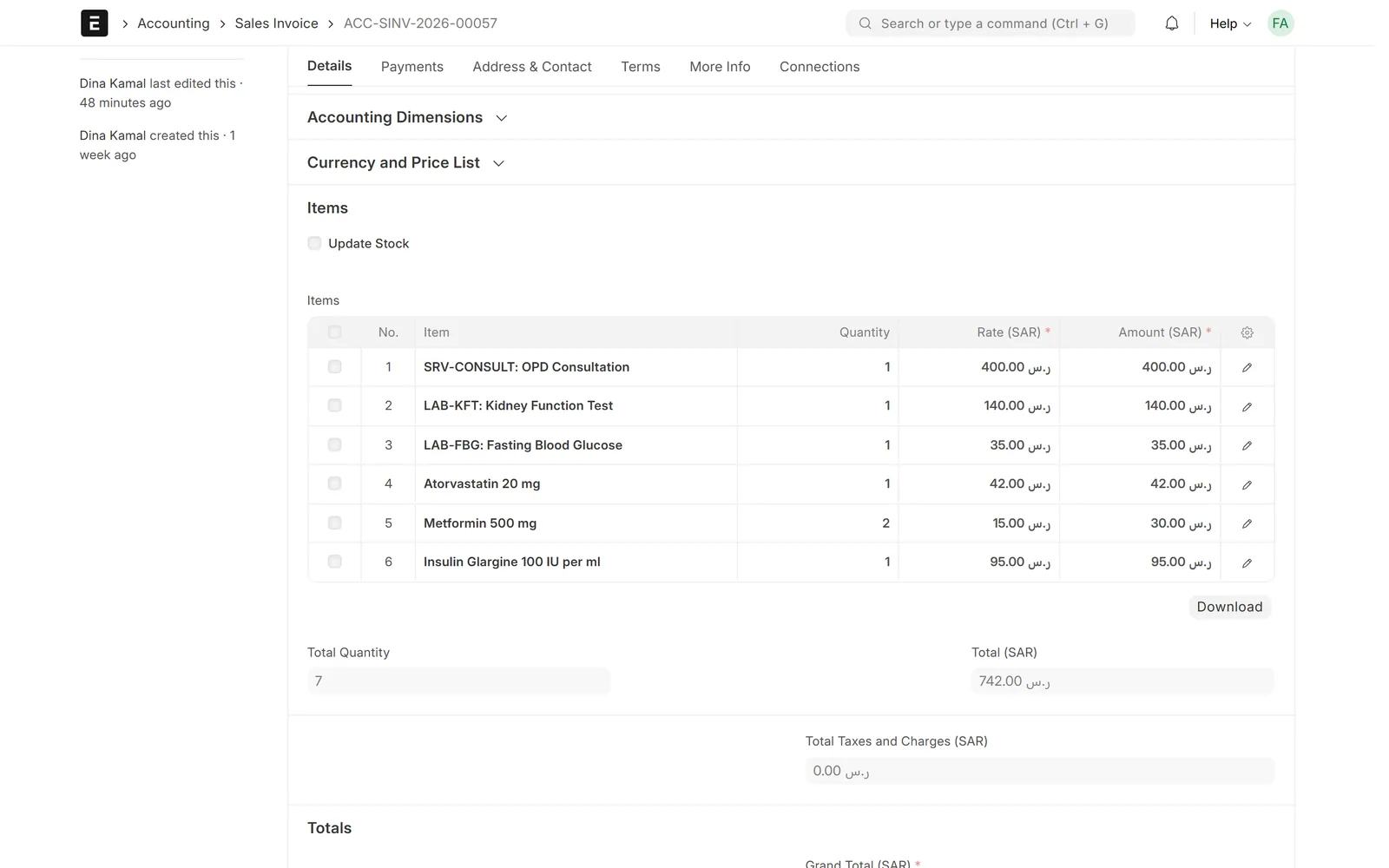
Sales invoice with a consultation, two lab tests and three medications totalling SAR 742
One invoice for consultation, lab tests and medications

Billing, reports & setup

Dashboards and reports

Number cards for patients, admissions, open appointments and appointments to bill, charts for appointments and inpatient status, and appointment analytics by department or doctor.

Healthcare workspace with cards for total patients, admitted patients, open appointments and appointments to bill, and a monthly appointments chart
Healthcare workspace: patients, admissions, open appointments and appointments to bill

Billing, reports & setup

Arabic, guided setup and training data

Data Value adds an Arabic translation, a Healthcare Cycle workspace that walks the team through the patient journey in nine stages, a bilingual user guide, and demo data for staff training before go-live.
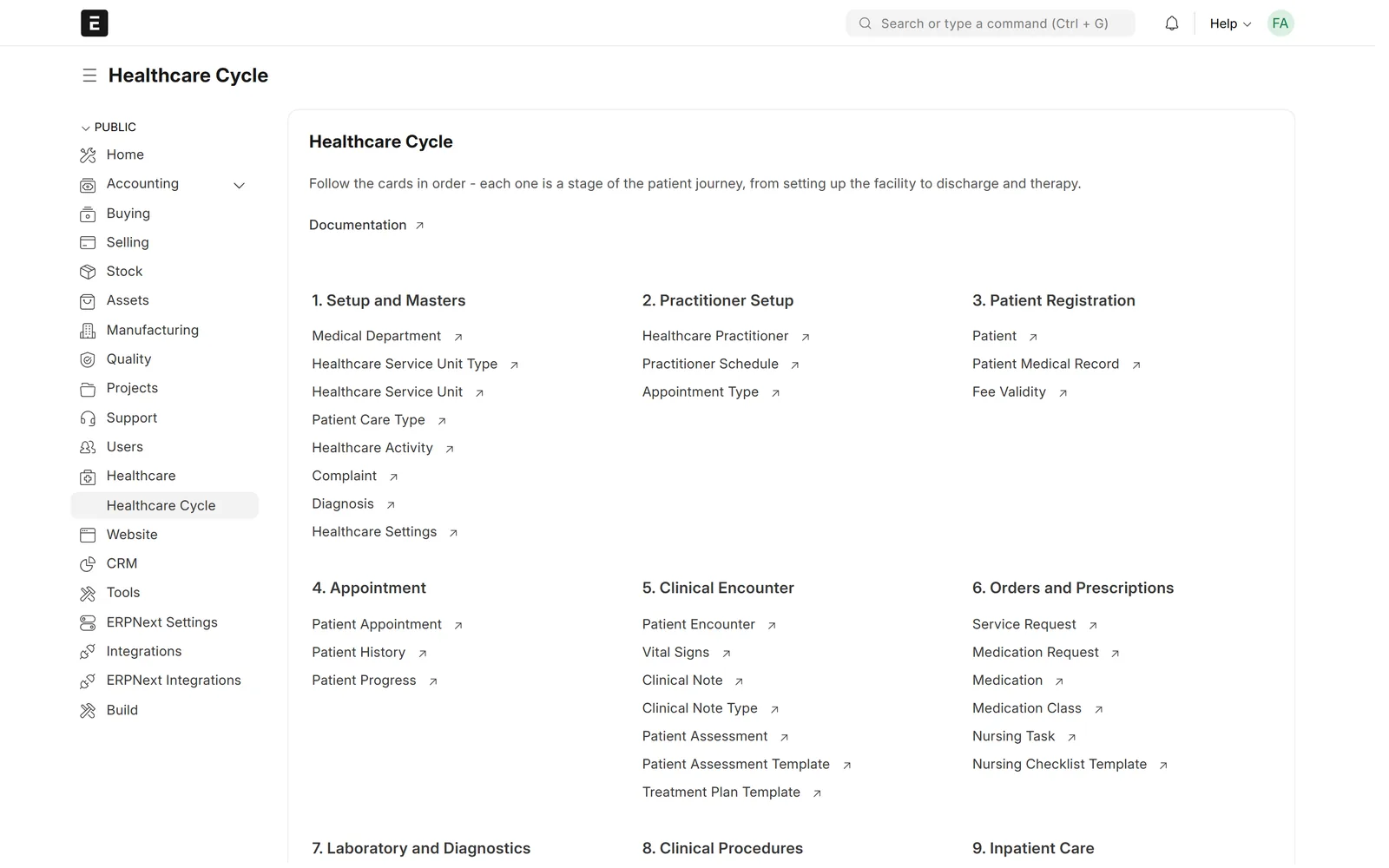
Workspace with numbered stages from setup and practitioners through registration, appointments, encounters and orders
Healthcare Cycle: the patient journey in numbered stages

Screens show demo data.

Challenges vs. solutions

Common challenges, and how Healthcare & Clinic Management answers each one

ChallengeHow Data Value solves itTraditional approach
Managing doctor schedules and bookingsAppointments booked against each doctor's schedule and service unit, shown in a calendar and followed from Scheduled to Checked In, Closed or No ShowPaper diaries and phone calls
Passing the doctor's orders to lab and pharmacyMedications, lab tests and procedures ordered in the encounter become medication and service requestsHandwritten orders carried between departments
Seeing a patient's full historyOne timeline of vital signs, encounters, lab tests and procedures, with charts for blood pressure, pulse, temperature and BMIPaper files kept in each department
Knowing which beds are freeWards, rooms and beds in a tree with occupied and vacant counts; admit, transfer and discharge in the systemWhiteboards and calls to the wards
Billing everything a patient receivedUnbilled consultations, lab tests, medications, procedures, bed stays and therapy sessions pulled into one ERPNext sales invoiceCollecting charges from each department by hand
Following therapy progressTherapy plans count planned and completed sessions, and assessment scores are charted over timeSession cards and paper notes
Training staff before go-liveA full bilingual demo dataset created from Healthcare Settings, plus an English/Arabic user guide one click from the workspacePractising on live records

Why Data Value

Why teams choose it

One patient record

Appointments, encounters, lab results, inpatient stays, therapy and billing share one patient record.

Billing inside ERPNext

Medical invoices and payments post to ERPNext accounting, with stock for medications and consumables.

Arabic, right-to-left

Most menus, workspaces and standard screens are in Arabic; remaining specialised labels are completed during implementation.

Guided Healthcare Cycle

A workspace walks your team through the patient journey in nine numbered stages.

Open-source core

Frappe Health (Marley Health) is open source under GPL v3; Data Value implements, translates and supports it.

Frappe Certified Gold Partner

Data Value has delivered 200+ projects for 120+ clients since 2020, from offices in Cairo and Riyadh.

How it works

From setup to daily use

  1. Set up the facilitydepartments, wards, rooms, beds and clinics as service units, plus your doctors and their schedules.
  2. Reception registers patients and books appointments; the calendar shows each doctor's day.
  3. Doctors record the encounter, diagnosis and prescriptions; lab, pharmacy, nurses and therapists receive the orders and record results.
  4. Admit patients to a bed when needed, give medications on schedule and discharge them with a complete record.
  5. Invoice everything delivered, record payments, and follow volumes on dashboards and reports.

FAQ

Frequently asked questions

Is this Data Value's own product?

No. It is Frappe Health (Marley Health), an open-source hospital information system under GPL v3. Data Value implements and extends it with Arabic translation, a guided Healthcare Cycle workspace, a bilingual user guide and training demo data, and supports it after go-live.

Does it work in Arabic?

Yes, the interface switches to Arabic with a right-to-left layout. Most menus, workspaces and standard screens are translated; some specialised healthcare labels still show in English and are completed during implementation.

Do I need ERPNext?

Yes. Frappe Health runs on top of ERPNext, which provides the accounting, invoicing, payments and stock behind the clinical screens.

Does it cover both outpatient and inpatient care?

Yes. It covers appointments and consultations, as well as inpatient admissions, bed occupancy, inpatient medication orders, nursing tasks and discharge.

Can patients receive appointment reminders?

The system can send appointment confirmations and reminders by SMS through Frappe's SMS settings, once an SMS gateway is connected.

See it with your own data

Book a demo and our team will walk you through the system and how it fits your business.

Free demo · No commitment