ERP for food manufacturing and meat processing, built on ERPNext
With our ERP for food manufacturing, you know when every batch was made, when it expires and where it went. The system follows each batch from the farm to the chiller, then the production hall and the shop.
We have implemented ERPNext for a food and meat processor in Saudi Arabia.
One batch per carcass or lot, with its slaughter and expiry dates
Days left before expiry, for every batch
An expired batch cannot be sold
ZATCA e-invoices from the sales invoice
The process
From farm to shop: one ERP for the whole food chain
1
Farms and suppliers
Animals, carcasses, ingredients and packaging arrive from farms and suppliers.
2
Receiving by batch
Each carcass or lot becomes a batch with its slaughter date and expiry date.
3
Chillers and stores
While batches wait in the chillers, a report shows how many days each has left.
4
Processing and production
Work orders then turn raw meat into cuts and processed products.
5
Packing
Finished batches are packed on a packing slip that names the batch.
6
Sales and delivery
Sales invoices go to ZATCA, and each delivery leaves on a delivery note.
7
Accounts
Every movement carries its value into stock and the ledger.
Problems we solve
What a food factory struggles with, and how the ERP answers
Fresh stock ages by the hour
Chilled meat loses value every day it waits, but the oldest batch is often found too late.
A standard report lists every batch with its expiry date and the days it has left, and a sale of an expired batch is refused.
Every carcass is different
Animals differ in type, weight, age and source. Unless that data sits on the stock, a quality question cannot be traced back to one animal.
Each carcass or lot is received as its own batch, so its slaughter date and expiry stay with the stock.
Weight disappears between the scale and the shelf
Meat loses weight while it chills and when it is cut. If nobody records that loss, system stock drifts away from the chiller.
For a food and meat processor in Saudi Arabia, we built weight-loss handling. An allowed loss rate applies to chosen item groups, and any extra loss is posted to an expense account.
The factory floor does not work in ERP menus
Butchers and packers stand at a station with gloves on, so they will not open several forms to report one job.
For a food and meat processor in Saudi Arabia, we built one Arabic screen per hall that lists its job cards. Workers start, pause and finish a job there, then enter the quantity done.
One product, many units
The same product is counted in kilos, packs and cartons, so a work order that ends on half a carton confuses the store.
Each item holds its units and the conversion factors between them, so stock moves in cartons are converted to packs or kilos by themselves.
Farms, factory and shops keep separate books
When each site keeps its own files, nobody sees total stock, and sales reach the accountant late.
One system holds the stock of the farms, the factory and the retail branches. Sales also post straight to the accounts, and invoices go to ZATCA.
What we set up
What we set up in an ERP for food manufacturing
Eight things we have built or configured for a food and meat processor. Each one says what standard ERPNext does and what we added for that project.
Carcass receiving, one batch at a time
Each carcass or lot is received as its own batch, with its slaughter date as the batch’s production date. ERPNext then works out the expiry date from the item’s shelf life. For a food and meat processor in Saudi Arabia, we added a carcass view to the purchase receipt. Its ‘Create Batches’ action splits a received line into batches, each with a series number, a permit or tag number and a quantity. The animal type and source are also chosen once per line.
A purchase receipt into the stores (general ERPNext demo, office supplies)
Batch tracing, QR scanning and a batch scanner
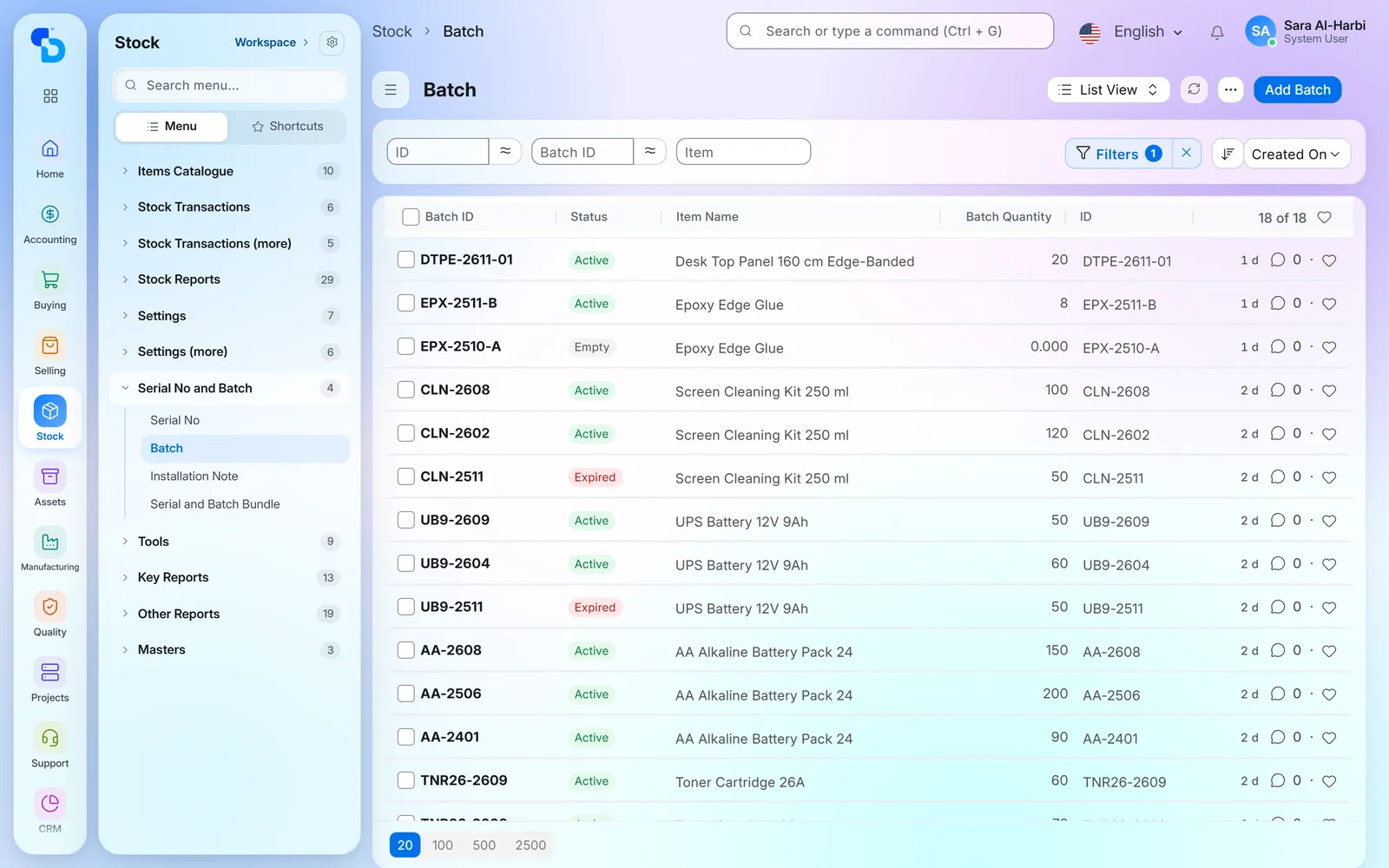
In standard ERPNext, a batch report shows each batch per warehouse with what came in, what went out and the balance. For a food and meat processor in Saudi Arabia, we added QR scanning. There, scanning a batch QR code on a stock entry, a delivery note, a sales invoice or a stock count adds the item, the batch, its quantity and its warehouse. A batch scanner page also shows the batch with its quantity, receiving warehouse and expiry date, and lists the documents that moved it.
The batch list with status and quantity per batch (general ERPNext demo, office supplies)
Weight loss, calculated and posted
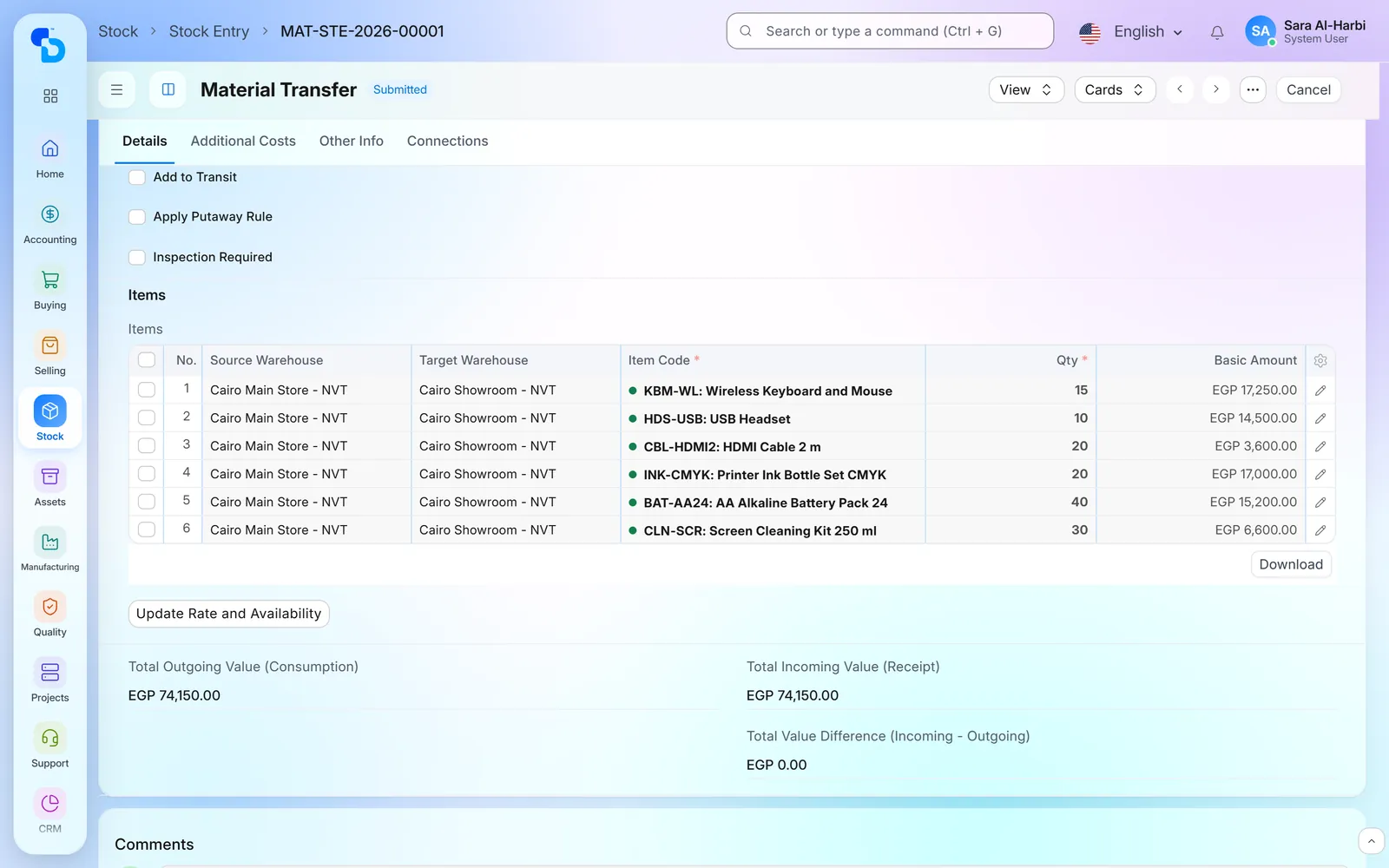
Meat loses weight while it chills and when it is cut. For a food and meat processor in Saudi Arabia, we built weight-loss handling on the stock transfer. There, one allowed loss rate applies to chosen item groups. The transfer then shows the batch quantity beside the quantity moved and works out the loss. A repack entry writes the batch down by the allowed rate, and any loss beyond it is posted to a chosen expense account and cost centre.
A material transfer between two warehouses (general ERPNext demo, office supplies)
Batch expiry and stock age by warehouse
A standard report lists every batch with its expiry date and the days it has left. ERPNext also refuses the sale of a batch whose expiry date has passed. For a food and meat processor in Saudi Arabia, we built a stock-age report on top. It lists stock by warehouse with the batch, its quantity and its slaughter, production and expiry dates. The report can also be e-mailed every day to chosen roles.
The standard Stock Ageing report: stock value by age band per item (general ERPNext demo, office supplies)
Work orders with material availability
A standard work order shows the quantity required, transferred and consumed for each material. Its finished batch also gets its own expiry date. For a food and meat processor in Saudi Arabia, we built a work-orders board on top. Planners see open work orders there, with the materials required, transferred and in store. From the same board, they then create the material transfer. Two rules also keep plans clean: one routing per production plan, and work orders in whole multiples of the largest unit.
A work order: required items against the quantity to manufacture (general manufacturing demo, office supplies)
Arabic screens for each factory hall
For a food and meat processor in Saudi Arabia, we built one screen for the processing hall and one for the production hall. Each screen lists job cards with the work order, item, operation, workstation, quantities, time spent and status. A worker starts, pauses or finishes a job, then names the employees and enters the quantity done. When the last operation ends, the system drafts the production entry, and the supervisor then reviews and submits it. In standard ERPNext, the automatic batch pick for production already skips an expired batch.
Work orders by status (general manufacturing demo, office supplies)
Packing, loading and delivery
A standard packing slip lists the items of a delivery with their batch and the gross weight of the packages. For a food and meat processor in Saudi Arabia, we built a packing screen with start, pause and finish actions. A loading tab on the delivery note there records the driver, the vehicle and the entry, exit and loading times. Ticking ‘delivered to customer’ on the note then updates the sales order.
A delivery note to a customer (general ERPNext demo, office supplies)
HR and payroll across farms, factory and shops
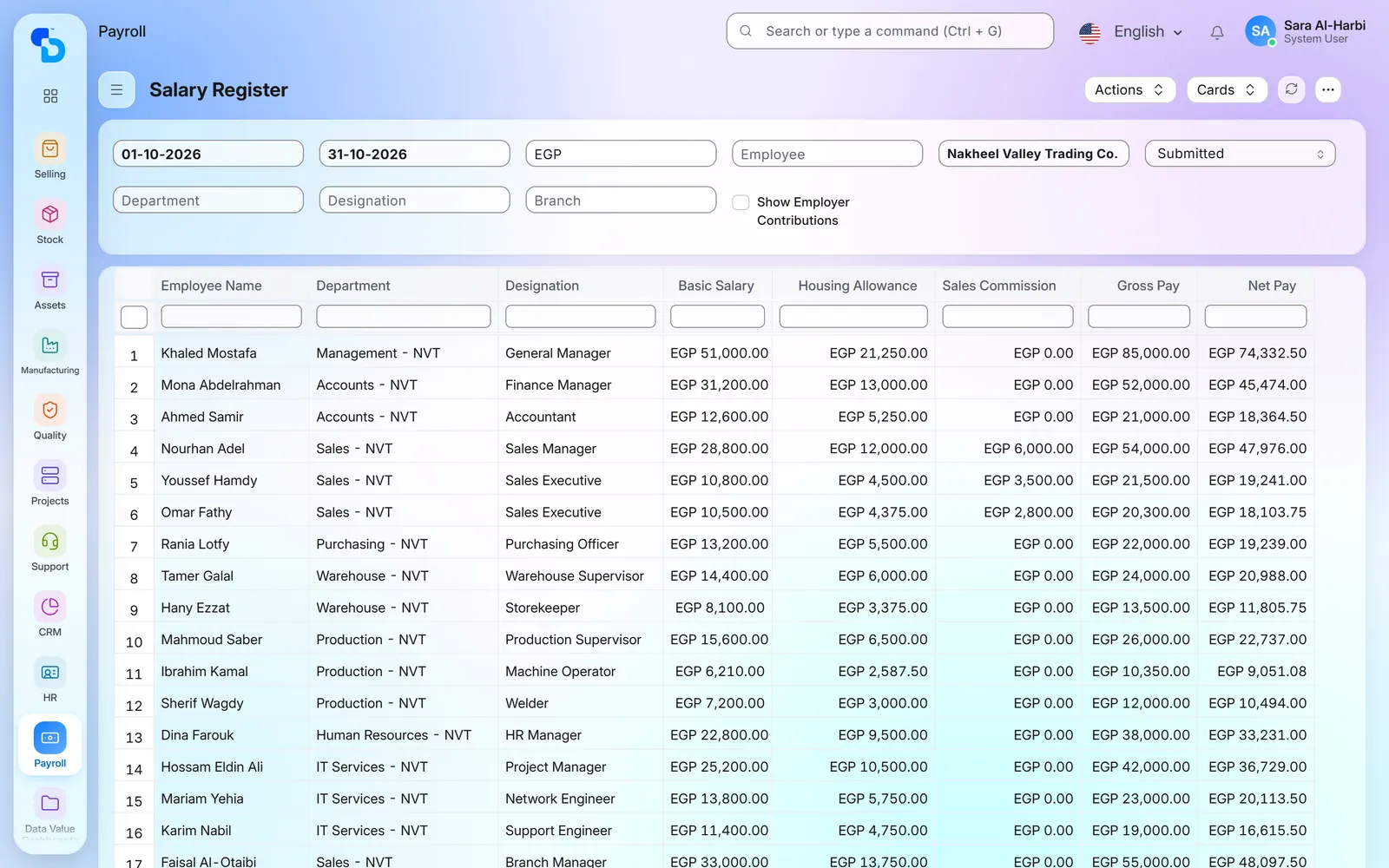
Staff on farms, in the factory and in shops sit in one HR system. A shift attendance report shows each employee’s shift, in and out time, late entry and early exit. The salary register also lists each payslip with one column per earning and deduction. For a food and meat processor in Saudi Arabia, we also built a check-in report with the first punch in, last punch out, device and shift, which flags a missing punch.
The standard salary register for one month (general HR and payroll demo)
Screens show demo data.
Modules
ERPNext modules and integrations for food manufacturing
Where we have delivered ERP for food manufacturing
Client name withheld
A food and meat processor in Saudi Arabia
Meat production and food manufacturing, from farm to retail · Saudi Arabia
One system from the farm to the shop counter.
Accounting
Purchasing
Sales
Inventory
Manufacturing
ZATCA integration
HR
What we set up
Stock of raw materials and finished goods across farms, the factory and retail branches
Carcass receiving by batch, with tag number and slaughter date
Production orders for processed products, with a screen for each hall
Weight-loss handling and a daily stock-age report
Sales from branches and the online store posted to the accounts, with ZATCA e-invoicing
HR for staff across all sites
Screens behind the food manufacturing steps
The standard ERPNext screens behind those steps: batch expiry, the ZATCA tax invoice and the bill of materials.
Stock per batch and warehouse: quantity in, quantity out and balance (general ERPNext demo, office supplies)
Batch Item Expiry Status: each batch with its expiry date and the days left (general ERPNext demo, office supplies)
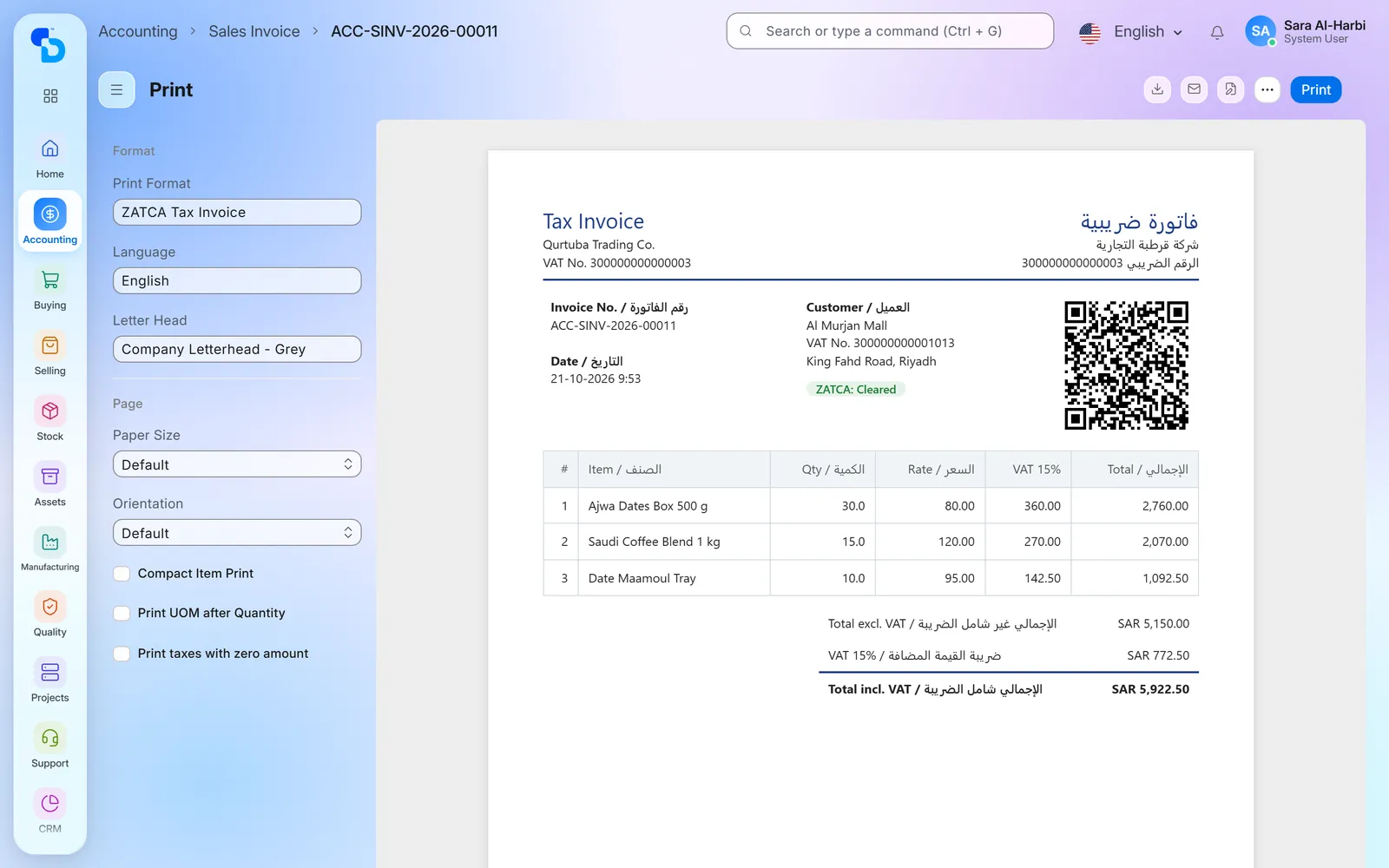
A bilingual tax invoice with the ZATCA QR code and the 'Cleared' status (ZATCA integration demo, fictional company)
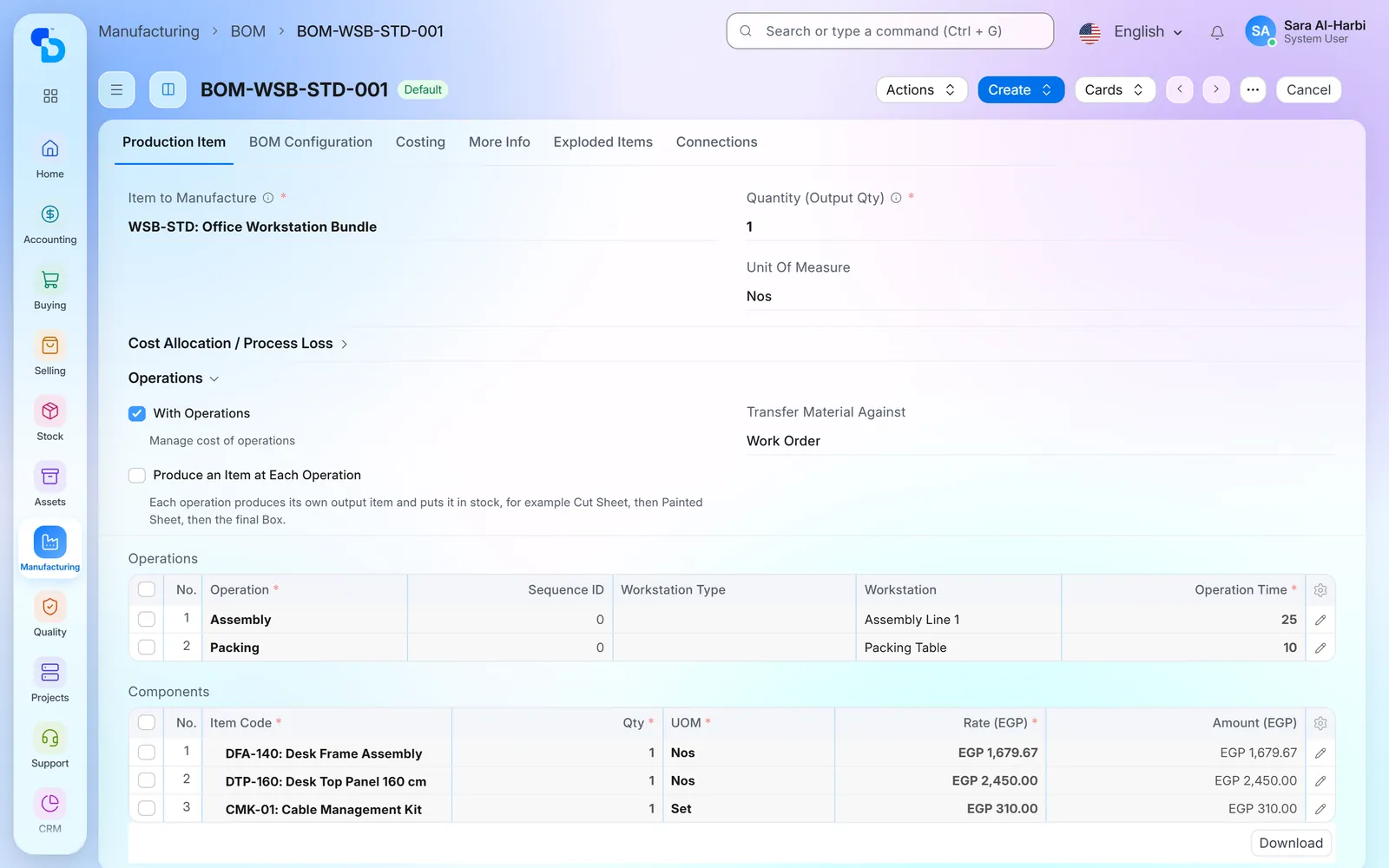
A bill of materials: the raw materials, quantities and cost of one finished item (general manufacturing demo, office supplies)
Screens show demo data.
FAQ
Frequently asked questions about ERP for food manufacturing
Have you implemented ERPNext for a food manufacturer before?
Yes. We implemented ERPNext for a food and meat processor in Saudi Arabia with farms, a processing plant and retail branches. The project covered accounting, purchasing, sales, stock and manufacturing, as well as ZATCA e-invoicing and HR.
Can we trace a product back to its batch and its animal?
Yes, back to its batch. Each carcass or lot is received as a batch with its slaughter date. A batch report then shows every warehouse it passed through, from the farm store to the shop. For a food and meat processor in Saudi Arabia, we also added the tag number and the animal details to the batch.
How does the ERP handle food expiry dates?
Each batch holds a production date and an expiry date. ERPNext can also work out the expiry from the item’s shelf life. When you sell, it refuses a batch whose expiry date has passed. Before it gets that far, a standard report lists every batch with the days it has left.
How do you handle weight loss during chilling and cutting?
For a food and meat processor in Saudi Arabia, we built it into the stock transfer. An allowed loss rate is set for chosen item groups. The system then compares the batch quantity with the quantity moved, writes the batch down by that rate and posts any extra loss to an expense account. Standard ERPNext does not do this by itself.
Does this food manufacturing ERP support e-invoicing in Saudi Arabia and Egypt?
Yes. In Saudi Arabia, our ZATCA Phase 2 integration sends tax and simplified invoices from the sales invoice. If your factory is in Egypt, we have a separate ETA e-invoicing integration.
Is this ERP for food manufacturing standard ERPNext or custom work?
Both. Purchasing, stock, batches, bills of materials, work orders, sales and accounts are standard ERPNext. Carcass receiving, weight-loss handling, the stock-age report and the hall screens are additions we built for a food and meat processor in Saudi Arabia. On a new project, we adapt them to that factory.
We make other food products, not meat. Does this ERP still apply?
Mostly, yes. The project we delivered is in meat, but batches, expiry dates, bills of materials, work orders and packing work the same for any food product. The animal details are meat-specific, so we adapt those fields to your product.