Our ERP for plastic manufacturing connects raw material purchasing, finished pipe stock, sales and accounts in one system. So every receipt, delivery and payment reaches the books without retyping, in local or foreign currency.
We have implemented ERPNext for a plastic pipes factory in Sudan.
Raw material and finished pipe stock tied to purchasing and sales
Purchases and sales that post straight to the accounts
Supplier accounts in their own currency, with exchange differences posted
Payments with mode, reference number and bank posting
The process
Plastic manufacturing from raw material to finished pipe, in one system
1
Raw material purchasing
The factory orders raw material from suppliers, in local or foreign currency.
2
Receipt into stores
The stores receive each delivery into raw-material stock at its cost.
3
Production stock
Raw material leaves for production, then finished pipes and fittings enter finished-goods stock.
4
Sales orders
Customers order pipes and fittings against the stock you actually hold.
5
Delivery and invoice
Delivery reduces finished stock, and the invoice raises the customer’s balance.
6
Payments and bank
The accountant records each receipt and payment with its mode and reference number.
7
Accounts
Finally, every movement carries its value into the ledger and the financial statements.
Problems we solve
The problems plastic manufacturing runs into, and how the ERP solves them
Stock that nobody trusts
The store counts raw material and finished pipes in one place, while purchases and sales are recorded in another. Soon the stock figure and the real shelves no longer agree.
Raw material and finished goods each have their own stock. Every receipt and delivery also updates the quantity and its value at once.
Buying and selling run apart
When purchasing and sales work as separate processes, someone has to copy each invoice into the accounts by hand.
Receipts, deliveries and invoices post directly to the ledger, so stock and accounts move together.
Month-end reports wait on consolidation
If the figures live in stock sheets, sales files and the accounts, every report starts with consolidating them.
Every report draws on one connected set of books. As a result, the profit and loss statement, the balance sheet and the stock reports are ready whenever you open them.
Deals in more than one currency
Suppliers often price imported raw material in a foreign currency, while sales and the books stay in local currency.
Invoices and journal entries carry their own currency and exchange rate. The general ledger then shows a supplier's account in its own currency, or in company currency.
Payments stuck between the office and the bank
A payment recorded in the system is not always money in the bank yet. Without a status, the accountant follows deposits on paper.
Each payment keeps its mode, reference number and date, and the payments list filters by reference number. For cheques that wait at the bank, our Cheque Management solution adds a status per cheque.
Entries that wait in draft
When nobody submits a saved document, stock and the accounts stay one step behind the factory.
For a plastic pipes factory in Sudan, we set invoices, payments and journal entries to post as soon as they are saved. Standard ERPNext keeps the draft step, which suits a second review.
What we set up
What we set up: ERP for plastic manufacturing in practice
Eight things we have configured or built for a plastic pipes factory.
Raw material and finished pipe stock
The store and the accounts read the same stock figure, because every receipt, transfer and delivery updates the quantity and its value at once. Raw material stock and finished pipe stock are tracked separately, and both are tied to purchasing and sales. The stock ledger also lists each movement with the balance after it.
The warehouse tree, with stores, work in progress and finished goods (general ERPNext demo)
Raw material purchasing that reaches stock and accounts
Nobody copies purchases into the accounts at month end, because each step posts on its own. The factory orders raw material on a purchase order, then receives it into the stores at its cost. The supplier invoice records what you owe, and finance pays for what was ordered and received.
A purchase receipt into the stores (general ERPNext demo)
Sales of pipes and fittings from real stock
One sale updates stock, receivables and revenue together. The sales team takes orders against the finished stock you hold. Delivery then takes the pipes out of finished-goods stock, and the sales invoice raises the customer’s balance. The printed invoice also shows the amount in words, the rounded total, the due date and the customer’s tax ID.
A delivery note from the stores to a customer (general ERPNext demo)
Invoices and journal entries in more than one currency
Imported raw material needs no separate exchange calculation in a spreadsheet. You can raise a purchase or sales invoice in a foreign currency with its own exchange rate. When a payment settles an invoice at a different rate, ERPNext posts the exchange gain or loss for you.
A purchase invoice in a foreign currency with its exchange rate (general ERPNext demo)
A general ledger in the supplier's currency
The general ledger shows a foreign-currency supplier’s account in its own currency, and the same report shows it in company currency. You filter it by company, dates, account, party or voucher. You can also group it by voucher, account or party. For a plastic pipes factory in Sudan, we also built a ledger report that shows debit, credit and balance in both currencies side by side.
The standard general ledger with its filters (general ERPNext demo)
Payments by mode and reference number
Each payment keeps its mode, its reference number and its date, and the bank and party accounts move with it. You can also filter the payments list by reference number. For a plastic pipes factory in Sudan, we added a deposit status to each payment, such as Pending, Sent To Bank or Collected, shown in the payments list. If you need the full cheque cycle, you can add our Cheque Management solution.
A payment entry with its cheque status and bank actions (Cheque Management demo)
Post on save for routine entries
Standard ERPNext saves a document as a draft first, then posts it when someone submits it. At a plastic pipes factory, we set sales invoices, purchase invoices, payments and journal entries to post as soon as they are saved. However, this is a choice for each company. If a second person must review first, the draft step or an approval workflow stays in place.
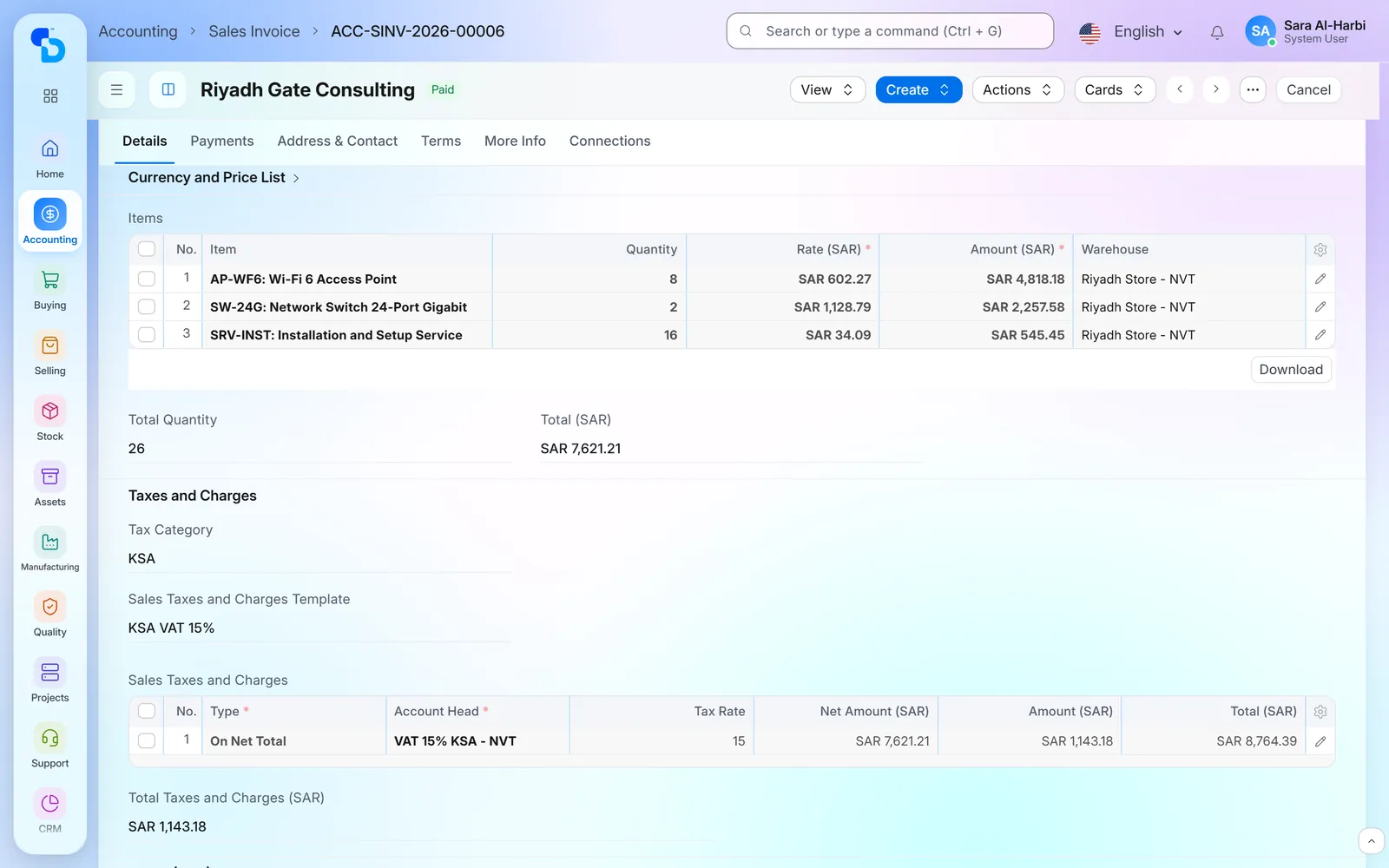
A sales invoice with its items and totals (general ERPNext demo)
Financial statements from one set of books
Purchasing, stock, sales and payments all post to the same ledger. As a result, the profit and loss statement, the balance sheet and receivables need no consolidation. Open them for any period, then compare quarters side by side. Reporting starts from one connected system, not from three separate files.
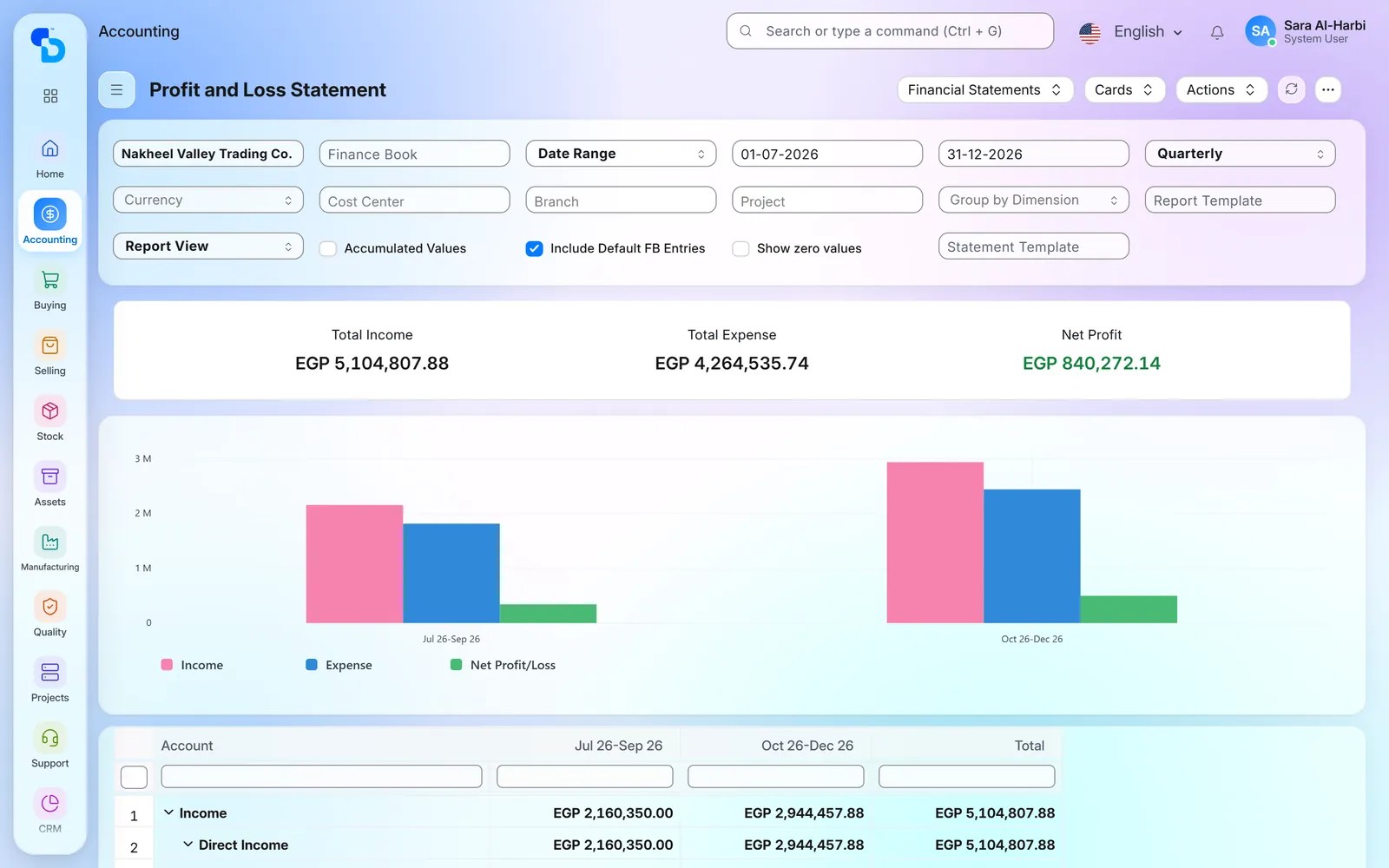
Profit and loss by quarter: income, expense and net profit (general ERPNext demo)
Where we have delivered ERP for plastic manufacturing
Client name withheld
A plastic pipes and fittings factory in Sudan
Plastic pipes and fittings for water supply, irrigation and infrastructure · Sudan
Purchasing, stock, sales and accounts on one connected system.
Accounting
Inventory
Purchasing
Sales
What we set up
Raw material and finished pipe stock tied to purchasing and sales
Purchases and sales that post directly to the accounts
Invoices and journal entries in more than one currency
A general ledger report in company and account currency
A deposit status on payments
Post on save for invoices, payments and journal entries
Plastic factory ERP screens
Standard ERPNext screens behind ERP for plastic manufacturing.
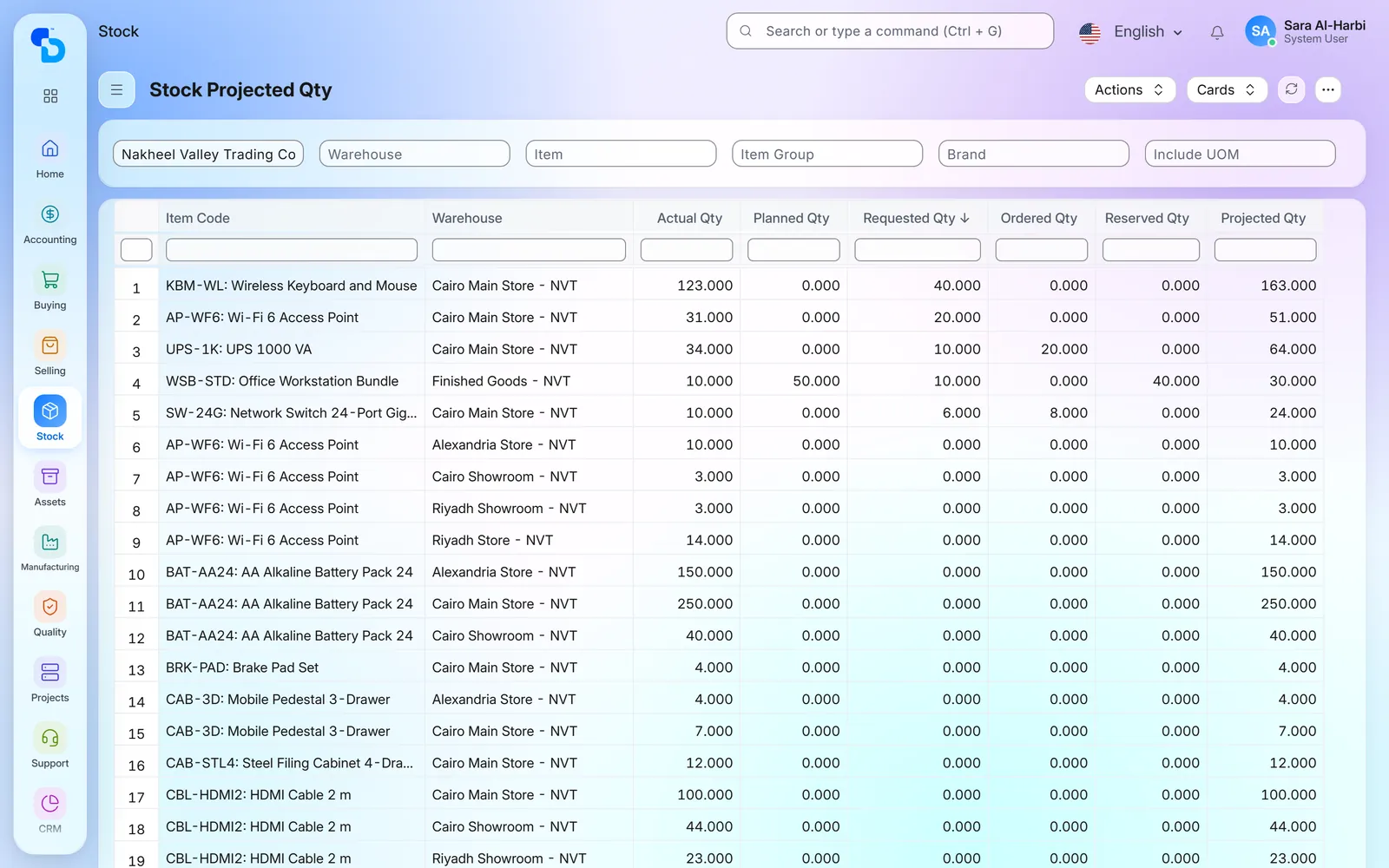
Stock by item and warehouse: actual, planned and requested quantity (general ERPNext demo)
Accounts receivable by age, with the amount due in each age band (general ERPNext demo)
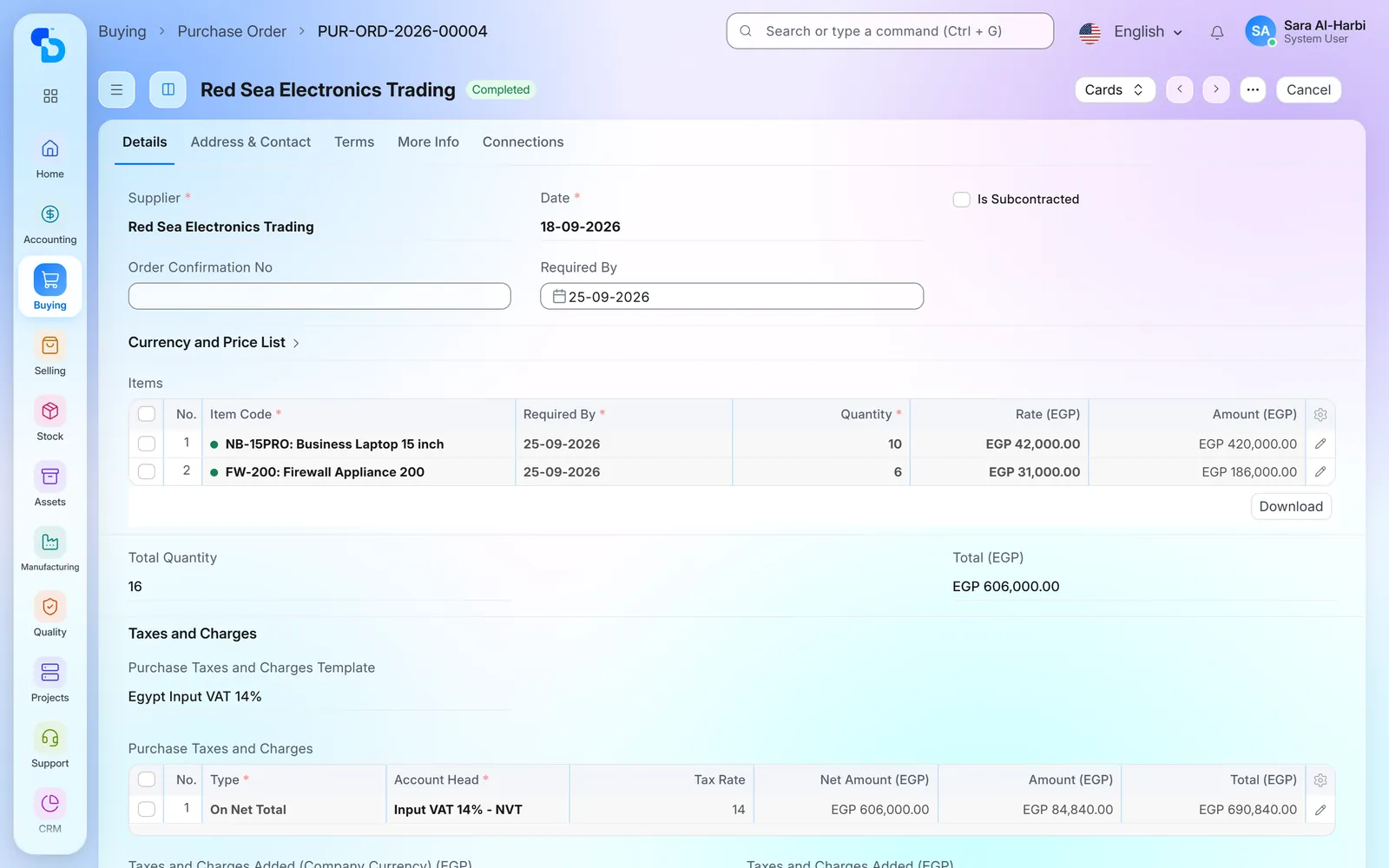
A purchase order with items, required-by dates and target warehouse (general ERPNext demo)
The stock ledger: each movement with its quantity and the balance after it (general ERPNext demo)
Screens show demo data.
FAQ
Questions about ERP for plastic manufacturing
Have you implemented ERP for a plastic pipes factory before?
Yes. We have implemented ERPNext for a plastic pipes and fittings factory in Sudan. The project covered accounting, stock, sales and purchasing. We also built a ledger report by currency and added a deposit status on payments.
What does ERP for plastic manufacturing cover on ERPNext?
It covers raw material purchasing, stock of raw material and finished goods, sales, payments and the accounts. Every step posts to the same ledger, so the financial statements need no consolidation.
Does the ERP keep raw materials and finished plastic pipes apart?
Yes. ERPNext holds stock per warehouse, so raw material and finished pipes are tracked separately. Every receipt and delivery also updates the right stock, with its value.
Can we buy and sell in more than one currency?
Yes, because invoices and journal entries carry their own currency and exchange rate. The general ledger also shows a supplier’s account in its own currency or in company currency, and ERPNext posts the exchange difference when you pay at another rate.
How do we follow payments the bank has not confirmed yet?
Each payment keeps its mode and reference number, and the payments list filters by reference number. For cheques, our Cheque Management solution follows each cheque until collection. For a plastic pipes factory in Sudan, we also added a deposit status to each payment.
Can we buy raw material by the tonne and sell pipes by the piece?
Yes, because each item has a stock unit and conversion factors to other units. So you can buy raw material by the tonne and stock it in kilograms, or sell pipes by the piece or by length. This is standard ERPNext, and we set the units with you.
Do you cover production orders and bills of materials?
ERPNext covers them in its Manufacturing module: bills of materials, work orders and job cards. However, that module was not part of the project described here. We scope it with you if you want production planned inside the system.
Is this standard ERPNext or custom work?
Mostly standard ERPNext. For the plastic pipes factory in Sudan, we added three things: a general ledger report by currency, a deposit status on payments and post on save for routine documents.
Running a plastic manufacturing plant? Ask about a similar project
Tell us how you buy raw material, hold stock and sell pipes and fittings. We will then show you how ERP for plastic manufacturing runs the same steps on ERPNext.