

- Home
- Industries
- Manufacturing
Manufacturing ERP software, built on ERPNext
Our manufacturing ERP software runs your factory in one system, from the sales order to the finished goods warehouse. Material issues, operation times and costs reach stock and the accounts without retyping. Each trade also gets the records it needs, from roasting reports to a pack-to-melt report.
- Bills of materials with operations, scrap and alternatives
- Production plans built from sales orders
- Job cards with time and quantity per operation
- Actual cost on every work order
Manufacturing trades where we have delivered ERPNext
Our manufacturing ERP software starts from standard ERPNext, then each trade adds its own records. So start with yours.

Green-bean samples, green against roasted quantity per roaster, cupping records, blends and café sales.
- Implemented for coffee roasters in Egypt.

Mould availability and cost, pack-to-melt yield, line downtime, make-to-stock planning and loading for export.
- Implemented for a glass manufacturer in Egypt.
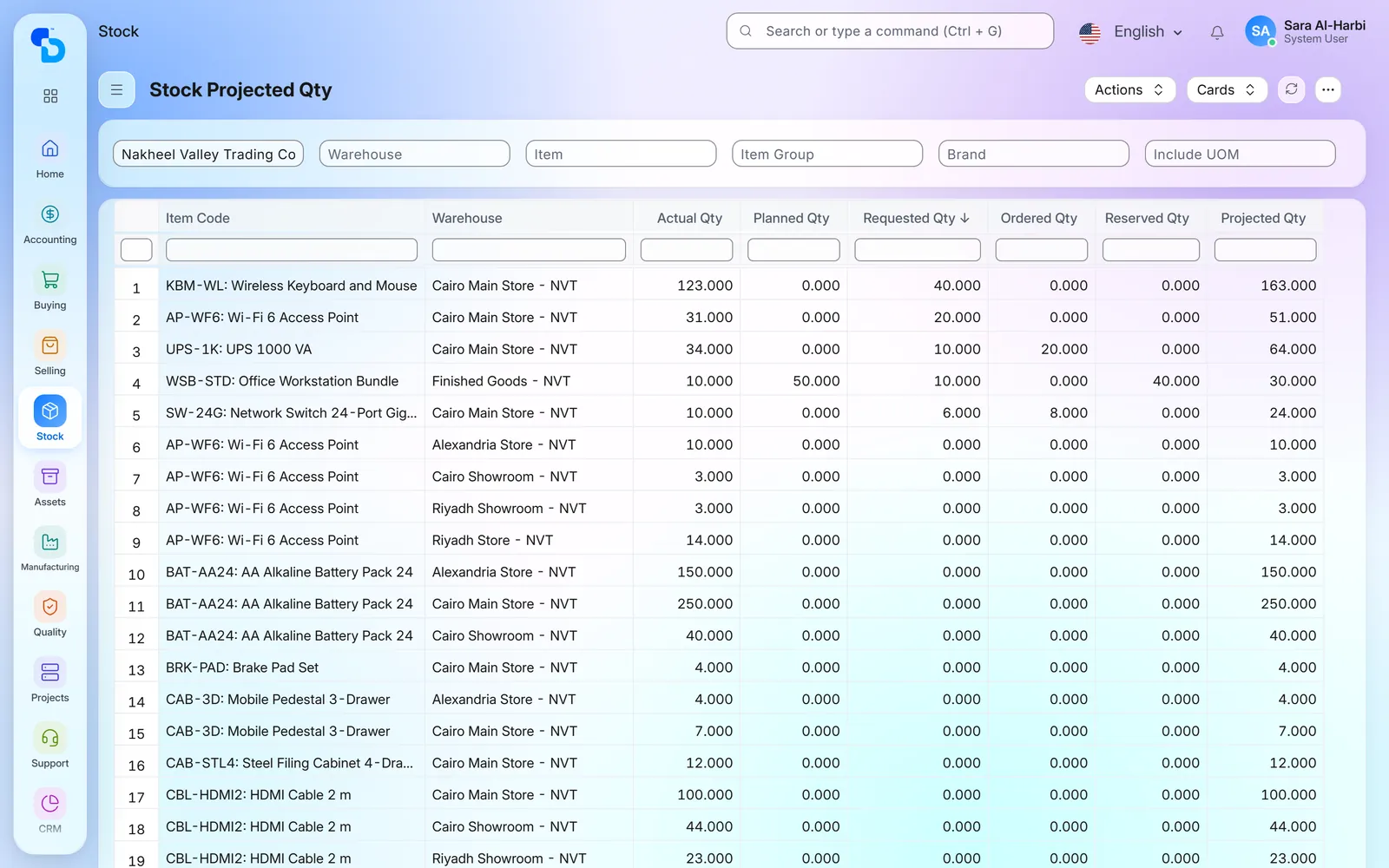
Raw material and finished pipe stock tied to purchasing and sales, with a multi-currency ledger.
- Implemented for a plastic pipes factory in Sudan.

Stock across farms, factory and shops, production orders for processed products, ZATCA invoices and HR.
- Implemented for a food and meat processor in Saudi Arabia.

Screens show demo data.
From sales order to finished goods, in one system
Demand
First, sales orders and material requests show what has to be made.
Plan
A production plan then turns demand into work orders and material requests.
Materials
Purchasing buys the shortages before the run starts.
Production
Work orders issue materials to the line, while job cards record each operation.
Quality
Inspections then accept or reject what was received or made.
Finished goods
Finally, the finished quantity enters stock with its batch number.
Accounts
Meanwhile, every movement carries its value into stock, cost and the ledger.
What holds a factory back, and what manufacturing ERP software does about it
Nobody trusts the unit cost
Selling decisions rest on a cost that someone calculated once in a spreadsheet. Meanwhile, material rates, scrap and machine hours keep moving.
- Each work order collects both the materials it consumed and the time logged on its job cards. So finished goods enter stock at what they actually cost.
The line stops for a missing material
Planning knows the orders, while the stores know the stock. But purchasing hears about a shortage only when the line is already waiting.
- The production plan compares what the orders need with projected stock, then raises material requests for the gap. Reorder levels cover the regular items.
Orders run late and nobody sees why
A late order is noticed when the customer calls. By then, the cause is lost: a busy machine, a stoppage or a late material.
- Work orders carry planned and actual dates, while job cards show each operation. Downtime entries also record stoppages and their reasons.
Quality records live on paper
Inspection sheets sit in a folder. So a complaint cannot be traced back to the batch, the supplier or the operation.
- The system records each inspection with its readings and result, whether at receipt, on the job card or at delivery. Batch numbers then tie the finished product to the production entry of its work order.
General software does not know your trade
A roaster needs cupping scores, while a glass plant needs pack-to-melt yield. General software knows neither, so both stay in spreadsheets.
- So we build the records and reports of your trade on top of standard ERPNext. For example, we have built roasting reports, cupping records and a pack-to-melt report.
What we set up in our manufacturing ERP software
Eight parts of ERPNext we configure for a factory, each next to its screen.
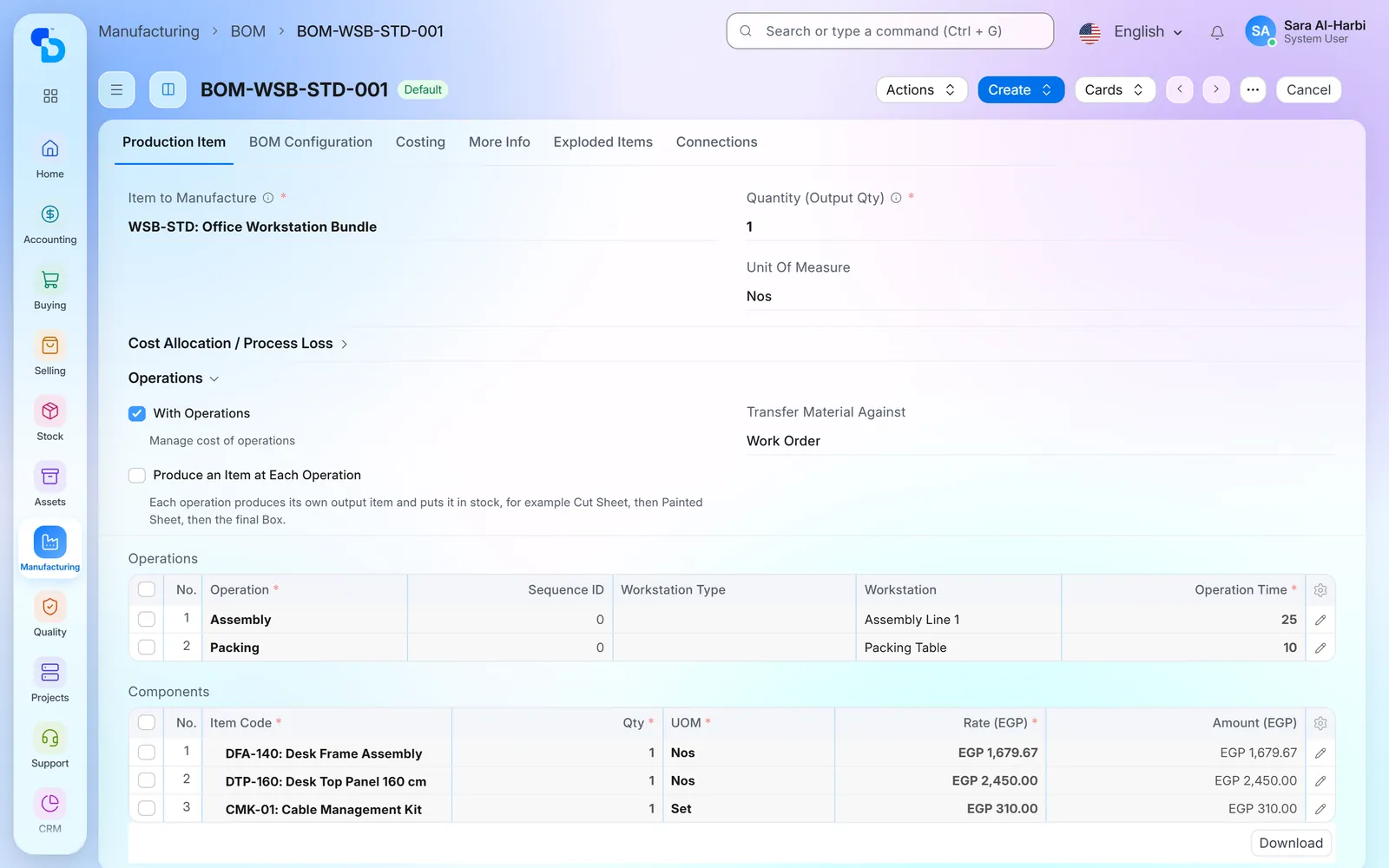
Bills of materials with operations, scrap and alternatives
Each product gets a bill of materials: its materials and quantities, its operations and the workstation for each. A sub-assembly carries its own bill, so complex products are built level by level. Expected scrap and process loss are part of the recipe. A component can also have an approved alternative.
Production plans from sales orders
A production plan pulls open sales orders or material requests and lists what to make, including sub-assemblies, with planned start dates. For raw materials, it compares the requirement with projected stock, then creates material requests for the shortage. So purchasing starts from the plan, not from a phone call.

Materials checked, then issued to the line
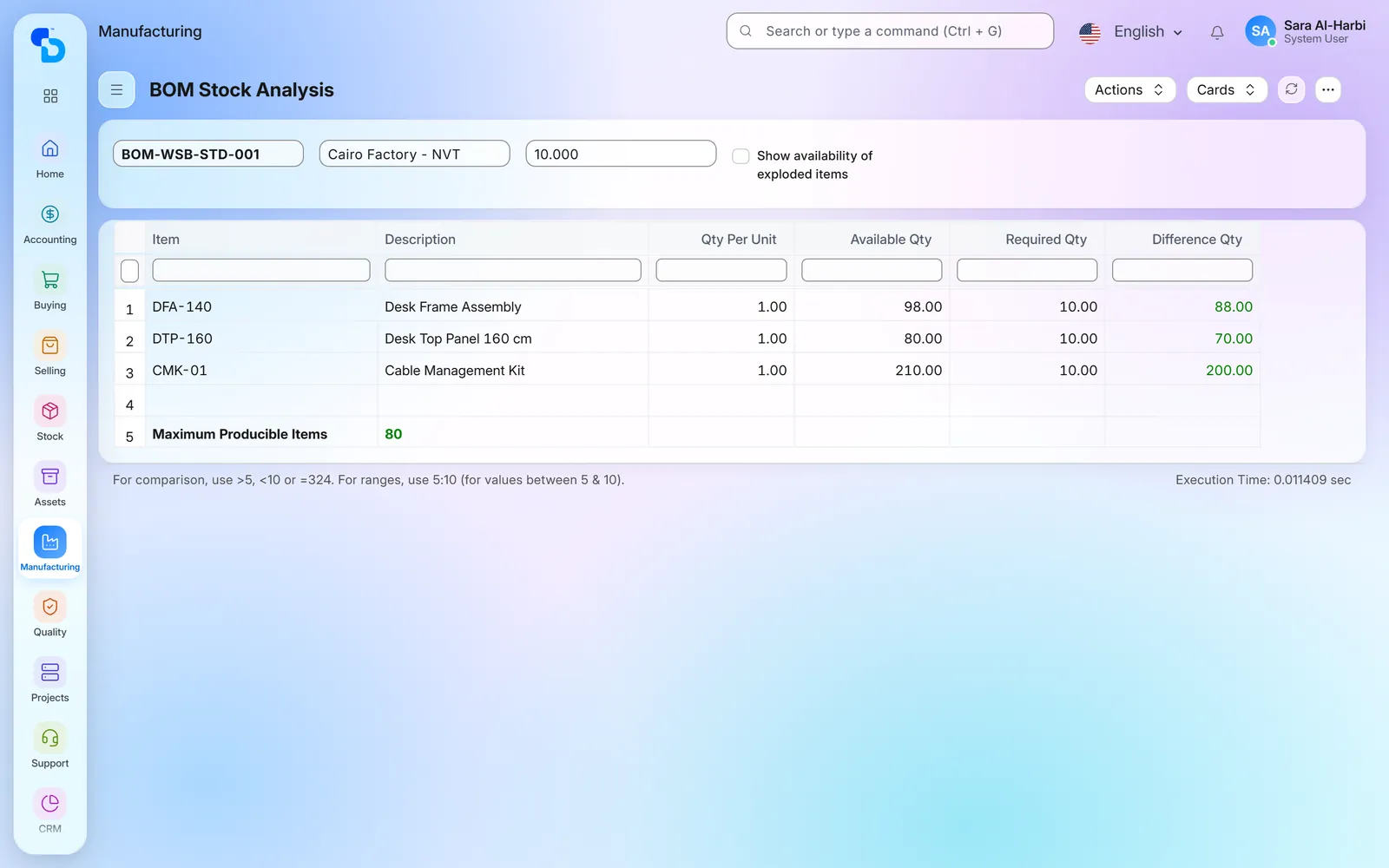
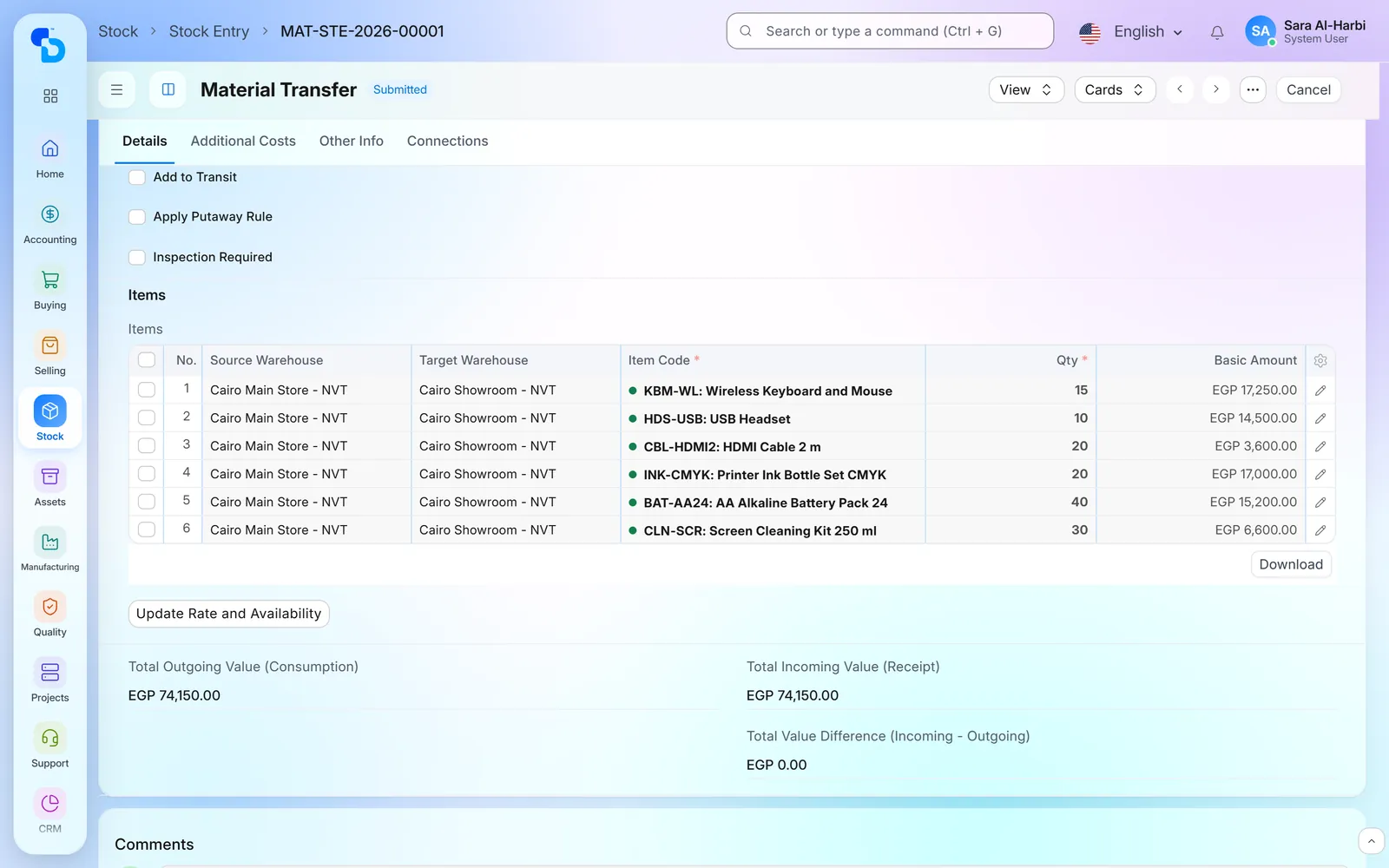
Before a run starts, the BOM stock report shows whether each material is in stock for the planned quantity. The stores then transfer materials to the work-in-progress warehouse against the work order, in one transfer or several. After that, the work order shows what was required, transferred and consumed.
Work orders and job cards on the shop floor
A work order states what to make, how many and by when. Each operation also gets a job card, where the operator logs the start time, the end time and the completed quantity. Supervisors can then see which orders have not started, are in process or are complete.

Workstation hours, capacity and downtime
Every workstation has its working hours and a holiday list, as well as an hourly cost. When capacity planning is on, the system schedules job cards inside those hours, one after another on each machine. When a machine stops, a downtime entry records the workstation, the period and the reason. A report then adds up the lost hours per machine.

Quality inspections at receipt, in process and before delivery
Inspection templates list the parameters to check and their acceptable values. An inspection can be required at purchase receipt, on a job card or before delivery. The inspector then records the readings, and the result is accepted or rejected. As a result, each quality record sits beside its stock movement.

Batch numbers from raw material to finished product
Batch-tracked materials keep their batch number on every receipt, transfer and issue. When a work order finishes, the finished goods get their own batch, with manufacturing and expiry dates where needed. Batch reports then show each batch from receipt to the work order.

The actual cost of every order, in the accounts
Before a run, the bill of materials gives the planned cost: materials at their rate, plus each operation at the workstation’s hourly rate. The work order then collects the materials actually consumed and the time logged. Finished goods therefore enter stock at that cost, and the value moves through the ledger with them. Reports also compare required with consumed quantities per order.
Screens show demo data.
Modules and integrations used
Bills of materials, plans, work orders, job cards and workstations.
Warehouses for raw materials, work in progress and finished goods, plus batches.
Material requests and purchase orders, then receipts for materials and packaging.
Sales orders, deliveries and invoices that feed the plan.
Stock value, production cost, receivables and payables.
Machines as assets, with their depreciation and maintenance plans.
Employees, attendance and leave across plants and shops.
Sales invoices and credit notes sent to the Egyptian Tax Authority.
Sales invoices cleared or reported to ZATCA.
Branch and restaurant till sales posted to ERPNext as sales invoices.
Where we have delivered manufacturing ERP software
A glass manufacturer in Egypt
Glass manufacturing · Egypt
Production, planning, packing and export in one system, including reports built for glass.
- A pack-to-melt report per machine and shift
- Downtime entries per machine, including the stop reason
- A make-to-stock planning report with months on hand and safety stock
- New-product records with mould availability and ownership
- Packaging requests, loading requests and exit permits
- Inbound and outbound customer claims
- Manufacturing
- Inventory
- Purchasing
- Sales
- Accounting
- CRM
A food and meat processor in Saudi Arabia
Food processing, from farm to shop · Saudi Arabia
Farms, the factory and the shops in one system.
- Stock across farms, the factory and the shops
- Production orders for processed products
- Branch and online-store sales flowing into the accounts
- ZATCA e-invoicing inside the sales process
- HR across sites
- Accounting
- Purchasing
- Sales
- Inventory
- Manufacturing
- HR
- ZATCA
A wood trader that makes pallets in Egypt
Wood and pallets · Egypt
Timber purchasing, pallet stock, sales and accounts in one flow.
- Timber purchasing, from requirement to supplier payment
- Stock of both wood and finished pallets
- Sales and delivery checked against available stock
- A fixed asset register with depreciation
- Accounting
- Sales
- Purchasing
- Inventory
- Fixed Assets
Frequently asked questions
Which trades does your manufacturing ERP software cover?
So far, we have delivered ERPNext in Egypt for coffee roasters, a glass manufacturer and a wood and pallet business. We have also delivered it for a plastic pipes factory in Sudan and a food processor in Saudi Arabia. Each trade page lists what we set up.
Is this standard ERPNext or custom work?
Both. Bills of materials, planning, work orders, stock and accounts are standard ERPNext. On top of that, we build what a trade needs, such as a roasting report or a pack-to-melt report.
Can we track scrap and process loss?
Yes. First, expected scrap and process loss are set on the bill of materials. Each work order then records its process loss, and a report lists it per order with its value.
Do you support subcontracted operations?
Yes. When an operation runs outside your plant, a subcontracting order sends your materials to the subcontractor. When the items come back, the receipt adds the service cost to their value.
Can we see raw materials, work in progress and finished goods separately?
Yes. Each has its own warehouse, so the stock reports give quantity and value per warehouse at any date.
Does it cover e-invoicing in Egypt and Saudi Arabia?
Yes, through our integrations. In Egypt, sales invoices go from ERPNext to the Egyptian Tax Authority. In Saudi Arabia, they are cleared or reported to ZATCA.
Does the system work in Arabic?
Yes. Screens and reports work in Arabic, right to left, and in English. A few standard field labels still show in English on the Arabic screens.
Related industries and solutions
Every sector we have delivered in.
Buy, stock and then sell in one system.
Running a factory? Ask about a similar project
First, tell us what you make and how an order moves through your plant. Then we show you the same steps in manufacturing ERP software built on ERPNext.