One ERP for coffee roasters, from the green-bean sample to the cupping score and the wholesale order. You buy, roast, blend, pack and sell coffee in one system, so the stock and the accounts keep up with every step.
We have implemented ERPNext for coffee roasters in Egypt.
Green-bean samples with moisture, density and grade
Green in compared to roasted out, per roaster
A cupping score on every roast
Blend recipes as a share of each coffee per kilogram
The process
From green bean to cup, in one system
1
Green beans
You receive each supplier lot into the green-bean warehouse.
2
Sample and grading
You measure and grade a sample of each lot before you approve or reject it.
3
Roasting
A work order sends green coffee to a roaster, then records the roasted quantity.
4
Cupping
The taster scores each roast, then accepts or rejects it.
5
Blending and packing
Operators blend the accepted coffee to its recipe and pack it.
6
Sales
You deliver each wholesale order and invoice it.
7
Accounts
Every movement carries its value into both stock and the ledger.
Problems we solve
What coffee roasters struggle with, and how the ERP answers
Every green-bean lot is different
Two lots of the same origin can still differ in crop year, processing, moisture and density. When that data stays in the buyer’s notebook, nobody can tie a roast back to the beans it came from.
You register each lot's sample with its origin, crop year, processing, grade, moisture, water activity, density and colour degree, then mark it approved or rejected. Because each lot comes in as its own batch, its stock ledger shows every roast it went into.
Roasting loss hides in the stock
Green coffee loses weight in the roaster. Unless you compare green in with roasted out for every roast, the loss disappears into the stock figures.
The roasting report shows, for each work order and roaster, the green quantity required and transferred against the roasted quantity produced.
Blends are recipes
A blend is a recipe of several coffees, and its cost moves whenever the recipe or the cost of one bean moves.
You code each blend as an item with its recipe as percentages per kilogram. The bill of materials built from that recipe holds the quantity and cost of each coffee, then drives the work order.
One coffee, many packs
The same roasted coffee leaves the roastery in several pack sizes, and the bags, labels and cartons are also stock.
Bills of materials link both the coffee and its packaging to each finished pack, and each pack has its own work order.
The cupping table decides quality
A roast that fails at the cupping table should not reach a customer, and stored coffee still changes with moisture.
The taster scores each roast on its job card and marks it accepted or rejected, while periodic checks log moisture and water activity per warehouse and item.
Wholesale orders need production behind them
A roaster sells to cafés, offices and shops, and an order often asks for coffee the roastery has not roasted or packed yet.
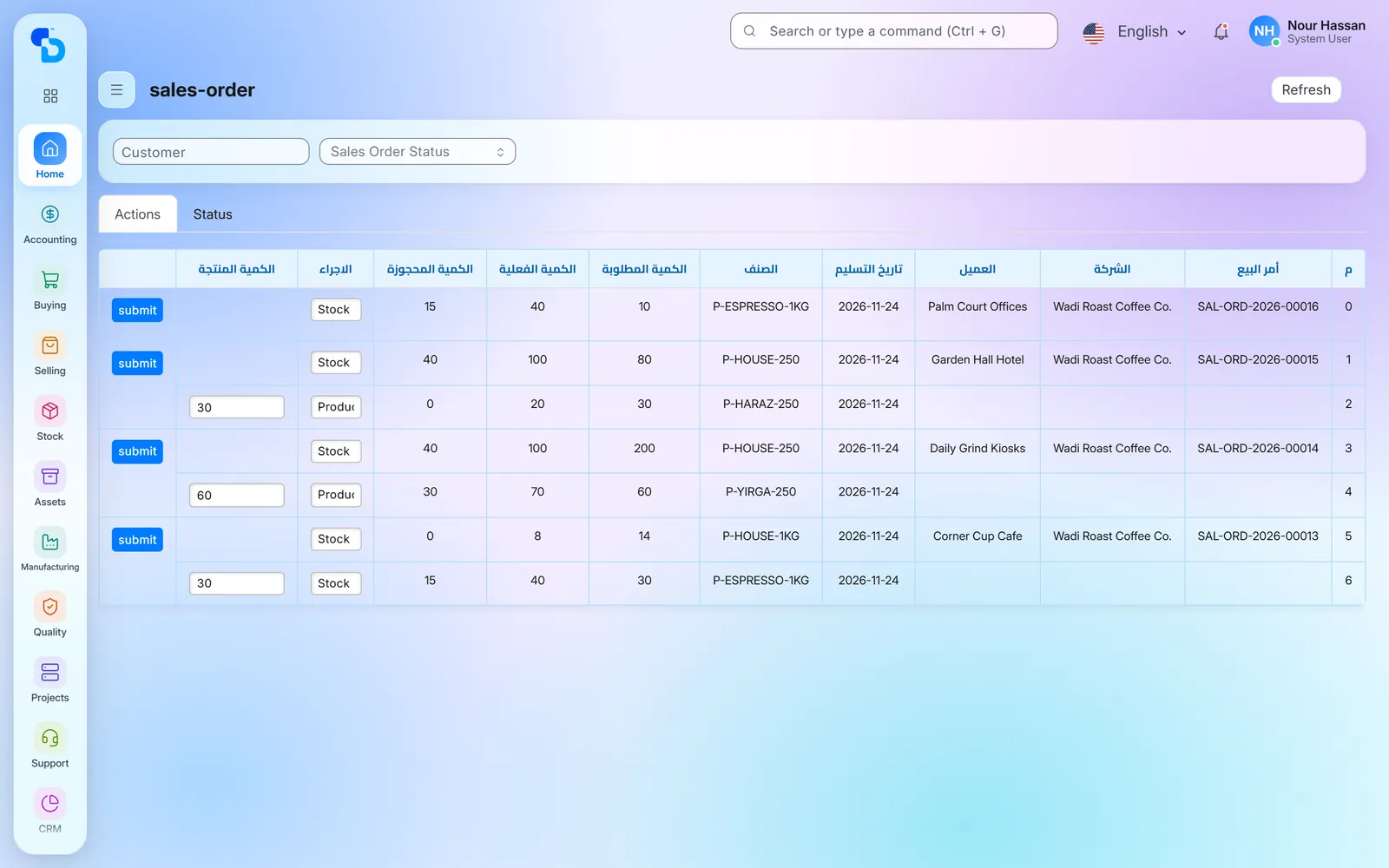
An orders screen shows the required, in-stock, reserved and produced quantities of each wholesale order. When you mark an order line for production, it creates the draft work orders it needs.
What we set up
What we set up in an ERP for coffee roasters
Seven things we have built or configured for roasters, each with its screen.
Green-bean sample register
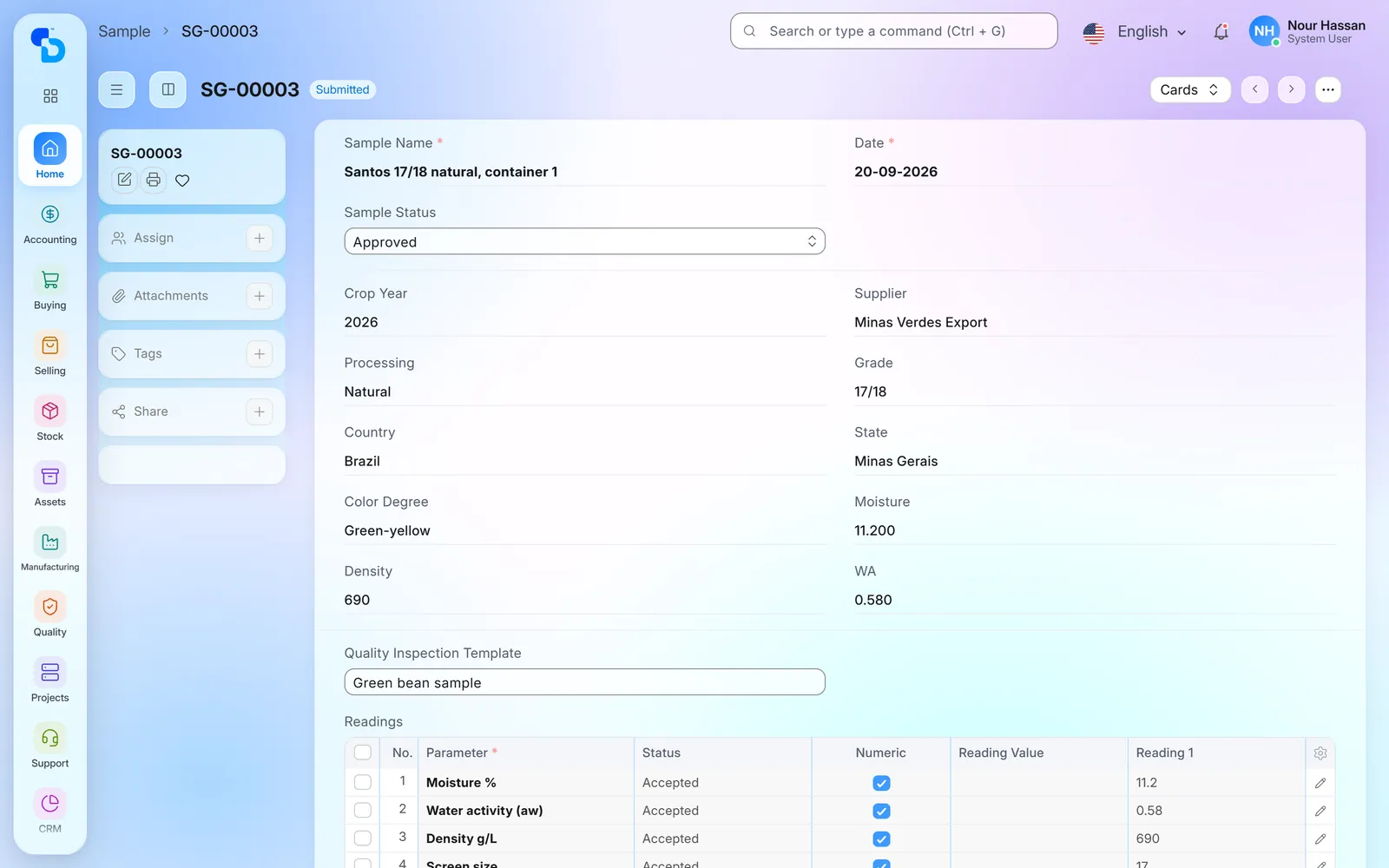
Before you buy or use a lot, you record its sample: name, supplier, country of origin, crop year, processing method and grade. The record also holds moisture, water activity, density and colour degree, with quality readings taken from a template. You then approve or reject the sample, and the decision stays with the sample record.
Green-bean sample, approved: supplier, crop year, processing, grade, country, colour, moisture, water activity and density, together with readings from the template
Roasting report: green in, roasted out
The roasting report puts green in next to roasted out for every roast, so you read the roasting loss roast by roast. For each work order and roaster, it lists the green coffee required, the green quantity actually transferred to the roaster and the roasted quantity produced, for the dates you choose.
Roasting report: per work order and roaster, the roasted quantity produced, the green quantity required and the green quantity transferred (column names in Arabic)
A roasting screen for the floor
Roasting staff work from one screen that lists the production orders waiting for each roaster, with the item, the status and the roasted quantity produced so far. From the list they create a roast for a work order, so nobody on the floor has to find their way through the full ERP menus.
Roasting screen: the orders in process on the roasters, with green and roasted quantities, start and stop buttons, as well as 'New Job Card' to create a roast (the app's column names are in Arabic)
A cupping score on every roast
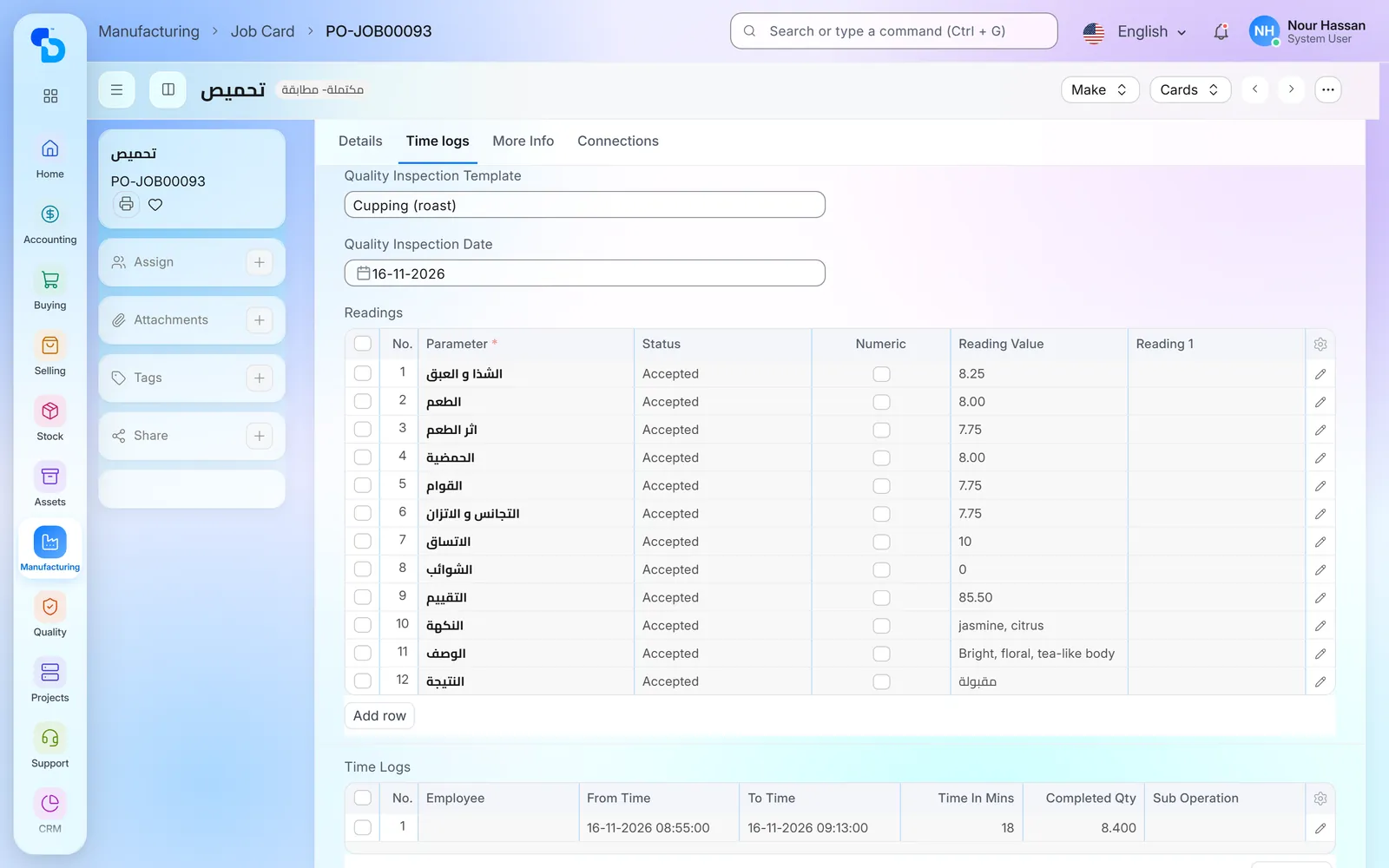
A quality screen lists the roasts of an item. For each roast the taster records aroma, taste, aftertaste, acidity, body, balance and defects, then an overall score and a description, and marks the roast accepted or rejected.
A roast's job card with the cupping template's readings, the overall score and the result 'accepted' (reading names are in Arabic)
Moisture and water activity in the warehouse
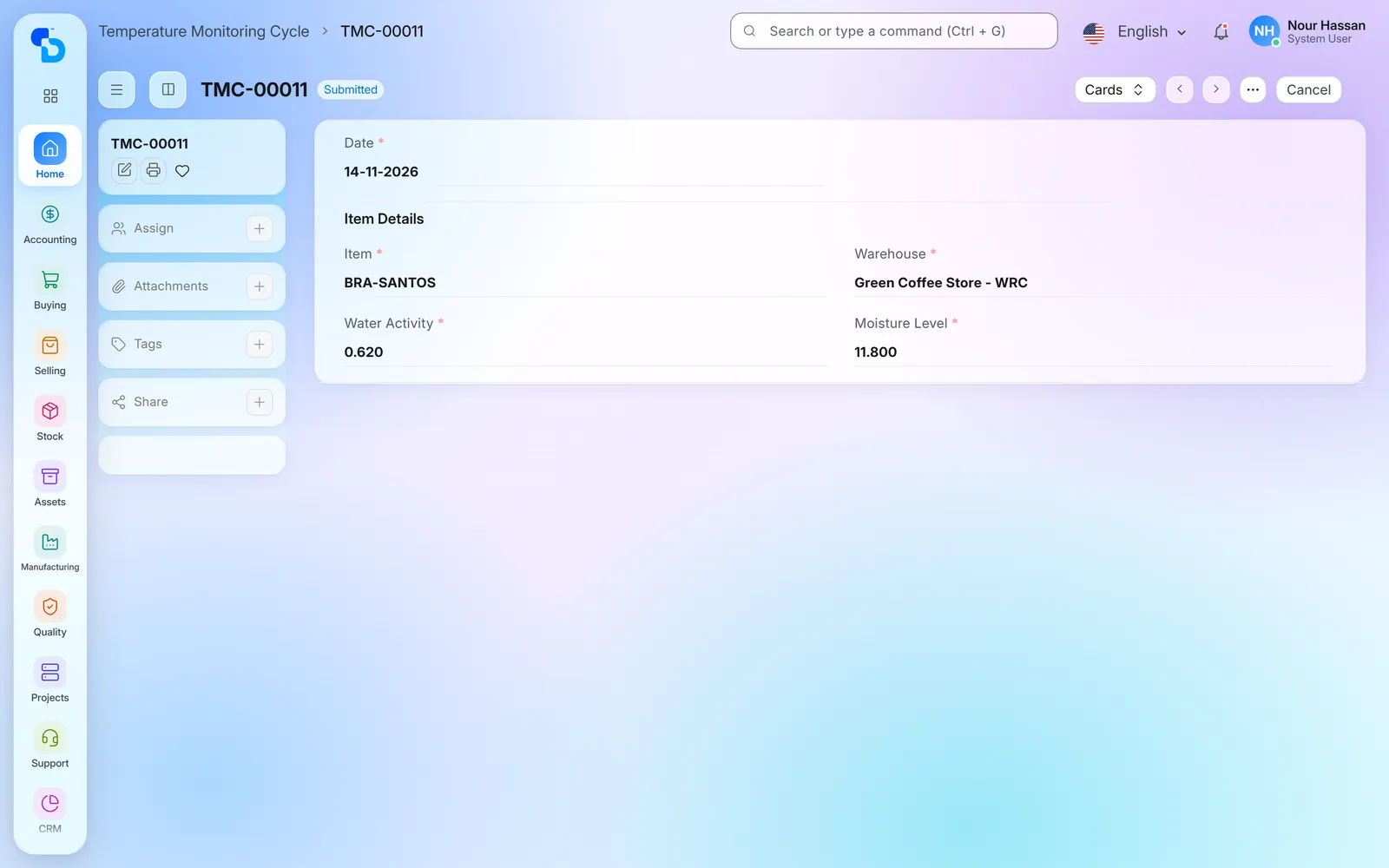
The team checks stored coffee on a cycle. Each check records the date, the item, the warehouse, the moisture level and the water activity, so the roaster has a history per warehouse instead of a paper log.
Moisture and water-activity check of a green coffee in the green-coffee store (the app names this record 'Temperature Monitoring Cycle')
The list of checks across the green, roasted and packed coffee
Blend recipes and item coding
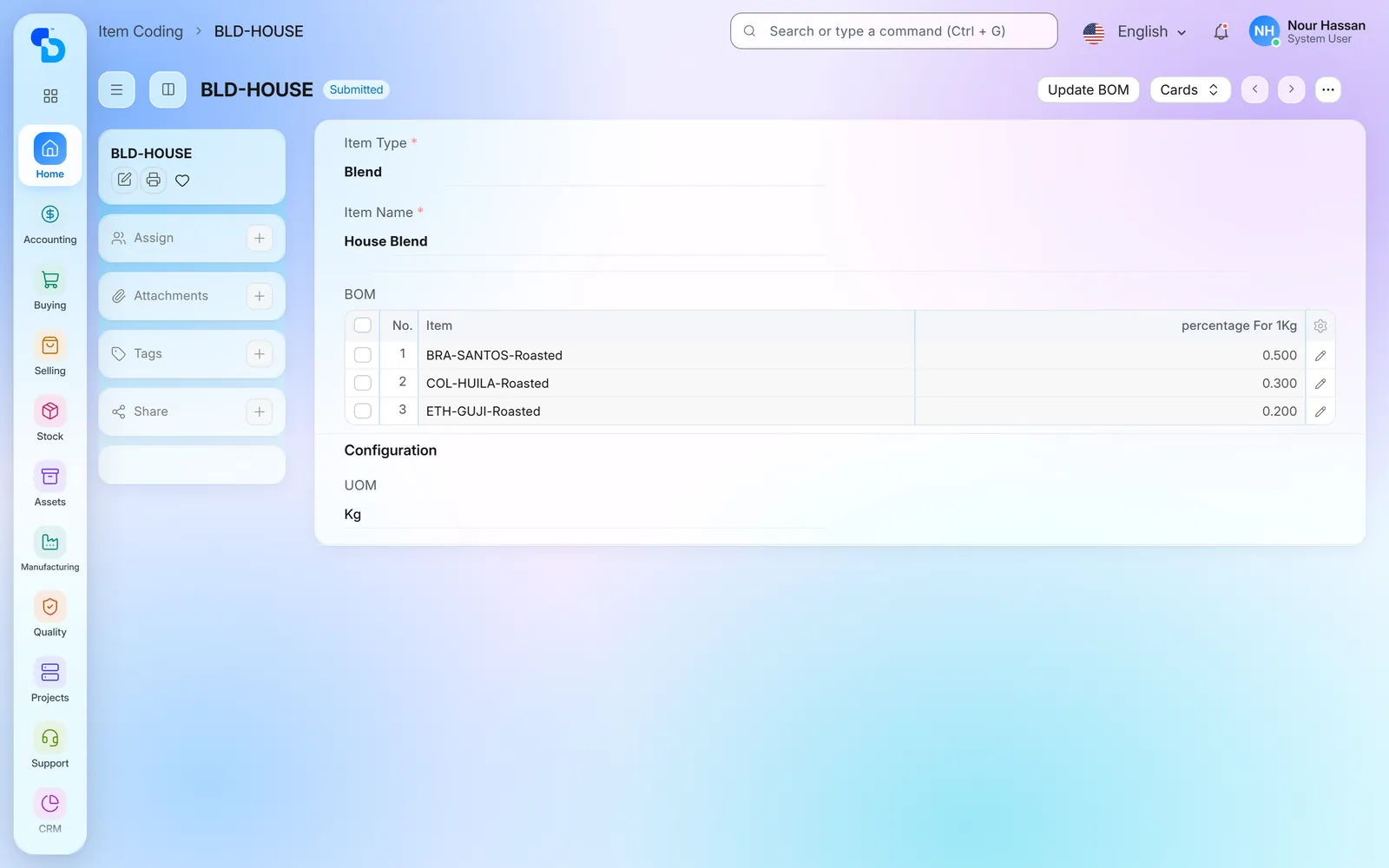
A new green coffee or blend starts as an item-coding request. For a blend, the request holds the recipe as a percentage of each coffee per kilogram and the roasted item group it belongs to, together with the item’s Egyptian e-invoice code. When you submit the request, the system creates the items and their bill of materials, and work orders then use that recipe.
Item coding of a house blend: the share of each roasted coffee in one kilogram
The bill of materials created for the blend, including the quantity and cost of each roasted coffee
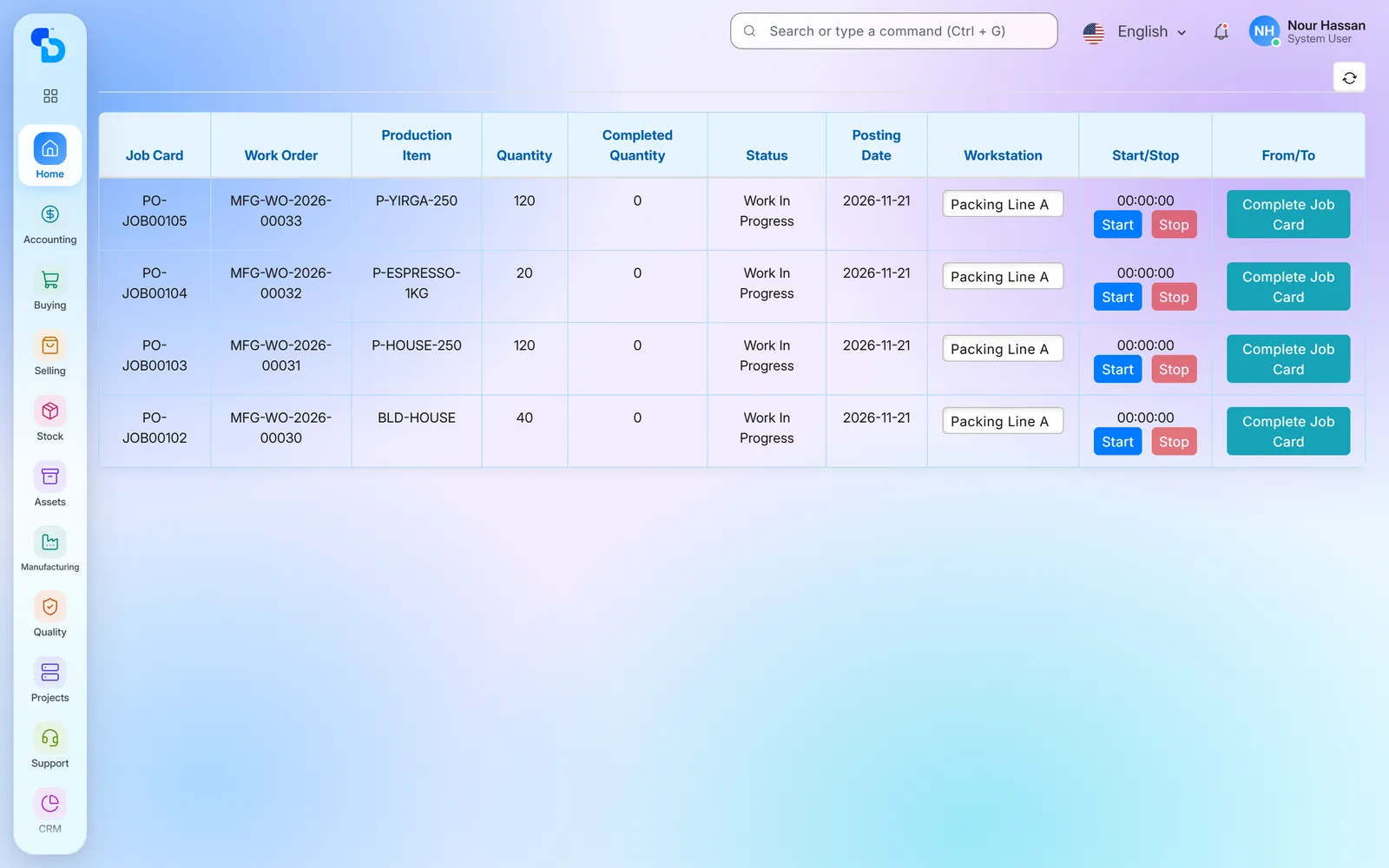
Blending and packing job cards
Blending and packing have their own screen. It lists the job cards with the work order, the production item, the workstation and the quantities, and lets the operator start and stop each job. When the operator starts a blend order from the screen, the roasted coffee moves to blending, and the operator then completes the blending job card on the same screen. Packing instead runs on standard ERPNext work orders, with a bill of materials for each pack.
Mixing and packing screen: job cards in progress with work order, item, quantity and workstation, and start and stop buttons
One system from the green-bean sample to the cupping score.
What we set up
Green-bean sample register with moisture, water activity, density and grade
Roasting report per work order and roaster
Cupping inspection on the job card of each roast
Moisture and water-activity checks per warehouse
Item coding and workstation routing
Manufacturing
Inventory
Purchasing
Sales
Accounting
Client name withheld
A coffee roaster and packer in Egypt
Coffee roasting and packing · Egypt
Production, stock and accounts in one system.
What we set up
Bills of materials and work orders that link both green coffee and packaging to finished goods
Purchasing, stock and sales on the same items
Manufacturing
Inventory
Purchasing
Sales
Accounting
More screens: stock, lot ledger and wholesale orders
Three more screens from the ERP for coffee roasters, the stock and order views a roaster uses every day.
Roasting screen: the orders in process on the roasters, with green and roasted quantities, start and stop buttons, as well as 'New Job Card' to create a roast (the app's column names are in Arabic)
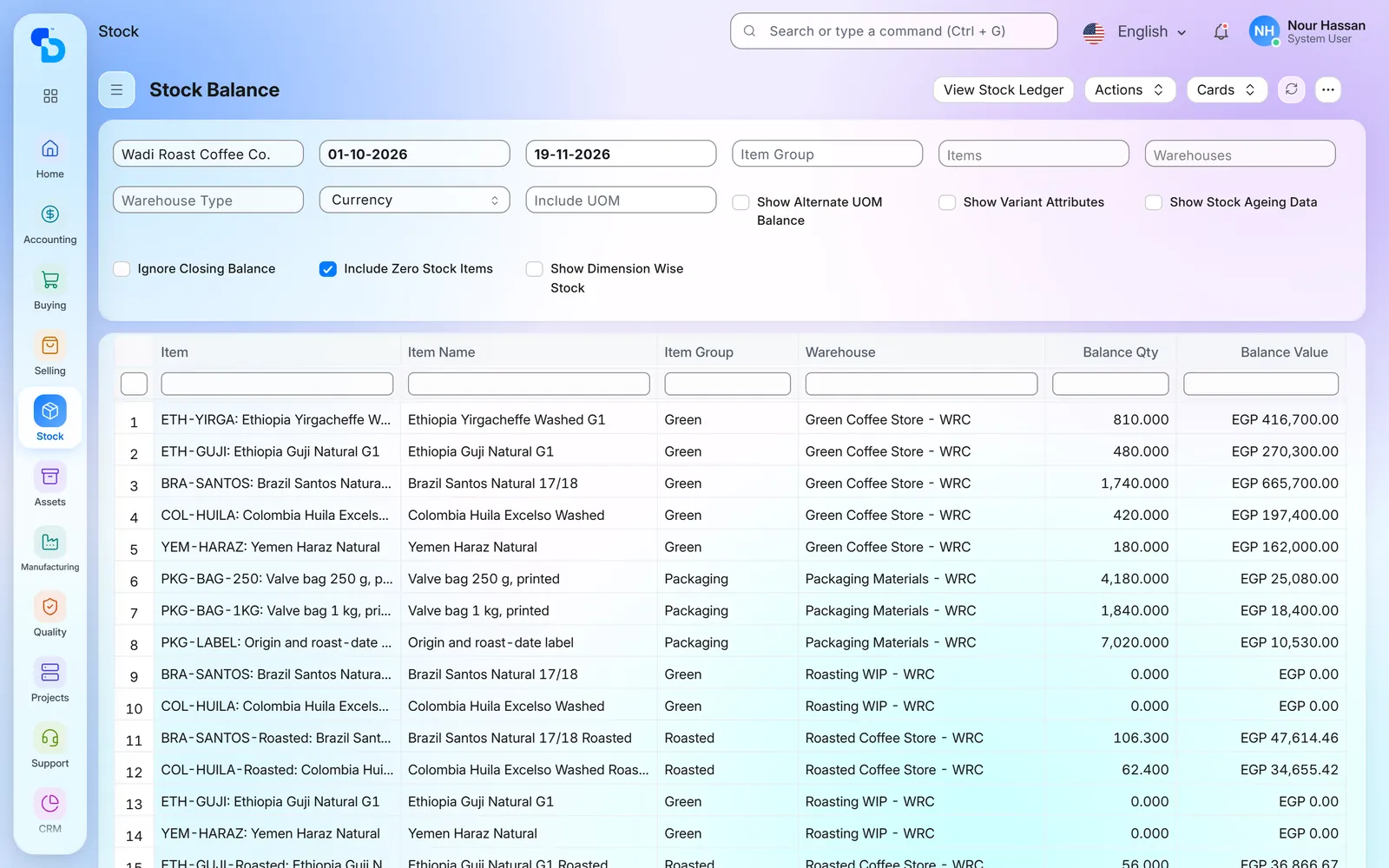
Stock Balance: green, roasted, in-process and packaging stock by warehouse, with both quantity and value
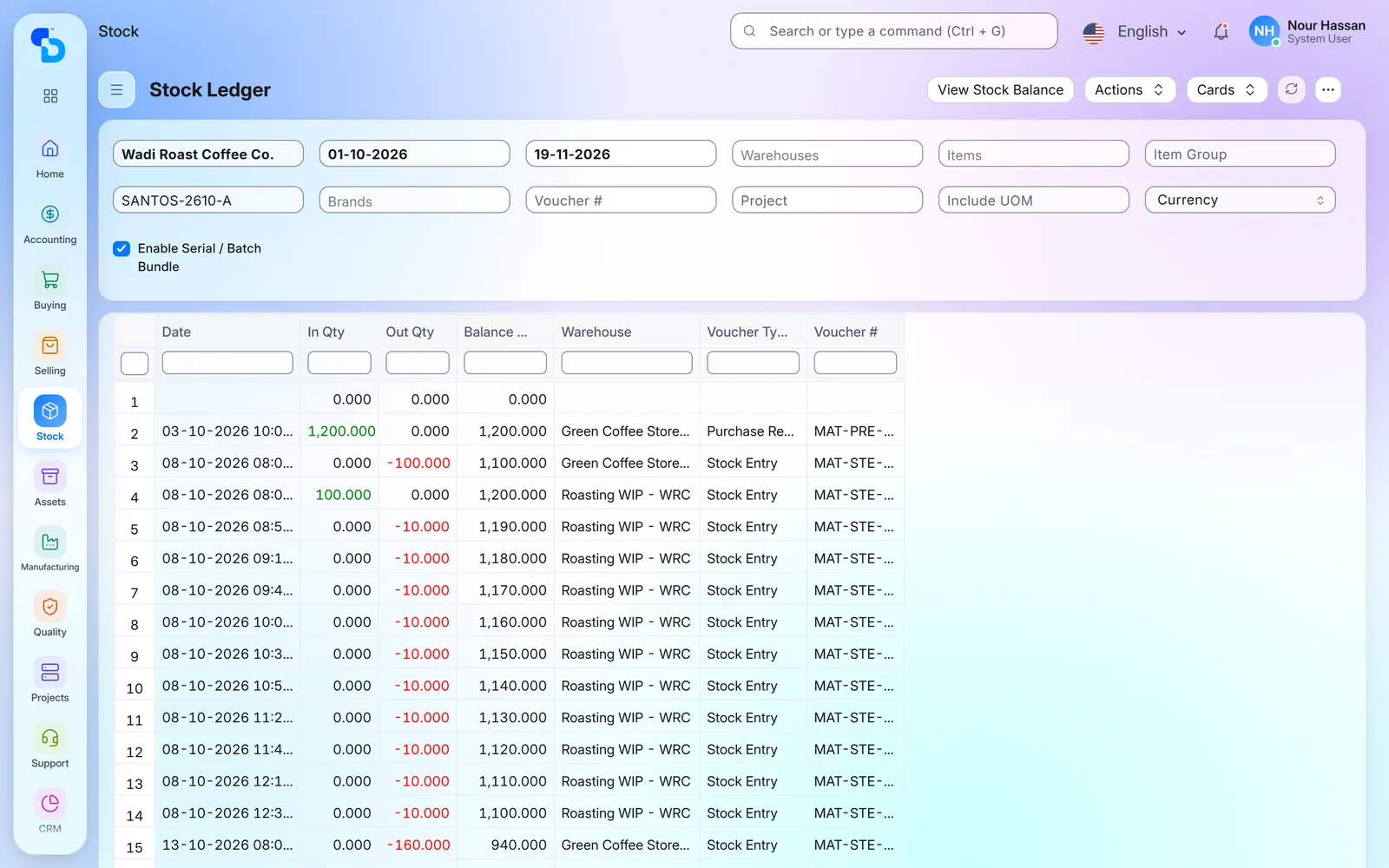
Stock ledger of one green-bean lot: the receipt, then the transfers to the roaster and the green coffee taken by each roast
The app's orders screen: wholesale orders with the café or office, the item, and the required, in-stock, reserved and produced quantities (column names in Arabic)
Screens show demo data.
FAQ
Frequently asked questions about ERP for coffee roasters
Have you implemented ERPNext for coffee roasters before?
Yes, for coffee roasters in Egypt: the work ran from standard manufacturing, stock and accounts to roaster-specific records such as green-bean samples, roasting reports and cupping scores.
How does the system show roasting loss?
The roasting report lists, for each work order and roaster, the green coffee transferred to the roaster and the roasted coffee produced. The difference between the two is the loss for that roast.
Can we record cupping scores?
Yes, the taster scores each roast on aroma, taste, aftertaste, acidity, body, balance and defects, gives it an overall score, then marks it accepted or rejected.
Does it handle blends?
Yes, a blend is an item whose recipe is the percentage of each coffee per kilogram. That recipe is its bill of materials, while blending itself runs as an operation with its own work orders and job cards.
Is the ERP for coffee roasters standard ERPNext, or custom work?
Both: purchasing, stock, manufacturing, sales and accounts are standard ERPNext. The sample register, the roasting and packing screens, cupping scores and the roasting report are additions that we built for roasters and then adapt to each one.
Does it support Egyptian e-invoicing?
Yes, through our ETA e-invoicing integration. Each coffee item carries its e-invoice item code, either GS1 or EGS.