

Data Value Theme for ERPNext v15 and v16
A modern, branded look for ERPNext v15 and v16: ready colour schemes, dark mode, a branded login page, a custom menu builder, number cards and map widgets, all set from one settings page.
| Category | Themes |
| Version |
Version 15
Version 16
|
Data Value Theme: a modern, branded ERPNext v15 and v16
Data Value Theme gives the ERPNext desk a clean, modern interface that carries your brand, on version 15 and on version 16. Everything is set from one Theme Settings page, so your team can change colours, menus, fonts and the login page without writing code.
Features
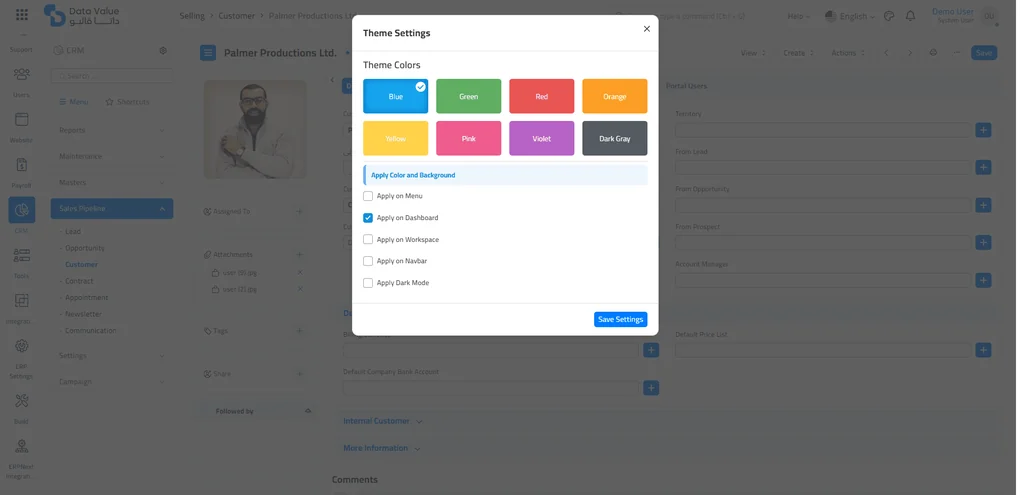
- Ready colour schemes. Eight built-in schemes (blue, green, red, orange, yellow, pink, violet and dark grey) plus your own custom colours, applied to the menu, navbar, workspaces and dashboards as you choose.
- Dark mode. Switch the whole interface to a dark view.
- Branded login page. Your logo on the sign-in page, with a single background photo or a slideshow, full-page or transparent.
- Custom menu builder. Keep the default menu built from your modules or build your own menu layout for your team.
- Side menu options. Show icon labels, hide tooltips, keep sub-menus closed and set your own loading image.
- Language switcher. Use the default language list or your own list of languages with their flags.
- Start where you work. Open a chosen workspace or dashboard after sign-in.
- Fonts. Pick from a large Google Fonts list, including Arabic fonts such as Cairo, Tajawal, Almarai and IBM Plex Sans Arabic.
- Number cards and maps. Add number cards to forms and reports, and map widgets on dashboards that place your records on a map.
- Your logo everywhere. Theme logo, login logo and favicon set from the same page.
The v16 edition
- The same look on ERPNext v16. The v16 edition is a separate app build of the same theme, with the same Theme Settings page.
- Edit Modules. Reorder, rename, re-icon or hide modules for the whole site or for one user, without code.
- Arabic and right to left. The desk runs right to left in Arabic.
- Per-user choice. Each user can switch between the Data Value interface and the standard ERPNext interface from the user menu.
- Full-width forms. One button hides the form sidebar so the form takes the full width.
- Safe with updates. It installs as a normal Frappe app, hooks into Frappe only through stable extension points and changes no core files. Kill switches per page load, browser, user or site return Frappe’s own interface without uninstalling.
Good to know
- A site runs one desk theme only. Do not combine this theme with Data Value Crystal or another desk theme.
Supported versions
Runs on Frappe/ERPNext version 15 and version 16. The v16 edition is a separate app build with the same look. Our team confirms the exact version before you buy.
What is included
- A licence for one production site, plus staging and test copies of that same site.
- Installation by our team on sites we host or can access; otherwise step-by-step installation instructions.
- 12 months of updates and email support from delivery. Renewal is optional.
- Our team confirms that the product fits your ERPNext version and setup before you buy.
Prices are on request. Press Request to Buy and our team will contact you with a quotation.
Built by Data Value, a Frappe Certified Gold Partner with offices in Cairo and Riyadh. Questions before you buy: info@datavalue.solutions, +20 103 016 8687 or +966 50 440 2121.
Buying terms: read our App Store terms, licence and refund policy.