

 ERPNext
Run your Zid store from ERPNext
Zid orders arrive in ERPNext as Sales Orders, and ERPNext sends stock, prices and products back to the store. Your items, warehouses and accounts stay in one place.
- Orders become Sales Orders
- Stock and prices pushed to Zid
- Returns become credit notes
- Missed orders recovered
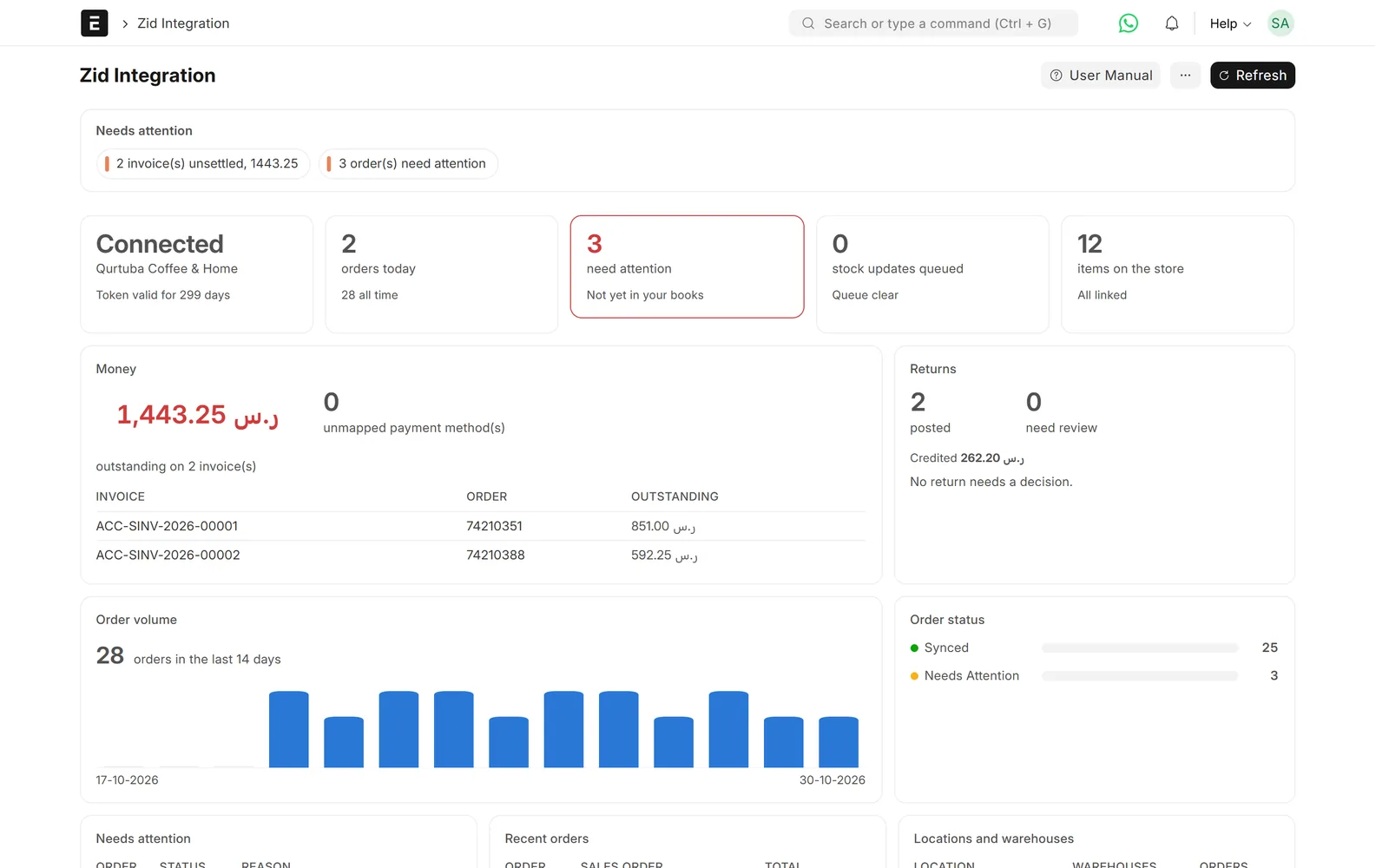
Zid dashboard: orders by status and webhook health
Problem → outcome
What changes when Zid and ERPNext are connected
-
Without the connectorOrders are typed into ERPNext by handWith the Data Value connectorEach Zid order becomes a submitted Sales Order with its customer, address, taxes, shipping and discounts.
-
Without the connectorThe store sells stock you do not haveWith the Data Value connectorZid shows what is free to sell: stock on hand minus open sales orders minus a safety buffer.
-
Without the connectorPrices differ between the store and the booksWith the Data Value connectorPrices are kept on a Zid Selling price list in ERPNext and sent to the store, without VAT; Zid adds the 15% at checkout.
-
Without the connectorA missed webhook means a missing orderWith the Data Value connectorAn hourly check and a nightly sweep find orders Zid did not deliver and create them.
What syncs
What moves, and in which direction
Zid
Storefront, checkout, orders and customers
- Orders, customers and addressesZid → ERPNextSales Order, Customer, Addresson order.create
- Payment statusZid → ERPNextPayment Entry (optional)on payment update
- Returns and credit notesZid → ERPNextCredit Note / Sales Returnon order status
- Products and bundlesERPNext → ZidItems ticked “Sync to Zid”, Product Bundleson demand
- Prices (VAT-exclusive)ERPNext → ZidItem Price on “Zid Selling”queued on change
- Available quantityERPNext → ZidStock ledger, by locationqueued on every movement
- Order status and trackingERPNext → ZidDelivery Note submitted (optional)on submit
ERPNext
Items, warehouses, prices, stock and accounts
Features
What you get, screen by screen
Real screens from our demo site, with a fictional demo company.

Orders
Orders arrive as checked Sales Orders
Each order is matched to your items by SKU and posted only if its total matches Zid’s.
- Customer, address, taxes, shipping and discounts mapped
- A total that does not match is blocked, not posted
- Unknown SKUs are held for review
- No duplicates when Zid sends an event twice

Stock
The store only sells what you can ship
Every stock movement queues an update, and a worker sends it to Zid every two minutes.
- Available = on hand − open sales orders − buffer
- Zid locations mapped to ordered lists of warehouses
- Nightly full sweep for items that never move
- Stock Drift report compares both sides
Catalogue
Products and prices come from ERPNext
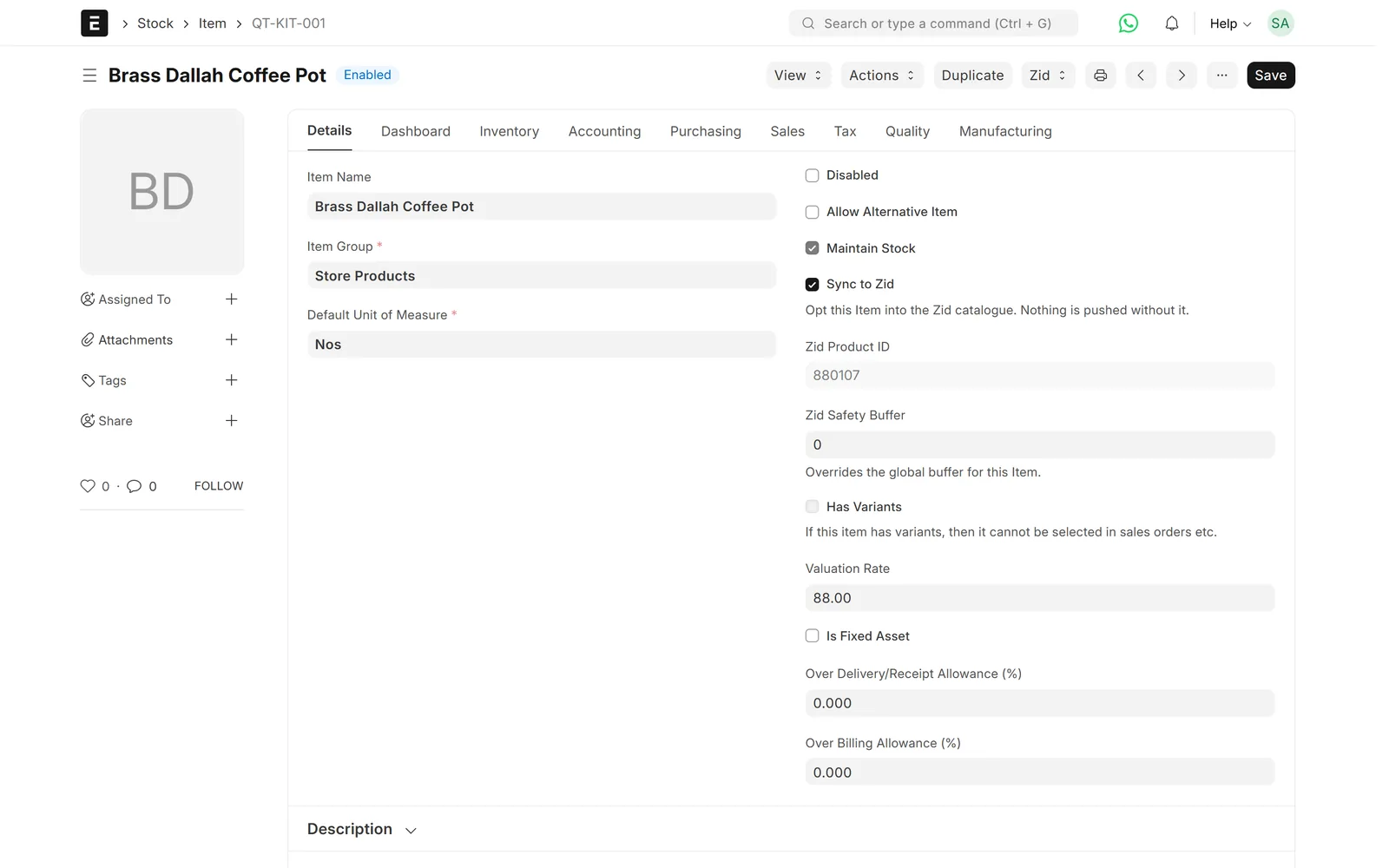
Tick “Sync to Zid” on an item, give it a Zid Selling price and push it, one by one or in bulk.
- Items not ticked are refused, never skipped silently
- Unchanged prices are not sent again
- Zid grouped products become Product Bundles

Money
Delivery, invoice and payment when you want them
Switched off by default. When on, an order status map decides which documents follow the Sales Order.
- Delivery Note, Sales Invoice and Payment Entry
- Cash-on-delivery clearing account
- Option to post only paid orders
- Delivery Note sends status and tracking back to Zid

Returns
Returns and credit notes handled
Zid’s order status drives returns, so stock and accounts follow what the merchant did in Zid.
- Partial credit notes
- Called-off returns reversed
- Return warehouse taken from the merchant’s choice

Monitoring
You can see that it is working
A workspace and dashboard show orders by status and whether the webhooks are healthy.
- API, webhook and sync logs
- Hourly check and nightly sweep
- Broken webhooks recovered automatically
- Order Review and Stock Comparison reports
Limits & versions
What it does not do (yet)
Versions and setup
- ERPNext and Frappe v15. A v16 site is not supported yet.
- One Zid store and one company per ERPNext site.
- Connected once by an administrator through Zid’s sign-in (OAuth).
- Warehouse mapping is set by hand on purpose, and checked during setup.
Not covered
- Abandoned carts, coupons, loyalty and product reviews.
- Zid POS and marketplace order specifics.
- Reporting Zid invoices to ZATCA: that is a separate service, “Zid invoices to ZATCA”.
Setup
How we set it up
- ScopeWe confirm your store settings, warehouses, payment methods and which documents you want after the Sales Order.
- ConnectYour administrator signs in to Zid once to connect the store to ERPNext.
- MapWe map Zid locations to warehouses, payment methods and order statuses, and link items by SKU.
- Test on your dataWe run real orders, returns and stock moves on a test site before go-live.
- Go live and supportWe switch it on and support it under a support agreement.
Related
Works together with
Integrations
Related connectors
ERPNext modules
Runs on these modules
Services
We take care of
FAQ
Frequently asked questions
Does a Zid order create a Sales Invoice?
It creates a submitted Sales Order. Delivery Note, Sales Invoice and Payment Entry can follow automatically, driven by the order status, or you create them yourself.
Are prices sent with or without VAT?
Without VAT. ERPNext sends the net price from the Zid Selling price list and Zid adds the 15% VAT at checkout. We check your store’s tax settings during setup.
What happens if Zid stops sending webhooks?
An hourly check and a nightly sweep compare orders on both sides and create any that are missing. Broken webhooks are re-registered automatically.
Can I connect more than one Zid store?
Today the connector runs one Zid store and one company per ERPNext site. Tell us if you run several stores and we will scope it.
Does it work on ERPNext v16?
Not yet. It is pinned to v15 because it uses ERPNext functions that changed in v16. We will update this page when v16 is supported.
How much does it cost?
Prices are on request. They depend on your setup, the documents you want after the Sales Order, and whether we also host ERPNext for you.
Zid ⇄ ERPNext
See your Zid store in ERPNext
Book a demo and we will walk you through orders, stock and returns between Zid and ERPNext, and how it fits your store.
Free demo · No commitment · Prices on request