Skip to content

Umrah & Hajj operators · Egypt & Saudi Arabia

Run every Umrah and Hajj group from one system

Tourism DV is Data Value's travel and Umrah/Hajj system, built on ERPNext. It follows each group from the package and the pilgrim's passport through visas, hotel rooms and transport to the invoice and the margin.

The group invoice is built from the group itself, so pilgrims and prices are not typed again for billing.

  • Packages priced by room basis
  • Group visas in one step
  • Rooming lists that never overfill
  • Ministry export and group manifest
Umrah Desk with pipeline value, expected margin, visa counts by status, upcoming pilgrim groups and passports expiring within 90 days
Umrah Desk: active groups, pipeline value, margin and visa status at a glance. Screens show demo data.

Who it is for

Built for the people who run it every day

  • Umrah and Hajj operators
  • Travel agencies selling Umrah
  • Visa and operations teams
  • Sales and reservations staff
  • Finance and collections teams

Industry

Part of ERPNext for Tourism & Travel

See how Data Value serves travel, tourism and Umrah companies on ERPNext.

Explore the industry page →

What you get

What you get with Hajj & Umrah Operations

9 capabilities in 3 groups, each shown next to its screen in the real system.

Packages & pilgrims

Packages priced by room basis

Each package holds the Makkah and Madinah hotels with their distance to the Haram, nights per city, transport, meals, visa, ziyarat and a day-by-day programme. Cost and selling prices are set for Quad, Triple, Double and Single rooms.
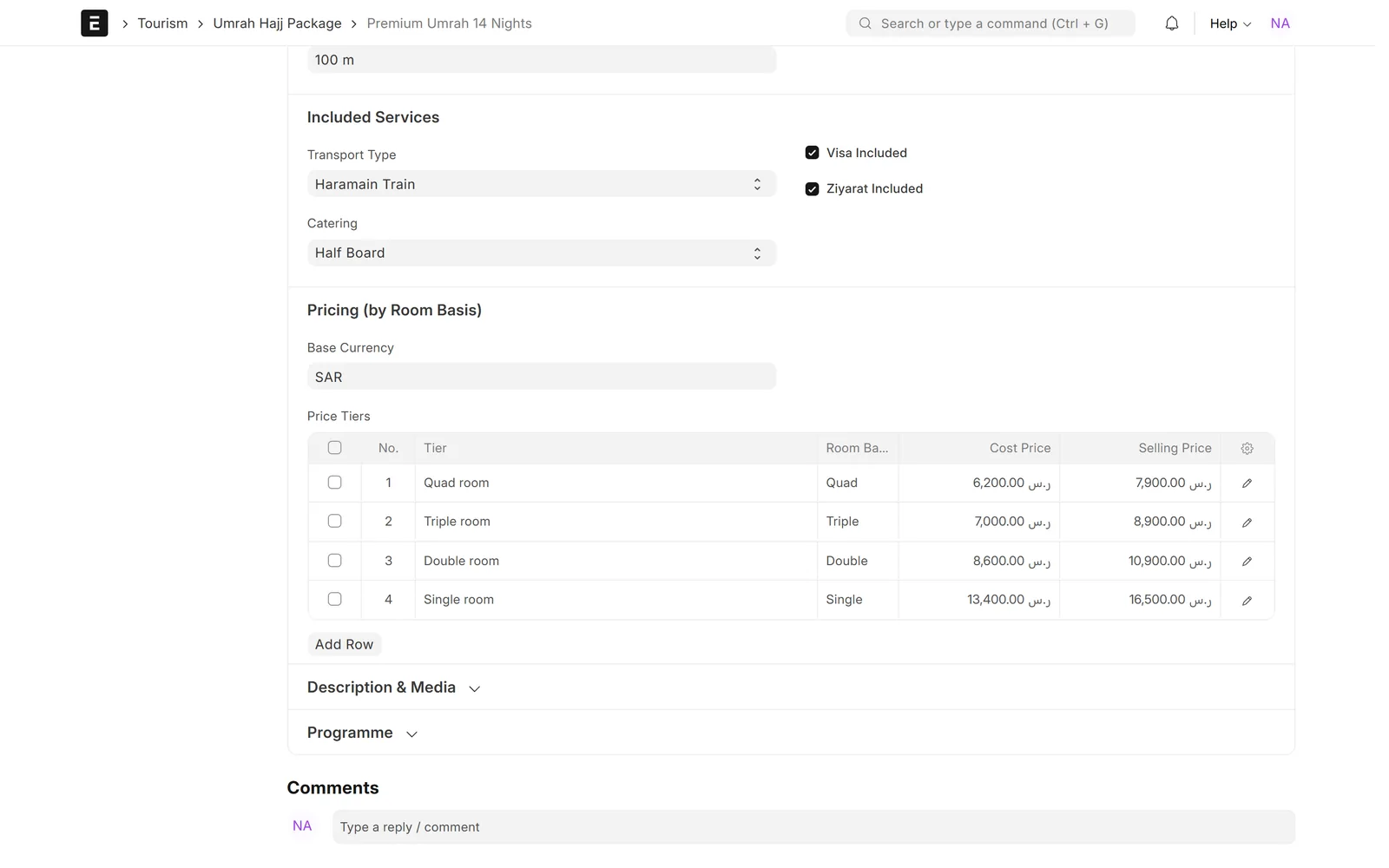
Umrah package with Haramain train, half board, visa and ziyarat included, and cost and selling prices for quad, triple, double and single rooms
Umrah package with included services and prices by room basis

Packages & pilgrims

Pilgrim register with document readiness

Each pilgrim has English and Arabic names, national ID, passport, Mahram link and documents. The pilgrim file shows what is on file and warns before a passport expires.
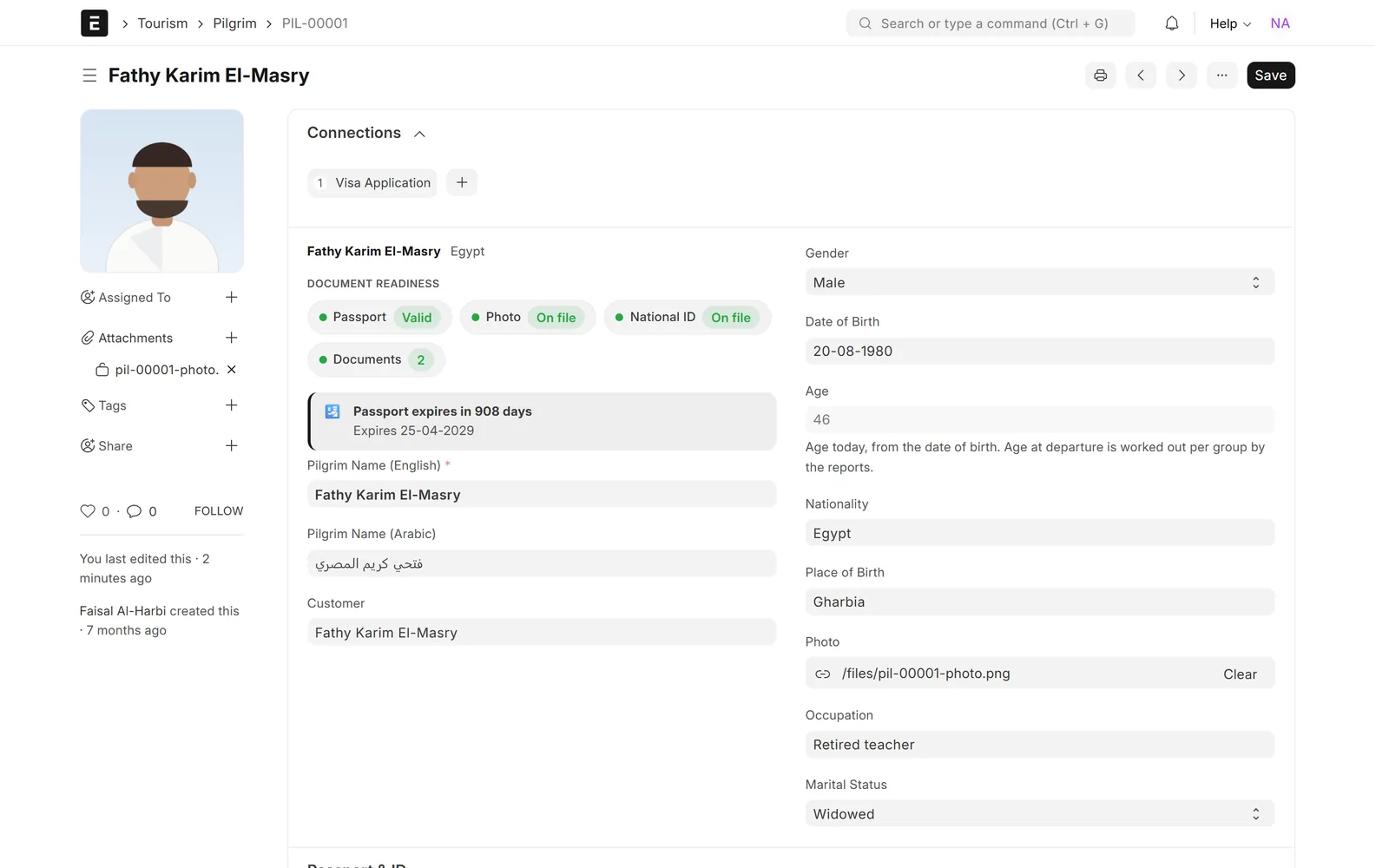
Pilgrim form with profile photo, passport valid, photo and national ID on file, passport expiry countdown and English and Arabic names
Pilgrim profile with Arabic name and document readiness

Packages & pilgrims

Group departures with capacity and progress

A group links the package, travel dates, customer, ministry registration number and Mutawif. It shows how full the group is, where each pilgrim stands in the journey and whether every document is ready before travel.
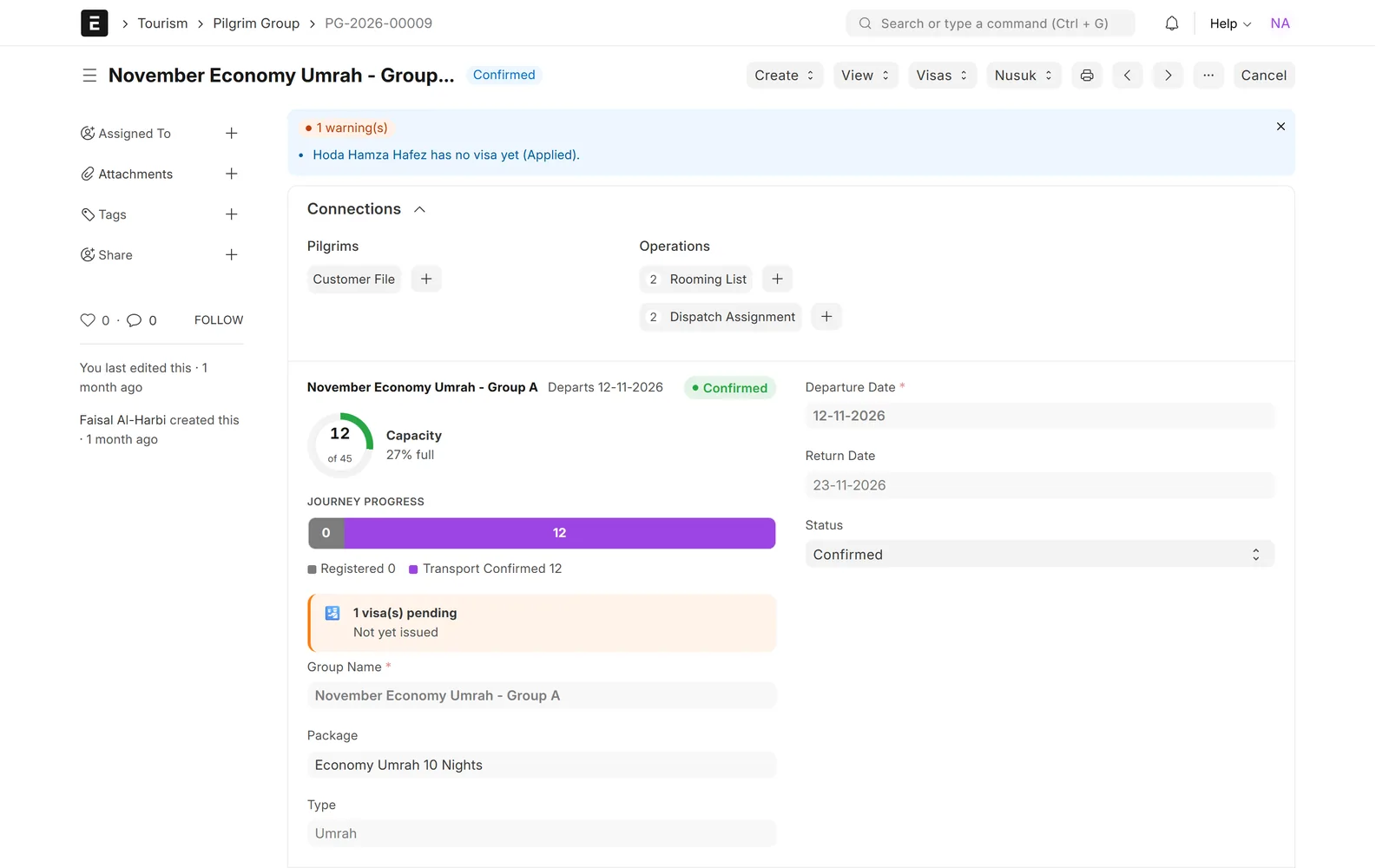
Confirmed Umrah group with a capacity ring of 12 of 45 places, journey progress bar, a pending visa warning and links to rooming lists and dispatch assignments
Pilgrim group: capacity, journey progress and travel readiness

Visas, rooms & ministry

Group visas in one step

Create a visa application for every pilgrim in the group and submit them together. Follow each one on a visa pipeline board from documents pending to passport returned, with a dated status history.
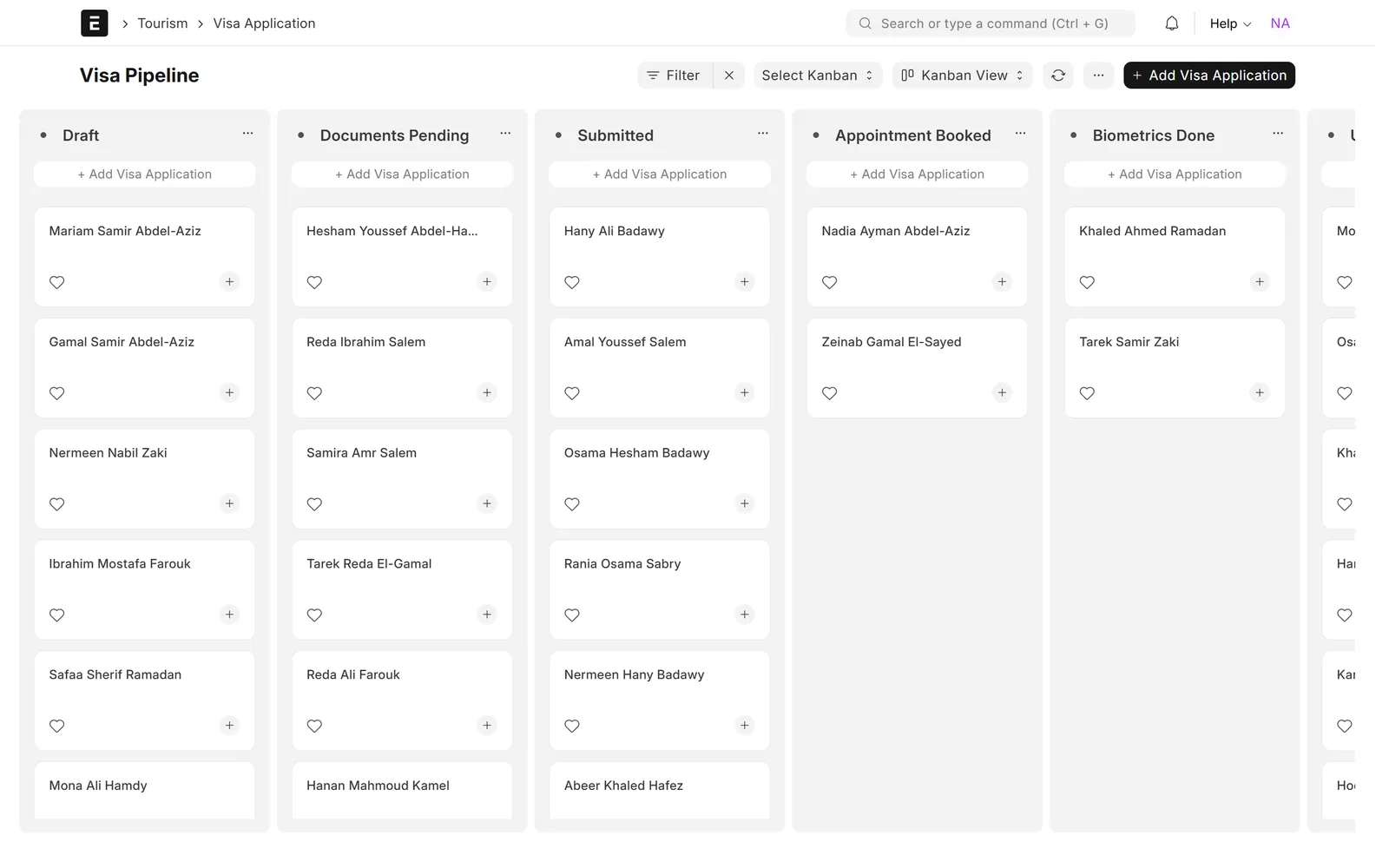
Kanban board of visa applications in Draft, Documents Pending, Submitted, Appointment Booked and Biometrics Done columns
Visa pipeline: every application from draft to biometrics

Visas, rooms & ministry

Rooming lists that cannot be overfilled

Build the Makkah and Madinah rooming lists from the group's package. One row per person, and no room takes more people than its room type allows.
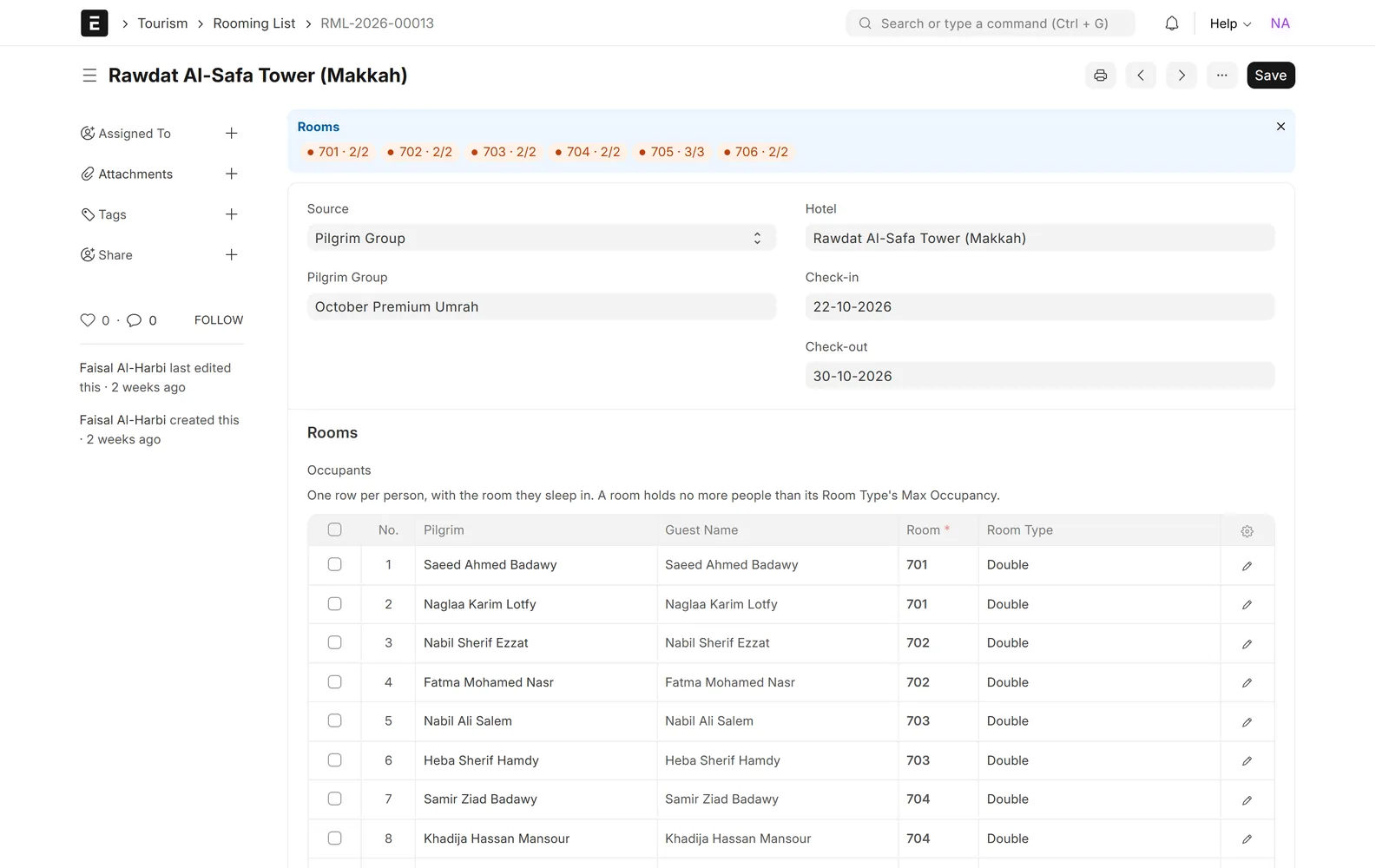
Rooming list for a Makkah hotel with an occupancy chip per room and each pilgrim listed with their room number and room type
Makkah rooming list: one row per pilgrim, rooms never overfilled

Visas, rooms & ministry

Ministry export and group manifest

Produce the group manifest and the ministry pilgrim export with licence number, company code, registration number, travel dates and Arabic and English names, and export it straight from the report.
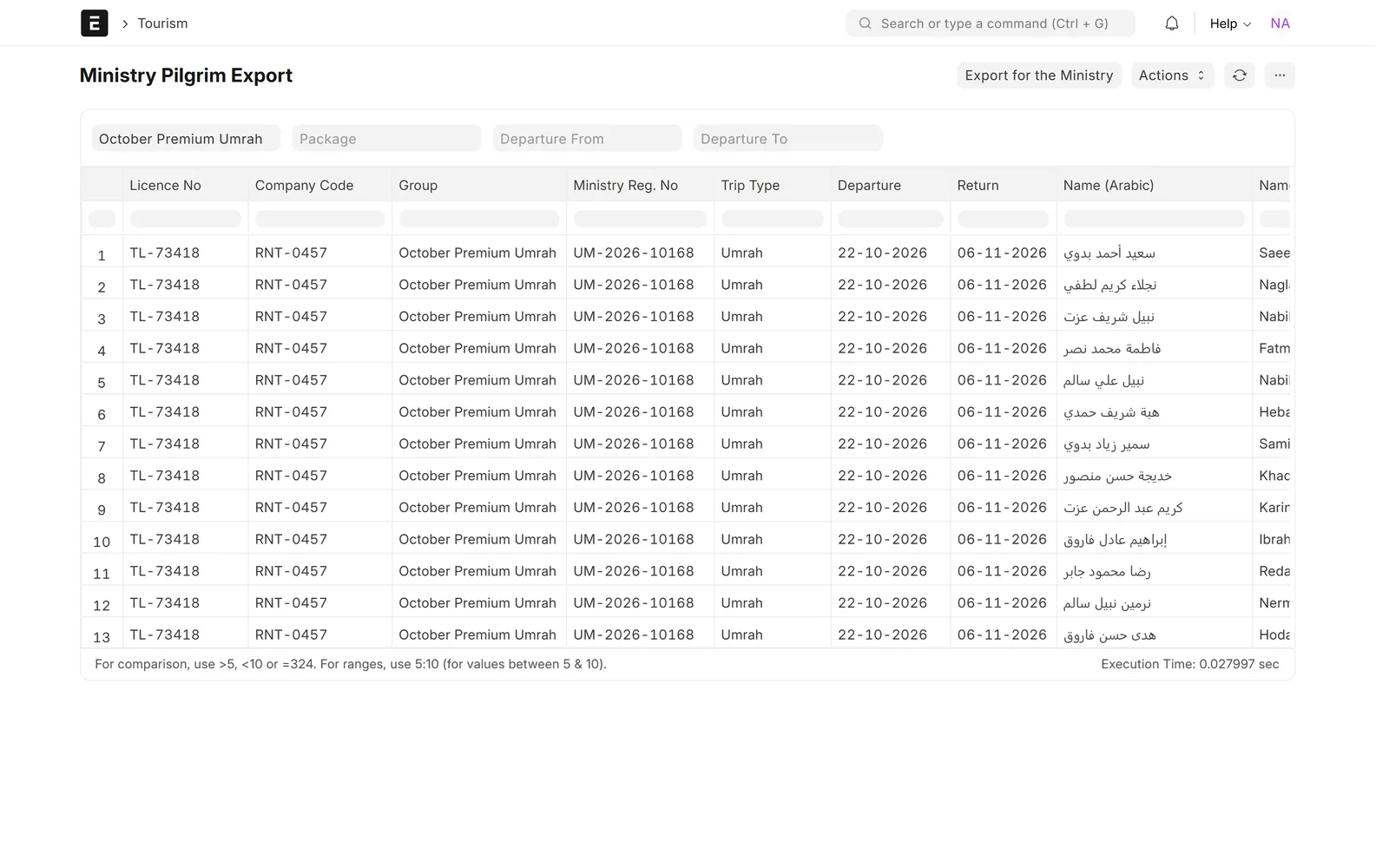
Ministry Pilgrim Export with licence number, company code, ministry registration number, trip type, dates and Arabic and English names, with an Export for the Ministry button
Ministry pilgrim export, ready to download for submission

Finance & oversight

Group invoicing and margin per group

Invoice the group customer in ERPNext with pilgrims grouped by room basis and price, and record payments. Compare planned cost, selling price and margin for every group.
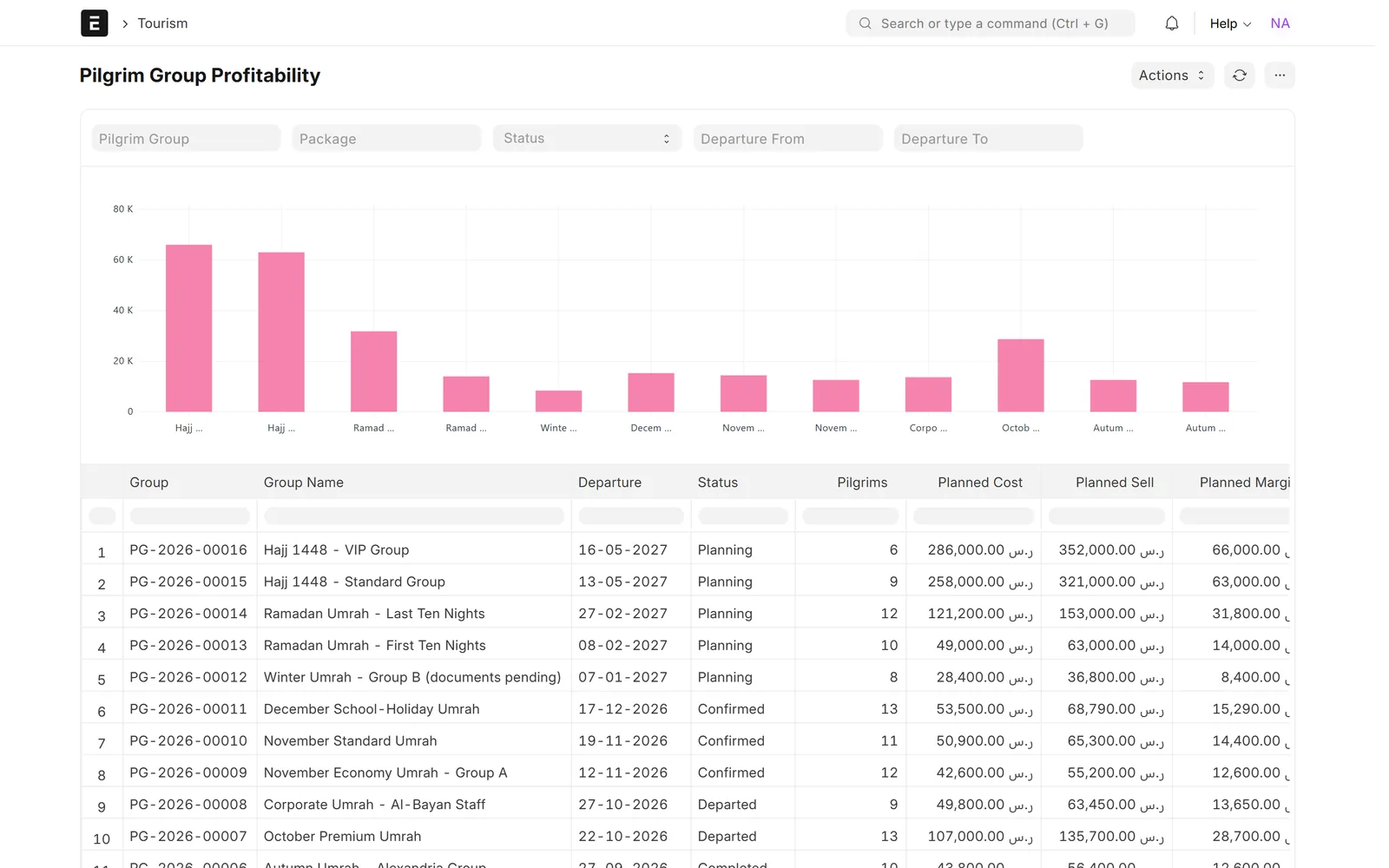
Pilgrim Group Profitability report with a planned margin bar chart and a table of groups with departure, status, pilgrims and planned cost, sell and margin in SAR
Planned cost, selling price and margin for every group

Finance & oversight

Umrah Desk and Command Center

One desk shows active groups, pipeline value, expected margin, visa counts by status and passports expiring within 90 days. The Command Center adds revenue, receivables, open inquiries and follow-ups due.

Umrah Desk with pipeline value, expected margin, visa counts by status, upcoming pilgrim groups and passports expiring within 90 days
Umrah Desk: active groups, pipeline value, margin and visa status at a glance

Finance & oversight

Nusuk and MAQAM ready, plus a public package page

Connectors for Nusuk visas and MAQAM hotels and transport are built in and run in mock mode until your Ministry credentials are added. Published packages appear on a mobile-friendly public page.
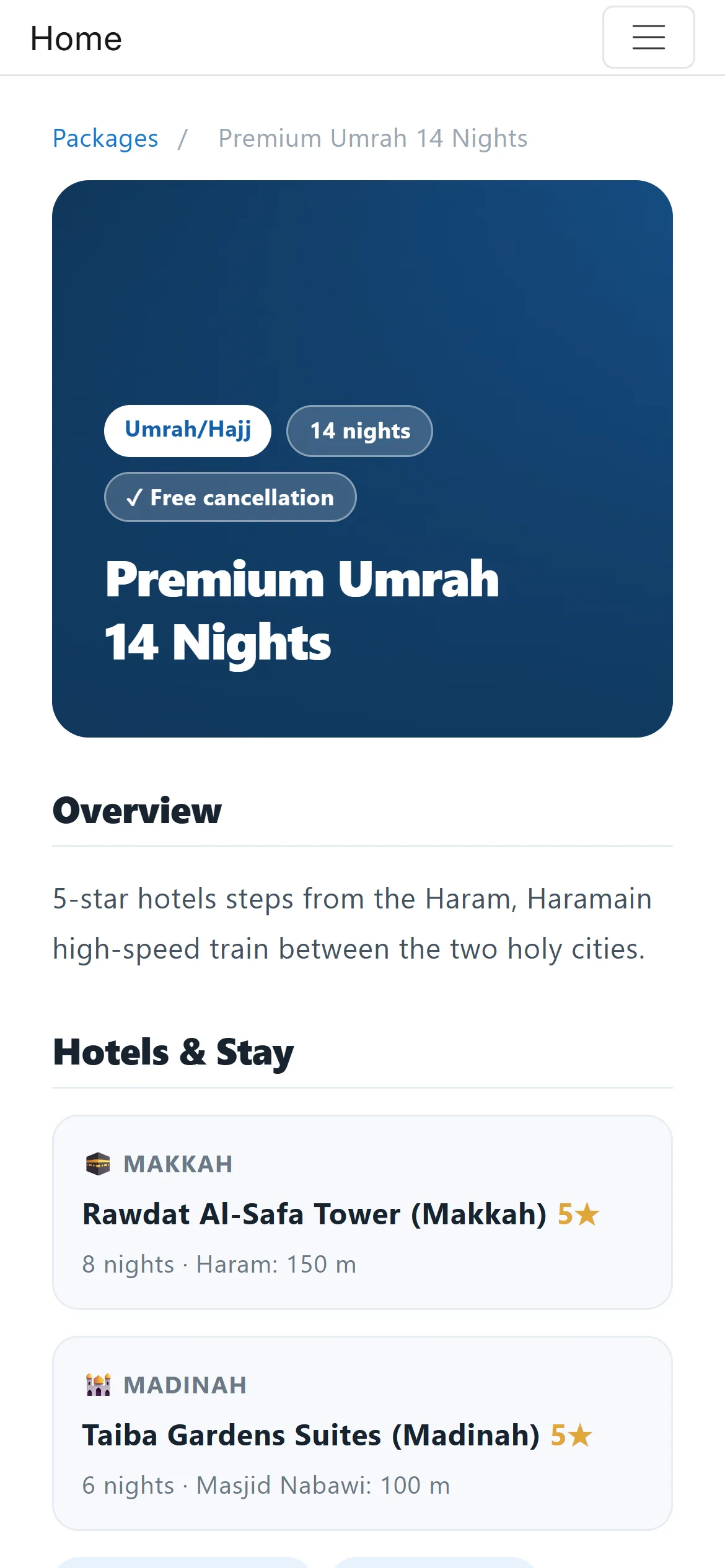
Mobile page for a 14-night Umrah package with an overview and the Makkah and Madinah hotels, with their distance to the Haram and to Al-Masjid An-Nabawi
Public package page on mobile

Screens show demo data.

Challenges vs. solutions

Common challenges, and how Hajj & Umrah Operations answers each one

ChallengeHow Data Value solves itTraditional approach
Pricing packages for each room typeEach package holds the Makkah and Madinah hotels, nights, services and cost and selling prices for quad, triple, double and single roomsSeparate price sheets per package
Checking pilgrim documents before travelThe pilgrim form shows passport, photo, national ID and document status and warns before a passport expires; the group shows whether every document is in orderChecking passport copies one by one
Processing visas for a whole groupOne step creates and submits a visa application for every pilgrim, each followed on a visa board with a dated status historyTracking each visa in a spreadsheet
Building hotel rooming listsMakkah and Madinah rooming lists built from the group's package, with no room holding more people than its type allowsRooming lists typed and rechecked by hand
Preparing the ministry pilgrim listMinistry export with licence number, company code, registration number, travel dates and Arabic and English names, exported from the reportRe-typing names into a separate sheet
Applying Mahram rulesEach pilgrim links to a Mahram; the system rejects a pilgrim set as their own Mahram and checks the Mahram's genderManual checks by the operations team
Knowing the margin per groupGroup invoices in ERPNext by room basis and price, with planned cost, selling price and margin for every groupProfit worked out in spreadsheets after the season

Why Data Value

Why teams choose it

Built for Umrah and Hajj

Packages, pilgrims, groups, visas and rooming lists are records in one system, not side sheets.

Invoices and payments in ERPNext

Group invoices, payments, suppliers and accounts are standard ERPNext documents.

Arabic and English names

Pilgrims are kept with Arabic and English names for the manifest and the ministry export, on an Arabic right-to-left desk.

Ready for Nusuk and MAQAM

Connectors are built in and run in mock mode until your Ministry-issued credentials are added.

One desk for the season

Active groups, pipeline value, expected margin, visa counts and passports expiring within 90 days on one screen.

Data Value's own product

Tourism DV is built and supported by Data Value, a Frappe Certified Gold Partner with offices in Cairo and Riyadh.

How it works

From setup to daily use

  1. Set up hotels, room types and seasons, then build each Umrah or Hajj package with its programme and room-basis prices.
  2. Register pilgrims with passport, national ID and Mahram, and assign them to a group departure.
  3. Create and submit the group's visas, follow them on the board, and build the Makkah and Madinah rooming lists.
  4. Check the group is ready to travel, then export the ministry list and the manifest.
  5. Invoice the group in ERPNext, record payments and review the margin per group.

FAQ

Frequently asked questions

Is it connected to Nusuk and MAQAM?

The connectors are built in. They need an approved operator account and the credentials the Ministry issues; until those are entered they run in mock mode, so the visa and hotel flow can be used and tested without sending anything.

Can we use it in Arabic?

Yes. The desk switches to Arabic with right-to-left layout, and pilgrims are kept with Arabic and English names for the manifest and the ministry export. Some parts still show English, such as the Command Center tab names, some values inside reports and the mobile staff console, and names you enter in English stay in English.

Does it handle Mahram rules?

Each pilgrim can be linked to a Mahram. The system rejects a pilgrim set as their own Mahram and checks the Mahram's gender.

Do we need ERPNext?

Yes. Tourism DV runs on ERPNext, so invoices, payments, suppliers and accounts are standard ERPNext documents.

Does it cover tours and other travel as well as Umrah?

Yes. The same system takes inquiries through quotations and bookings, with an approval workflow, for hotels, flights, transfers, visas and tour packages, then issues service vouchers and invoices.

See it with your own data

Book a demo and our team will walk you through the system and how it fits your business.

Free demo · No commitment