Real estate & contracting · Car parks in Saudi Arabia, Egypt & MENA
Parking management for malls, towers and hospitals, on ERPNext
Run one car park or many from ERPNext: entry and exit lanes, signed tickets, tariffs, subscriber cards, shop validations and the cashier booth, with every shift's cash posted to your accounts. A Gate Agent PC at each car park keeps the barriers and the booth working even when the internet is down.
It is Data Value's own Frappe/ERPNext app with a Windows gate and cashier agent, built and running at a working car park.
- Works offline at the gate
- Cashier booth app in Arabic
- Subscriber cards and shop validations
- Shifts posted to ERPNext
Who it is for
Built for the people who run car parks
- Malls and shopping centres
- Office towers and mixed-use developments
- Hospitals and medical towers
- Parking operators with several car parks
- Finance teams reconciling cashier shifts
Industry
Part of ERPNext for Real Estate & Contracting
See how parking, property and facility management fit together for malls, towers and developers.
What you get
From the gate to the general ledger
12 capabilities in 3 groups, each shown next to its screen in the real system.
Gates & booth
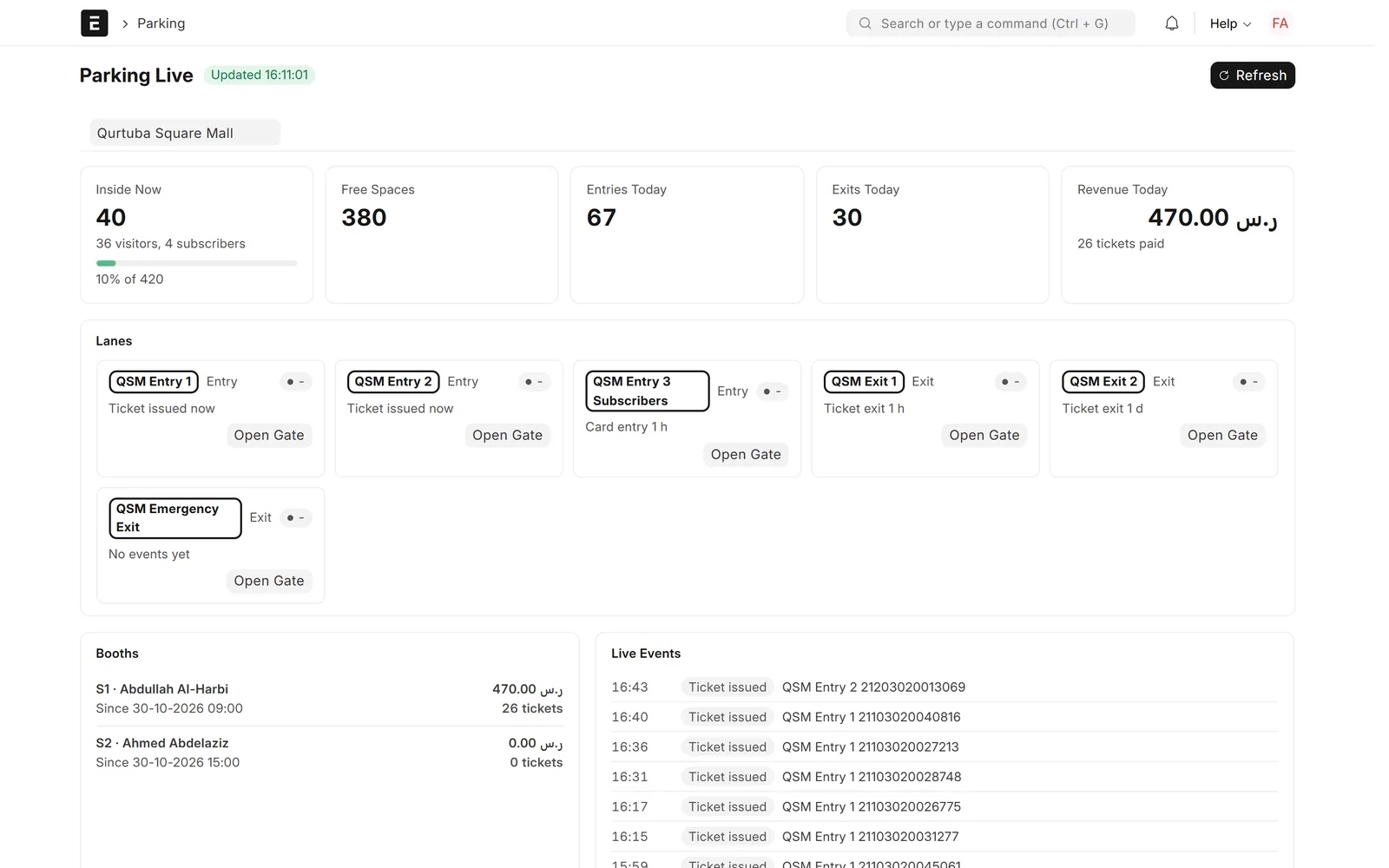
Parking Live
See every car park as it is right now, and open a gate remotely when needed.
- Cars inside now, visitors and subscribers
- Free spaces against capacity
- Entries, exits and revenue today
- Each lane, each open booth and the live event feed

Gates & booth
A Gate Agent that works offline
One Windows PC per car park keeps the barriers and the booth running, with or without the internet.
- Opens barriers and prints tickets
- Checks subscriber cards against its own access list
- Keeps deciding when the link is down
- Sends events later, each accepted once
Gates & booth
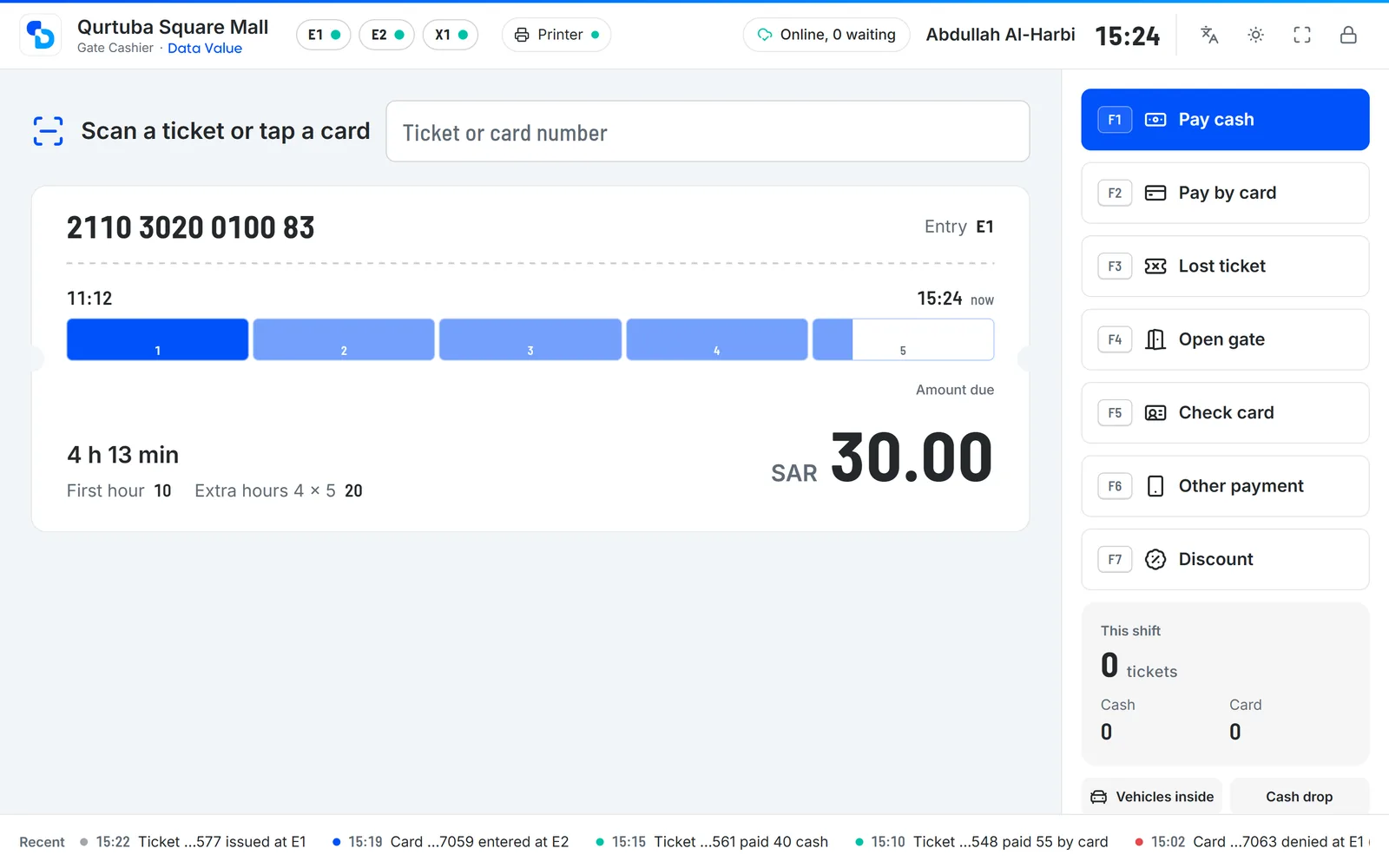
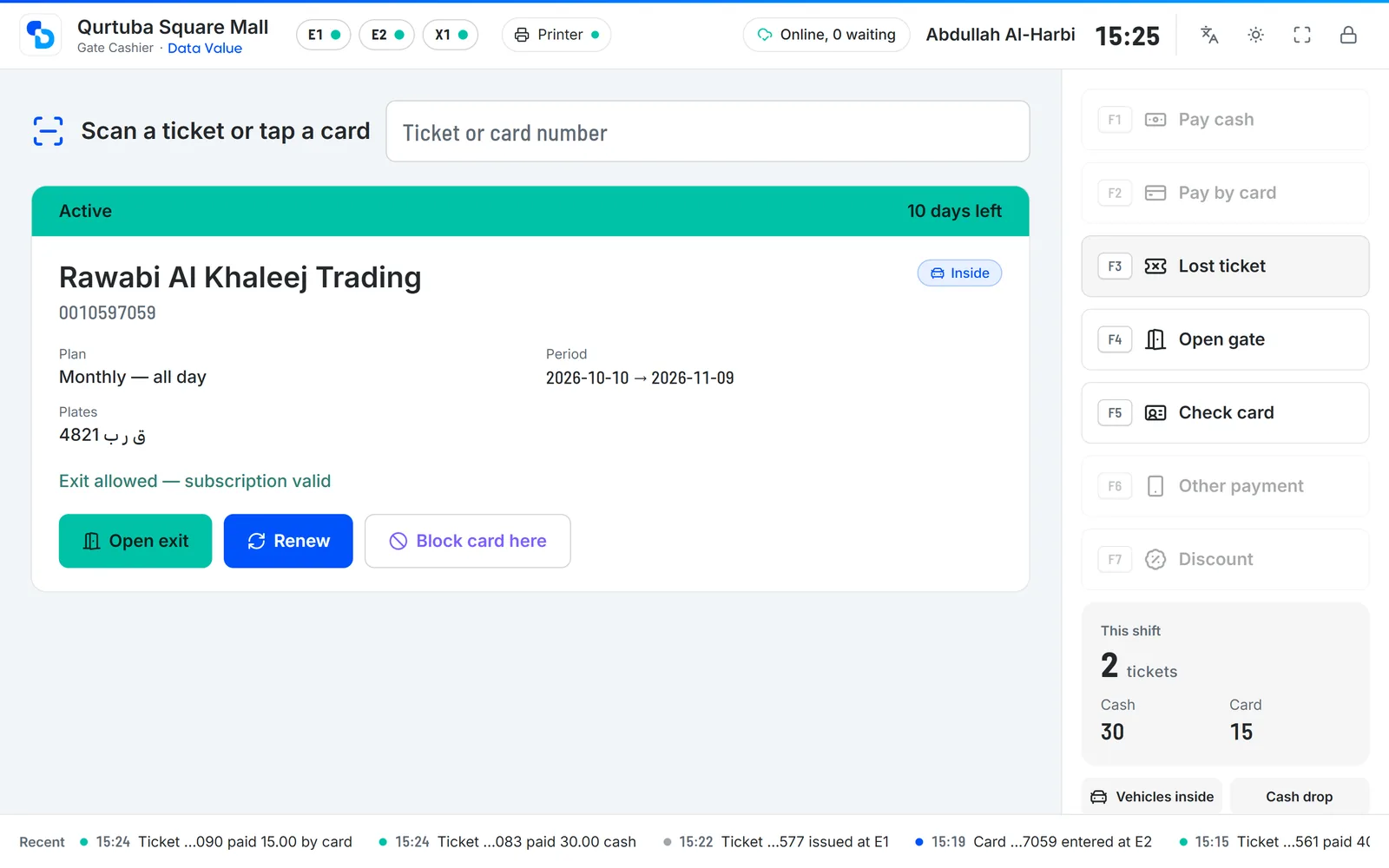
Gate Cashier booth app
Scan a ticket, see the stay and the fee, take the payment and open the exit.
- Stay on a time ruler with the fee broken down
- Cash with change, bank card or other methods
- Lost tickets, discounts by reason, gate openings with a supervisor PIN
- Customer display, shortcuts, Arabic and English
Gates & booth
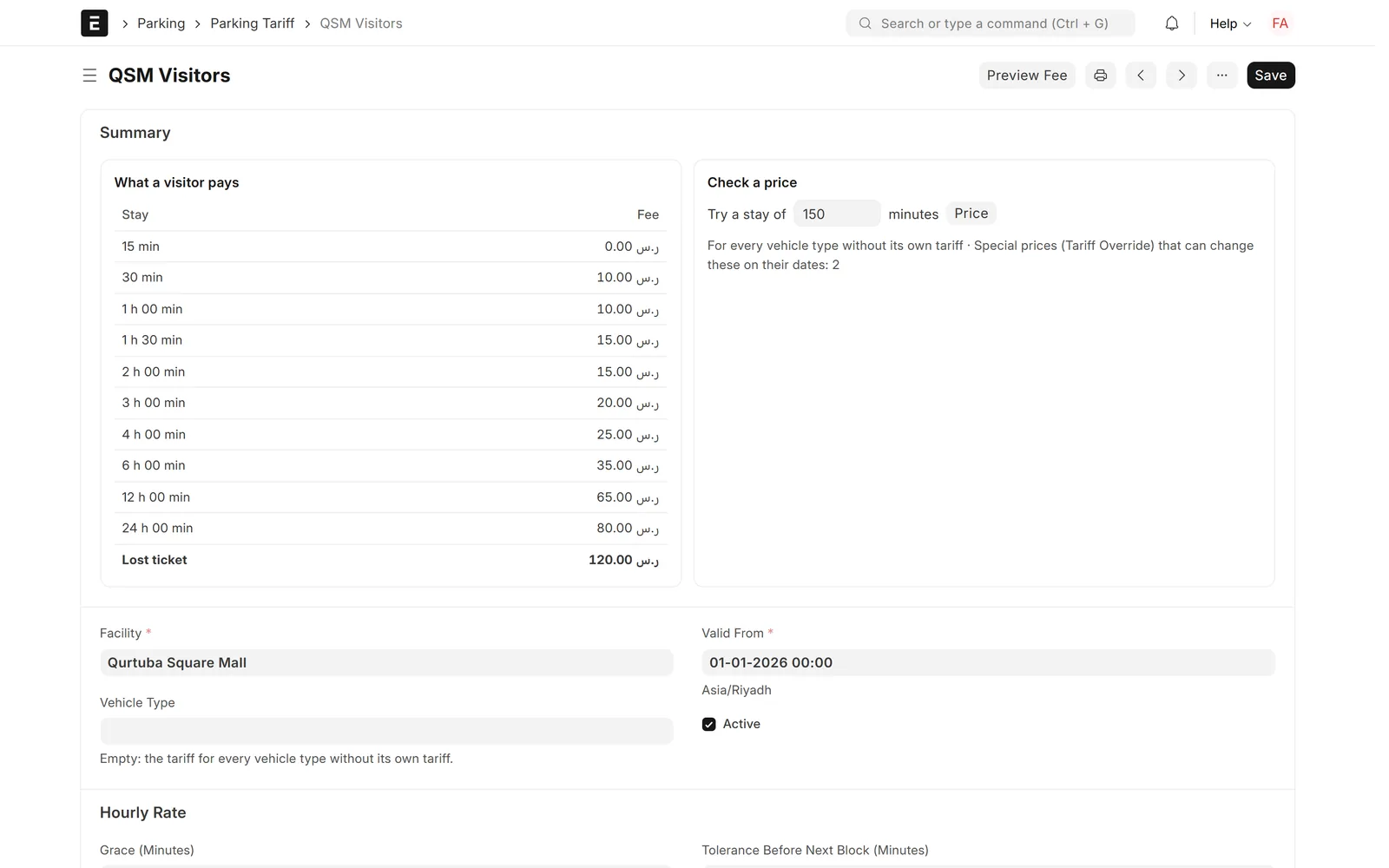
Tariffs and special prices
Set how visitors pay per car park and vehicle type, and preview the fee before you save.
- Grace minutes, first and extra blocks, daily cap
- Overnight charges and lost-ticket fees
- Special prices by dates, holidays or weekdays
- Free, flat per visit or another tariff
Gates & booth
Signed tickets and Ticket Lookup
Every ticket number is signed, and every ticket's story is one search away.
- 14-digit numbers signed with the car park's secret
- Forged or reused numbers refused at the booth
- Search by ticket number, plate or receipt
- Entry, validations, payment, cashier and exit in one view

Subscribers & tenants
Subscriptions and access cards
Sell monthly to annual parking with cards, time windows, pauses and renewals.
- Monthly, quarterly, semi-annual or annual plans
- All-day or time-window access, grace days and pauses
- 125 kHz and MIFARE cards, anti-passback, always-allowed cards
- Subscription Desk: search by name, phone, plate or card

Subscribers & tenants
Subscription billing in ERPNext
Every subscription is invoiced in ERPNext, and the cards follow the payment.
- A Sales Invoice per subscription
- Payment status follows the invoice's outstanding amount
- Optionally keep cards closed until the invoice is paid
- Renew and pay in cash at the booth
Subscribers & tenants
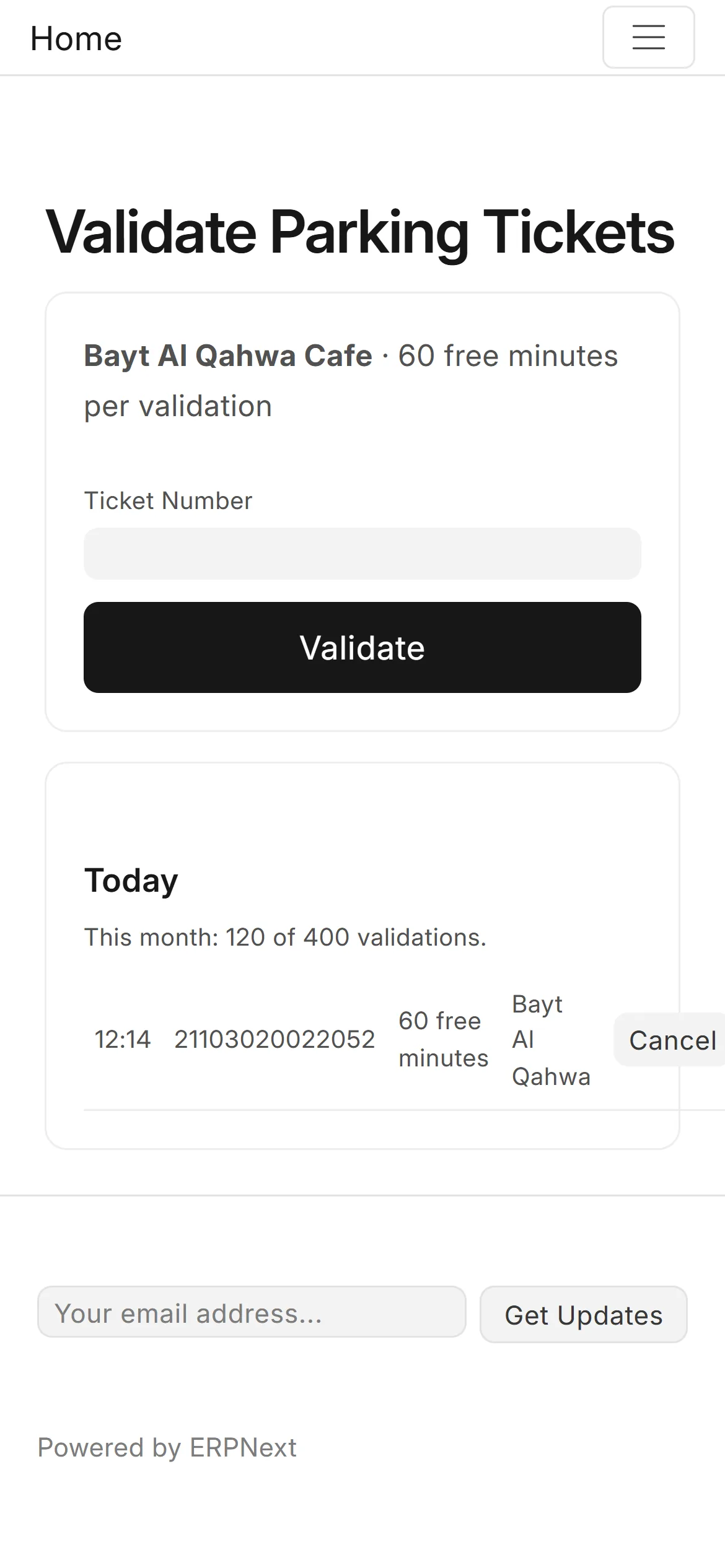
Shop and clinic validations
Let shops, cinemas and clinics give free parking, and bill them for it.
- Validate a ticket from a phone page
- Free minutes, a percentage, free parking or a fixed amount
- Daily and monthly limits per tenant
- Monthly invoice per tenant
Subscribers & tenants
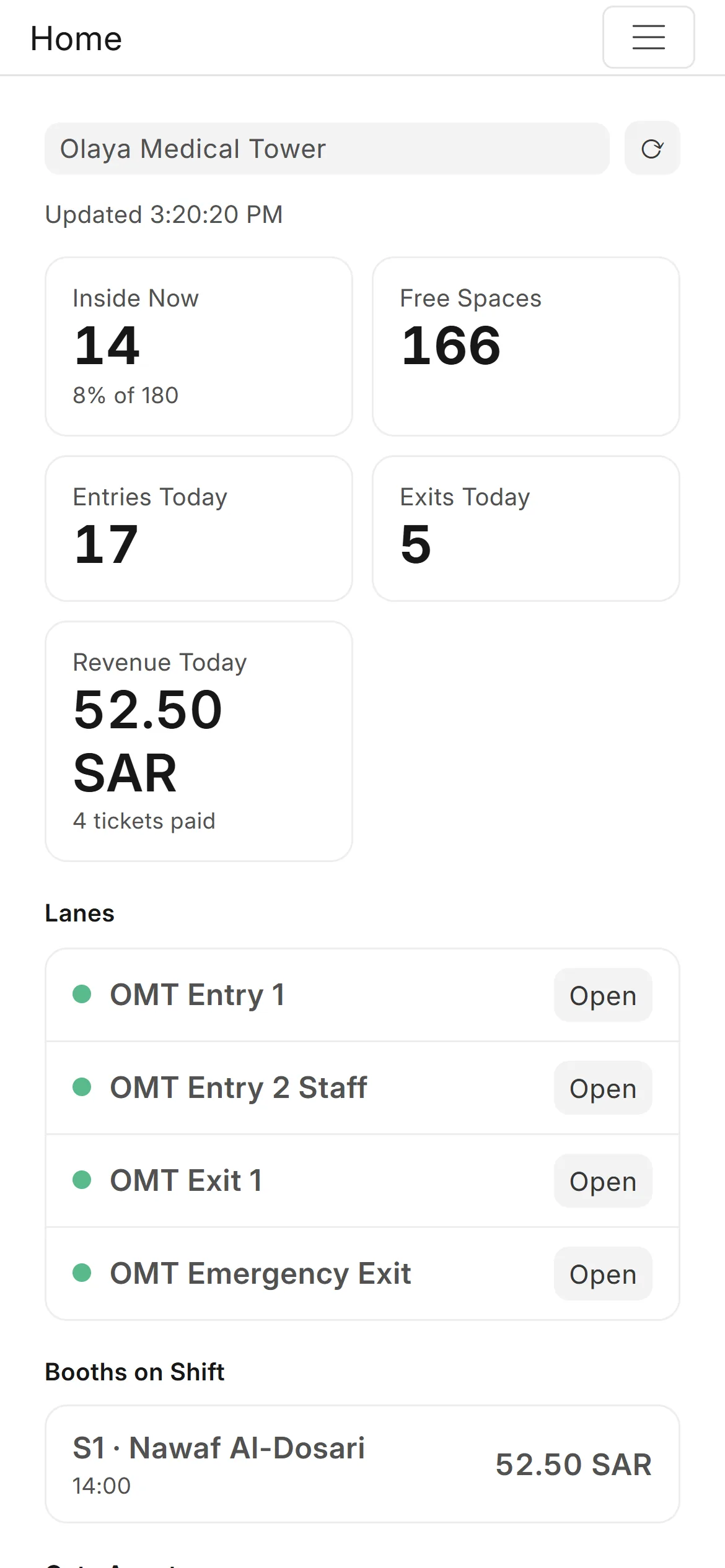
Phone pages for managers and subscribers
Managers, subscribers and the public get their own pages, no app to install.
- Manager phone view of each car park
- Public free-spaces page for a sign or website
- Subscriber portal with cards and invoices
- Online renewal through the site's payment gateway
Cash, accounts & reports
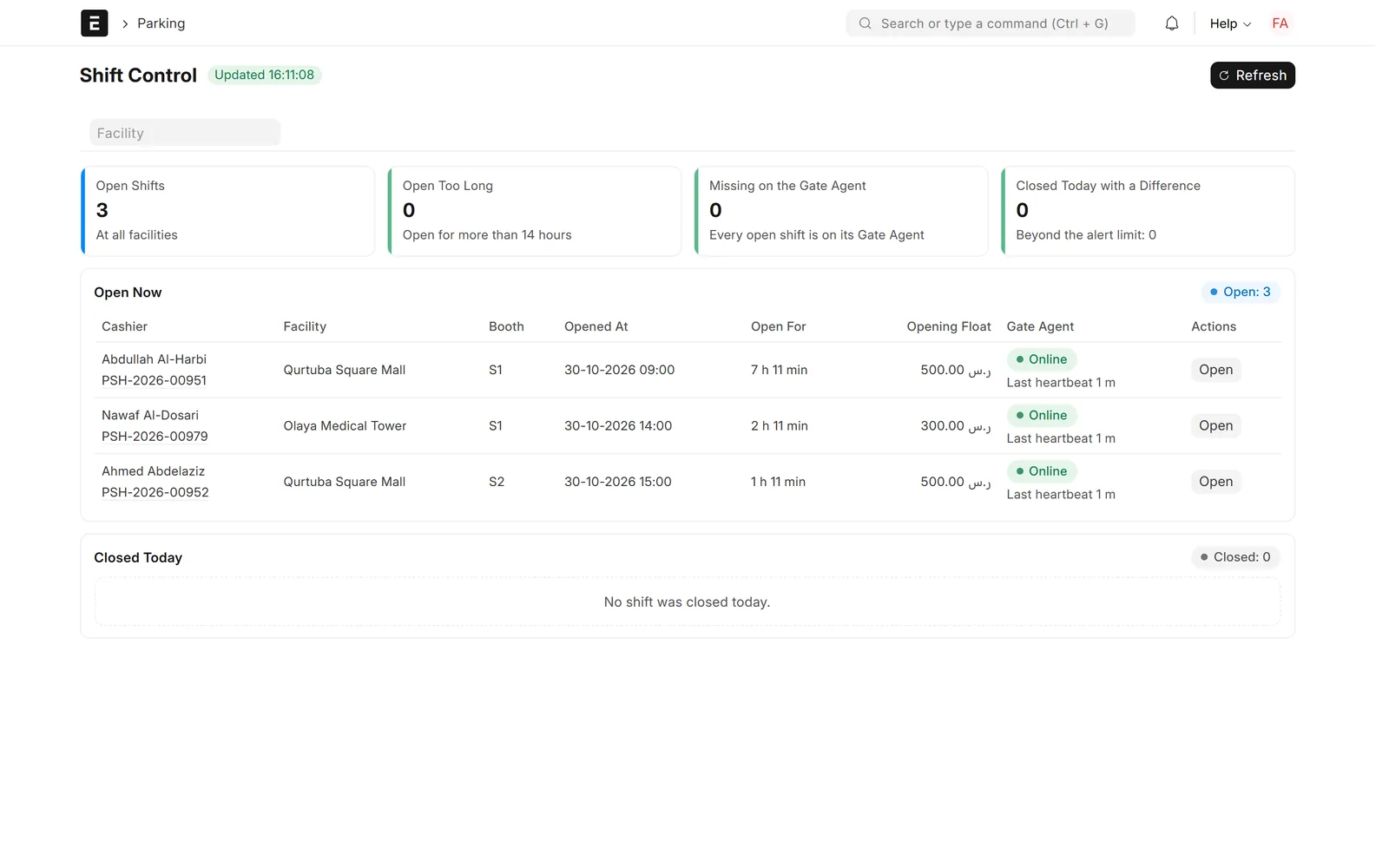
Cashier shifts and the daily closing
Count every shift blind, review the day, and post it to the accounts.
- Opening float, cash drops and a blind count by denomination
- Shift Control flags shifts open too long
- Daily Closing lists the day's shifts, payments and differences
- Approval posts a Sales Invoice and an over/short entry

Cash, accounts & reports
Cashier shift record
Each shift keeps its counts, exceptions and the accounting it produced.
- Tickets paid, cash, card and other totals
- Expected against counted cash, short or over
- Gate openings by hand, voids, lost tickets, discounts
- Linked Sales Invoice and Journal Entry

Cash, accounts & reports
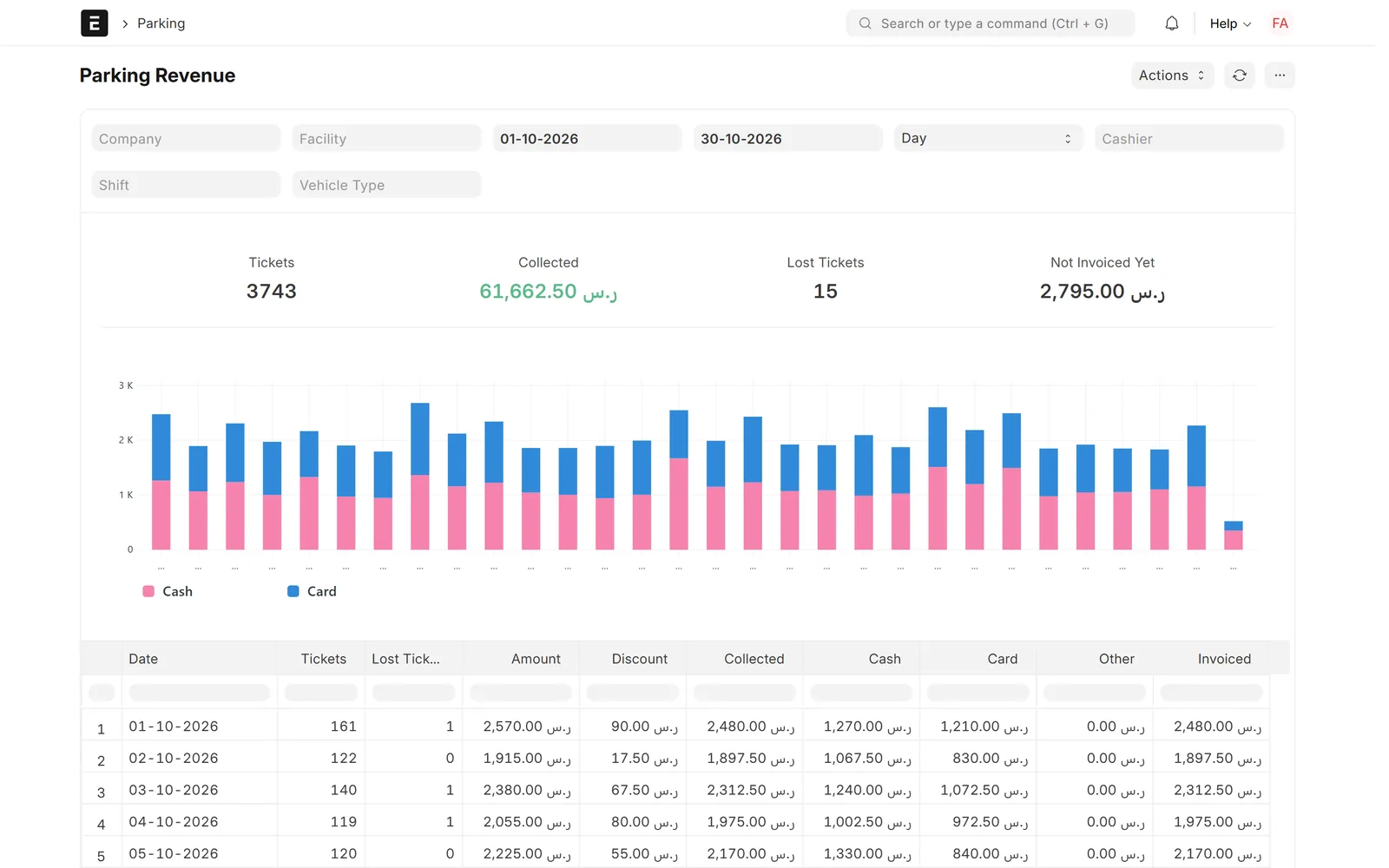
Twenty reports and alerts
Revenue, traffic, occupancy and cash control, with alerts when something needs a look.
- Revenue, hourly traffic, occupancy and peak, heatmap
- Lost and voided tickets, manual openings, access denied
- Cashier performance, shift variance, cash drops
- Alerts, daily summary e-mail, SMS or WhatsApp reminders
Screens show demo data.
Challenges vs. solutions
Common challenges, and how Parking Management answers each one
| Challenge | How Data Value solves it | Traditional approach |
|---|---|---|
| Barriers stop when the internet drops | A Gate Agent PC at each car park decides on the spot and syncs later | Gates depend on a central server or are opened by hand |
| Cash leaks at the booth | Blind counts, supervisor PINs for openings and voids, shift variance reports | Paper tallies checked at the end of the month |
| Parking revenue outside the books | Each approved shift posts a Sales Invoice, payments and an over/short entry | Daily totals re-keyed into accounting |
| Expired or unpaid subscribers still get in | Cards follow the subscription dates, grace days and invoice payment | Card lists updated by hand on the gate controller |
| Shop validations nobody bills | Tenants validate from a phone page and are invoiced monthly | Paper stamps and manual counts |
| No live view of occupancy | Parking Live and a manager phone view per car park | Phone calls to the booth |
Why Data Value
Why teams choose it
Offline first
Gates and the booth keep working when the link is down.
In your ERPNext books
Shifts, subscriptions and validations become invoices and entries.
Cash under control
Blind counts, supervisor approvals and signed tickets.
Arabic and English
The booth app, phone pages and desk screens in both languages.
Many car parks, one office
Each car park with its company, cost centre and Gate Agent.
Twenty reports
Revenue, traffic, occupancy, exceptions and cashier performance.
How it works
From setup to daily use
- Survey and set upData Value surveys your lanes, barriers, readers and printers, then sets up each car park, its lanes, tariffs, operators and payment methods in ERPNext.
- Pair the Gate Agentthe Windows installer sets up the agent and the cashier app, and the PC pairs with a one-time code from ERPNext.
- Run the gates and the boothvisitors take a ticket and pay at the booth, subscribers tap their card, and every event reaches ERPNext.
- Close and postcashiers close with a blind count, the accountant approves the Daily Closing, and invoices and over/short entries are posted.
Related
Works together with
ERPNext modules
Runs on these modules
FAQ
Frequently asked questions
What happens when the internet goes down?
The Gate Agent PC at the car park keeps opening the barriers, printing tickets, checking cards and running the booth from the prices, cards and operators it already holds. It sends the events to ERPNext when the link returns, and each event is accepted only once.
Which barriers, readers and printers does it work with?
It talks to the lanes through Modbus TCP I/O modules or the lane boards already installed, to card readers over serial, TCP or USB, and to ESC/POS ticket and receipt printers. We survey your hardware before we quote, so the exact devices are confirmed for each site.
Does it read licence plates?
No. This version does not include plate-recognition cameras. Plates are typed where they matter, for lost tickets and on subscriber cards, and a camera can attach a photo to every gate opened by hand.
Can visitors pay at a machine or online?
Visitors pay at a staffed booth by cash, bank card or other methods you set up. Pay-on-foot machines are not part of this version. Subscribers can renew online on the portal when a payment gateway is installed on your site.
Does it post to our accounts?
Yes. Approved shifts become Sales Invoices with their cash and card payments and a cash over/short Journal Entry; subscriptions and tenant validations are invoiced as well, with cost centres and accounting dimensions per car park.
Is the interface in Arabic?
The cashier booth app is in Arabic and English, and the ERPNext screens and phone pages switch to Arabic and right-to-left. A few labels still show in English, and Data Value completes them during implementation.
Can we move from our old parking system?
Yes. Cars still inside, subscriber cards with their end dates and always-allowed cards can be imported from files exported from the old system, so the gates keep working on the day you switch.
See a car park run from ERPNext
Data Value will walk you through Parking Live, the cashier booth and a day's closing on a demo car park, and survey what your gates need. Prices on request.
Free demo · No commitment