Schools & training centres · Egypt, Saudi Arabia & MENA
School management from admission to fee collection
Run admissions, classes, timetables, attendance, grading and student fees in one system built on Frappe Education, the open-source education app for ERPNext.
Data Value implements it for your school, extends and localizes it to Arabic, and supports it after go-live.
- Admissions pipeline on a Kanban board
- Timetables that reject clashes
- Whole-class attendance in one screen
- Fees posted to ERPNext accounts
Who it is for
Built for the people who run it every day
- Private and international schools
- Training centres and institutes
- Academic management teams
- School finance teams
- Organisations already on ERPNext
Industry
Part of ERPNext for Education
See how Data Value serves schools and training centres on ERPNext.
What you get
What you get with School Management
9 capabilities in 3 groups, each shown next to its screen in the real system.
Admissions & students
Admissions pipeline
Publish admission rounds per academic year and move applicants through Applied, Approved, Admitted or Rejected on a Kanban board. An admitted applicant becomes a student in one step.

Admissions & students
Student records
Personal details, guardians, siblings, house and student category are kept on the student and enrollment records.

Admissions & students
Programs, courses and groups
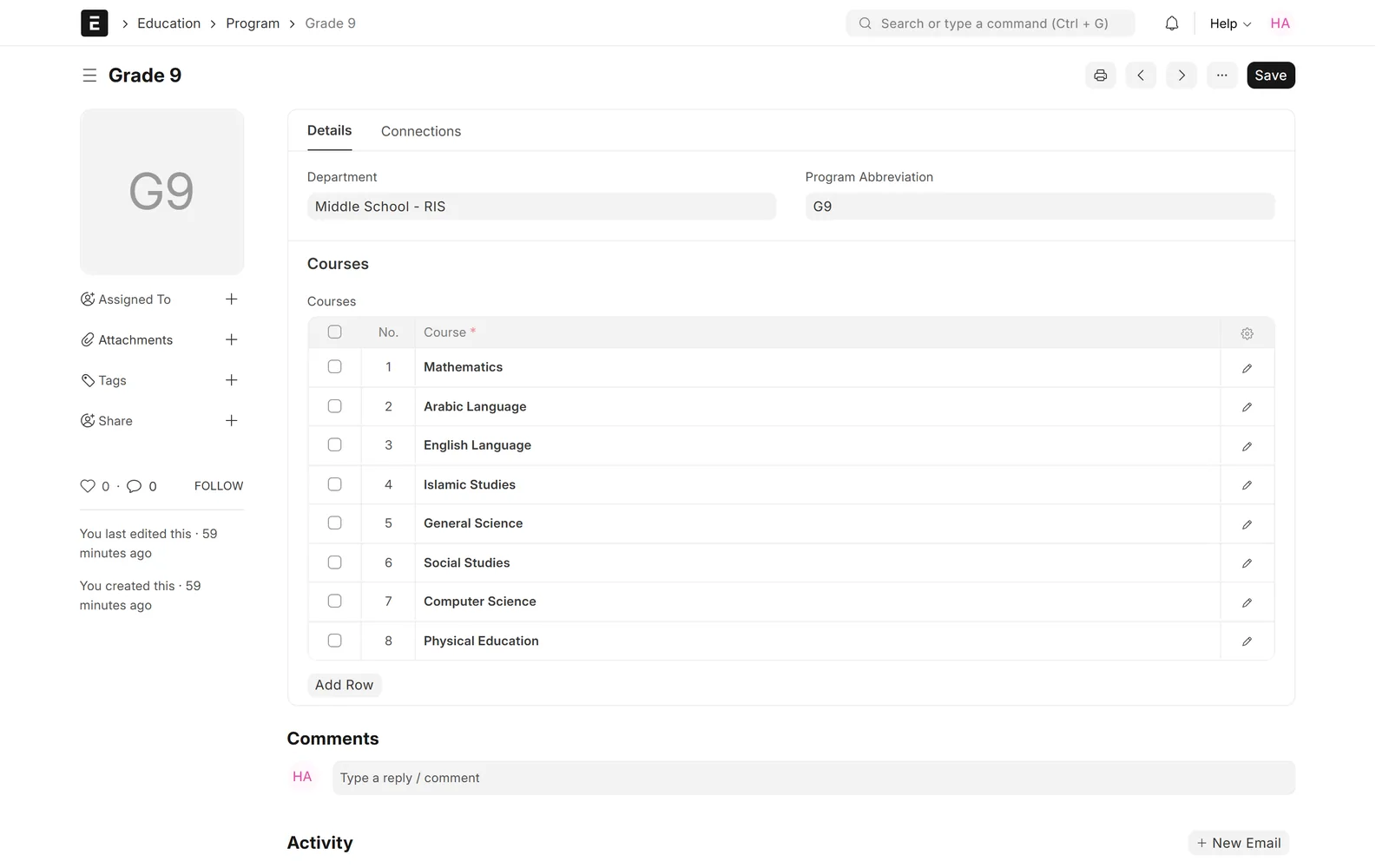
Define grades or programs with their courses, enroll students per year and term, and split them into sections or course and activity groups.
Timetable & attendance
Timetable scheduling
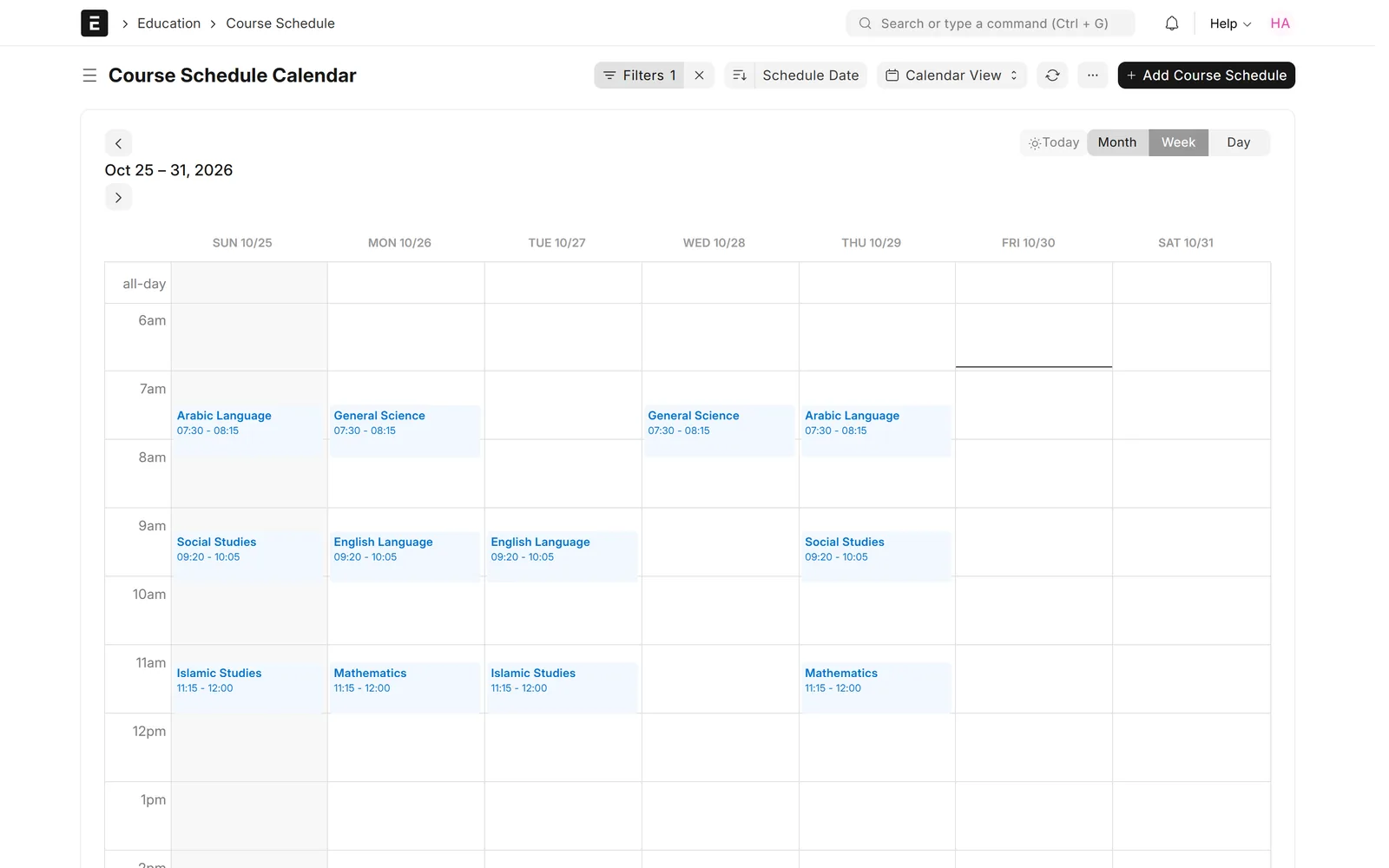
Generate class sessions for a group over a date range on chosen weekdays. Room, instructor and group clashes are rejected, and the timetable shows as a calendar.
Timetable & attendance
Daily attendance
Teachers mark a whole class present or absent for a date from one screen, by student group or by class session, with student leave applications recorded alongside.

Timetable & attendance
Attendance reports
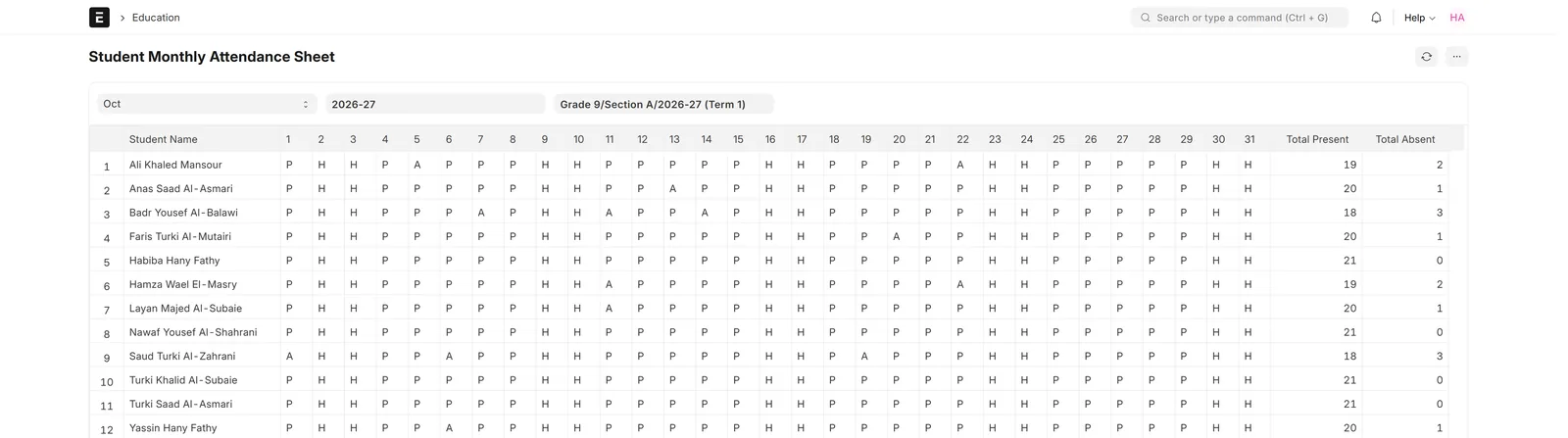
A monthly attendance sheet per group, absent students for a given date and attendance by batch.
Grades & fees
Assessment and grading
Plan assessments with weighted criteria, enter marks for the whole group in one grid, and let the grading scale assign letter grades automatically.

Grades & fees
Grade reports
Final assessment grades by group with a chart, course-wise results and the status of each assessment plan.

Grades & fees
Fees, billing and collection
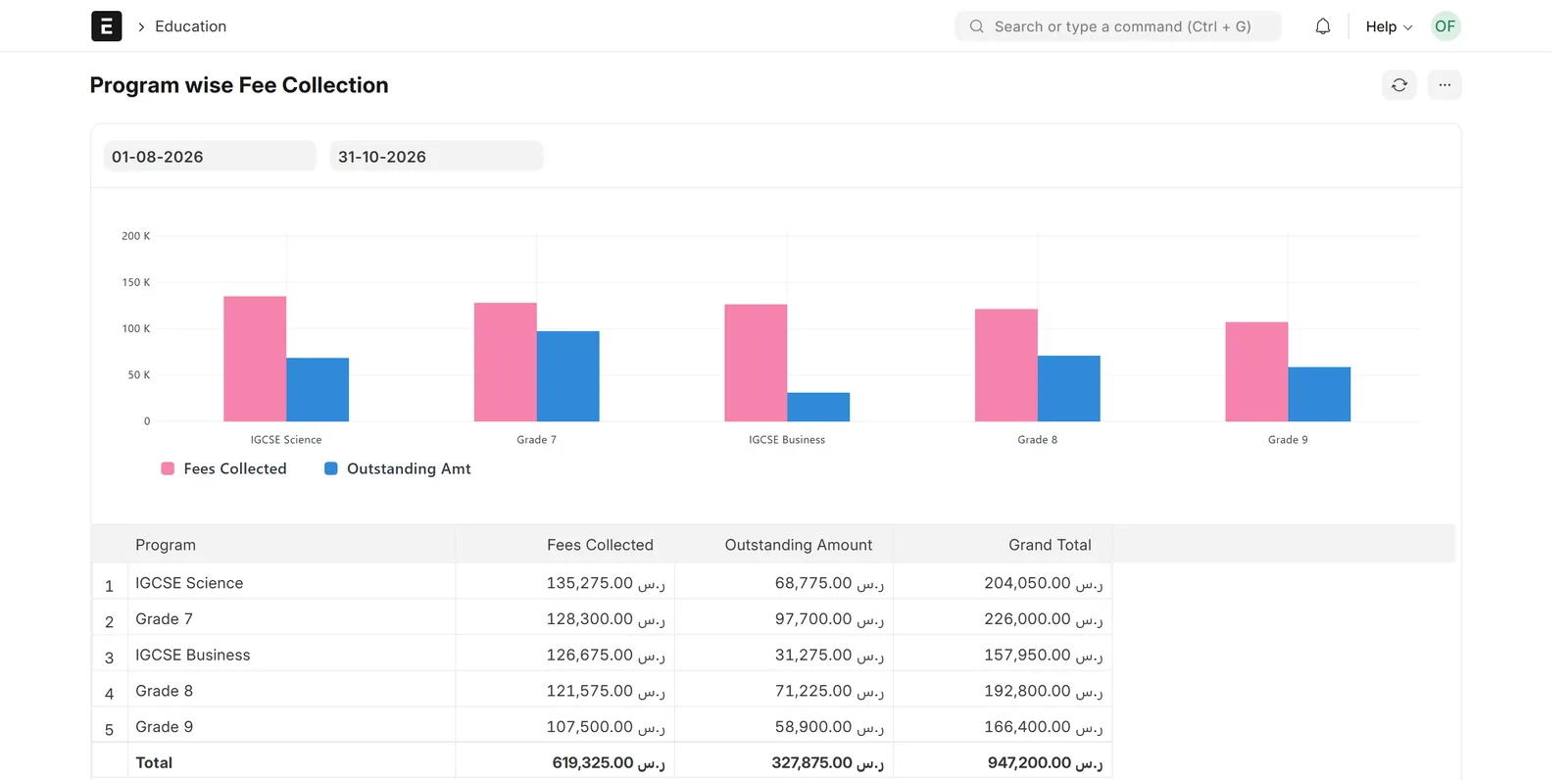
Set fee structures per program and term, bill whole groups at once, and post each fee to ERPNext receivables and income. Track collected and outstanding amounts by program.
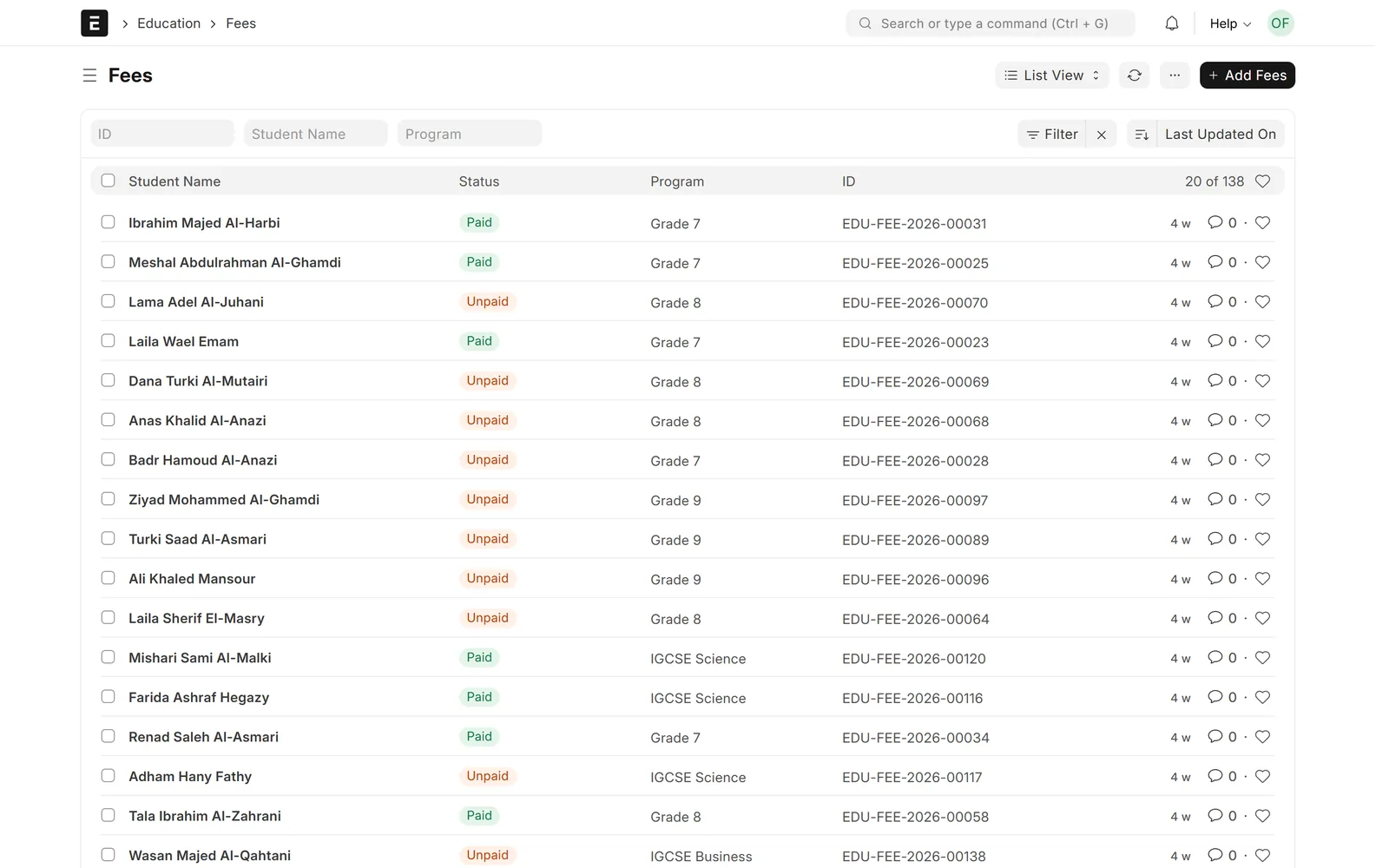
Screens show demo data.
Challenges vs. solutions
Common challenges, and how School Management answers each one
| Challenge | How Data Value solves it | Traditional approach |
|---|---|---|
| Following applicants through admission | Admission rounds per academic year and a Kanban board from Applied to Admitted; an admitted applicant becomes a student in one step | Application forms in folders and spreadsheets |
| Building a timetable without clashes | The Course Scheduling Tool creates sessions over a date range and rejects overlapping room, instructor or group bookings | Timetables drawn by hand in spreadsheets |
| Taking daily attendance | Teachers mark the whole class present or absent from one screen, by student group or by class session | Paper registers collected from each class |
| Calculating grades | Marks entered for the whole group in one grid, with weighted criteria and a grading scale that assigns letter grades | Manual calculations in spreadsheets |
| Billing tuition each term | Fee structures per program and term, raised for whole groups with a Fee Schedule | Invoices prepared one student at a time |
| Keeping fees in the accounts | Each fee posts to receivable and income accounts in ERPNext, and payments are recorded with Payment Entry | A separate fee list matched with the accounts by hand |
| Seeing who is absent or unpaid | Monthly attendance sheet, absent students for a date, and collected and outstanding fees by program | Counting from registers and receipt books |
Why Data Value
Why teams choose it
One system from admission to fees
Admissions, classes, timetables, attendance, grades and fees run in one system.
Fees in your ERPNext accounts
Fees post to receivable and income accounts, and payments use ERPNext Payment Entry.
Arabic screens for your staff
Frappe and ERPNext run right-to-left in Arabic, and translating the education screens is part of our implementation.
Open-source Frappe Education
Built on the open-source education app for ERPNext by Frappe Technologies.
Works with your existing ERPNext
It installs on the same site, so school fees, accounts and HR share one system.
Frappe Certified Gold Partner
Data Value has delivered 200+ projects for 120+ clients since 2020, from offices in Cairo and Riyadh.
How it works
From setup to daily use
- Discoverywe review your admission process, grade structure, timetable rules and fee plans with your academic and finance teams.
- Setupwe configure academic years and terms, programs, courses, rooms, grading scales, fee structures and your chart of accounts.
- Arabic and data migrationwe localize the screens your staff use to Arabic and import your current students, guardians and balances.
- Training and go-liveadmissions, teachers and finance staff are trained on their own screens before the first term runs in the system.
- SupportData Value supports the system after go-live and adapts it as your school grows.
Related
Works together with
FAQ
Frequently asked questions
Is this your own product?
No. It is Frappe Education, an open-source app for ERPNext by Frappe Technologies. Data Value implements, extends, localizes and supports it as a Frappe Certified Partner.
Does it work in Arabic?
Frappe and ERPNext have an Arabic right-to-left interface. The education app does not ship its own Arabic labels, so translating its screens is part of our implementation.
Can parents and students use it?
Students get a web portal with their fee records, and published admission rounds appear on a public admissions page. A parent-facing area or an online application form is configured during implementation.
Does it handle fees and accounting?
Yes. Fees are billed from fee structures and post to your ERPNext accounts, and payments are recorded with ERPNext Payment Entry.
Can it run with our existing ERPNext?
Yes. Frappe Education installs as an app on the same Frappe and ERPNext site, so school fees and accounting run in the same system as the rest of your ERPNext.
See it with your own data
Book a demo and our team will walk you through the system and how it fits your business.
Free demo · No commitment