Skip to content

Real estate & contracting · For landlords and developers

Property management for malls, offices and developers, on ERPNext

Run your whole portfolio in one system: buildings and units, leases, reservations, unit sales, service charges, collections and maintenance, with invoices and payments posted straight into ERPNext.

It is Data Value's implementation and extension of Muezzin, an open-source property management app for Frappe, adapted to how commercial landlords and developers lease, sell and collect.

  • Units board and availability calendar
  • Leases that build their own schedules
  • Collections desk and Customer 360
  • Rent roll, aging and expiry reports
Property management dashboard with occupancy, vacant, reserved, leased and sold unit cards and collection figures
Portfolio dashboard: occupancy, unit status, contracted rent and this month's collection. Screens show demo data.

Who it is for

Built for the people who lease, sell and collect

  • Shopping malls and strip centres
  • Business parks and office buildings
  • Real-estate developers
  • Leasing and sales teams
  • Accountants and collectors
  • Facility supervisors
  • Management

Industry

Part of ERPNext for Real Estate & Contracting

See how property, construction and tender management fit together for developers and contractors.

Explore the industry page →

What you get

Everything a property team runs, in one place

9 capabilities in 3 groups, each shown next to its screen in the real system.

Portfolio & units

Portfolio dashboard

See the whole portfolio on one screen, and open the report behind any number.

  • Occupancy by area and by unit count
  • Vacant, reserved, leased and sold units
  • Contracted rent, period collection and overdue receivables
  • Upcoming expiries and open maintenance tickets
Donut and bar charts of unit status, occupancy per building and monthly collected versus outstanding leasing dues
Trends: units by status, occupancy by building, and collected vs outstanding by month

Portfolio & units

Units board and availability calendar

Every unit on one board, and every booking on one timeline.

  • Unit tiles grouped by building and floor
  • Status, tenant, rent and overdue markers on each tile
  • A timeline of each unit's leases, sales and reservations
  • The free gaps between them, so you see what can be let
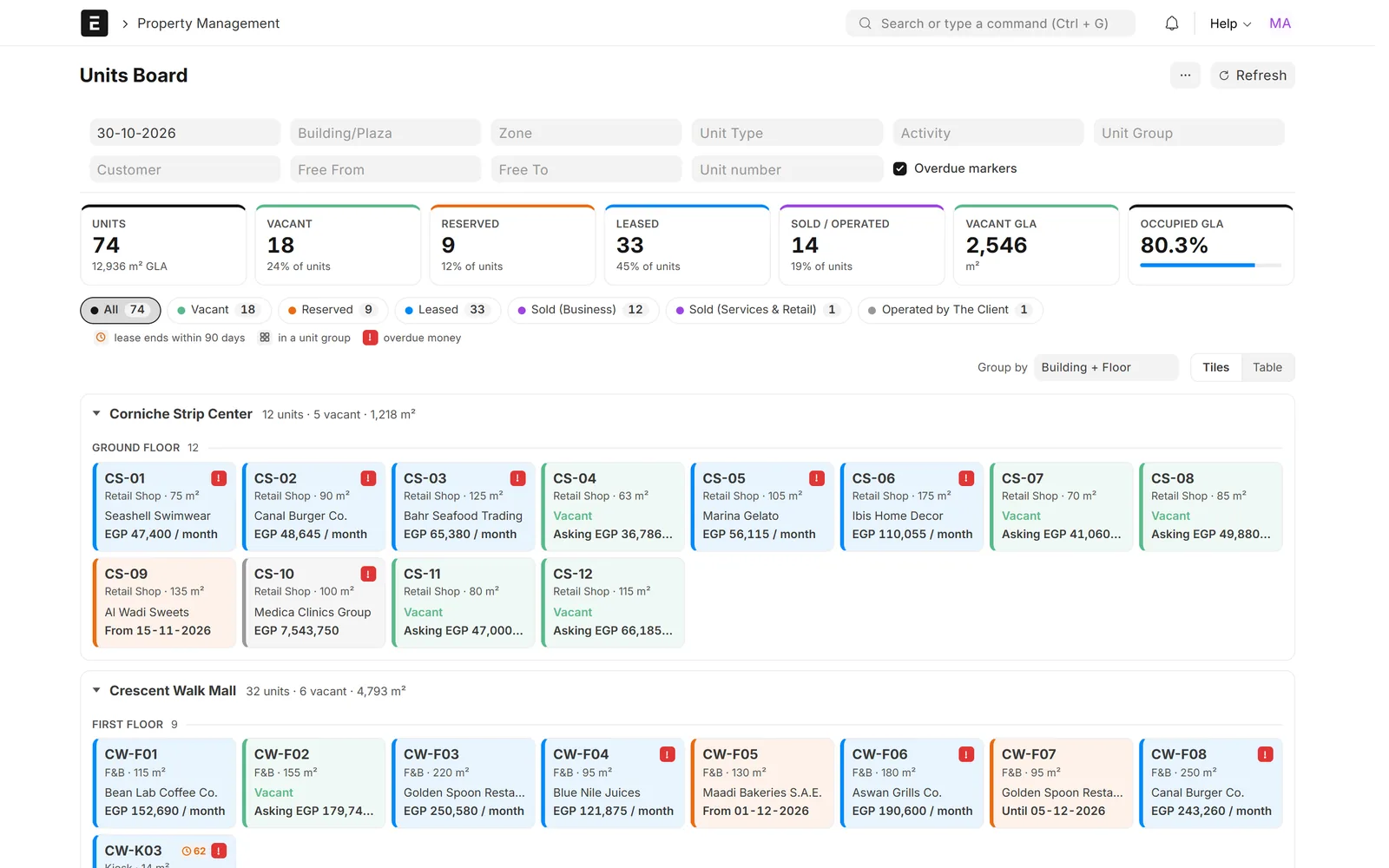
Grid of unit tiles coloured by status, grouped by building and floor, with summary counters
Units board: every unit by building and floor, with tenant, rent and overdue markers

Portfolio & units

Leasing and finance reports

The leasing and finance reports a landlord needs, limited to each user's buildings.

  • Rent roll and service charge roll
  • Rent collection and receivables aging
  • Lease expiry and renewals, effort rate and forecasting
  • Cheque tracker and customer statements
Lease expiry report with summary figures, a bar chart by expiry window and a contract table
Lease expiry and renewals: rent at risk and units with nothing booked after

Leasing, reservations & sales

Leases that build their own schedules

Rent, service-charge and marketing schedules come from the contract terms.

  • Annual raises, discounts and deposits
  • Multi-unit leases, annexes and contract hold
  • Revenue-share leases bill the tenant's share of sales above base rent
  • Invoices are ERPNext Sales Invoices, so the ledger stays in ERPNext
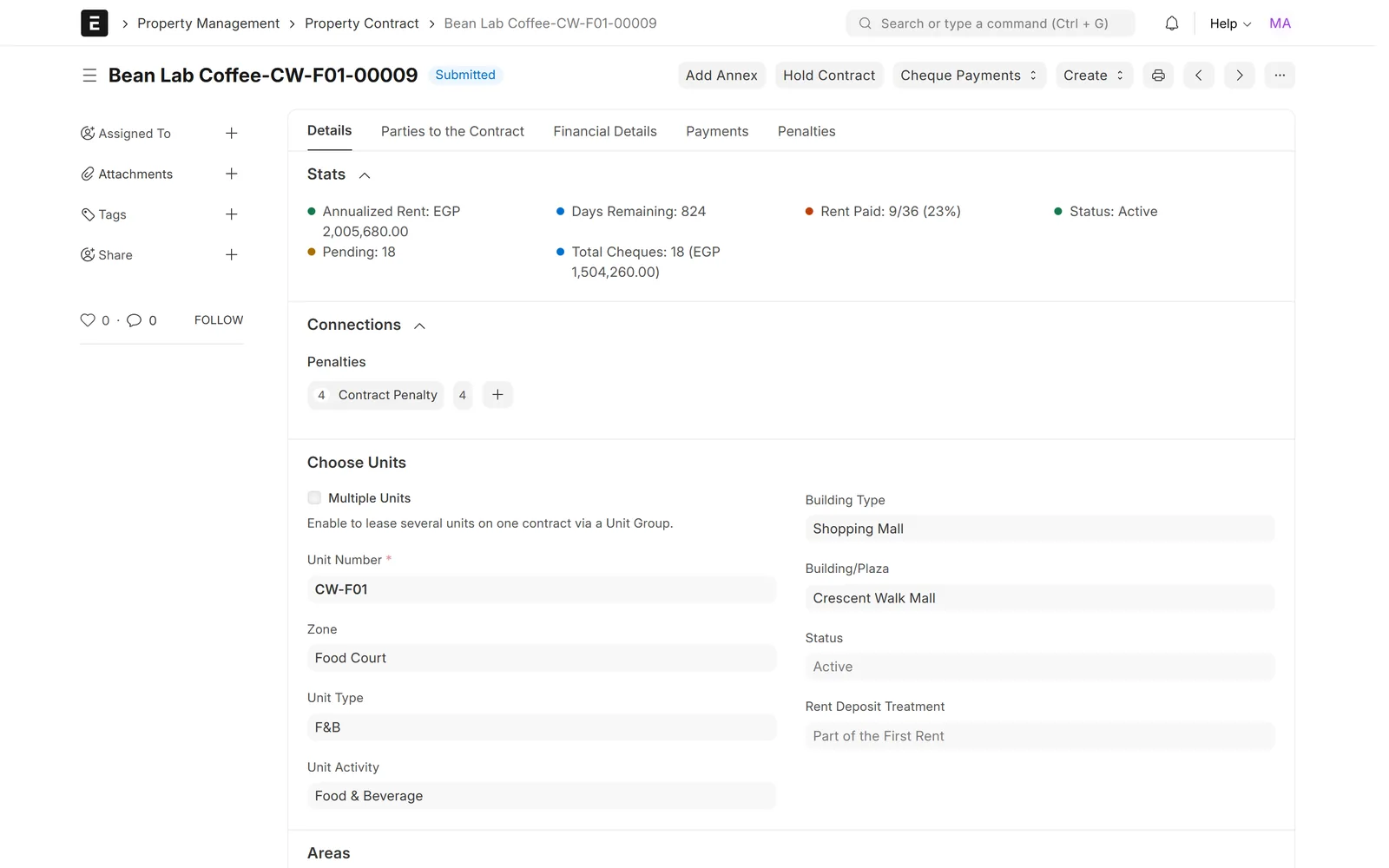
Submitted lease contract for a food court unit showing stats, linked penalties and unit details
Lease contract with live stats: annualised rent, rent paid, cheques and days remaining

Leasing, reservations & sales

Reservations with deposits

Hold a unit for a customer against a deposit.

  • Convert the reservation into a lease or a sale contract
  • Refund the deposit, or forfeit it to an invoice
  • Status follows the reservation dates automatically
  • A reservations register shows every hold and its outcome
Timeline of units with lease, sale and free bars from 2026 to 2028
Availability calendar: leases, sales and free periods per unit on one timeline

Leasing, reservations & sales

Unit sales on instalments

Sell units on instalments, then bill owners a service charge.

  • Down payment, delivery payment and post-delivery instalments
  • Discount and delivery tax on the sale contract
  • Each instalment row invoiced in ERPNext
  • Service contracts bill owners a service charge calculated monthly
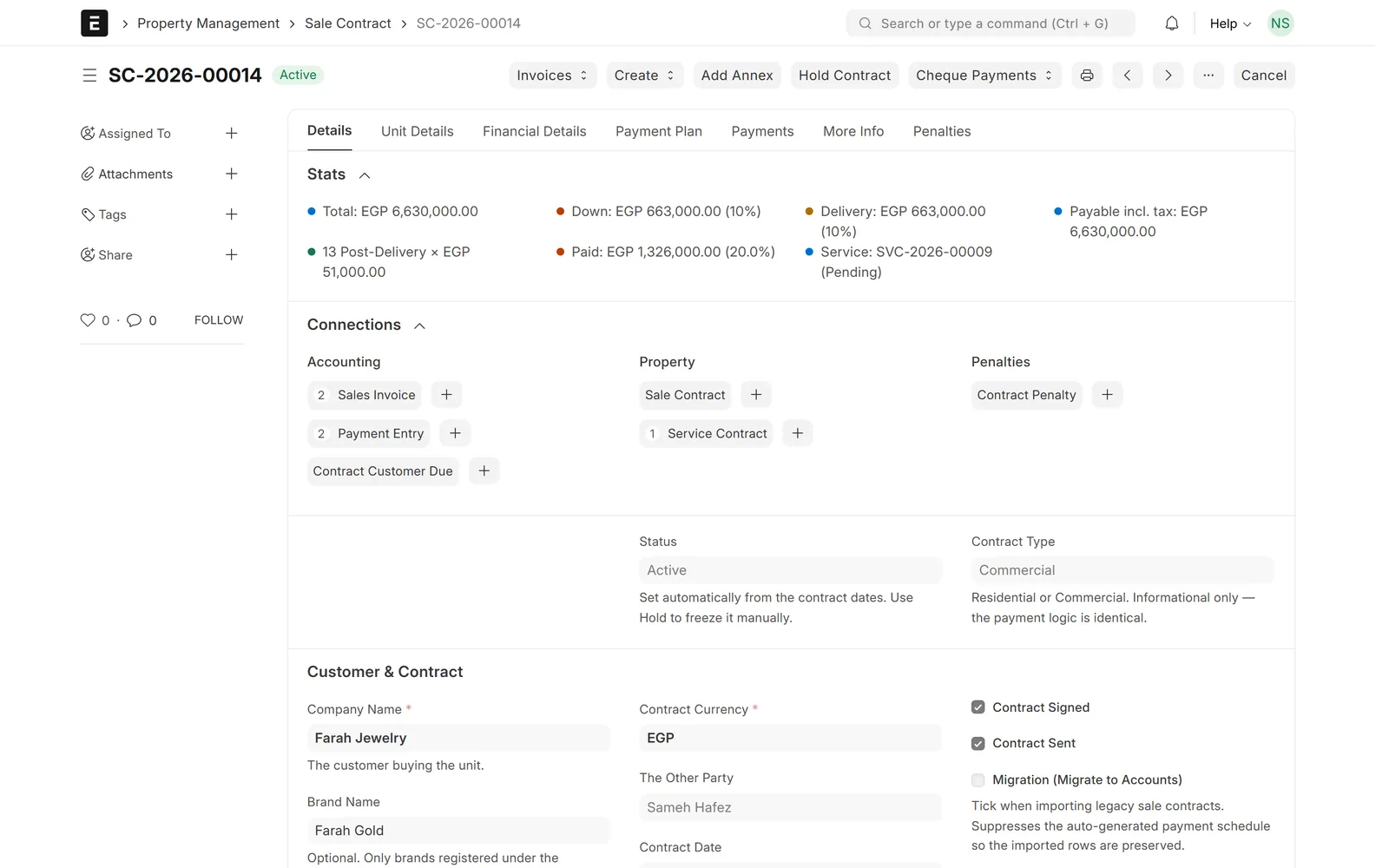
Active sale contract with payment stats and links to invoices, payments and a service contract
Unit sale contract: price, down payment, delivery and post-delivery instalments

Collections & operations

Collections desk and Customer 360

One worklist of everything overdue, due soon or due but not yet invoiced.

  • Reminders, statements and bulk invoicing
  • A tenant's units, contracts, balance and cheques on one page
  • Penalties and tickets linked to the tenant
  • Users see only the buildings they are allowed to
Collections worklist with overdue totals, queue chips and customer rows with reminder and statement buttons
Collections desk: overdue, due this week and due-not-invoiced, grouped by customer

Collections & operations

Late-payment and late-opening penalties

When automatic penalties are switched on, they are drafted for you.

  • A daily job checks overdue payment rows
  • A grace period before any penalty
  • By percentage or by fixed amount
  • A separate penalty for opening after the agreed date
Customer profile page with KPI cards and a table of the tenant's leased units
Customer 360: units, rent, deposits and overdue balance for one tenant

Collections & operations

Tenant operations

Day-to-day building work, linked to the property and the tenant.

  • Maintenance tickets, with open tickets on the dashboard
  • Permits
  • Safety and fire inspections and daily routine checklists
  • Tenant surveys
Property management dashboard with occupancy, vacant, reserved, leased and sold unit cards and collection figures
Portfolio dashboard: occupancy, unit status, contracted rent and this month's collection

Screens show demo data.

Challenges vs. solutions

Common challenges, and how Property Management answers each one

ChallengeHow Data Value solves itTraditional approach
Tracking vacant and leased unitsUnits board by building and floor with live status, plus an availability calendar of free periodsManual Excel sheets
Holding units for customers before a contractReservations against a deposit that convert into a lease or sale, or are refunded or forfeitedDeposits followed in separate sheets
Managing lease contracts and renewalsSchedules built from the contract terms; the lease expiry and renewals report shows rent at riskManual follow-up and paper contracts
Selling units on instalmentsSale contracts with down payment, delivery and post-delivery instalments, invoiced row by rowInstalment plans kept outside the accounts
Raising tenant invoicesERPNext invoices raised from the lease schedule, one by one or in bulk from the collections deskManual entry every month
Tracking penalties and debtsA daily job drafts late-payment penalties after a grace period; receivables aging per customerManual follow-up
Rental and performance reportsRent roll, service charge roll, effort rate and forecasting, limited to each user's buildingsLate Excel reports

Why Data Value

Why teams choose it

Integrated property structure

Property, floor, zone, unit and contract, all linked in one system.

Invoices from the schedule

Rent and service-charge invoices come from the contract schedule, one by one or in bulk.

Specialist property reports

Rent roll, receivables aging, lease expiry and effort rate, with every dashboard card opening its report.

Access by building

A user limited to some buildings sees only those buildings in dashboards, desks and reports.

Arabic, right to left

Dashboards, desks and reports in Arabic with a right-to-left layout.

Built on open source

ERPNext and the open-source Muezzin app underneath, extended by Data Value.

How it works

From setup to daily use

  1. Set up the portfoliobuildings, floors, zones and units with their areas, types and asking rents.
  2. Reserve, lease or selltake deposits and convert reservations into lease or sale contracts that build their own payment schedules.
  3. Invoice and collectraise ERPNext invoices from the schedule, record payments and cheques, and work the collections desk.
  4. Run the buildingstrack maintenance tickets, permits and inspections for each property and tenant.
  5. Watch the portfoliooccupancy, collection, expiries and receivables are on the dashboard and in the reports every day.

FAQ

Frequently asked questions

Is this an off-the-shelf product?

It is Data Value's implementation of Muezzin, an open-source property management app for Frappe, which we have extended with leasing, sales, reservation, collections and reporting features. We set it up and adapt it to your contracts and processes.

Does it run on ERPNext?

Yes. Invoices are ERPNext Sales Invoices and payments are ERPNext Payment Entries, so receivables, aging and the general ledger stay in ERPNext.

Can one lease cover several units?

Yes. Units are grouped into a unit group and leased on one contract, and they are invoiced and reported together.

Can we restrict users to certain buildings?

Yes. A user limited to some buildings sees only those buildings in the dashboards, desks and reports.

Is it available in Arabic?

Yes. Dashboards, desks and reports are available in Arabic with a right-to-left layout. Some forms still show English labels; we complete those as part of the implementation.

See it with your own data

Book a demo and our team will walk you through the system and how it fits your business.

Free demo · No commitment