Skip to content

People · For employers in Saudi Arabia

Saudi HR and payroll in one bilingual workspace

PeopleOS runs the full employee lifecycle for companies in Saudi Arabia, from hiring and contracts to monthly payroll and the final settlement, in Arabic and English.

Statutory calculations cite the rule they apply and its official source, so HR and finance can trace each statutory amount back to the law.

  • Iqama and document expiry alerts
  • Payroll with GOSI contributions
  • End-of-service settlements
  • Arabic and English, right to left
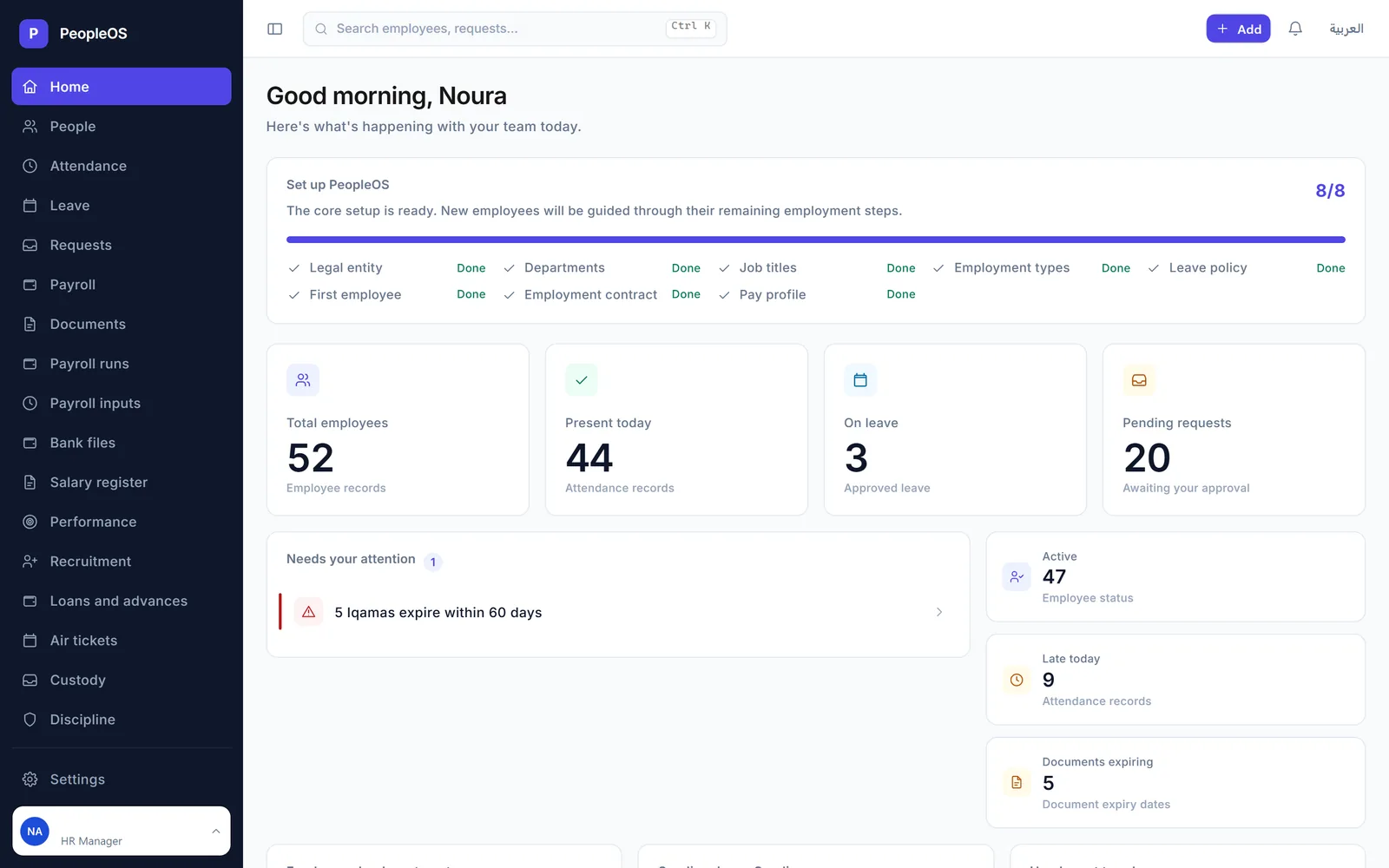
PeopleOS HR dashboard with 52 employee records, 44 present today, 3 on leave, 20 pending requests and an alert that 5 Iqamas expire within 60 days
HR home: headcount, attendance, pending approvals and expiring Iqamas at a glance. Screens show demo data.

Who it is for

Built for the people who run it every day

  • Contracting and facility services companies
  • Employers with Saudi and expatriate staff
  • HR directors and specialists
  • Payroll and finance teams
  • Line managers who approve requests
  • Employees on mobile

What you get

What you get with PeopleOS Saudi HR & Payroll

9 capabilities in 3 groups, each shown next to its screen in the real system.

People & documents

Arabic and English, right-to-left ready

Every screen works in Arabic and in English.

  • Switch language in one click
  • Right-to-left layout in Arabic
  • Employee names kept in both languages
  • Payroll and settlement statements in Arabic or English
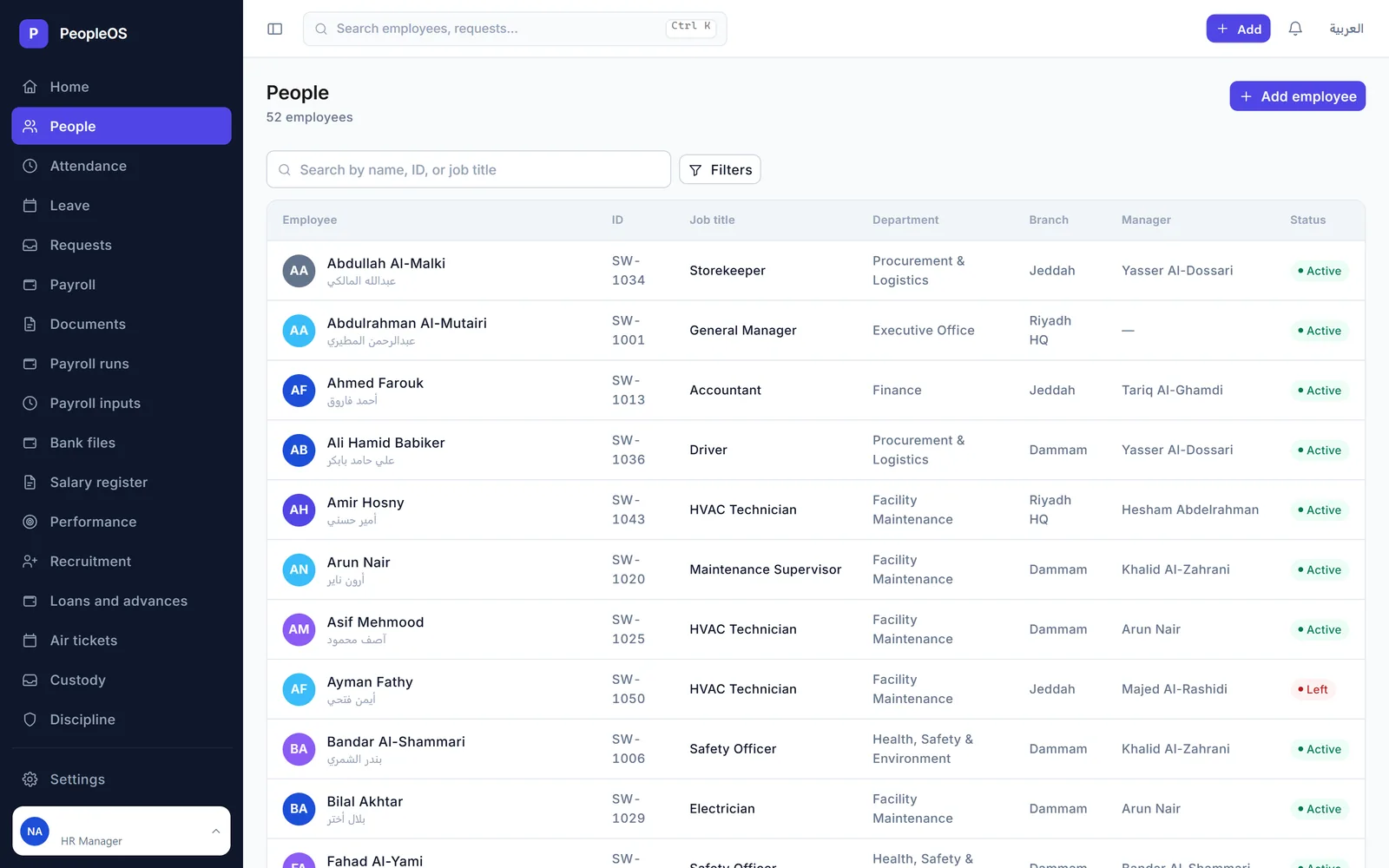
List of employees with Arabic and English names, ID, job title, department, branch, manager and status
Employee directory with Arabic and English names

People & documents

Iqama and document expiry tracking

See which Iqamas and documents need renewing before they lapse.

  • Expired, expiring within 30 days, expiring within 60 days
  • Iqamas, passports, work permits and other documents
  • Alerts on the HR dashboard and the documents page
  • A compliance tab on each employee, from your own records
Documents page grouping Iqamas by expired, expiring within 30 days and within 60 days
Iqama expiry tracker: expired, within 30 days, within 60 days

People & documents

Contracts, visas and air tickets

Track each employee's contract, visas and travel entitlements.

  • Fixed-term and indefinite contracts with probation and expiry
  • Work, business visit and family visit visas
  • Exit re-entry and final exit visas
  • Air-ticket entitlements that follow the employee's ticket policy
PeopleOS HR dashboard with 52 employee records, 44 present today, 3 on leave, 20 pending requests and an alert that 5 Iqamas expire within 60 days
HR home: headcount, attendance, pending approvals and expiring Iqamas at a glance

Payroll & end of service

Payroll with GOSI built in

Monthly payroll that is calculated, reviewed and submitted, then frozen.

  • GOSI calculated per employee cohort
  • Occupational hazards for non-Saudis
  • Annuities, occupational hazards and SANED for Saudis
  • The new Social Insurance Law schedule, by first registration date
Dashboard charts of employees by department, a Saudi and non-Saudi donut for 47 active employees, a six-month headcount line, a payroll preview and today's attendance
Workforce analytics: departments, Saudi and non-Saudi split, headcount trend and payroll preview

Payroll & end of service

Salary register and bank transfer files

A read-only record of every period, and bank files you can prove.

  • Salary register filtered by entity, department and status
  • Export to CSV or print on A4
  • Transfer files in CSV, fixed-width or XLSX bank templates
  • Saudi IBAN validation and a SHA-256 fingerprint of each file
Payroll runs page with the submitted September 2026 run for 49 employees, its totals and per-employee rows with Arabic and English statement downloads
Submitted payroll run with gross, deductions, net and employer cost

Payroll & end of service

End-of-service and final settlements

Final settlements that show how every amount was reached.

  • End-of-service award under Articles 84, 85 and 87
  • A clearance checklist before the exit
  • A settlement statement in Arabic or English
  • Each calculation step, and the clauses your HR team set, with their source
Settlement statement for a resignation after 5.2 years: award base, first five years, years after five, full award, 67 percent resignation entitlement and award payable, followed by the applied clauses for Articles 85, 111, 84 and 87 with their official source
End-of-service calculation with the Labour Law articles applied

Rules, requests & self-service

Saudi statutory rules with their sources

Saudi Labour Law rules kept with their dates and official source.

  • Notice periods, Articles 75 and 76
  • Overtime, Article 107
  • Leave cash-out, Articles 109, 111 and 116
  • An unverified rule is refused, not estimated
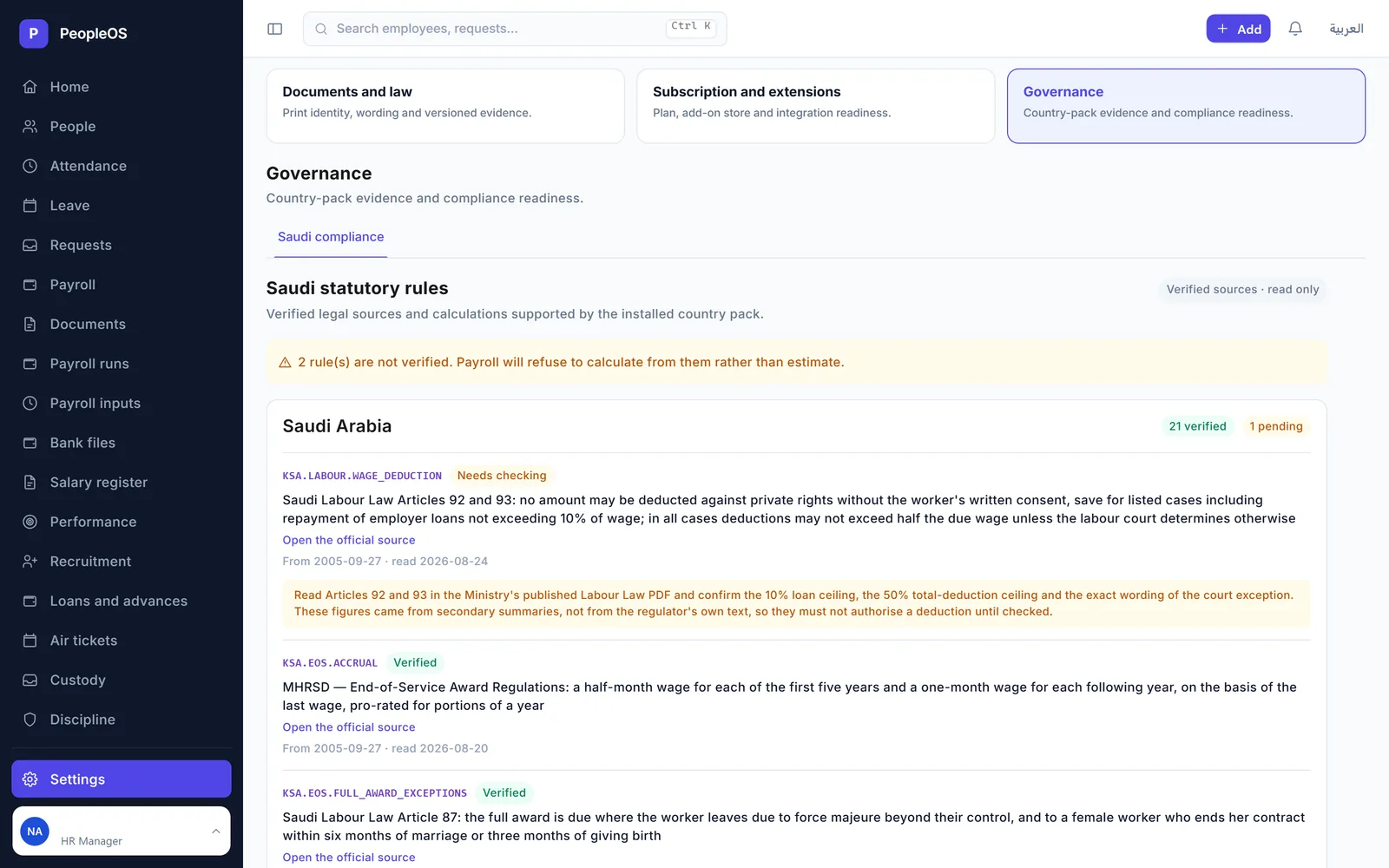
Governance settings listing Saudi Labour Law rules, one marked needs checking and the others verified, each with a link to its official source
Saudi statutory rules, each with its official source and verification status

Rules, requests & self-service

Leave, attendance and one approvals inbox

Leave, attendance and every request in one place.

  • Leave policies and balances set by the employer
  • Daily attendance with late flags
  • Leave, attendance corrections, loans and employee actions in one inbox
  • Approve, reject or return for information
Requests page listing leave requests awaiting a decision, with approve, reject and return for information buttons
One approvals inbox for leave and other requests

Rules, requests & self-service

Employee self-service on mobile

Employees check their pay and leave from their phone.

  • Posted payslips with earnings and deductions
  • Leave balances
  • Their own requests and their status
  • A phone-friendly layout with bottom navigation
Mobile payslip for September 2026: gross 7,300, deductions 1,216.67, net 6,083.33, with basic salary, transport and housing allowances and an unpaid-leave deduction
Payslip on mobile with earnings and deductions

Screens show demo data.

Challenges vs. solutions

Common challenges, and how PeopleOS Saudi HR & Payroll answers each one

ChallengeHow Data Value solves itTraditional approach
Iqamas and documents expiring unnoticedDashboard and documents page flag what has expired or expires within 30 or 60 daysExpiry dates checked by hand in a spreadsheet
Calculating GOSI for Saudi and non-Saudi staffContributions calculated per employee cohort, including the new Social Insurance Law scheduleRates typed into spreadsheets
Working out end-of-service awardsArticles 84, 85 and 87 applied, with a statement that shows each stepManual calculation with no record of how it was reached
Keeping up with Labour Law changesRules stored with their dates and official source; an unverified rule is refusedFormulas edited by hand
Chasing approvals for leave and requestsOne inbox to approve, reject or return for informationEmail threads and paper forms
Paying salaries through the bankBank-template transfer files with IBAN validation and a SHA-256 fingerprintTransfer files prepared by hand

Why Data Value

Why teams choose it

Arabic and English

The interface switches language in one click, and statements print in either language.

Rules with their source

Each statutory rule carries its dates and a link to its official source.

Refuses rather than guesses

Payroll will not use a rule that has not been verified.

Made for mixed workforces

Iqamas, visas, air tickets and GOSI by cohort for Saudi and expatriate staff.

Self-service on the phone

Employees see payslips, leave balances and requests on a phone-friendly layout.

With or without ERPNext

Runs on the Frappe Framework on its own, or uses the ERPNext Employee record.

How it works

From setup to daily use

  1. Set up your companylegal entity, branches, departments, job titles, leave policy and pay items. A checklist on the dashboard shows progress.
  2. Bring in your people with their Iqama, passport, contract and pay profile, in Arabic and English.
  3. Run the monthcollect leave, attendance and payroll inputs, calculate and review the run, submit it and generate the bank file.
  4. Handle exits correctlycalculate the final settlement, complete clearance and give the employee a statement in their language.

Related

Works together with

ERPNext modules

Runs on these modules

Solutions

Related solutions

FAQ

Frequently asked questions

Is PeopleOS connected to GOSI, Mudad, Qiwa or WPS?

Not yet. PeopleOS calculates GOSI contributions and tracks Iqama and document expiry from your own records, but it does not submit anything to government portals. The employee compliance tab states that its status comes from records held in PeopleOS and is not verified with any government system.

How is the end-of-service award calculated?

From the employee's service and approved wage basis, using Article 84 for the accrual, Article 85 for the resignation tiers and Article 87 for the full-award exceptions. The settlement statement shows each step and the clauses applied, with their article and official source.

Can employees use it in Arabic?

Yes. The interface switches to Arabic with a right-to-left layout, and payroll and settlement statements can be printed or downloaded in Arabic or English.

Do I need ERPNext?

No. PeopleOS is built on the Frappe Framework and runs on its own with its own employee records. A compatibility mode uses the ERPNext Employee record when ERPNext is already in place.

What happens when a Labour Law rule changes?

Rules are stored with the dates they apply from and to, and with their official source. Each payroll month uses the rule in force that month, and a rule that has not been verified is refused rather than guessed.

See it with your own data

Book a demo and our team will walk you through the system and how it fits your business.

Free demo · No commitment